


In this guide
WiFi Map is still one of the largest crowdsourced Wi-Fi password apps. Its Google Play listing shows more than 100 million downloads and a 4.3-star average from about 3 million reviews. But the 2026 app is not the one most older reviews describe. The VPN that once justified a Pro subscription is gone from the store descriptions, the in-app $WIFI crypto wallet was switched off in April 2026, and the privacy policy allows far more tracking than a hotspot finder needs.
This is an assessment, not a hands-on test. It draws on WiFi Map’s website and help center, its privacy policy, the App Store and Google Play listings, and the user reviews published on those stores, all checked on September 14, 2026. The short version: the hotspot map is useful in busy cities if you download offline regions before you leave, but you pay for it with location data.
WiFi Map in 2026: ratings, downloads and hotspot claims
The app is published by WiFi Map LLC, which gives a New York address at 25 Broadway as its developer contact on that same Google Play page. Its founders, who sign only as Igor and Denis, describe the project as more than a decade old in a note on the WiFi Map help center that claims over 185 million users, 15 million community-shared hotspots and 2 billion connections. The App Store listing now sells it as a travel app that also maps public toilets, drinking fountains and ATMs.
| Metric | Figure on September 14, 2026 |
|---|---|
| App Store rating (US) | 4.6 stars, about 32,000 ratings |
| Google Play rating | 4.3 stars, about 3.03 million reviews |
| Google Play downloads | 100 million+ |
| Latest iOS version | 8.7.7, released July 17, 2026 |
| Latest Android update | August 14, 2026 |
| Hotspot count claimed | 15 million to 150 million, depending on the page |
That last row deserves a warning. The 15 million figure appears in the founders’ note and the App Store description, a help center page titled What is WiFi Map says over 100 million, and the Google Play text still claims more than 150 million. WiFi Map does not explain the gap. A reasonable guess is that the bigger numbers count every network ever added rather than hotspots that currently work, so plan around the smallest figure.

How WiFi Map works: hotspot map, offline maps and eSIM
The crowdsourced hotspot map
Users add a venue, its network name and the password. Anyone nearby then sees a pin, taps it and connects with the shared details. Nothing is detected automatically, so a hotspot only exists in the app if someone bothered to add it.
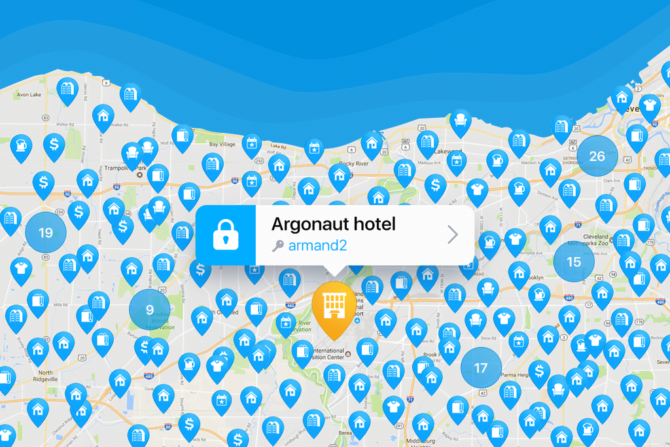
Coverage follows the user base, not tourist maps. WiFi Map’s homepage country ranking puts Indonesia (about 1.46 million hotspots), Brazil (1.22 million) and the United States (1.02 million) at the top, while Spain, a major travel destination, shows about 194,000. The same homepage now claims 200 million users and 15 million contributors.
Stale passwords are the core weakness. The help center admits a listed password can be wrong simply because nobody has updated it, and asks users to file a report from the hotspot’s details screen. Hotspots that nobody connects to, or that rack up failed attempts and reports, turn gray and are eventually archived and hidden. So there is a cleanup system, but it depends on community activity, which is exactly what quieter towns lack.
Offline maps: Premium or 2,000 points
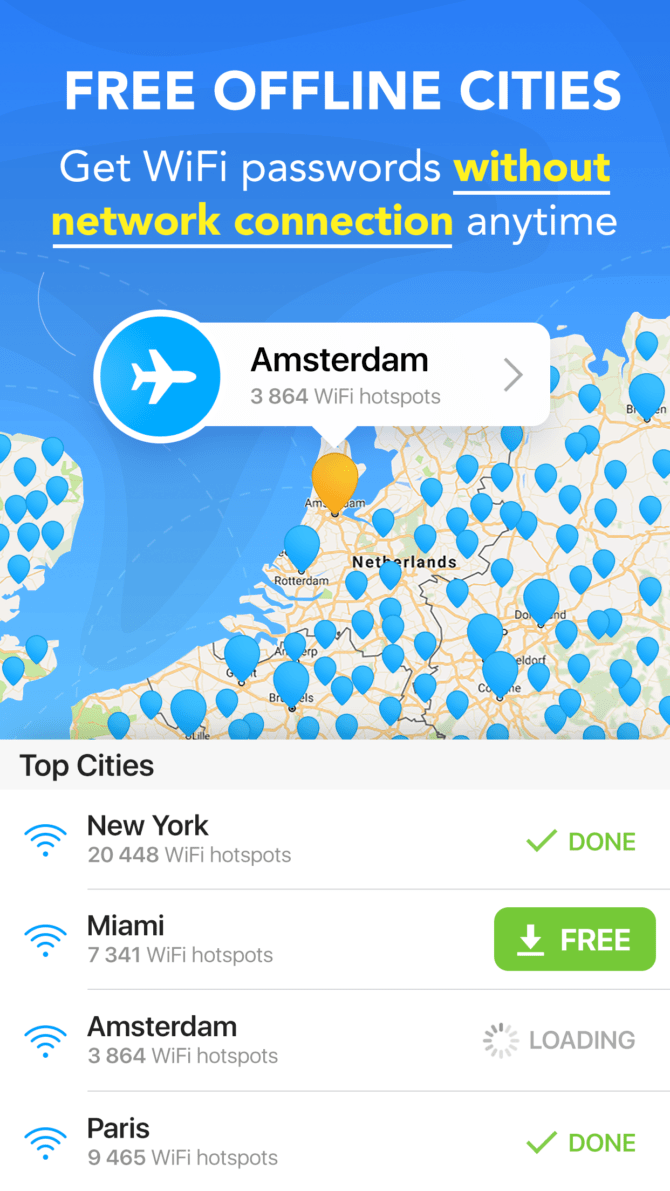
Offline maps save a whole region’s map and hotspot data to your phone, so you can find a network after landing without mobile data. WiFi Map’s own example is downloading Catalonia before a trip to Barcelona. This is the feature that makes the app worth installing for international travel.
It is not free by default. The App Store description ties downloadable offline regions and ad removal to the subscription. The other route is contribution: WiFi Map’s points table awards 150 points for registering and 150 for each new hotspot, with an ad-free app at 1,000 points and unlimited offline maps at 2,000. Adding a dozen or so real hotspots gets you there without paying.
WiFi Map eSIM prices
WiFi Map also sells data-only travel eSIMs. The eSIM page on wifimap.io lists five packages, each valid for 30 days on 4G/LTE networks:
| Data | Price | Per GB |
|---|---|---|
| 1 GB | $4.99 | $4.99 |
| 3 GB | $13.47 | $4.49 |
| 5 GB | $19.95 | $3.99 |
| 10 GB | $29.99 | $2.99 |
| 20 GB | $49.80 | $2.49 |
Check the details in the app before you rely on it. The website says 90+ countries, the App Store description says 100+ and mentions a 25 GB package, and the Google Play text says 70+ countries with packages up to 10 GB. Confirm the price for your destination at checkout. The same page notes the eSIM is for data only, with no calls or SMS, and that most eSIMs cannot be reinstalled once deleted, so do not remove it mid-trip to troubleshoot.
Speed test, amenities and travel widgets
The rest is a grab bag: a speed test, map layers for public toilets, drinking fountains and cash or crypto ATMs (added in version 8.4.1, February 2025), and widgets for currency rates, world time, tips and weather. Handy, but none of it is a reason to install WiFi Map.
What happened to the WiFi Map VPN
WiFi Map used to sell WiFi Map VPN Protection, and many older reviews treat it as the main reason to pay. The current App Store and Google Play descriptions, the help center and the homepage feature list no longer mention a VPN, so do not subscribe expecting one. If you want an encrypted tunnel on unfamiliar networks, you will need a separate service; the best free VPNs worth using are a reasonable starting point.
WiFi Map Premium price: $34.99 a year on the App Store
The US App Store’s in-app purchase list, checked on September 14, 2026, shows these subscription prices. The names mix the old “Pro” branding with the newer “Premium” label:
- Yearly (Pro or Premium): $34.99
- Monthly Pro: $12.99
- Weekly Pro or Premium: $11.99
- Premium Annual Offer / Premium Yearly Offer: $69.99
Apple’s list does not say which of these a given user is offered, prices differ by country, and Google Play does not show subscription prices on its public listing. The $19.99 and $29.99 yearly prices quoted in older reviews no longer appear in Apple’s list.
The weekly plan costs nearly as much as the monthly one, so it only makes sense for a single short trip you cancel right after. Regular travelers should take the yearly plan or, better, earn the same two benefits through points. Both store listings say the app contains ads, and ads dominate recent complaints, so the 1,000-point ad-free reward matters.
The $WIFI token: launched in 2023, wallet removed in 2026
WiFi Map created its $WIFI token in April 2023 and minted it on the Polygon network, according to the official $WIFI FAQ. The idea was to pay contributors for adding hotspots, verifying networks and running speed tests, and to let them spend tokens on eSIM data. That FAQ still mentions trading on exchanges such as OKX and Gate.io, but it predates the changes below, so treat it as history rather than current guidance.
App Store release notes from late 2025 describe a new activity-based reward system with a separate Earn wallet. Then, in April 2026, WiFi Map announced that the in-app $WIFI wallet would be removed on April 25, citing Apple and Google policies on crypto features in mobile apps. Users were told to withdraw eligible tokens to an external wallet, and the company said it was exploring a wallet on its website instead. The eSIM page still advertises 3% cashback in $WIFI, so the website has not fully caught up.
When deciding whether to install WiFi Map, ignore the token. It is not a reliable way to earn money, and it no longer lives in the app.
Is WiFi Map safe? What its privacy policy and data labels say
WiFi Map is a legitimate app, not malware. The real questions are how much data it takes, what happens to shared passwords, and how careful you are on the networks it finds.
What the privacy policy says WiFi Map collects
The WiFi Map privacy policy, last updated September 16, 2025, is unusually blunt:
- Hotspot data: the location, venue name and address, router IP address, BSSID, network name and password for every hotspot you add, plus signal strength, speed test results and when your device connects.
- Your device and account: email address, social login profile, age range, country, language, device model, device ID, advertising ID, MAC address where available, mobile carrier, your search queries and the list of other apps installed on your phone.
- Location: the policy says the app regularly tracks your precise location while installed, “whether or not you are using our App.”
- Sharing: WiFi Map may share hotspot data, precise location and personal information with third parties under licensing arrangements, for research and commercial uses that include interest-based advertising. Named service providers include Google (Firebase, Ads, Analytics), Meta, Intercom and AppMetrica.
- Public profile: your username, profile photo and every place, photo or review you add are visible to all users.
You can ask WiFi Map by email to stop using your data for advertising, and users in the EEA get the usual GDPR rights, including erasure. Still, background location tracking and a list of your installed apps go well beyond what a hotspot map needs to work.
App Store and Google Play labels tell different stories
The App Store privacy section says purchases and identifiers may be used to track you across other companies’ apps and websites, and lists precise location, email, usage data and diagnostics among the data collected. Apple notes that it has not verified these answers. Google Play’s data safety page for WiFi Map says the developer collects no data and shares none. That declaration is hard to square with the privacy policy, so rely on the policy and your phone’s permission settings rather than the Play label.
Shared passwords and your home network
WiFi Map’s homepage FAQ says the app shows both public and private hotspots. Its privacy policy says you may upload a password only if you own the network or have the owner’s permission, but nothing technical stops someone from adding a neighbor’s or a small shop’s network.
If your network shows up, there is no self-service removal. The help center says to contact support with a screenshot of the hotspot. Change the password as well, because anyone who already saved it can still connect. CISA’s wireless security guidance recommends WPA3 encryption where your router supports it and a separate guest network for visitors, which is also the sensible setup for a cafe that wants to share Wi-Fi without exposing its main network.
Public Wi-Fi risks, kept in proportion
Public Wi-Fi is less dangerous than it was a decade ago. The FTC’s consumer guidance says most websites and apps now encrypt traffic, so using a public network is usually safe, and the bigger risk is landing on a scam site that looks real. The same CISA guidance describes evil twin attacks, where someone broadcasts a fake network that copies a real venue’s name, and advises turning off file sharing on public networks.
In practice, confirm the network name with staff, check for HTTPS on anything sensitive, forget the network when you leave, and use mobile data for banking if a hotspot feels off. If a hotspot asks you to sign in and the page never appears, see how to force a public Wi-Fi login page to open. For how encryption protects what you send, see this guide to securing data transfer.
Settings to change after you install WiFi Map
- iPhone location: in Settings, Privacy and Security, Location Services, set WiFi Map to While Using the App instead of Always, and consider turning off Precise Location. Apple’s Location Services guide explains each option.
- iPhone Wi-Fi address: leave Private Wi-Fi Address on. Apple devices use a rotating address by default on open or weakly secured networks, which makes tracking across hotspots harder.
- Android location: the privacy policy itself points to Settings, Apps, WiFi Map, Permissions, Location. Choose Allow only while using the app. More settings worth checking are in this guide to securing an Android phone.
- Advertising: reset or delete your advertising ID in your phone settings, and email WiFi Map support to opt out of ad use of your data.
What WiFi Map users complain about
Store reviews keep returning to three problems, all rooted in how the app is built rather than one-off bugs.
- Out-of-date passwords: a prominent 2018 Google Play review, marked helpful by more than 1,100 people, says home networks in particular were hit and miss and that deleting dead entries was too hard. Gray pins and problem reports help, but the complaint still holds in low-traffic areas.
- Ads: a Google Play review from September 7, 2026 complains about long, intrusive video ads. WiFi Map’s reply pointed to the ad-free reward at 1,000 points.
- Battery and performance: a 2022 Play review marked helpful by nearly 300 people describes heavy battery drain and cluttered screens. Restricting location to while-in-use reduces background activity.
WiFi Map vs Instabridge and built-in phone options
Instabridge on Google Play is still active, published by Instabridge Sweden AB, and now bundles its own eSIM data alongside a Wi-Fi map. On paper the two apps are close:
| WiFi Map | Instabridge | |
|---|---|---|
| Google Play downloads | 100M+ | 100M+ |
| Google Play rating | 4.3 (3.03M reviews) | 4.2 (4.14M reviews) |
| Hotspot claim | 15M to 150M | 20M+ networks |
| eSIM coverage claim | 70+ to 100+ countries | 190+ countries |
| Offline Wi-Fi map | Premium or points | Yes |
| Contains ads | Yes | Yes |
Neither app’s numbers are independently verified, so if you travel often, install both and see which has fresher entries where you are going. Your phone also covers part of the job. Android can notify you about available high-quality public networks and share a saved Wi-Fi network as a QR code, which is a far safer way to give friends your password than posting it to a public map.
If you need guaranteed connectivity rather than free connectivity, a hotspot app is the wrong tool. Look at a travel eSIM or your carrier’s roaming options, or carry one of the best mobile WiFi hotspots for a group. These tips for using your phone while traveling abroad cover the roaming side.
WiFi Map review verdict: who it is for
- Worth installing: budget travelers heading to large cities who will download offline regions before leaving, check a hotspot’s recent activity before trusting it, and can live with ads or earn their way out of them.
- Worth installing: active contributors. Because 1,000 points removes ads and 2,000 points brings unlimited offline maps, people who add real hotspots rarely need to pay.
- Think twice: privacy-conscious users. Background precise location, installed-app collection and third-party data sharing are a lot to accept for free Wi-Fi. If you use it anyway, restrict location access first.
- Skip it: anyone who needs data the moment they land, such as business travelers. Buy an eSIM or roaming plan, and compare WiFi Map’s eSIM with other sellers before choosing it.
- Skip it: people shopping for a VPN or crypto rewards. The VPN is no longer listed, and the $WIFI wallet has left the app.
WiFi Map still does its original job reasonably well wherever lots of people use it. Much of what was built around that job has been cut, and the paid tier now mostly buys offline maps and no ads. Install it for a city trip, lock down its location permission, and try the points route before paying.
WiFi Map FAQs
Is WiFi Map safe to use?
WiFi Map is a legitimate app from WiFi Map LLC with more than 100 million Google Play downloads, but its privacy policy says it regularly tracks precise location even when the app is not in use and may share location and personal data with third parties. Set its location permission to while using the app, and treat unknown hotspots with care. The FTC says most sites and apps now encrypt traffic, so public Wi-Fi is usually safe for everyday browsing.
How much does WiFi Map Premium cost?
On September 14, 2026, the US App Store listed the yearly Pro or Premium plan at $34.99, a monthly plan at $12.99 and a weekly plan at $11.99, with separate offers at $69.99. Prices vary by country. You can also get an ad-free app at 1,000 contribution points and unlimited offline maps at 2,000 points without paying.
Does WiFi Map still include a VPN?
No VPN is mentioned in the current App Store or Google Play descriptions, the help center or the WiFi Map homepage, even though the company once sold WiFi Map VPN Protection. If you want a VPN on public networks, use a separate provider.
How much is a WiFi Map eSIM?
The wifimap.io eSIM page lists 30-day data-only packages from $4.99 for 1 GB to $49.80 for 20 GB, which works out to $2.49 to $4.99 per GB. Country coverage claims range from 70+ to 100+ depending on the listing, so check your destination in the app before buying.
How do you remove a home WiFi network from WiFi Map?
There is no self-service option. WiFi Map’s help center says to contact support with a screenshot of the hotspot you want deleted. Change your Wi-Fi password too, because anyone who already saved the old one can still connect.
Did Instabridge shut down?
No. Instabridge is still available on Google Play from Instabridge Sweden AB, with more than 100 million downloads, a 4.2-star rating and its own eSIM data plans in 190+ countries, making it the closest direct alternative to WiFi Map.





Share Your Thoughts