


currently above our target price. This guide is positioned under $100. At least one live retailer price is above that target (seen around $150.00). Rankings that say “Best Under $100” are hidden until prices return.
Disclosure: TechEngage is a participant in the Amazon Services LLC Associates Program, an affiliate advertising program designed to provide a means for sites to earn fees by linking to Amazon.com and affiliated sites. We may earn a commission when you buy through links on this page, at no extra cost to you. Our editorial picks are made independently of these partnerships.
Mechanical keyboards used to be a $150 hobby with a soldering iron on the side. In 2026 the floor moved. Gasket mounts, hot-swap sockets, PBT keycaps, and Bluetooth-plus-dongle wireless now show up on boards that still clear Amazon’s “under $100” filter. The catch is noise: a lot of listings are membrane boards with “mechanical-feel” in the title, or 60% toys with no arrows and no firmware.
This list is narrowed to eight keyboards that are actually mechanical, actually in stock, and actually useful — from the AULA F75 Pro as the all-round 75% wireless pick, to the Keychron V1 if you want QMK, to the Redragon K552 if you just want a metal TKL that survives a LAN. Layout still matters more than RGB. If your desk also needs a display and a dock, start with our USB-C hub guide and a monitor from the gaming monitor roundup so the keyboard is not fighting for the only port.
Prices and ratings below are live Amazon data via AAWP, not screenshots. Switch preference is personal; hot-swap boards on this list let you change your mind later.
In this guide
Quick Comparison: Best Mechanical Keyboards Under $100
| Keyboard | Layout | Wireless | Hot-Swap | Best For |
|---|---|---|---|---|
| AULA F75 Pro | 75% | BT / 2.4 GHz / USB-C | Yes | Best overall |
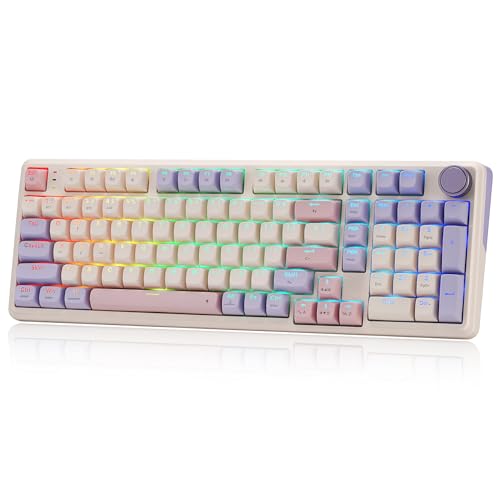
| Redragon K768 PRO | ~95% / 100-key | BT / 2.4 GHz / USB-C | Yes | Wireless value + numpad |
| Keychron V1 | 75% | Wired USB-C | Yes | QMK/VIA customizers |
| RK R98 Pro | 96% | Wired USB-C | Yes | Compact numpad |
| Kisnt KN85 | 75% | BT / 2.4 GHz / USB-C | Yes | Budget wireless 75% |
| Keychron C2 | Full-size 104 | Wired USB-C | No (this SKU) | Mac full-size |
| RK RK61 | 60% | BT / 2.4 GHz / USB-C | Varies by SKU | Travel / small desks |
| Redragon K552 | TKL 87 | Wired | No | Budget gaming TKL |
1. AULA F75 Pro — Best Overall

| Price & Details | |
|---|---|
| Price | $64.99 |
| Discount | 19% |
| Brand | AULA |
| Check availability on Amazon |
The F75 Pro is the board that most often fits someone who wants a “real” custom-feeling keyboard without crossing $100. It is a 75% layout — function row, arrows, and a nav cluster, no numpad — with tri-mode Bluetooth 5.0 / 2.4 GHz / USB-C, a gasket mount, and hot-swap sockets. That combination used to live on $150 Keychrons. Street price sits well under the cap, and the 4,000 mAh cell lasts through a work week if you dim the RGB.
Stock LEOBOG Reaper switches come pre-lubed and land in the creamy-linear camp: quieter than clicky blues, smoother than most budget reds. The aluminum-feel knob is actually useful — volume in office mode, lighting in game mode — instead of a gimmick that never leaves the default setting. Side-printed PBT keycaps look dramatic in photos; they also survive oil better than the ABS shine-through caps on cheaper boards.
Firmware is AULA’s own software, not QMK/VIA. Windows users who want a few macros will be fine. macOS users who live in VIA should skip to the Keychron V1. Stabilizers are decent out of the box after a five-minute clip-in check; lubing the spacebar is the usual fix if you are sensitive to rattle. Pair it with a USB-C hub if your laptop only exposes one port and you still need HDMI plus charging.
Why it stands out: Gasket 75% layout, tri-mode wireless, hot-swap Reaper switches, a useful knob, and PBT side-print caps at a price that used to buy a barebones kit.
Check availability on Amazon2. Redragon K768 PRO — Best Wireless Value
| Price & Details | |
|---|---|
| Price | $54.99 |
| Discount | 15% |
| Rating on Amazon | 4.7 out of 5 stars |
| Brand | Redragon |
| Check availability on Amazon |
Redragon’s K768 PRO is a 100-key / ~95% board: you keep a condensed numpad and a knob without stretching to a 104-key slab. Gasket mounting plus five-layer foam is the same recipe as the $80–$90 creamy boards flooding Amazon, but this SKU often lands closer to $60. The 8,000 mAh battery is oversized for the class — RGB-off wireless is specified long enough that weekly charging is typically unnecessary.
Tri-mode (2.4 GHz dongle, Bluetooth, USB-C) with a claimed 0-delay 2.4 GHz path is the right setup for a desk that also hosts a work laptop. Hot-swap sockets mean you are not stuck with the factory linear switches. If you later want a quieter office feel, drop in a set of silent reds without touching a soldering iron.
Build quality is plastic, not aluminum, and the software is Redragon’s usual Windows-first utility. That is the trade for the price. If you want Mac-native key legends and QMK, look at Keychron. If you want maximum battery and a numpad in a compact footprint, this is the value pick on this list.
Why it stands out: Near-full layout with a knob, gasket foam stack, huge 8,000 mAh cell, and tri-mode wireless at a mid-tier street price.
Check availability on Amazon3. Keychron V1 — Best for Customizers (QMK/VIA)

| Price & Details | |
|---|---|
| Price | $84.99 |
| Brand | Keychron |
| Check availability on Amazon |
The original Keychron V1 is tray-mounted. This linked configuration is the wired 75% V1 with hot-swappable Keychron K Pro Red linear switches and a frosted-black case (Amazon ASIN B09NKTJH9F). It connects over USB-C; it does not add Bluetooth or a 2.4 GHz receiver. Keychron lists the original V1 separately from its gasket-mounted V1 Max. See the original V1 specifications and configuration selector before ordering.
QMK/VIA customization, south-facing RGB, double-shot PBT keycaps and screw-in stabilizers are the original V1’s main attractions. Switch choice, knob option and case color are configuration-specific: confirm the selected listing at checkout. The V1 Max and V1 8K are separate products, so their wireless features, mounting details or polling rates should not be attributed to this V1.
It is USB-C only — no Bluetooth. That is a feature if you game or hate dongle hunting, and a miss if you hop between a tablet and a PC. Mac users get extra legends in the box. At roughly $85 it sits at the top of this price cap, and it earns the slot.
Why it stands out: QMK/VIA, tray-mounted 75% layout, PBT caps, screw-in stabs, and Mac/Windows dual legends without leaving the sub-$100 lane.
Check availability on Amazon4. RK ROYAL KLUDGE R98 Pro — Best 96% With a Numpad
| Price & Details | |
|---|---|
| Price | $69.99 |
| Rating on Amazon | 4.5 out of 5 stars |
| Brand | RK ROYAL KLUDGE |
| Check availability on Amazon |
A 96% / 98-key board keeps the number pad and a volume knob while shrinking the empty gaps of a full-size keyboard. The R98 Pro is gasket-mounted, ships MDA-profile PBT keycaps, and uses pre-lubed linear switches that already sound closer to a mid-tier custom than a 2019 membrane slab. It is wired-only on this SKU, which keeps latency boringly low and the price often in the low $50s on sale.
If you live in Excel, CAD, or accounting shortcuts, losing the numpad on a 75% is a daily tax. This layout is the compromise: compact enough for a standing desk with a monitor arm, complete enough that you do not remap numpad macros onto a function layer.
RK’s software is serviceable on Windows. Mac users can type immediately over USB-C but will miss VIA. Factory lube on the stabs varies unit to unit — a two-minute band-aid tape mod on the spacebar is still worth it. For the money, the R98 Pro is the best “I still need numbers” mechanical on Amazon right now.
Why it stands out: 96% layout with a real numpad and knob, gasket mount, PBT MDA caps, and sale pricing that undercuts most wireless 75% boards.
Check availability on Amazon5. Kisnt KN85 — Budget candidate (price-dependent) 75% Wireless
| Price & Details | |
|---|---|
| Price | $44.09 |
| Discount | 10% |
| Rating on Amazon | 4.6 out of 5 stars |
| Brand | Kisnt |
| Check availability on Amazon |
Kisnt is not a heritage brand, but the KN85 is the current Amazon overall-pick 75% for a reason: Bluetooth / 2.4 GHz / USB-C, hot-swap linear switches, custom RGB, and a street price around $50. You get dedicated arrows and a function row without paying AULA or Keychron money. For a first mechanical or a second board next to a couch PC, that is the right math.
Hot-swap sockets are the long-term value. Stock linears are fine; swapping to brown tactiles later costs $15 and changes the personality of the board. RGB is south-ish and bright enough for a dim room. Do not expect Keychron’s VIA polish or Redragon’s years of spare-part support — treat it as a platform that sounds better than its invoice.
Build is lightweight plastic. If you mash WASD on a gaming laptop desk, a heavier board like the K552 or V1 will slide less. For mixed typing and casual games on a budget, the KN85 is the wireless 75% that makes the most sense as a gift.
Why it stands out: Tri-mode 75% layout, hot-swap, and RGB at ~$50 — the cheapest way to get the current compact-wireless feature set.
Check availability on Amazon6. Keychron C2 — Best Full-Size for Mac
| Price & Details | |
|---|---|
| Price | $56.99 |
| Rating on Amazon | 4.4 out of 5 stars |
| Brand | Keychron |
| Check availability on Amazon |
Full-size boards still make sense when you want a numpad, media keys, and a layout that matches every office keyboard you have ever used. The C2 is Keychron’s wired 104-key Mac-first take: extra Mac legends in the box, a Siri/Cortana key, USB-C, and brown tactile switches on this retro-color SKU. It regularly dips into the low $40s, which is wild for a named-brand mechanical with a proper layout.
This listing is the non-hot-swap brown version — simpler, cheaper, and enough if you do not plan to swap switches. The retro ABS caps will shine with oil faster than PBT; that is the cost of the price. Two-level feet and an inclined case beat most flat gaming boards for long writing sessions. Windows users flip a side switch and swap a few modifiers.
Skip it if you need wireless or QMK (that is the C2 Pro / V-series). Choose it if you sit at a desk, use macOS daily, and refuse to relearn a 60% layer for screenshots and brightness. It is the least “gamer RGB” board here, which is the point.
Why it stands out: True 104-key layout, Mac/Windows legends, tactile browns, and Keychron build at a price that undercuts most TKL gaming keyboards.
Check availability on Amazon7. RK ROYAL KLUDGE RK61 — Best 60% Portable
| Price & Details | |
|---|---|
| Price | $56.99 |
| Rating on Amazon | 4.5 out of 5 stars |
| Brand | RK ROYAL KLUDGE |
| Check availability on Amazon |
Sixty percent keyboards drop the function row, arrows, and numpad into layers. The RK61 is the board that made that layout cheap and wireless: Bluetooth to three devices plus a 2.4 GHz dongle and USB-C, in a footprint that slides into a 13-inch sleeve. This white wireless SKU is the travel / dorm pick — pair it with a laptop and a compact gaming monitor and the desk still has room for a mousepad.
Hot-swap is not on every RK61 variant; this wireless white unit is the convenience SKU with a coiled cable in the box. RGB is present. Software is RK’s, not QMK (the wired QMK RK61 is a different ASIN). Learn Fn+WASD for arrows or you will hate it in file dialogs. Once muscle memory lands, it is the keyboard that most often ends up in a backpack without extra planning.
Battery is typical 60% — charge weekly with RGB on. Bluetooth on Windows is fine; macOS connecting to three profiles is the usual Bluetooth lottery. If you need arrows printed on the board, buy the KN85 or F75 Pro instead.
Why it stands out: True 60% wireless with Bluetooth + 2.4 GHz, proven sales volume, and a backpack-friendly size that still types like a mechanical.
Check availability on Amazon8. Redragon K552 — Budget candidate (price-dependent) Gaming TKL
| Price & Details | |
|---|---|
| Price | $36.99 |
| Rating on Amazon | 4.4 out of 5 stars |
| Brand | Redragon |
| Check availability on Amazon |
The K552 is the old king of sub-$40 mechanicals, and it is still selling because the formula works: 87-key TKL, metal top plate, Outemu-style reds, rainbow LED, and a cable that just works. Tens of thousands of Amazon reviews are not a vibe — they are a reliability signal. If you want a first mechanical for FPS games and you do not care about wireless or hot-swap, stop scrolling.
The metal plate makes it heavier and less flexy than gasket cream-boards. That is better for gaming stability and worse if you wanted a thocky foam sandwich. Lights are LED, not per-key RGB paradise. There is no Bluetooth. N-key rollover and anti-ghosting cover typical WASD + modifier stacks. Spill resistance is “maybe you survive a splash,” not an IP rating.
The K552 is a poor forever custom platform. It is a better fit for a LAN PC, a kid’s first upgrade off a laptop keyboard, or a backup that can take a beating. At ~$37 it is the cheapest honest mechanical TKL that still feels like a step up from membrane.
Why it stands out: Metal-plate TKL, linear reds, huge review volume, and a price that still undercuts most “mechanical-feel” impostors.
Check availability on AmazonHow to Choose a Mechanical Keyboard Under $100
Layout first. 75% is the default in 2026 because arrows and F-keys stay visible. Buy 96%/full-size if you use a numpad daily. Buy 60% only if desk space or a backpack is the constraint. TKL (87 keys) is the classic gaming shape: no numpad, arrows stay.
Wireless vs wired. 2.4 GHz dongles are what you want for games. Bluetooth is what you want for a tablet and a work laptop. Wired USB-C still wins for simplicity and for QMK flashing. If your ultrabook is USB-C only, budget a hub — the same problem as charging a phone and a board at once.
Hot-swap is the upgrade path. Factory switches on budget boards are a starting point. A $12–$20 switch set changes sound and feel more than RGB ever will. Soldered boards (K552, some C2 SKUs) are fine when the stock switch is already what you like.
Firmware. QMK/VIA (Keychron V-series) is the grown-up option. Vendor RGB software is the rest. If you care about Linux or a Mac layer that survives OS reinstalls, pay for QMK.
A keyboard is only part of a desk. Pair a compact board with a standing desk that actually fits it, and keep audio off the laptop speakers with a set from our Bluetooth headphone guide if you game with clicky switches in a shared room.
Final Thoughts
If you want one board and no homework, get the AULA F75 Pro. If you want a numpad without a full-size boat, the RK R98 Pro or Redragon K768 PRO are the cleaner desks. Custom firmware still belongs to the Keychron V1. And if the budget is “please just feel better than a laptop keyboard,” the Redragon K552 remains the honest cheap TKL.
This page uses live Amazon prices, discounts, and ratings. Check the price table on each pick before you buy — street prices on this category move every week.





Share Your Thoughts