

In this guide
Choose the Sabrent CR-CSDM if you want a straightforward USB-C reader for both camera SD cards and microSD cards. The ProGrade PGM0.5 is a better fit when you want a reader that plugs straight into your device, while the PGYTECH CreateMate adds storage for spare cards. All four picks below support UHS-II cards, but your card and USB port still determine how quickly files move.
The biggest buying mistake is paying for a fast reader without checking the cards you own. A UHS-II reader can read older UHS-I cards, but it cannot turn them into faster cards. And if your laptop already has a suitable SD slot, a separate reader may only be worth buying for microSD support or a more convenient connection.
Disclosure: As an Amazon Associate, TechEngage earns from qualifying purchases.
Compare the USB-C SD card readers
| Reader | Best fit | Useful feature | Tradeoff | Amazon price |
|---|---|---|---|---|
| Sabrent CR-CSDM | Everyday SD and microSD transfers | Short cable; simultaneous card transfers | Attached cable cannot be replaced separately | $19.99 |
| ProGrade PGM0.5 | A small travel setup | Built-in USB-C plug; two UHS-II slots | Check clearance around your device’s port | |
| PGYTECH CreateMate | Carrying several camera and drone cards | Reader and spare-card case in one | Larger than a simple reader | $39.95 |
| Lexar Professional USB-C Dual-Slot | A desktop photo-import setup | SD and microSD slots; activity light | No card-storage compartment | $26.99 |
1. Sabrent CR-CSDM: a practical everyday reader
| Price & Details | |
|---|---|
| Price | $19.99 |
| Brand | Sabrent |
| Buy at Amazon | Check availability on Amazon |
Product data updated: 30 October 2026 - 21:35
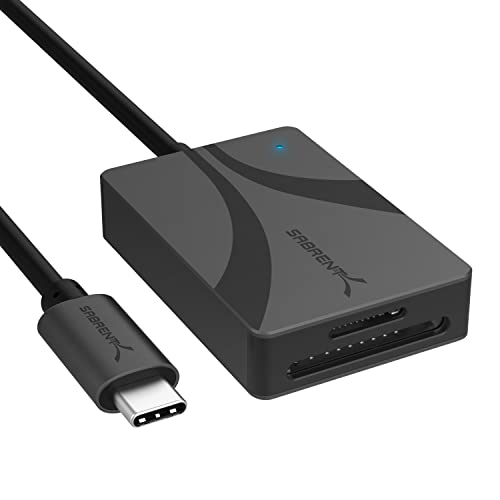
The Sabrent is the place to start if you need a reader rather than a larger dock. It has separate SD and microSD slots, supports UHS-II, and can transfer from both slots at once. That is handy after a trip when your camera uses SD and your action camera or drone uses microSD: neither card needs an adapter just to fit the reader.
Its short cable lets the body rest beside a laptop instead of hanging directly from the USB-C socket. You can also position the card slots where they are easier to reach. On a crowded desk, that small bit of flexibility can be more useful than buying the smallest possible adapter.
Sabrent specifies a 5Gbps USB connection and card transfer speeds up to 312MB/s. Treat the latter as a maximum under suitable conditions, not the time you should expect for every folder. Two cards share the connection, and copying to a slow hard drive can hold up the whole transfer.
Choose it for its two card slots and uncomplicated cabled layout. If you want somewhere to keep spare cards as well, the CreateMate below replaces two accessories with one.
2. ProGrade PGM0.5: a compact reader for travel

| Price & Details | |
|---|---|
| Brand | ProGrade Digital |
| Buy at Amazon | Check availability on Amazon |
Product data updated: 30 October 2026 - 21:35
The PGM0.5 suits a bag where every extra cable becomes something else to forget. Its USB-C connector is built into the reader, and both its SD and microSD slots support UHS-II. Plug it into a compatible device, insert the card, and use your usual file manager or photo-import app.
That design has a physical tradeoff. A cabled reader can lie on a desk while a directly attached reader sticks out from the device. Check the space around a laptop’s adjacent ports and the opening in a phone or tablet case. Avoid leaving the reader connected while putting the device into a bag.
ProGrade specifies USB 3.2 Gen 1 for this model. Its 5Gbps interface figure is not a promise that an SD card will copy files at 625MB/s. The card’s own interface and read speed impose lower limits, and actual transfers also depend on the destination storage.
It makes most sense if the built-in connector solves a real portability problem for you. For a laptop that stays on a desk, the Sabrent’s short cable gives you more freedom to place the reader.
3. PGYTECH CreateMate: a reader that stores your cards

| Price & Details | |
|---|---|
| Price | $39.95 |
| Rating on Amazon | 4.6 out of 5 stars |
| Brand | PGYTECH |
| Buy at Amazon | Check availability on Amazon |
Product data updated: 30 October 2026 - 21:35
The CreateMate is the most useful departure from a basic adapter in this group. It combines a USB-C reader with storage for four SD cards, four microSD cards, two Nano SIM cards and an eject pin. If loose memory cards keep disappearing into pockets in your camera bag, the storage layout is the main reason to choose it.
Its reading slots are separate from those storage spaces. You can transfer from an SD card and a microSD card at the same time, but it does not read all eight stored cards at once. Both reading slots support UHS-II, and PGYTECH specifies speeds up to 312MB/s under suitable conditions.
The case adds bulk compared with the ProGrade reader, but it can replace a separate card wallet. PGYTECH lists IP54 protection for the enclosure. Keep it away from immersion and avoid opening or using the reader where rain can reach the cards or connector.
For phone and tablet use, the device must support USB storage access through its USB-C port. The connector alone is not enough. This is a card-management accessory for an existing camera setup, not a way to add an SD card slot inside your phone.
4. Lexar Professional USB-C Dual-Slot: for a photo-import desk

| Price & Details | |
|---|---|
| Price | $26.99 |
| Rating on Amazon | 4.5 out of 5 stars |
| Brand | Lexar |
| Buy at Amazon | Check availability on Amazon |
Product data updated: 30 October 2026 - 21:35
The Lexar Professional reader gives you SD and microSD slots with UHS-II support in a compact body. Its USB-C connection makes it a straightforward companion for a laptop without a built-in reader. An LED activity light helps show when the reader is working, which is useful when the file-copy window is behind another app.
Lexar rates read speeds at up to 312MB/s and lists a USB 3.2 Gen 1 interface. It is also compatible with older USB connections, though their lower speed limits still apply. Moving the reader to a USB 2.0 connection will not preserve UHS-II transfer performance.
This is an alternative to the Sabrent for a simple SD-and-microSD setup, rather than a clear upgrade in speed. Compare their current offers and the physical layout that suits your desk. If your main goal is storing and organizing spare cards, choose a case-style reader instead.
Wait for the import to finish, open a few copied files, and eject the card before removing it. For important photos, keep a second copy before formatting the card in your camera. A successful copy operation on one drive is not a backup plan by itself.
How to choose without paying for speed you cannot use
Check the card before the reader. UHS-I and UHS-II describe the card’s interface. UHS-II cards have an extra row of contacts. A compatible UHS-II reader can also use UHS-I cards, but the older card remains the limiting part of the connection. V30, V60 and V90 are video-speed classes, not promises about how fast photos will copy to a laptop.
Check what the camera actually uses. SD and microSD are different sizes; CFexpress is a different card format. None of these readers replaces a CFexpress reader. If your camera records to CFexpress and SD, decide which card you need to import before buying.
Check the computer’s port. USB-C describes the connector, not one fixed transfer speed. Connect directly to a suitable USB port when troubleshooting slow imports. A hub can share bandwidth with other devices. Our USB-C guide explains the connector and speed differences, while our USB-C hub picks are worth comparing if you also need HDMI, charging or extra USB ports.
Think about where the files are going. Copying to a nearly full or slow drive can make a good reader feel sluggish. If your photo library needs more space, see our portable SSD guide. Keep irreplaceable files in more than one location before clearing the camera card.
Using a card reader with a phone or tablet
A USB-C port does not guarantee the same storage support or speed on every phone. Your device must support the reader and the card’s file system, and the app must be able to access the files. Use a file manager or photo-import app to locate the card; do not assume every image or video format will open in the default gallery.
If the card does not appear, remove any hub and connect the reader directly. Check that the case is not preventing the plug from seating fully, then try the card on a computer. Do not format a card containing files you need just because a phone cannot read it.
Why an SD card reader may be slower than expected
Start with a large file rather than a folder of thousands of tiny files. Small files involve more overhead, so the transfer rate can look much lower. Then check the card’s rated read speed, the USB connection and the destination drive. Read and write speeds are different: a card that imports quickly may write new files much more slowly.
Also distinguish copying files from uploading them. Your internet connection does not determine a local card-to-computer copy speed. It matters when the next step is sending those files to cloud storage. Keep the two operations separate while finding the bottleneck.
How to choose between these four picks
The recommendations prioritize card support, connection layout and the job each reader solves. Manufacturer speed figures are maximum ratings, not measured copy times. Choose the Sabrent for a short-cable setup, ProGrade for its built-in connector, CreateMate for spare-card storage, or Lexar for a conventional reader with an activity light.
Frequently asked questions
Do I need a UHS-II reader for UHS-I cards?
Not necessarily. A UHS-II reader is useful if you also own UHS-II cards or expect to use them. It can read UHS-I cards, but it cannot make those cards perform like UHS-II models.
Can these readers read CFexpress cards?
No. These picks are for SD and microSD cards. CFexpress requires a compatible reader for the correct CFexpress type.
Will a USB-C SD card reader work with my phone?
It depends on the phone, its support for USB storage, the card format and the app. Check device compatibility and connector clearance before buying.
Does a faster reader improve image quality?
No. It helps move the files you already recorded. It does not improve photo detail, video quality or the camera’s recording performance.
Should I buy a reader if my laptop has an SD slot?
Check whether the built-in slot supports your cards and transfers quickly enough. A separate reader is most useful when you need microSD support, a different card interface or easier access to the slot.


Share Your Thoughts