

In this guide
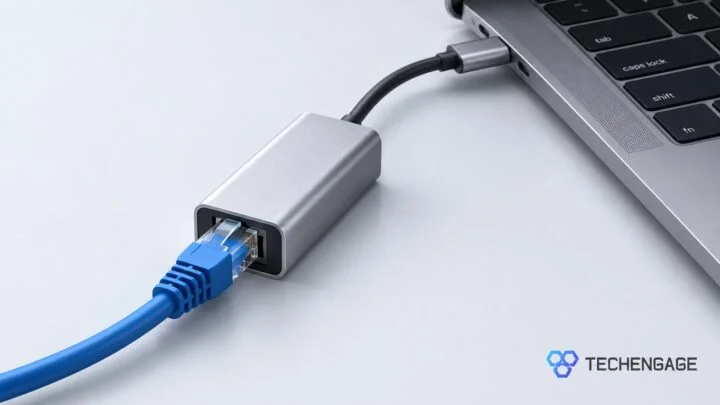
The best USB-C Ethernet adapter depends on your network and the ports you can spare. Start with the Plugable USBC-E2500 for a 2.5Gb upgrade, choose Cable Matters if you also need laptop charging through the same port, or keep things simple with a Gigabit adapter for an existing Gigabit network.
These four picks cover USB-C MacBooks and compatible Windows laptops, with clear differences in speed, charging and connector design. A faster adapter helps only when the rest of the connection can keep up.
Disclosure: As an Amazon Associate, TechEngage earns from qualifying purchases. Prices and availability can change.
Compare the USB-C Ethernet adapters
| Adapter | Maximum Ethernet link | Best fit | Amazon price |
|---|---|---|---|
| Plugable USBC-E2500 | 2.5Gbps | Switching between USB-C and USB-A computers | $19.99 |
| Cable Matters 2.5Gb with 140W PD | 2.5Gbps | Ethernet and laptop charging through one port | $29.75 |
| TP-Link UE300C | 1Gbps | A compact connection to a Gigabit network | $12.99 |
| Anker PowerExpand A8313 | 1Gbps | A compact metal-bodied Gigabit adapter | $16.99 |
The speeds above are link capabilities, not promised download speeds. For a laptop that also needs HDMI, card readers or several USB ports, compare our USB-C hub picks before buying a single-purpose adapter.
1. Plugable USBC-E2500: a practical 2.5Gb upgrade
| Price & Details | |
|---|---|
| Price | $19.99 |
| Discount | 33% |
| Brand | Plugable |
| Buy at Amazon | Check availability on Amazon |
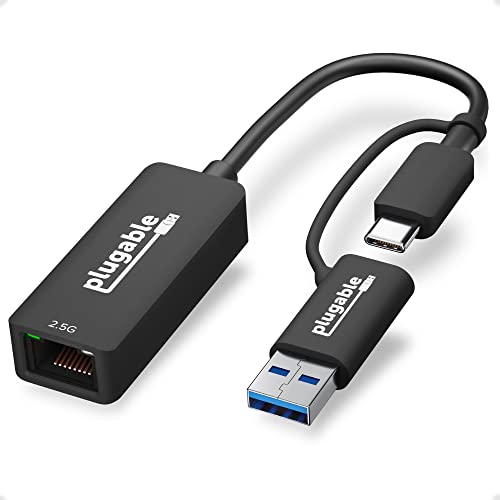
The Plugable USBC-E2500 is the most useful starting point if you want faster wired networking and use more than one computer. Its attached USB-A adapter lets you move between a USB-C laptop and an older USB-A machine without carrying a separate converter.
It supports a 2.5Gbps Ethernet link through USB 3.0. Pair it with a compatible 2.5Gb router or switch; it also works with slower Ethernet networks. Plugable specifies Cat 5e cabling or better, so a working cable may not need replacing.
On macOS, it uses the built-in NCM driver. Windows obtains its driver through Windows Update, so set it up while you still have another internet connection available. Choose this model for networking alone: it does not provide charging passthrough.
2. Cable Matters 2.5Gb with 140W PD: for charging and Ethernet together
| Price & Details | |
|---|---|
| Price | $29.75 |
| Discount | 15% |
| Rating on Amazon | 4.5 out of 5 stars |
| Brand | Cable Matters |
| Buy at Amazon | Check availability on Amazon |
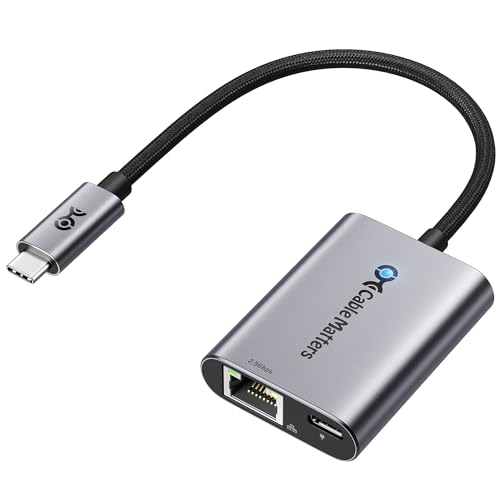
Choose this Cable Matters adapter when a wired connection would otherwise take the USB-C port you use to charge your laptop. It combines 2.5Gb Ethernet with a separate USB-C Power Delivery input, keeping another laptop port available for storage or a display.
The selected model supports USB PD 3.1 charging up to 140W. That is a supported ceiling, not the power every laptop will receive: your charger, charging cable and computer must support the appropriate mode. The adapter does not replace a power supply.
Its aluminum enclosure and braided cable suit a compact desk setup. Windows and macOS are among the supported platforms. If your existing dock already provides suitable Ethernet and charging, another adapter may add little; this one makes more sense when you want those two connections without a full multiport hub.
3. TP-Link UE300C: for straightforward Gigabit networking
| Price & Details | |
|---|---|
| Price | $12.99 |
| Discount | 32% |
| Rating on Amazon | 4.6 out of 5 stars |
| Brand | TP-Link |
| Buy at Amazon | Check availability on Amazon |
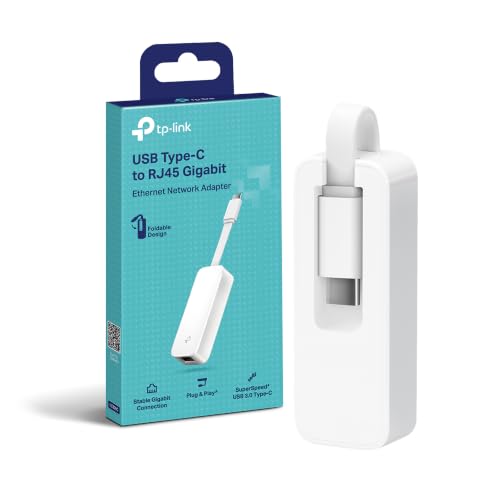
The UE300C is the simple choice when you need an Ethernet socket rather than a network upgrade. Its foldable cable and small plastic body are easy to pack with a laptop, and the 10/100/1000Mbps port covers a conventional Gigabit home or office network.
TP-Link lists plug-and-play support for Windows 11 and 10, macOS, ChromeOS and Linux. Connect it to a USB 3.0-capable USB-C port for full Gigabit capability. It has no charging input, so leave another port available for power if your laptop needs one.
Compare its current price with the Plugable before ordering. The UE300C is sufficient for a Gigabit connection, but a small price difference may favor the 2.5Gb model if you plan to upgrade your network. Neither adapter can make a slower internet subscription faster.
4. Anker PowerExpand A8313: for an aluminum Gigabit adapter
| Price & Details | |
|---|---|
| Price | $16.99 |
| Discount | 35% |
| Brand | Anker |
| Buy at Amazon | Check availability on Amazon |
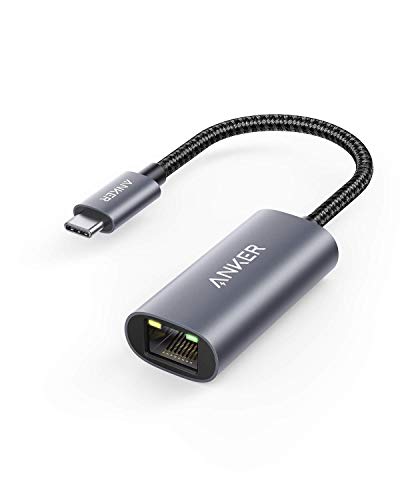
Anker’s PowerExpand A8313 offers a different physical design for the same basic job as the TP-Link: adding a Gigabit Ethernet socket to a USB-C computer. Its aluminum exterior and braided cable are the reasons to consider it, rather than a higher network speed.
The adapter supports connections up to 1Gbps from a compatible USB-C 3.0 device. It is compact enough to keep in a laptop bag, with a single Ethernet port and no charging passthrough or extra USB ports.
Choose it if you prefer that enclosure and cable design. For speed-focused buying, compare the live prices carefully: a less expensive 2.5Gb adapter can be the better fit for an upgraded network. There is little reason to replace a working Gigabit adapter with this one solely to improve download speed.
Should you buy Gigabit or 2.5Gb Ethernet?
Buy for the connection you will actually use. A Gigabit adapter makes sense for a Gigabit router and an internet plan below that ceiling. A 2.5Gb adapter becomes useful when your computer connects to a 2.5Gb LAN port and you have either a faster internet service or compatible local devices to exchange files with.
Check the router’s LAN ports, not just the speed advertised on its box. A fast internet-facing WAN port does not mean every port serving your devices is equally fast. A Gigabit switch between the laptop and router also limits that part of the connection.
For local file transfers, both ends matter. A faster laptop adapter will not remove a bottleneck at a Gigabit NAS port, a slow drive or another computer. If your work involves moving large files to external storage instead, our portable SSD guide covers that different upgrade.
Check your USB port and charging needs
USB-C describes the connector, not a guaranteed data rate. Use a data-capable USB 3.0 or faster port for these adapters; connecting through a slower hub can reduce performance. Our USB-C explainer covers the differences between connector shape, USB speeds and Thunderbolt.
Count the connections your laptop needs while you work. Ethernet-only adapters occupy a port without providing another charging input. A model with Power Delivery can combine charging and networking, but you still need a compatible charger and cable. For most people, that convenience matters more than the largest wattage printed on the box.
Set up the adapter on Mac or Windows
Connect an Ethernet cable from the adapter to a LAN port on your router or switch, then plug the adapter directly into the laptop. Many supported systems connect automatically. If you need to inspect the connection on a Mac, open System Settings → Network; on Windows 11, open Settings → Network & internet → Ethernet.
For a home network, automatic DHCP is normally appropriate. On an office network, use the settings supplied by your administrator. Install a driver only when required for your exact adapter and operating system, and obtain it from the manufacturer rather than a third-party driver-download site.
Why is the connection slower than expected?
Start with the physical connection. Try another working cable and router port. Confirm that the port supports the speed you want, then connect the adapter directly to the laptop to rule out a hub. A loose connector or damaged cable can cause problems that buying a faster adapter will not solve.
Separate local-network speed from internet speed. An internet speed test also depends on your service plan, other traffic and the test server. A 2.5Gb link does not mean every download will reach 2.5Gbps. Test under similar conditions and avoid judging an adapter from a single result.
For gaming and calls, look for consistency. Wired networking can help when weak or congested Wi-Fi is the problem. It cannot guarantee lower ping, fix an overloaded remote server or increase the speed supplied by your internet provider.
Frequently asked questions
Do USB-C Ethernet adapters work with MacBooks?
Yes, compatible adapters add Ethernet through a MacBook’s USB-C or Thunderbolt port. Check support for your macOS version and leave a way to charge the laptop if the adapter does not offer charging passthrough.
Is a 2.5Gb adapter worth buying for Gigabit internet?
It can be useful for faster local transfers or a planned network upgrade. If your router, switch and local devices are all Gigabit, it will not make that path run at 2.5Gbps.
Do I need a new Ethernet cable?
Not automatically. Plugable specifies Cat 5e or better for the USBC-E2500. Start with a known-good cable that meets your adapter’s requirements, and replace damaged or unsuitable cabling if the connection is unreliable.
Can I charge a laptop while using Ethernet?
Yes, if the adapter has a USB-C Power Delivery input and your laptop supports charging through that connection. The Cable Matters pick combines these functions. Its supported charging ceiling still depends on a compatible charger, cable and laptop.


Share Your Thoughts