

In this guide
Disclosure: TechEngage is a participant in the Amazon Services LLC Associates Program, an affiliate advertising program designed to provide a means for sites to earn fees by linking to Amazon.com and affiliated sites. We may earn a commission when you buy through links on this page, at no extra cost to you. Our editorial picks are made independently of these partnerships.
A wireless CarPlay adapter only works if your car already runs CarPlay over a USB cable. The adapter plugs into that USB port, pretends to be your iPhone, and then talks to the real phone over Bluetooth and Wi-Fi. Apple’s CarPlay setup guide separates cars that support CarPlay by USB, wirelessly, or both, and that label decides everything here: if your car has no CarPlay at all, none of these dongles will add it, and Ottocast’s own FAQ says its adapters will not work in cars that offer wireless-only CarPlay either.
If your car passes that test, the choice mostly comes down to three things: whether you also need wireless Android Auto for a second driver, how fast the adapter reconnects when you start the car, and whether the maker still ships firmware updates when iOS or Android changes. A cable-free dash also pairs well with other small upgrades from this list of car accessories for drivers and passengers.
Before buying, check whether you even need one. Many new cars now include wireless CarPlay from the factory, and Honda says every 2026 Accord ships with wireless CarPlay and Android Auto as standard. For iPhone owners who are shopping for their car setup at the same time, these iPhone accessories on Amazon cover chargers and cables for the drive.
Quick Comparison: Best Wireless CarPlay Adapters in 2026
| Adapter | Converts | Phones | Notable | Best For |
|---|---|---|---|---|
| AAWireless TWO Plus | CarPlay and Android Auto | iPhone X or newer, Android 11+ | Button to switch phones | Best overall |
| Ottocast Mini Cube 3.0 | CarPlay and Android Auto | iOS 10+, Android 11+ | About 8.8 g cube | Budget 2-in-1 |
| Ottocast Mini Pico | CarPlay and Android Auto | iOS 10+, Android 11+ | One-tap phone switch button | Shared cars on a budget |
| Carlinkit Mini Ultra | CarPlay and Android Auto | iOS 10+, Android 11+ | 6.55 mm thin | Smallest profile |
| AAWireless TWO | Android Auto only | Android 11+ | Button to switch phones | Best for Android Auto |
| Motorola MA1 | Android Auto only | Android 11+, 5GHz Wi-Fi | Google-licensed bridge | Simple Android Auto plug-in |
1. AAWireless TWO Plus: Best Overall
| AAWireless TWO Plus | |
|---|---|
| Price | $74.99 |
| Brand | AAWireless |
| Check availability on Amazon | |
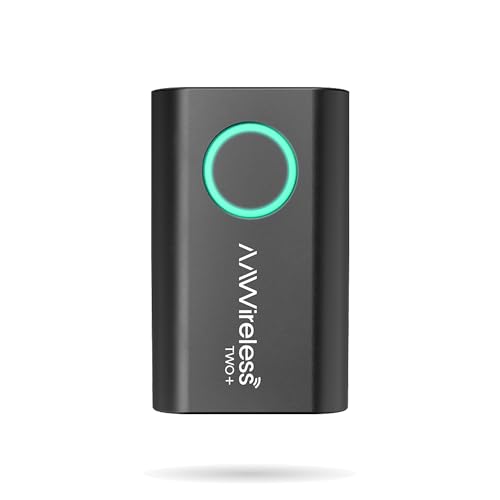
The TWO+ is the 2-in-1 version of AAWireless’s long-running Android Auto dongle, and it turns both wired CarPlay and wired Android Auto into wireless connections. AAWireless lists a 5.5 x 3.5 x 1.5 cm body weighing 18 g, a USB-C port with a USB-C to USB-A cable in the box, and support for iPhone X or newer and Android 11 or newer. A physical button pairs a new phone, jumps to the next paired phone or puts the adapter in standby, and a companion app handles firmware updates, troubleshooting and button mapping. That combination suits shared cars where one driver carries an iPhone and the other uses Android.
The main limit is the phone floor: iPhones older than the X are not supported, while the Carlinkit and Ottocast picks here accept phones on iOS 10 or later. ArenaEV’s three-week review found it reconnected quickly every time, but twice the car’s physical controls stopped working inside a full-screen app until the reviewer returned to the home screen. AAWireless also states that cars with built-in wireless CarPlay or Android Auto are not compatible, so owners of newer cars should skip it. Read recent Amazon reviews from owners of your car brand before ordering.
Why it stands out: It pairs both protocols with a hardware phone-switch button and app-based firmware updates, a combination no other pick here matches.
Check availability on Amazon2. Ottocast Mini Cube 3.0: Budget candidate (price-dependent) 2-in-1 Adapter
| Ottocast Mini Cube 3.0 | |
|---|---|
| Price | $43.99 |
| Brand | OTTOCAST |
| Check availability on Amazon | |
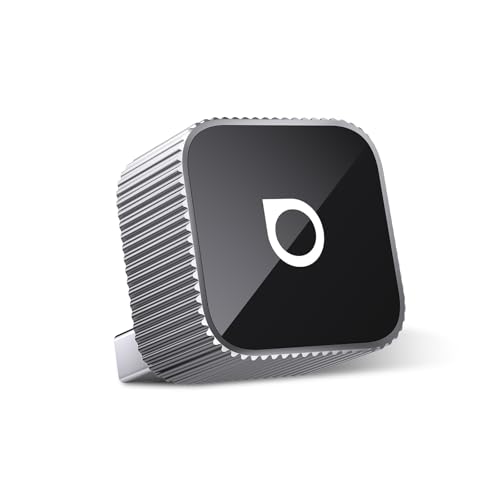
Ottocast’s Mini Cube 3.0 is a tiny cube that plugs straight into the car’s USB port and handles both wireless CarPlay and wireless Android Auto. Ottocast’s product page lists 21.6 x 21.6 x 23.5 mm and about 8.8 g, an aluminum body meant to draw heat away, reconnection in around 5 seconds after first setup, and FOTA firmware updates. It supports iOS 10+ and Android 11+ and needs no app for daily use, which keeps setup short for less technical drivers.
Ottocast lists Sony aftermarket head units as incompatible and asks Mitsubishi owners to contact support before ordering. The same ArenaEV review that praised the TWO+ called the Mini Cube 3.0 the only alternative from an established maker, while noting a slight tendency to run warm. Because it sticks straight out of the port, check that it will not block a cupholder or get knocked in a tight console; a short USB extension helps there. Switching phones is less direct than on AAWireless or the Mini Pico, since it usually rejoins the last phone used.
Why it stands out: It covers both protocols in one of the smallest housings available, from a brand with an official update channel and a US Amazon storefront.
Check availability on Amazon3. Ottocast Mini Pico: Budget candidate (price-dependent) Pick for Shared Cars
| Ottocast Mini Pico | |
|---|---|
| Price | $49.00 |
| Rating on Amazon | 3.5 out of 5 stars |
| Brand | OTTOCAST |
| Check availability on Amazon | |
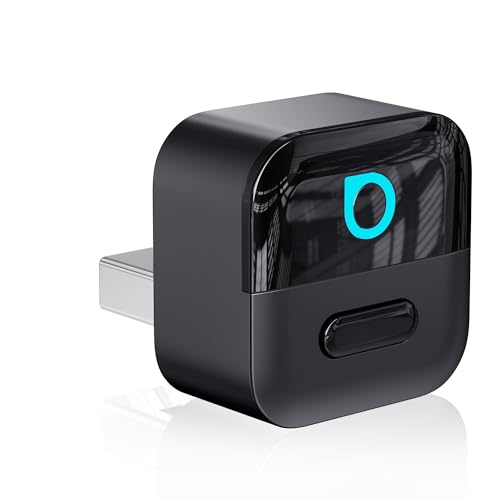
The Mini Pico is Ottocast’s newer 2-in-1 dongle, and its main addition over the Mini Cube is a physical button. Ottocast’s Mini Pico page says one press switches to another paired phone, and a press also disconnects the current phone cleanly so the next driver can take over. It handles wireless CarPlay and wireless Android Auto, supports iOS 10+ and Android 11+, reconnects automatically when the car starts, receives FOTA updates, and comes in USB-A and USB-C versions with a 90-degree connector that keeps it close to the port.
Ottocast publishes far fewer hardware details for the Mini Pico than for the Mini Cube 3.0, with no dimensions or wireless chip specs on its product page, so speed claims on retail listings are hard to verify. The compatibility rules are the same as other Ottocast adapters: factory wired CarPlay or wired Android Auto is required, Sony aftermarket head units are excluded, and wireless-only CarPlay cars will not work. There is no companion app, so button behavior cannot be remapped the way it can on AAWireless adapters.
Why it stands out: It brings a hardware phone-switch button, the most useful feature for shared cars, to a lower-cost 2-in-1 adapter.
Check availability on Amazon4. Carlinkit Mini Ultra: Best Smallest Adapter
| Carlinkit Mini Ultra | |
|---|---|
| Price | $30.99 |
| Rating on Amazon | 3.5 out of 5 stars |
| Brand | Carlinkit |
| Check availability on Amazon | |
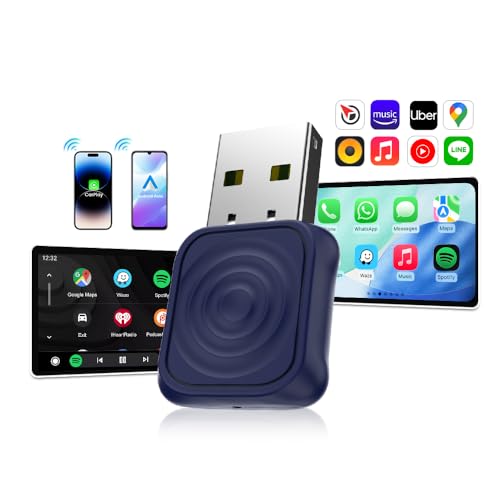
The Mini Ultra is Carlinkit’s flat, flash-drive-sized 2-in-1 adapter. Carlinkit specifies 32.85 x 20 x 6.55 mm, 5.8GHz Wi-Fi, Bluetooth 5.4, 0.75W power draw and a USB-A plug with a USB-C adapter included. It supports iPhone 6 or newer on iOS 10+ and Android 11 or newer. At 6.55 mm thick, it is the least likely pick to jut into a storage cubby.
Carlinkit says it does not support BMW vehicles, and its own comparison table shows it uses a modest dual-core MIPS chip. It also has no companion app; updates run through a browser page on the adapter’s own Wi-Fi network, which works but asks more of the owner. Skip it if you want a button to switch phones; there is none.
Why it stands out: The thinnest, lightest adapter in this guide, with current Bluetooth and 5GHz Wi-Fi specs listed by the manufacturer.
Check availability on Amazon5. AAWireless TWO: Best for Android Auto
| AAWireless TWO | |
|---|---|
| Price | $64.99 |
| Rating on Amazon | 4.1 out of 5 stars |
| Brand | AAWireless |
| Check availability on Amazon | |
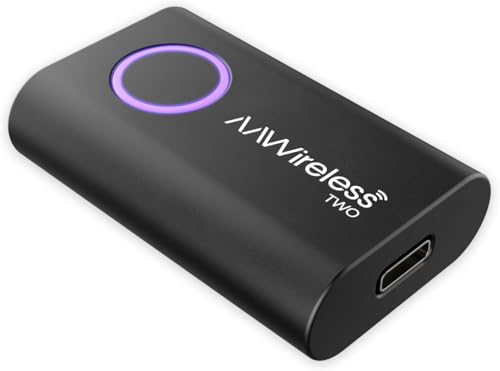
The AAWireless TWO is the Android Auto-only sibling of the TWO+. AAWireless says it works with cars and aftermarket head units that have wired-only Android Auto, requires Android 11 or newer, and shares the same 18 g, USB-C hardware, pairing button and auto-standby. The app lets you remap button presses, update firmware and adjust settings such as screen DPI.
9to5Google’s hands-on described it mainly as a fit-and-finish upgrade over the original AAWireless, with a smaller body and a button that makes switching between phones in a shared car much easier, while connection speed stayed about the same. It cannot run CarPlay, so skip it if an iPhone user shares the car.
Why it stands out: A dedicated Android Auto adapter with ongoing firmware support and easy multi-phone switching.
Check availability on Amazon6. Motorola MA1: Best Simple Android Auto Plug-In

| Motorola MA1 | |
|---|---|
| Price | $129.94 |
| Rating on Amazon | 3.5 out of 5 stars |
| Brand | Motorola Sound |
| Check availability on Amazon | |
The Motorola MA1 is a small puck on a short fixed USB-A cable, sold under the Motorola Sound brand, which 9to5Google’s review notes is made by licensee SGW Global and launched with direct backing from Google. It needs an Android 11 phone with 5GHz Wi-Fi and a car with factory wired Android Auto. Tom’s Guide’s review found performance almost indistinguishable from a cable, with Android Auto launching in about 23 seconds wirelessly versus 18 seconds wired, and a Pixel 6 Pro losing 7% battery in an hour of music playback.
The weakness is long-term support. 9to5Google reported startup times of 20 to 40 seconds, awkward switching between two phones, and lag that got worse over months, adding that the MA1 cannot receive firmware updates to fix software problems. It pairs with one phone at a time in practice, has no CarPlay support, and the rigid cable can crowd a small console. Buy it only if you want the simplest plug-in option and the price is well below the AAWireless TWO.
Why it stands out: It needs almost no setup and has been reviewed in depth by major outlets for years.
Check availability on AmazonHow to Choose a Wireless CarPlay Adapter
Confirm your car has factory wired CarPlay
Plug your iPhone into the car’s USB data port with a cable. If CarPlay opens, the car has wired CarPlay and an adapter can make it wireless. If nothing happens, no dongle will help. Apple’s model list includes more than 800 models, with CarPlay standard or optional on many 2016 and later cars, though some trims support it only in certain configurations. Owners of older cars may have a dealer retrofit route instead, as with Mazda’s CarPlay upgrade for older models. Also check the adapter’s exclusions: Carlinkit lists BMW, Ottocast lists Sony aftermarket stereos, and AAWireless says cars with built-in wireless CarPlay are not supported.
Wi-Fi band, lag and audio delay
Adapters use Bluetooth for the handshake and then move to Wi-Fi for the actual CarPlay or Android Auto stream. Google’s Android Auto help page says wireless Android Auto needs a phone with Android 11 and 5GHz Wi-Fi support, and every Android-capable pick here follows that rule. Expect a small delay on touch input and on steering-wheel track skips compared with a cable, since the adapter adds a hop between phone and car. No independent lab currently publishes standardized lag tests for these dongles, so manufacturer claims of zero lag should be read as marketing.
Boot and reconnect time
Each time you start the car, the head unit boots, the adapter powers up, and then the phone joins its Wi-Fi network. Manufacturers usually quote the last step only, such as the roughly 5 second reconnect Ottocast lists for the Mini Cube 3.0. Real start-to-map times are longer and depend heavily on the car; the Motorola MA1 took about 23 seconds in Tom’s Guide’s testing, and 20 to 40 seconds in 9to5Google’s. If you often start driving the moment the engine turns on, a cable may still feel faster on short trips.
Firmware updates
Apple and Google change CarPlay and Android Auto every year, and the adapter has to keep up. AAWireless and Ottocast push updates through apps or over the air, while Carlinkit uses a browser page on the adapter’s own network. An adapter with no update path, like the MA1, stays exactly as it shipped. Before a major iOS release, check the maker’s support page for known issues rather than updating the phone blindly.
Power, heat and phone battery
The adapters themselves draw little power; Carlinkit rates the Mini Ultra at 0.75W. The bigger cost is on the phone, which no longer charges from the car’s USB port and spends energy on Wi-Fi. Pair the adapter with a wireless charging pad or a MagSafe mount on long trips; this roundup of car phone mounts includes charging options. Adapters that sit in direct sun on the dash, or in a closed console next to a charging pad, will run warm.
Multiple phones, iPhone versus Android
Most adapters remember several phones but reconnect to the last one used. AAWireless and the Ottocast Mini Pico add a physical button to jump between phones, which is the cleanest option for couples or rideshare drivers. A 2-in-1 adapter only passes through the protocol your car already supports, so an Android phone in a car with wired CarPlay but no Android Auto still will not work.
Interference and known issues
Dropouts, stuttering audio and failures to reconnect are the most common complaints across every brand. Some fixes are simple: Carlinkit’s dropout troubleshooting guide for its adapters suggests moving the adapter to Wi-Fi channel 149 and changing the head-unit link type, which points to channel congestion and head-unit quirks as common causes. Buy from a seller with a clear return window so you can test the adapter in your own car during the first few weeks.
How These Picks Were Chosen
These picks are based on manufacturer spec sheets and compatibility pages, official Apple and Google documentation, published reviews from outlets such as Tom’s Guide, 9to5Google and ArenaEV, and Amazon rating volume for each listing. TechEngage did not test these adapters in its own vehicles. Models were only included if they are sold on Amazon US in September 2026 and the maker publishes clear compatibility rules.
Wireless CarPlay Adapter FAQs
Will a wireless CarPlay adapter work in a car without CarPlay?
No. Adapters from AAWireless, Carlinkit and Ottocast all require factory wired CarPlay or wired Android Auto, because they only convert an existing USB connection to wireless. Cars with no CarPlay need a new head unit or a dealer retrofit instead.
Do wireless CarPlay adapters add lag?
Some delay is normal because the adapter adds a Wi-Fi hop between the phone and the car. Tom’s Guide measured about 23 seconds to launch Android Auto through the Motorola MA1 versus 18 seconds by cable, and touch or track-skip response can feel slightly slower than wired.
Can one adapter handle both iPhone and Android phones?
Yes, 2-in-1 models such as the AAWireless TWO Plus, Carlinkit Mini Ultra and Ottocast Mini Cube 3.0 support both, but only if the car supports the matching wired protocol. An Android phone will not work in a car that only has wired CarPlay.
Does wireless CarPlay drain the phone battery?
Yes. The phone stops charging from the car’s USB port and uses Wi-Fi for the whole drive; Tom’s Guide recorded a 7 percent drop in one hour of music playback. A wireless charging pad or MagSafe mount offsets it.
Is an adapter useful in a car that already has wireless CarPlay?
No. AAWireless says its adapters are not compatible with cars that have built-in wireless CarPlay or Android Auto, and Ottocast rules out wireless-only CarPlay cars. Many 2026 models, including every Honda Accord, already ship with wireless CarPlay as standard.
Do wireless CarPlay adapters need firmware updates?
They should get them. AAWireless updates through its app, Ottocast uses over-the-air updates, and Carlinkit uses a browser page on the adapter. The Motorola MA1 cannot be updated, which 9to5Google flagged as its biggest long-term weakness.
TechEngage may earn a commission from qualifying Amazon purchases made through links on this page. Prices and availability are pulled from Amazon and can change.





Share Your Thoughts