

In this guide
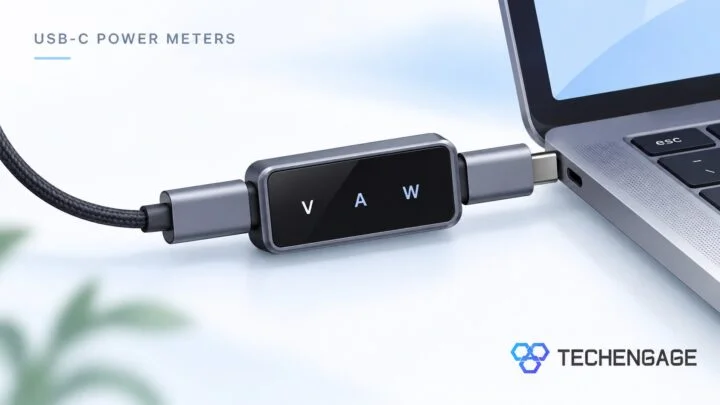
The best USB-C power meter depends on what you need to find out. Choose a simple inline meter to see charging watts, or a diagnostic tester if you need to inspect a charger’s supported protocols and a cable’s identification chip. The Plugable USBC-VAMETER3 is the straightforward choice for charging checks; the ChargerLAB POWER-Z KM003C offers more diagnostic tools.
A meter can help you compare chargers and cables before replacing them. It does not make a charger faster, and a low reading alone does not prove that anything is faulty.
Disclosure: As an Amazon Associate, TechEngage earns from qualifying purchases. Prices and customer ratings below can change.
Which USB-C power meter should you buy?
| Product | Best fit | Key feature | Consider before buying | Price |
|---|---|---|---|---|
| Plugable USBC-VAMETER3 | Quick laptop and phone charging checks | 240W EPR support; simple inline display | Not compatible with Thunderbolt 3 | $29.95 |
| ChargerLAB POWER-Z KM003C | Charger and cable diagnostics | Protocol, PDO and E-marker tests | More functions to learn than a basic wattmeter | $109.99 |
| FNIRSI FNB58 | USB-A and USB-C workbench testing | Multiple connectors, recording and cable diagnostics | 4–28V range; not for 36V/48V charging | $52.99 |
| ChargerLAB POWER-Z C240 | Portable charging readout | Small display for voltage, current and power | Not the choice for precision measurements | $29.99 |
1. Plugable USBC-VAMETER3: for straightforward charging checks

| Price & Details | |
|---|---|
| Price | $29.95 |
| Rating on Amazon | 4.5 out of 5 stars |
| Brand | Plugable |
| Buy at Amazon | Check availability on Amazon |
Plugable’s meter is the most approachable pick here if you want to read charging power without navigating diagnostic menus. It connects inline, shows the direction of current flow and has a button to rotate its OLED display. Plugable specifies support for USB Power Delivery 3.1 Extended Power Range, including charging up to 240W.
That makes it a useful starting point for comparing a laptop’s original charger with another compatible adapter. Keep the laptop and battery conditions similar, then change one cable or charger at a time. The current Amazon price is $29.95.
The important compatibility exception is Thunderbolt 3, which Plugable explicitly excludes. It supports USB data and USB-C Alt Mode passthrough, but you should check your dock’s requirements before adding it to the connection. Choose the KM003C instead when reading cable chips or charger protocols is your main task.
2. ChargerLAB POWER-Z KM003C: for protocol and cable diagnostics

| Price & Details | |
|---|---|
| Price | $109.99 |
| Brand | ChargerLAB |
| Buy at Amazon | Check availability on Amazon |
The KM003C makes sense when your question is more specific than “how many watts are flowing?” You can use it for E-marker reading, charger power-profile checks and charging-protocol detection. These can help narrow down whether a charger and cable advertise the capabilities your device needs.
It is the pick for an enthusiast maintaining several USB-C chargers or investigating an unexpected charging limit. Its current Amazon price is $109.99, so compare the extra diagnostic features with how often you will actually use them. A simple meter is easier to justify for occasional checks.
Start with passive monitoring. Protocol detection and triggering are separate functions that require following the instructions for the exact setup. Keep sensitive devices disconnected during charger-trigger tests unless the manufacturer’s procedure explicitly calls for them. Obtain firmware and instructions from ChargerLAB’s support page.
3. FNIRSI FNB58: for mixed USB workbench tasks

| Price & Details | |
|---|---|
| Price | $52.99 |
| Discount | 7% |
| Rating on Amazon | 4.3 out of 5 stars |
| Brand | FNIRSI |
| Buy at Amazon | Check availability on Amazon |
The FNB58 combines USB-A, USB-C and Micro-USB interfaces with a larger color display. FNIRSI lists E-marker reading, charging-protocol detection and recording features, which give it a different role from a tiny inline meter. It suits a workbench where you need to inspect several connector types.
Check the voltage limit before choosing it for a high-power laptop. FNIRSI specifies a 4–28V monitoring range, so this is not the tool for 36V or 48V USB-C charging. Do not assume that a high advertised wattage means it can accept every Extended Power Range voltage.
The Amazon price for the linked configuration is $52.99. Confirm whether the selected version includes Bluetooth if wireless logging matters to you. The additional test modes reward reading the manual; they are unnecessary if you only want a quick charging-power display.
4. ChargerLAB POWER-Z C240: for a small everyday readout
| Price & Details | |
|---|---|
| Price | $29.99 |
| Rating on Amazon | 4.3 out of 5 stars |
| Brand | ChargerLAB |
| Buy at Amazon | Check availability on Amazon |
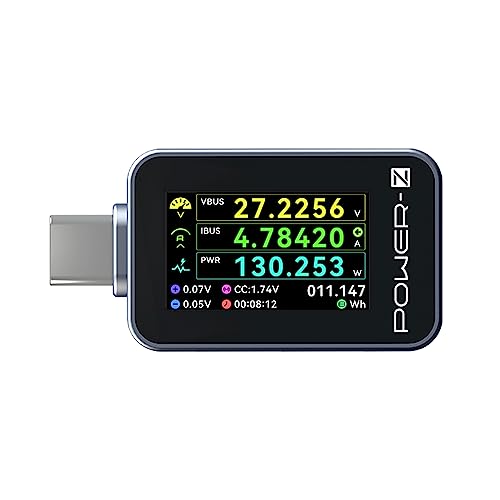
The C240 is the simpler POWER-Z option: a small metal-bodied meter with charging information on one screen. ChargerLAB lists voltage, current, power and accumulated energy among its readouts, with support for charging up to 240W. Its compact design is easier to carry than a larger bench tester.
Choose it to observe charging behavior, not to settle a fine accuracy comparison between two adapters. ChargerLAB says the C240 is less precise than the KM003C and recommends the latter for higher-accuracy work.
At $29.99 on Amazon, compare it with the Plugable meter on connector fit and display preference. The C240 is a reasonable portable readout; the KM003C remains the more suitable option when you need the diagnostic features described above.
How to choose a meter that answers your question
For charging watts: A basic inline meter is enough. Read voltage and current as well as watts, and compare measurements under similar conditions. A charger’s printed wattage is its capability, not a promise that every connected device will draw that amount.
For cable identification: Choose a tester with E-marker reading. Reading a chip is different from proving a cable’s actual data-transfer performance. A charging-power display cannot certify a cable for a particular video mode or file-transfer speed.
For charger compatibility: A protocol analyzer can reveal more than a wattmeter. Check the supported protocol and voltage, not just a large maximum-wattage number on the listing. Do not expose a meter to a voltage above its specified range.
For a dock: Check passthrough compatibility before inserting any tester. Our USB-C hub guide explains why display support and charging features need separate attention. Remove the meter when diagnosing a connection issue if its presence changes the behavior.
Check the basics before buying another charger
First try a known-good compatible cable and power adapter. Check the cable, power source and ports before replacing equipment. Stop using a damaged cable, especially one that works only when bent or moved.
For a useful comparison, record the device, charger port, cable and battery level. Keep workload and temperature similar, observe more than a single reading, and change one component at a time.
If a phone loses charge quickly even when charging works normally, investigate background app battery use as well. For charging away from an outlet, compare the output options in our travel power-bank guide. A meter helps you see a connection; it cannot repair a failing battery or replace the correct charger.
Frequently asked questions
What is the difference between a USB-C power meter and a cable tester?
A power meter reports electrical readings such as voltage, current and watts. A cable tester may inspect wiring or identification data. Some diagnostic tools combine these functions, but a wattage display alone cannot verify data speed or every cable capability.
Can a USB-C power meter measure 240W charging?
Only use a meter rated for the required voltage and power. A meter supporting 240W does not make a connected device draw 240W. The charger, cable and device must also support the charging mode.
Why is the reading lower than the wattage printed on my charger?
The charger rating describes available output. Actual draw depends on the device and operating conditions. Compare compatible cables and chargers under similar conditions rather than treating one low reading as proof of a fault.
Does a higher displayed rating mean a more accurate meter?
No. Maximum voltage and current, display resolution and measurement accuracy describe different properties. Choose according to the manufacturer’s stated operating limits and accuracy information, not the number of digits on the display.


Share Your Thoughts