• Skip to primary navigation
  • Skip to main content
  • Skip to primary sidebar
  • Skip to footer
TechEngage

TechEngage®

Hands-on reviews, research-backed buying guides and technology news.

  • News
    • Internet & Social
    • Gadgets
    • Car Tech
    • Business
    • Science & Health
  • Reviews
  • Buying Guides
  • How-to
  • AI
  • Computing
    • Apps
    • Security
    • Gaming
  • More
    • Tools
    • Puzzles
    • Mobile
  • Launchpad
  • Sign in
TechEngage » Apps & Software

Windows 11 leaked UI shows visual overhaul, redesigned icons, and other changes

Avatar for Sheharyar Ahmad Saeed Sheharyar Ahmad Saeed Connect with Sheharyar Ahmad Saeed on LinkedIn Published: Jun 16, 2021 · 9:29 AM ET

NewsNews report. Not a buying guide or hands-on product test.
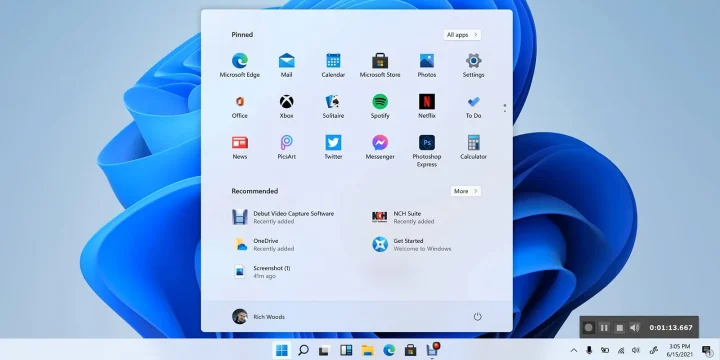
The leaked image of Start menu in Windows 11
Shares75FacebookTweetPinLinkedInPrint

Earlier this month, Microsoft announced its upcoming event to unveil “Next Generation of Windows.” Certain clues lead us to conclude that Microsoft is bringing a new operating system, Windows 11, in its upcoming event. Earlier today, Microsoft’s Windows 11 OS was spotted online. As a beta build got leaked, the internet was stormed with screenshots and videos of Windows 11. It didn’t take a lot of time, and we have plenty of leaks about the next version of Windows.
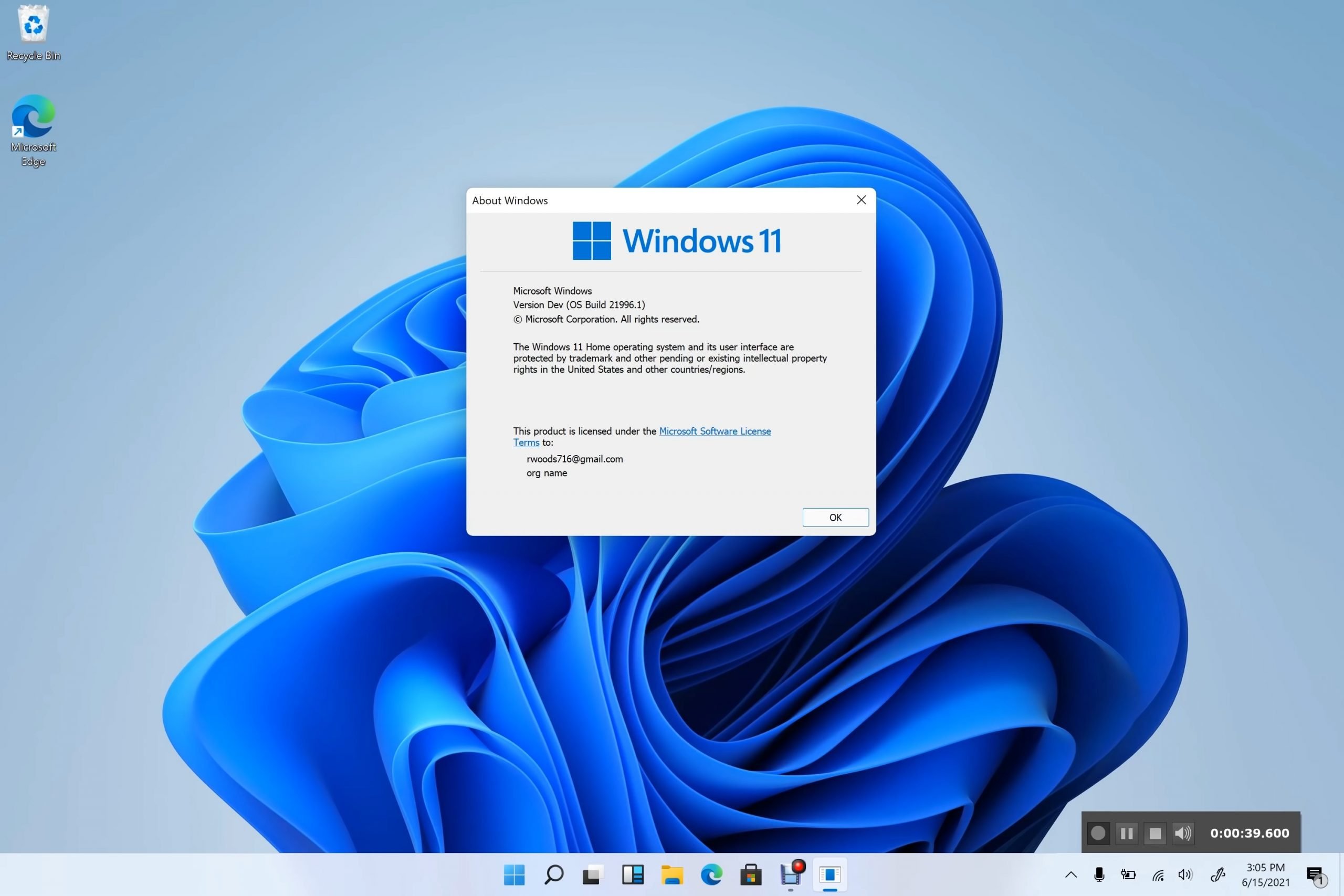
Windows 11 Leaked Version

Earlier, in an updated Microsoft Windows lifecycle document, the company has announced an end date to support Windows 10. The document reveals the support life cycle for the Windows 10 Home and Pro that Microsoft will terminate the support for Windows 10 Pro and Home on October 14, 2025. After appearing online first in screenshots on Baidu, Windows 11 has now been unveiled in its entirety, complete with a new user interface, Start menu, and many more features.

Microsoft is aiming to revamp the visual outlook of its upcoming operating system. As far as the first look at the new UI is concerned, the new Windows 11 takes design cues from canceled Windows 10X and is the spitting image of the unreleased OS. The alluring realigned taskbar grabs the attention with the pinned apps on the taskbar placed in the center (hello macOS!), which seems like an attempt to make it more like macOS’ centered doc design. However, users can bring these icons back to their place just like the classic Windows, i.e., leftward.
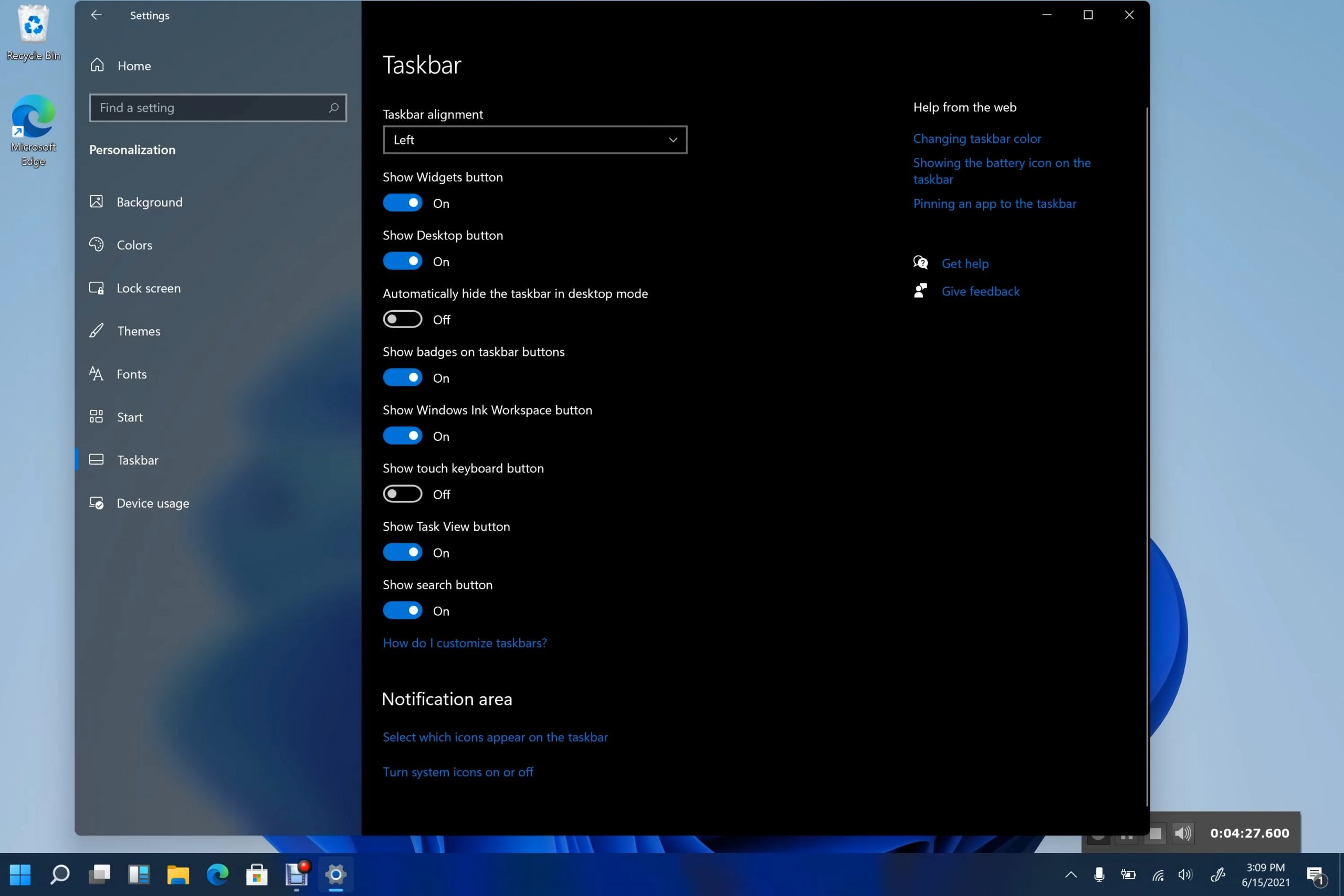
Windows 11 Left Start Menu

The Start menu of Windows 11 appears without live tiles and resembles the simplified version of canceled Windows 10X. The Start menu also features pinned apps, recent files, options to shut down or restart the device and now comes with round corners. The dark mode, which is also included with Windows 11, just like Windows 10’s dark mode, makes it look more like a refined rendition of Windows 10 than something radically new.
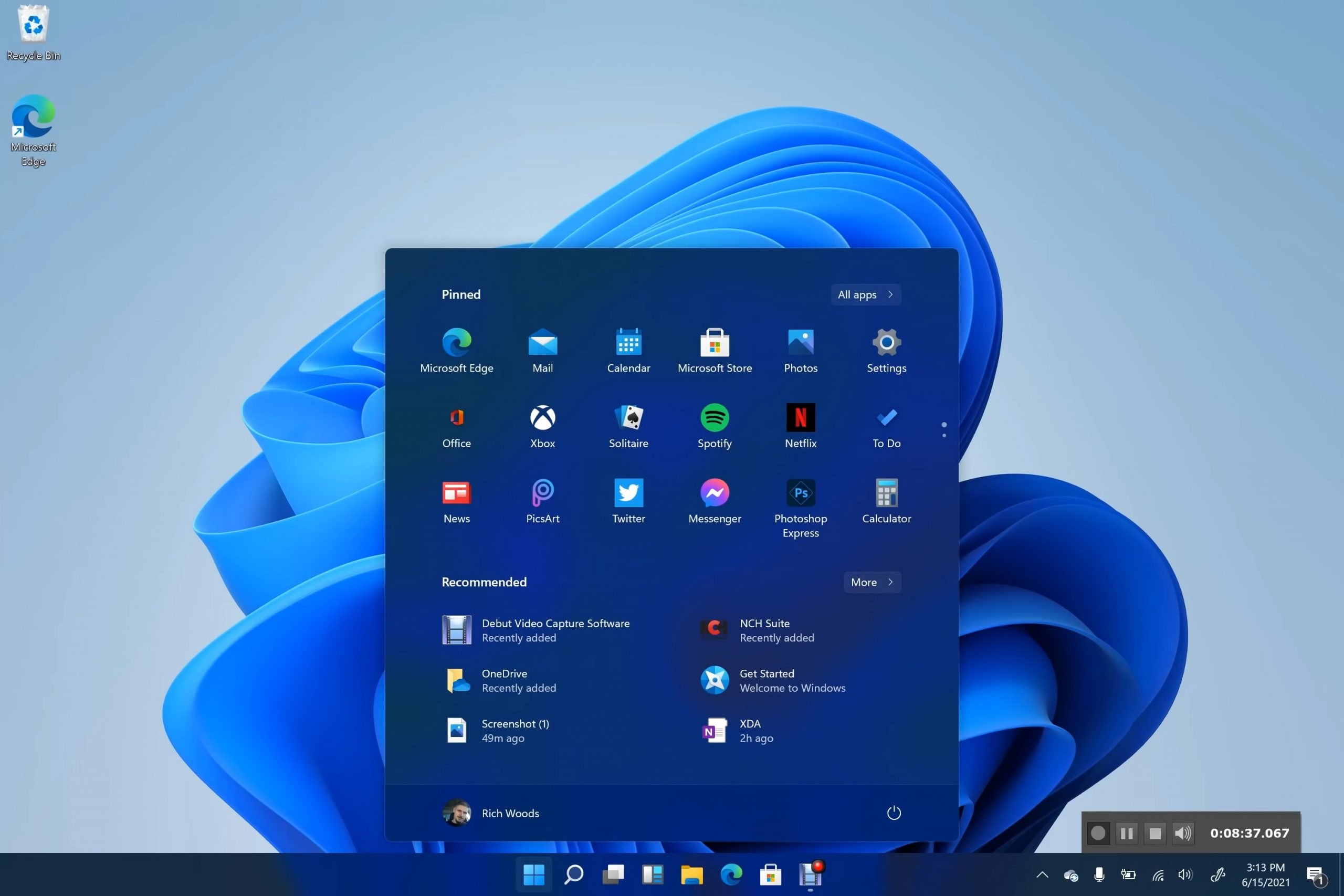
Windows 11 Dark Mode
Windows 11 dark mode / via XDA Devs

Live Tiles can be re-enabled in Windows 11 if you really want them https://t.co/mVWZ1yHouB pic.twitter.com/GgRAXcx4ym

— Tom Warren (@tomwarren) June 15, 2021

The default centered taskbar has newly redesigned icons. Other than that, the rumors also suggest that Microsoft is bringing back its Windows widget. Apart from these changes, there would probably be other changes as well for built-in apps in Windows 11.

As part of Windows 11, you can also access snap controls from the maximize button on all apps. These are similar to cascade windows, a feature that has been brought back into the operating system recently. The desktop allows you to quickly snap open windows side by side or arrange them in sections.

The new version of Windows 11 also comes with an improved setup experience. A set of steps is shown to help those using new hardware or upgrading to Windows 11 configure Windows. This is very similar to Windows 10X. A new startup sound is also included, which is triggered every time Windows 11 boots.

this is the new Windows 11 startup sound pic.twitter.com/UQZNFBtAxa

— Tom Warren (@tomwarren) June 15, 2021

Windows Store doesn’t appear to have received any significant update yet. In Windows 11, the Store interface looks similar to what it is today, with all the apps available to users. Considering that this is a leaked version, there’s more to come from Microsoft that probably haven’t been spotted yet.

Something incorrect? Report an error in this article. Include a source if you have one; your name and email are optional.

Filed Under: Apps & Software, Tech News & Analysis Tagged With: Microsoft, Microsoft Windows, Windows 10, Windows 11

Related Stories

  • How To Screen Record On Windows 11 With Audio

    How to Screen Record on Windows 11 With Audio

    Apps & SoftwareOct 10, 2026

  • How To Back Up Windows 11 Files To An External Drive

    How to Back Up Windows 11 Files to an External Drive

    Computing & HardwareOct 10, 2026

  • Microsoft Brings Office Editing To Copilot, Frontier First

    Microsoft brings Office editing to Copilot, Frontier first

    AIOct 10, 2026

Stay on top of technology

Get TechEngage reviews, buying guides and news in your feed.

Follow on Google News
Shares75FacebookTweetPinLinkedInPrint
Avatar for Sheharyar Ahmad Saeed

Sheharyar Ahmad Saeed

Mobile & Events Reporter

Sheharyar Ahmad Saeed is a Mobile and Events Reporter at TechEngage who covers smartphone launches, apps, technology conferences, and social media. He has written more than 170 articles, making complex product announcements easy to follow for everyday readers.

Joined TechEngage October 2020First article on TechEngage October 2020

Reader Interactions

Share Your Thoughts Cancel reply

Please read our comment policy before submitting your comment. Your email address will not be used or published anywhere. You will only receive comment notifications if you opt to subscribe below.

Primary Sidebar

Google News

Get TechEngage in your feed

Reviews, news, and buying guides as they publish.

Follow on Google News

Recent Stories

  • Nscale Anthropic Second Compute Deal |
    Tech News & AnalysisAnthropic and Nscale in Talks on Second $45B Compute Deal, Report SaysOct 19, 2026
  • Stellar Pst Repair Desktop Vs Online Techengage |
    Reviews & Buying GuidesStellar Repair for Outlook Review: Desktop vs. Online PST RepairOct 19, 2026
  • Health Conscious Home Cleaning Fana Anwar |
    Culture & LifestyleHow to Build a More Effective, Health-Conscious Home Cleaning RoutineOct 19, 2026
  • Google Home Local Matter Hue |
    Consumer Tech & GadgetsGoogle Home update brings local Matter control to Hue lightsOct 15, 2026
  • Windows Screen Recording Guide |
    Apps & SoftwareHow to Screen Record on Windows 11 With AudioOct 10, 2026

More in Apps & Software

  • Windows Screen Recording Guide |
    How to Screen Record on Windows 11 With AudioOct 10, 2026
  • Chrome Tabs Reloading Techengage |
    How to Stop Chrome Tabs From ReloadingOct 10, 2026
  • 136181 7Effec8402C5Ea64 |
    What Microsoft Announced on October 7: Surface Laptop Ultra, RTX Spark Dev Box, and Windows AISep 16, 2026
  • TechEngage news graphic: iOS 27 Is Out With Siri AI, with an illustrated laptop and phone showing an AI assistant
    Apple Releases iOS 27 and macOS Golden Gate With Siri AISep 15, 2026
More Apps & Software stories →

Footer

Discover

  • About TechEngage
  • Company News & Updates
  • Our Team
  • Advertise
  • Send us a tip
  • Submit your company to TechEngage Launchpad Hot
  • TechEngage Brand Kit
  • Contact us
  • Tools & Calculators

Legal pages

  • Editorial Standards
  • Reviews Policy
  • Our Ethics
  • Corrections Policy
  • Affiliate Disclosure
  • Privacy Policy
  • Cookies Policy
  • Terms & Conditions
  • GDPR Compliance
  • Copyright & DMCA

Must reads

  • Best Mechanical Keyboards Under $100
  • Best USB-C Hubs
  • Best Portable SSDs
  • Best Gaming Graphics Cards (GPUs)
  • Best Long-Range Outdoor WiFi Extenders
  • Best Wireless CarPlay Adapters
  • Best Slack Alternatives
  • Best Long-Range Walkie-Talkies

Download our apps

TechEngage app coming soon on the App Store Available onChrome

© 2026 TechEngage®. All Rights Reserved. TechEngage® is a project of TechAbout LLC.

TechEngage® is a registered trademark in the United States under Trademark Number 6823709 and in the United Kingdom under Trademark Number UK00003417167. It is also ISSN protected under ISSN 2690-3776 and has OCLC Number 1139335774.

Contact team@techengage.com · WhatsApp +1-307-381-8801

Your analytics choice
Allow Google Analytics to help us understand readership? You can use the site without it and change this choice anytime.

Privacy details