• Skip to primary navigation
  • Skip to main content
  • Skip to primary sidebar
  • Skip to footer
TechEngage

TechEngage®

Hands-on reviews, research-backed buying guides and technology news.

  • News
  • AI
  • Mobile
  • Apps
  • Reviews
  • More
    • Security
    • Internet & Social
    • Computing
    • Gadgets
    • Gaming
    • Car Tech
    • Business
    • Science & Health
TechEngage » Apps & Software

iOS 12.1 updated with Group FaceTime, new Emoji and more

Avatar for Muhammad Abdullah Muhammad Abdullah Follow Muhammad Abdullah on X Published: Nov 1, 2018 · 8:59 PM ET

iOS 12.1 emoji update
Illustration by Abdullah l TechEngage
FacebookTweetPinLinkedInPrint

Group FaceTime, Emoji, Depth Control in Camera & Dual SIM.

Apple announced the new iOS 12.1 update in October event held in New York. The update is rolling out for iPhone XS, iPhone XS Max and iPhone XR with Dual SIM support and Depth Control in Camera Preview. With iOS 12.1, you can now FaceTime with 32 people simultaneously.

Group FaceTime

With Group FaceTime update on iOS 12.1, you can chat with more people comfortably. You can now FaceTime with up to 32 people at the same time. It’s more flexible than ever with the ability to add anyone in your chat and join the group. The camera effects are also available in conversations. Animoji or Memoji will make your group chat even more fun. Here are the additional features that are coming to FaceTime with new iOS 12.1 update:

  • Ringless notification & Messages integration

FaceTime lets you join the group call without causing disruption. It notifies you when calling more than one person. iMessage integration with the FaceTime makes it easy to start a conversation right from the group chat.

  • Private Chat

Just like many favorite messaging and chatting apps, FaceTime conversations are end to end encrypted. The discussions are private and only viewable by the participants.

  • Automatic detection of active speakers

FaceTime comes with this particular feature that automatically detects the current speaker in the group chat and highlights the participant. The image of the participant automatically sizes when they are active in the conversation. The person who is not active stays at the bottom of the screen until they speak.

New Emoji

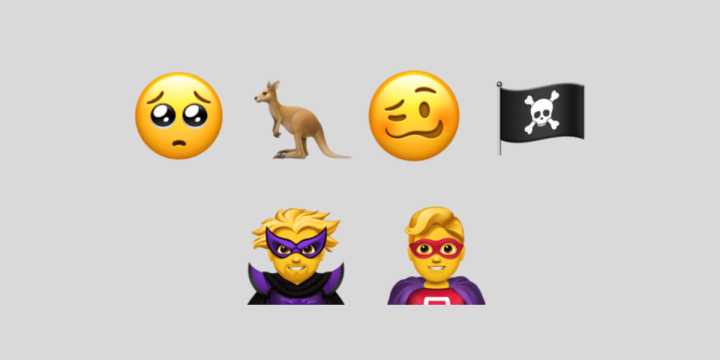
The update will also bring new emoji to the iOS ecosystem. There are 70 new emoji released by Apple for iPhone and iPad.  From drunk face emoji to new characters like curly hair, gray hair, red hair, and bald people, you will get everything. Further, there are more sports, food and animal emoji with more emotive smileys.
Also read: Apple finally updated Mac Mini!

Dual SIM

iOS 12.1 also brings Dual SIM support to iPhone XS, iPhone XS Max and iPhone XR. When announced in September, Apple announced Dual SIM feature in the new iPhones, a nano-SIM and a digital eSIM. Now, new iPhone users can activate additional plans on their iPhone without adding physical SIM.

Depth Control in Camera

Apple announced Depth Control feature with the new iPhone in their September event. It enables users to create more professional bokeh and sophisticated photos. Now, Depth Control in Camera is rolling out to all supported iPhones. The user can adjust the depth of field in real time camera preview. Users can also change bokeh level after taking a photo. The portrait mode also works on TrueDepth camera for selfies including Memoji. With this update, face tracking gets faster for third part ARKit apps.
Stay tuned for more updates!


Filed Under: Apps & Software

Related Stories

  • Microsoft Confirms October 7 Windows And Surface Event For Local Ai Pcs

    Microsoft Confirms October 7 Windows and Surface Event for Local AI PCs

    Tech News & AnalysisSep 16, 2026

  • Apple Releases Ios 27 And Macos Golden Gate With Siri Ai

    Apple Releases iOS 27 and macOS Golden Gate With Siri AI

    Tech News & AnalysisSep 15, 2026

  • Google Launches Gemini Desktop App For Windows With Alt+Space Shortcut

    Google Launches Gemini Desktop App for Windows With Alt+Space Shortcut

    Tech News & AnalysisSep 11, 2026

Stay on top of technology

Get TechEngage reviews, buying guides and news in your feed.

Follow on Google News
FacebookTweetPinLinkedInPrint
Avatar for Muhammad Abdullah

Muhammad Abdullah

Senior Tech Correspondent

Muhammad Abdullah is a Senior Tech Correspondent at TechEngage and its most prolific author, with more than 320 published articles. A computer scientist by training and a certified Growth Hacker, he covers mobile devices, apps, operating systems, social media, and gaming, turning complex digital trends into practical insights.

Joined TechEngage October 2018First article on TechEngage October 2018

Reader Interactions

Share Your Thoughts Cancel reply

Please read our comment policy before submitting your comment. Your email address will not be used or published anywhere. You will only receive comment notifications if you opt to subscribe below.

Primary Sidebar

Follow us on Google News

Recent Stories

  • Iphone 18 Pro Availability Sept 18 |
    Tech News & AnalysisiPhone 18 Pro and Pro Max Available Today in 65+ CountriesSep 18, 2026
  • Best Portable Monitors 2026 |
    Reviews & Buying GuidesBest Portable Monitors in 2026: 8 Picks for Travel, Work, and PlaySep 18, 2026
  • Samsung One Ui 9 Android 17 Rollout |
    Tech News & AnalysisSamsung Starts One UI 9 (Android 17) Rollout on Galaxy S26 SeriesSep 17, 2026
  • Best Wireless Mice 2026 |
    Reviews & Buying GuidesBest Wireless Mice in 2026: 8 Picks for Work, Travel, and PlaySep 17, 2026
  • Microsoft Windows Surface Event Oct 7 2026 |
    Tech News & AnalysisMicrosoft Confirms October 7 Windows and Surface Event for Local AI PCsSep 16, 2026

More in Apps & Software

  • Microsoft Windows Surface Event Oct 7 2026 |
    Tech News & AnalysisMicrosoft Confirms October 7 Windows and Surface Event for Local AI PCsSep 16, 2026
  • Apple Ios 27 Siri Ai Featured |
    Tech News & AnalysisApple Releases iOS 27 and macOS Golden Gate With Siri AISep 15, 2026
  • Feat |
    Tech News & AnalysisGoogle Launches Gemini Desktop App for Windows With Alt+Space ShortcutSep 11, 2026
  • Ost To Pst Og En |
    Apps & SoftwareStellar Converter for OST Review: Online and Desktop Tools TestedAug 21, 2026
More Apps & Software stories →

Footer

Discover

  • About TechEngage
  • Company News & Updates
  • Our Team
  • Advertise
  • Send us a tip
  • Startup Submissions
  • TechEngage Brand Kit
  • Contact us
  • Tools

Legal pages

  • Editorial Standards
  • Reviews Policy
  • Our Ethics
  • Corrections Policy
  • Affiliate Disclosure
  • Privacy Policy
  • Cookies Policy
  • Terms & Conditions
  • GDPR Compliance
  • Copyright & DMCA

Must reads

  • Best Mechanical Keyboards Under $100
  • Best USB-C Hubs
  • Best Portable SSDs
  • Best Gaming Graphics Cards (GPUs)
  • Best Long-Range Outdoor WiFi Extenders
  • Best Wireless CarPlay Adapters
  • Best Slack Alternatives
  • Best Long-Range Walkie-Talkies

About TechEngage

TechEngage® is an independent technology publication covering tech news, reviews and buying guides since 2003.

Founded
2003
Publisher
TechAbout LLC
ISSN
2690-3776
Google NewsRSS feed

© 2026 TechEngage®. All Rights Reserved. TechEngage® is a project of TechAbout LLC.

TechEngage® is a registered trademark in the United States under Trademark Number 6823709 and in the United Kingdom under Trademark Number UK00003417167. It is also ISSN protected under ISSN 2690-3776 and has OCLC Number 1139335774.

Contact [email protected] · WhatsApp +1-307-381-8801