

If you’ve just got your brand-new gaming PC, you’ll need some way to control your games. It’s important to have the best peripherals to ensure you have the best gaming experience possible. There are two mains ways to control your games when you’re playing on PC.
The first is using a mouse and keyboard. This is great for games like first-person shooters, which gives you greater control of your aim. If you choose the mouse and keyboard combo, you’ll want to invest in a good gaming mouse with a high DPI and a mechanical gaming keyboard to beat your opponents. If you’re joining the mouse and keyboard gang, we at TechEngage have lists for both Best Gaming Mice and Best Gaming Keyboards.
Your second choice of game input is a game controller. This is the best way to match the console experience, perfect if you’re playing platformers, driving games, and casual games. If you’re looking for a relaxing gaming experience, a controller is the best way to go. We also have a list of the best handheld video game consoles; you can check it out.
There are loads of choices for PC controllers on Amazon, and it can be quite difficult to pick one that does the job. That’s why we at TechEngage have put together this list of the best gaming controllers for PC on Amazon.
Best gaming controllers for PC on Amazon in 2026
1. Sony DualShock 4
| Details | Information |
|---|---|
| Price | $69.95 |
| Rating on Amazon | 4.2 out of 5 stars |
| Buy Now | Check availability on Amazon |
Pros:
- Sturdy
- Comfortable (for smaller hands)
- Great rumble and gyroscope
Cons:
- Some games need third party software
- Micro-USB
- Expensive
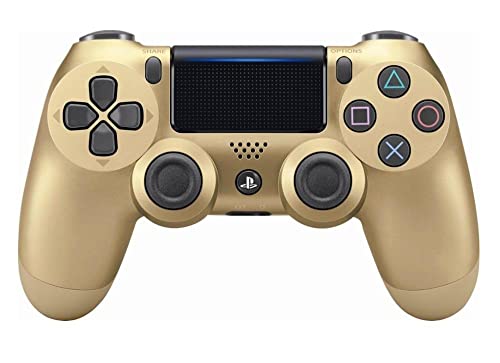
The first pick for the best PC controller is… a PlayStation 4 controller? Right, stick with me. If you have small to medium hands, this controller is hands down the most comfortable controller sub $100.
Whilst the DualShock 3 was leagues behind the Xbox 360 controller in comfort, but with the release of the PS4, the feel, shape, and sensitivity of the dual analog sticks and trigger buttons have been improved to provide a greater sense of control, no matter what you play.
This controller features a built-in speaker and stereo headset jack, putting several new audio options in the player’s hands. You can use the controller to plug in your headset to free you from your desk, perfect for gaming on your couch.
To use the DS4 to the best of its ability, I highly recommend using the Steam big picture to configure your controller. Once I set up the DualShock 4 preset, I could use the touchpad in supporting games. In Grand Theft Auto V, I was able to use the touchpad as two separate buttons and the touchpad as a secondary mouse input.
The DualShock 4 also has a great gyroscope, adding some extra possibilities on how to control your PC games. Recently, in a video, LinusTechTips was able to map the gyroscope to a mouse input for better mouse control in CS: GO using JibbSmart’s JoyShockMapper. Since then, Valve has added an input method to Steam Big Picture to add gyro input to their controller config. It works quite well, something well worth checking out.
Without Steam Big Picture, support for a DualShock 4 can be a little hit-or-miss. My copy of The Witcher 3 is from GOG, and therefore it doesn’t work well by itself. To ensure it works perfectly, you may find it useful to use DS4Windows by Jays2Kings. This program emulates an Xbox 360 controller to ensure complete combability.
With a list price of $59.99, the DualShock 4 is a little expensive compared to the third-party controllers on this list, but if you want guaranteed quality from a reputable brand, the DualShock 4 is a great choice.
2. Xbox Elite Controller 2

| Details | Information |
|---|---|
| Price | $167.99 |
| Discount | 16% |
| Rating on Amazon | 4.3 out of 5 stars |
| Buy Now | Check availability on Amazon |
Pros:
- Premium
- Highly customizable
- Really comfortable
Cons:
- Really, really expensive
If you’re going to splurge out for a premium controller, your choices used to be, for example, something from Thrustmaster. The main selling point of these controllers is the customizability of these gamepads, like, for example, the $160 fully modular eSwapX. These are perfect for eSports professionals, but for wealthy regular gamers, you won’t find these feel very premium or comfortable.
Then comes along Xbox’s Elite 2 controller, the iPhone 12 Pro Max of Xbox controllers. Designed to meet the needs of today’s competitive gamers, the new Xbox Elite Wireless Controller Series 2 features over 30 new ways to play like a pro. Enhance your aiming during gameplay with new adjustable-tension thumbsticks, shorter hair trigger locks, and a wrap-around rubberized grip.
With the Elite Series 2, you can tailor the controller to your preferred gaming style with the interchangeable thumbstick and paddle shapes. Use Xbox Wireless, Bluetooth, or the included USB-C cable to play across your Xbox One and Windows 10 devices. Using the Xbox Accessories app, you can assign key-bindings to buttons; for example, you can make a paddle become a shift button.
With an average rating of 4.5 out of 5 stars, customers love the performance and comfort of this premium product. One Amazon reviewer writes:
“The things I like is the solid feeling it has, the full grip in the handles, buttons are more responsive, the sticks pressure can be changed, it is Bluetooth compatible, has a rechargeable battery and a charging stand, and much more customizations and joysticks compared to the first version.
I honestly cannot find a single flaw on this controller. I’m also not quite sure how Microsoft or anyone else could top this. It is pure perfection in your hands. The price is absolutely worth it in my opinion.”
With a list price of $167.99 no-one can argue that this controller isn’t expensive. But, for a package of premium quality, customizability, and comfort, the Xbox Elite 2 Controller is unmatched.
Buy on Amazon
3. PowerA Wired Controller for Xbox Series X|S

| Details | Information |
|---|---|
| Price | $25.94 |
| Discount | 14% |
| Buy Now | Check availability on Amazon |
Pros:
- Officially licensed for Xbox
- Wired USB-C with a long cable
- Works on Windows PCs
Cons:
- No wireless option
- Build feels less premium than first-party pads
If you want a budget wired pad that just works on a Windows PC, the PowerA Wired Controller for Xbox Series X|S is a solid pick. It is officially licensed for Xbox, so you get standard Xbox button layout, dual rumble motors, impulse triggers, and a 3.5 mm headset jack without hunting for obscure drivers.
The included extra-long USB-C cable (about 10 ft) is the main selling point for desk setups. Plug it into your PC and most games recognize it as an Xbox controller right away, including titles on Steam. Wired also means you skip battery swaps and Bluetooth pairing quirks.
Precision-tuned analog sticks, anti-friction rings, and a lightweight shell make it comfortable for longer sessions if you do not need paddles or Elite-level customization. It is a practical daily driver for people who mostly use mouse and keyboard but want a controller for racing, platformers, or couch co-op.
Priced at $25.94, this is one of the easier affordable wired options to recommend for PC right now.
4. Xbox Wireless Controller + USB-C Cable
| Details | Information |
|---|---|
| Price | $51.57 |
| Discount | 21% |
| Buy Now | Check availability on Amazon |
Pros:
- First-party Xbox feel on PC
- Wireless and wired in one bundle
- Share button and textured grips
Cons:
- Needs AA batteries for wireless play
- Costs more than no-name Bluetooth pads
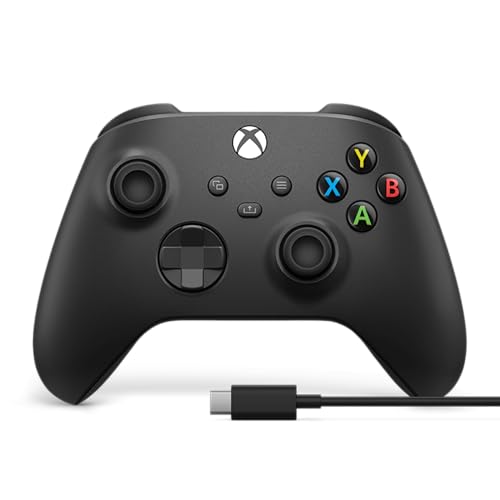
For a mainstream wireless PC controller, the Xbox Wireless Controller (Carbon Black) bundled with a USB-C cable is hard to beat. You get the current Xbox layout with hybrid D-pad, textured grips on the triggers and back case, a Share button, and a 3.5 mm headset jack.
On Windows, plug in the included cable for zero-setup play in the Xbox app, Steam, and most other launchers. Prefer couch distance? Pair over Bluetooth or Xbox Wireless (adapter sold separately for some setups). Microsoft rates wireless play at up to about 40 hours on AA batteries, and you can keep playing on the cable when the batteries run low.
Button remapping through the Xbox Accessories app is a nice bonus if you want custom profiles. Compared with generic wireless pads, this is the safer pick when you want correct Xbox prompts in games and broad PC compatibility.
Priced at $51.57, this bundle is a strong mid-range wireless choice for PC gamers who want first-party hardware without jumping to the Elite Series 2.
Affiliate Disclaimer: TechEngage participates in the Amazon Services LLC Associates Program. As an Amazon Associate, we earn from qualifying purchases through links to Amazon.com and its affiliated sites. For more information, please read our disclaimer.





Share Your Thoughts