• Skip to primary navigation
  • Skip to main content
  • Skip to primary sidebar
  • Skip to footer
TechEngage

TechEngage®

Hands-on reviews, research-backed buying guides and technology news.

  • News
    • Internet & Social
    • Gadgets
    • Car Tech
    • Business
    • Science & Health
  • Reviews
  • Buying Guides
  • How-to
  • AI
  • Computing
    • Apps
    • Security
    • Gaming
  • More
    • Tools
    • Puzzles
    • Mobile
  • Launchpad
  • Sign in
TechEngage » Apps & Software

Google Lens is now live for mobiles

Avatar for Amnah Asghar Amnah Asghar Connect with Amnah Asghar on LinkedIn Published: Oct 25, 2018 · 1:02 PM ET

NewsNews report. Not a buying guide or hands-on product test.
Google Lens
FacebookTweetPinLinkedInPrint
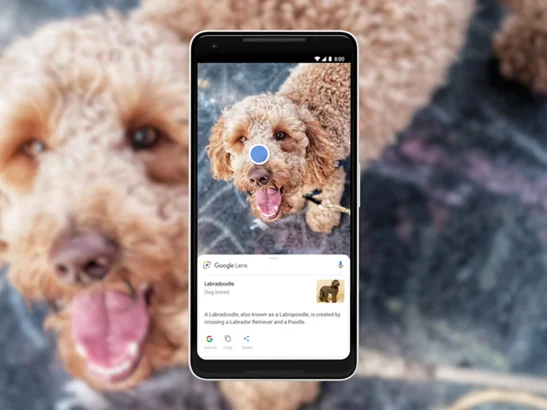
Google launched its Lens feature for phones with which you will be able to ‘explore within the image.’ On its 20th anniversary, Google brought Lens to the Google Images which literally made our day. Remember how you wished you could just find out where to get that comfy bean bag in that picture from? Well, Google Lens might just be it. Now you can use this feature on your phone. Its AI technology examines images and explores sub-images that could be of interest. If you select one of these sub-images, Lens will produce other relevant images. Many of these sub-images will have product pages where you can buy them or search for other related images more extensively. Lens will also let users “draw” on the images to create unique sub-images which they will be able to further search as well. It’s very simple to use. All you have to do is to press the Lens button on the image and dots will appear on all the things in the image. Tap the dot on the object you want to know about and there you have it; all the details of the similar object will pop up. But here’s the bummer; for now, it is only available for people in the U.S with only English language support. But who knows we might have other language versions in different other parts of the world soon. Stay tuned for more updates!

Related reading

  • Google Lens is now better than ever, detects a billion items
  • Best VPNs for Smart TVs
  • WWDC: Apple's most significant announcements at the annual worldwide developers' conference on First Day
Something incorrect? Report an error in this article. Include a source if you have one; your name and email are optional.

Filed Under: Apps & Software, Tech News & Analysis Tagged With: Google Lens

Related Stories

  • Russia’S Government Transition To Open-Source Linux: From Putin’S 2010 Order To 2026

    Russia’s Government Transition to Open-Source Linux: From Putin’s 2010 Order to 2026

    Apps & SoftwareOct 11, 2026

  • How To Screen Record On Windows 11 With Audio

    How to Screen Record on Windows 11 With Audio

    Apps & SoftwareOct 10, 2026

  • How To Stop Chrome Tabs From Reloading

    How to Stop Chrome Tabs From Reloading

    Apps & SoftwareOct 10, 2026

Stay on top of technology

Get TechEngage reviews, buying guides and news in your feed.

Follow on Google News
FacebookTweetPinLinkedInPrint
Avatar for Amnah Asghar

Amnah Asghar

Consumer Tech Writer

Amnah Asghar is a Consumer Tech Writer at TechEngage who covers smartphones, consumer gadgets, health technology, gaming, and digital security. Across nearly 150 articles, she focuses on turning product specifications and tech news into practical guidance for everyday readers.

Joined TechEngage July 2018First article on TechEngage July 2018

Reader Interactions

Share Your Thoughts Cancel reply

Please read our comment policy before submitting your comment. Your email address will not be used or published anywhere. You will only receive comment notifications if you opt to subscribe below.

Primary Sidebar

Google News

Get TechEngage in your feed

Reviews, news, and buying guides as they publish.

Follow on Google News

Recent Stories

  • Coveron Review Light V3 |
    Reviews & Buying GuidesCoveron Review: Is Its Identity Protection Worth It?Oct 31, 2026
  • Nordvpn Review Light V3 |
    Reviews & Buying GuidesNordVPN Review: Features, Privacy and ValueOct 31, 2026
  • Keeper Business Review Light V2 |
    Reviews & Buying GuidesKeeper Business review: sharing, plans and admin toolsOct 31, 2026
  • Keeper Personal Review Light V2 |
    Reviews & Buying GuidesKeeper Personal review: sharing, features and valueOct 31, 2026
  • Diagram showing a clip-on microphone, receiver and phone or camera recording setup.
    Reviews & Buying GuidesBest AI Voice Recorders for Calls and InterviewsOct 19, 2026

More in Apps & Software

  • Russia Government Transition Open Source Linux Featured |
    Russia’s Government Transition to Open-Source Linux: From Putin’s 2010 Order to 2026Oct 11, 2026
  • Windows Screen Recording Guide |
    How to Screen Record on Windows 11 With AudioOct 10, 2026
  • Chrome Tabs Reloading Techengage |
    How to Stop Chrome Tabs From ReloadingOct 10, 2026
  • 136181 7Effec8402C5Ea64 |
    What Microsoft Announced on October 7: Surface Laptop Ultra, RTX Spark Dev Box, and Windows AISep 16, 2026
More Apps & Software stories →

Footer

Discover

  • About TechEngage
  • Company News & Updates
  • Our Team
  • Advertise
  • Send us a tip
  • Submit your company to TechEngage Launchpad Hot
  • TechEngage Brand Kit
  • Contact us
  • Tools & Calculators

Legal pages

  • Editorial Standards
  • Reviews Policy
  • Our Ethics
  • Corrections Policy
  • Affiliate Disclosure
  • Privacy Policy
  • Cookies Policy
  • Terms & Conditions
  • GDPR Compliance
  • Copyright & DMCA

Must reads

  • Best Mechanical Keyboards Under $100
  • Best USB-C Hubs
  • Best Portable SSDs
  • Best Gaming Graphics Cards (GPUs)
  • Best Long-Range Outdoor WiFi Extenders
  • Best Wireless CarPlay Adapters
  • Best Slack Alternatives
  • Best Long-Range Walkie-Talkies

Download our apps

TechEngage app coming soon on the App Store Available onChrome

© 2026 TechEngage®. All Rights Reserved. TechEngage® is a project of TechAbout LLC.

TechEngage® is a registered trademark in the United States under Trademark Number 6823709 and in the United Kingdom under Trademark Number UK00003417167. It is also ISSN protected under ISSN 2690-3776 and has OCLC Number 1139335774.

Contact team@techengage.com · WhatsApp +1-307-381-8801

Your analytics choice
Allow Google Analytics to help us understand readership? You can use the site without it and change this choice anytime.

Privacy details