

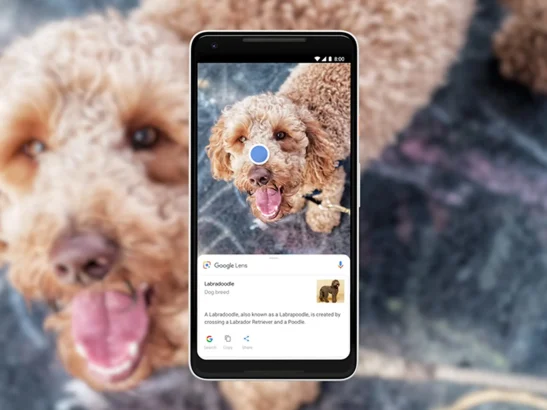
When Google announced sweeping changes to its image search in 2018, the company promised four things: AI-curated AMP Stories, featured videos pulled by machine vision, content-quality ranking for image pages, and a smarter Google Lens that could “look inside” images for sub-objects to explore. Eight years on, three of those four have shaped how visual search actually works in 2026 — and the fourth (AMP Stories) was quietly retired along the way. Here is where each promise landed.
Contents
AMP Stories: quietly retired
The first major update Google pitched in 2018 was AMP Stories built with AI. The idea was that searching for a celebrity would return a brief AI-curated biography in swipeable story format, with career highlights and personal-life context generated automatically.
AMP Stories were rebranded to Web Stories in 2021 and then mostly de-emphasized inside Google Search. The format still exists as an open spec — anyone can publish a Web Story — but Google no longer prioritizes story carousels for person queries in Search results. What replaced it is the Gemini-generated overview panel: for famous people, recent events, or product queries, Google now writes a natural-language summary at the top of the page using its multimodal Gemini model and pulls a knowledge panel alongside. The intent is the same as the 2018 vision; the format moved from swipeable cards to generative text plus a panel.
Featured Videos: now powered by Gemini
Videos can be a flexible way to research a topic — if the right clip is surfaced. The 2018 pitch was that computer vision would let Google understand the content of a video well enough to match it to a search query. Plan a trip to New York, search for “places to visit in New York,” and the algorithm would return clips of Madison Square Garden, Central Park, and Broadway rather than generic travel vlogs.
Featured Videos are still surfaced as a horizontal carousel on most queries with a strong video intent. The underlying tech is now Gemini’s video understanding model, which can transcribe, segment, and timestamp video moments. Many results now jump you to the exact second in a video relevant to your query — Google calls this “Key Moments.” For tutorial searches in particular, Key Moments has changed how people use YouTube as a reference: you land on the 1:47 mark, not the start of a 12-minute clip.
Better content still gets priority
The 2018 announcement promised that Google Images would prioritize websites where the image is “central to the page, and higher up on the page.” That signal turned out to be load-bearing.
Descriptive alt text, relevant captions and the surrounding page help Google understand an image. Use alt text that describes meaningful images, and keep decorative images distinct from content images. Google’s image guidance recommends useful context and descriptive text; it does not establish a blanket ranking penalty for every empty alt attribute.
Google Lens: from images-within-images to Multisearch
The 2018 pitch for Lens was that the AI would examine an image, identify sub-objects worth exploring, and let users tap on each one to find related results. Users could also “draw” on an image to mark a region for further search.
That vision matured into two distinct products:
- Multisearch (launched 2022) — point Lens at an object, then add a text refinement. “Find this jacket in red.” “Where can I buy these shoes locally?” Multisearch combines the image and the text into a single query and returns shoppable results, shoppable maps, or both.
- Circle to Search (launched January 2024 on Pixel 8 and Galaxy S24) — long-press the home button or the navigation gesture, then circle anything on your phone screen with a finger. Google identifies it instantly using on-device Lens models combined with cloud-side Gemini. The feature has since expanded to most flagship Android devices on Android 14 and 15.
Lens itself is no longer a separate app to launch — it lives inside Search, inside Google Photos, inside Chrome’s right-click menu, and inside Gboard. For the original 2018 launch coverage and the upgrade that followed, see our first look at Google Lens on phones and the follow-up on Lens detecting a billion items.
What did not make it
A few of the 2018 ambitions never shipped at the scale Google teased:
- AI-driven “draw on the image” annotations stayed inside research demos and never became a consumer Lens feature
- Image search results never gained the live shopping overlays that were demonstrated on stage
- The promised “visual recipes” format was absorbed into the general recipe rich-result template rather than getting its own card design
Where Google image search stands in 2026
Three things define modern Google image search:
- Image-text combined queries. Multisearch and Circle to Search are the new default for “what is this thing?” questions, and that has shifted user behavior away from pure-text queries on mobile.
- Generative overview text. The Search Generative Experience (SGE) returns natural-language summaries on most image-intent queries, drawing on multiple ranked image-bearing pages.
- A higher bar for image SEO. Alt text, surrounding semantic context, and dedicated landing pages now matter more than they ever have. Stock-photo dump pages no longer rank.
For publishers, the practical impact is straightforward: publishing a clear, single-subject image with descriptive alt text on a well-scoped page is still the highest-leverage SEO work you can do for image traffic. The mechanics have shifted, but the basics have not.
FAQ
Are AMP Stories or Web Stories still a thing in 2026?
The Web Stories format still exists as an open spec, and any site can publish one. Google no longer features them prominently inside Search results, and the dedicated discovery surfaces (Google App story carousel, Discover Web Stories tile) have been retired. The format still gets some traffic through Google Images and YouTube Shorts cross-posting, but it is no longer a major SEO opportunity.
What is Multisearch and how is it different from Google Lens?
Multisearch is a feature inside Google Lens that combines an image query with a text refinement. Regular Lens identifies what is in an image; Multisearch lets you add a follow-up like “in red” or “on a budget” so the result is filtered by both the visual and the language part of the query. It launched in 2022 and is now the default Lens experience for shopping queries.
Does Circle to Search work on iPhone?
Circle to Search is an Android feature tied to the home-button or gesture-bar long-press, so the gesture itself does not exist on iPhone. The Google iOS app does expose Multisearch and a Lens shortcut in the search bar, which covers the same use cases minus the universal-overlay shortcut.
How does Gemini change image search?
Gemini’s multimodal understanding lets Google reason about images and text in the same model, which powers the generative summaries at the top of image-intent results pages and the longer free-text refinements Multisearch now accepts. In practice, queries that were impossible in 2018 — “identify this plant and tell me if it is poisonous to cats” — now return a useful answer in one shot.
What is the best way to optimize an image for Google in 2026?
Four things still carry most of the weight: a descriptive alt attribute that reads like a sentence rather than a keyword stuff, a filename that matches the subject, surrounding body text that gives semantic context, and an image placed near the top of a page that is dedicated to that subject. Page Experience signals (loading speed, layout stability) and structured data round out the rest.



Share Your Thoughts