• Skip to primary navigation
  • Skip to main content
  • Skip to primary sidebar
  • Skip to footer
TechEngage

TechEngage®

Hands-on reviews, research-backed buying guides and technology news.

  • News
  • AI
  • Mobile
  • Apps
  • Reviews
  • More
    • Security
    • Internet & Social
    • Computing
    • Gadgets
    • Gaming
    • Car Tech
    • Business
    • Science & Health
TechEngage » Apps & Software

Google's news feed 'Discover' will now be available on phone browsers

Avatar for Amnah Asghar Amnah Asghar Connect with Amnah Asghar on LinkedIn Published: Sep 25, 2018 · 10:55 AM ET

Google news feed
Image Courtesy: Google
FacebookTweetPinLinkedInPrint
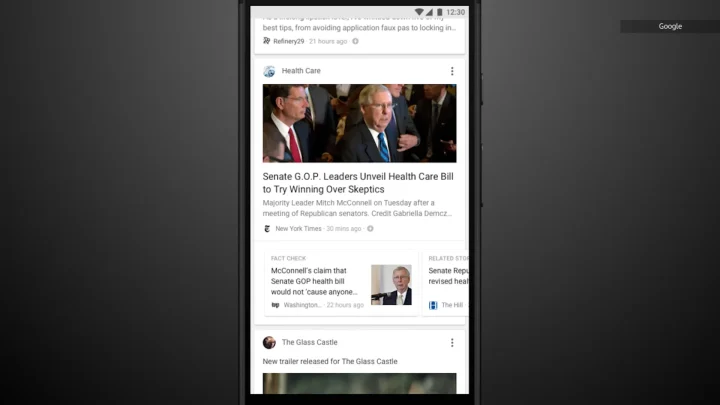
Good news for people who read morning paper on phones; Google is bringing news feed to the mobile browsers.

This means that the ‘Discover’ feature which was previously only available on the Google mobile app will now be seen in the browser too. The company is trying to pull off a well-thought-out restructure as its primary focus seems to be strictly what the users need at the moment.

So what is Google ‘Discover’ really about?

For those of you who have the Google app installed on their phones, it is nothing new. It is basically Google’s way of displaying news feed, just like Twitter’s ‘Discover’ category. The users will now be able to view what’s happening around the world by just visiting their browser on phone.

It won’t be wrong to assume that Google knows our preferences, likes, recent activities, what we normally look for etc more than any social networking site. Using its treasure of knowledge about each and every person using it, Google will have a personalized news feed for everyone. What comes up on our news feed may or may not pop up in your friend’s news feed.

What is even better is that this ‘Discover’ category (more like a page) is going to be more than news. By that we mean that along with keeping you updated about what a pile of mess the Earth is becoming (capitalism is destroying the nature and whatnot), it will delve in deeper to dig out updates on movies and fashion (if that’s what you’re into), new blog posts from the blogs you are following etc. In short ‘Discover’ will work like your very own personalized feed.

Users will also be able to customize it up to some extent. Which news would you like to continue seeing in the future and how much of it do you want to see on the daily basis; you decide. Couldn’t get any better than this, no?

If you think that you’ve had enough of the stories first on Snapchat then Instagram, Facebook, and WhatsApp well think again. Google, too, is bringing ‘Stories’ section to its ‘Discover’. But wait, it is not going to be anything like your social platform stories. Instead, it is going to be news-oriented. It will also show you featured videos on the basis of your interests. You won’t have to watch an entire video for the relevant part of the news as Google will filter out the irrelevant part and show you more videos of what you might be interested in.

And to our surprise, Google Images is finally getting an update. Google Images will be equipped with Google Lens now. Google lens will enable the users to skim the details of an image such as what the image is about, where is it taken from, etc. It will even let you crop images straight away without having to use the snipping tool for it.

Moreover, the company is also working towards improving the exhaustive job searches that often end up making the user scroll from one page to another and to another without benefitting them in the first place. The new feature ‘Pathways’ is just about finding the right job. It has an added feature called ‘Aspirations’ that will search the training courses and internships related to your field for you.

First the Chrome update and now this bunch of handy features; Google’s dedication towards is really something.

On a lighter note, Happy 20th Google!


Related reading

  • Google's smart reply feature rolls out to Hangouts chat
  • Google is Merging the power of Google Meet with Google Duo
  • Google Announces New Features of Google Maps at Google I/O
  • Google Unveils ‘Switch to Android’ app to move files from iPhone to Android

Filed Under: Apps & Software Tagged With: Google, News

Related Stories

  • Googlebook Shows How Android 17 And Gemini Intelligence Could Reshape Google’S Ecosystem

    Googlebook Shows How Android 17 and Gemini Intelligence Could Reshape Google’s Ecosystem

    AIMay 16, 2026

  • Microsoft Confirms October 7 Windows And Surface Event For Local Ai Pcs

    Microsoft Confirms October 7 Windows and Surface Event for Local AI PCs

    Tech News & AnalysisSep 16, 2026

  • Apple Releases Ios 27 And Macos Golden Gate With Siri Ai

    Apple Releases iOS 27 and macOS Golden Gate With Siri AI

    Tech News & AnalysisSep 15, 2026

Stay on top of technology

Get TechEngage reviews, buying guides and news in your feed.

Follow on Google News
FacebookTweetPinLinkedInPrint
Avatar for Amnah Asghar

Amnah Asghar

Consumer Tech Writer

Amnah Asghar is a Consumer Tech Writer at TechEngage who covers smartphones, consumer gadgets, health technology, gaming, and digital security. Across nearly 150 articles, she focuses on turning product specifications and tech news into practical guidance for everyday readers.

Joined TechEngage July 2018First article on TechEngage July 2018

Reader Interactions

Share Your Thoughts Cancel reply

Please read our comment policy before submitting your comment. Your email address will not be used or published anywhere. You will only receive comment notifications if you opt to subscribe below.

Primary Sidebar

Follow us on Google News

Recent Stories

  • Iphone 18 Pro Availability Sept 18 |
    Tech News & AnalysisiPhone 18 Pro and Pro Max Available Today in 65+ CountriesSep 18, 2026
  • Best Portable Monitors 2026 |
    Reviews & Buying GuidesBest Portable Monitors in 2026: 8 Picks for Travel, Work, and PlaySep 18, 2026
  • Samsung One Ui 9 Android 17 Rollout |
    Tech News & AnalysisSamsung Starts One UI 9 (Android 17) Rollout on Galaxy S26 SeriesSep 17, 2026
  • Best Wireless Mice 2026 |
    Reviews & Buying GuidesBest Wireless Mice in 2026: 8 Picks for Work, Travel, and PlaySep 17, 2026
  • Microsoft Windows Surface Event Oct 7 2026 |
    Tech News & AnalysisMicrosoft Confirms October 7 Windows and Surface Event for Local AI PCsSep 16, 2026

More in Apps & Software

  • Microsoft Windows Surface Event Oct 7 2026 |
    Tech News & AnalysisMicrosoft Confirms October 7 Windows and Surface Event for Local AI PCsSep 16, 2026
  • Apple Ios 27 Siri Ai Featured |
    Tech News & AnalysisApple Releases iOS 27 and macOS Golden Gate With Siri AISep 15, 2026
  • Feat |
    Tech News & AnalysisGoogle Launches Gemini Desktop App for Windows With Alt+Space ShortcutSep 11, 2026
  • Ost To Pst Og En |
    Apps & SoftwareStellar Converter for OST Review: Online and Desktop Tools TestedAug 21, 2026
More Apps & Software stories →

Footer

Discover

  • About TechEngage
  • Company News & Updates
  • Our Team
  • Advertise
  • Send us a tip
  • Startup Submissions
  • TechEngage Brand Kit
  • Contact us
  • Tools

Legal pages

  • Editorial Standards
  • Reviews Policy
  • Our Ethics
  • Corrections Policy
  • Affiliate Disclosure
  • Privacy Policy
  • Cookies Policy
  • Terms & Conditions
  • GDPR Compliance
  • Copyright & DMCA

Must reads

  • Best Mechanical Keyboards Under $100
  • Best USB-C Hubs
  • Best Portable SSDs
  • Best Gaming Graphics Cards (GPUs)
  • Best Long-Range Outdoor WiFi Extenders
  • Best Wireless CarPlay Adapters
  • Best Slack Alternatives
  • Best Long-Range Walkie-Talkies

About TechEngage

TechEngage® is an independent technology publication covering tech news, reviews and buying guides since 2003.

Founded
2003
Publisher
TechAbout LLC
ISSN
2690-3776
Google NewsRSS feed

© 2026 TechEngage®. All Rights Reserved. TechEngage® is a project of TechAbout LLC.

TechEngage® is a registered trademark in the United States under Trademark Number 6823709 and in the United Kingdom under Trademark Number UK00003417167. It is also ISSN protected under ISSN 2690-3776 and has OCLC Number 1139335774.

Contact [email protected] · WhatsApp +1-307-381-8801