

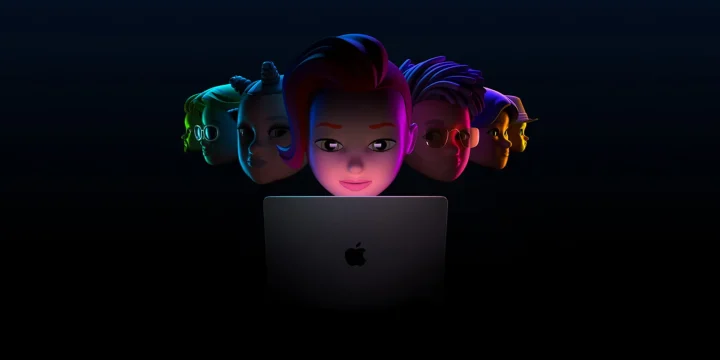
Four years after the WWDC 2022 keynote, the verdict on what Apple announced is much clearer than it was on the day. Some pieces of the keynote turned out to be inflection points — the M2 chip launched a four-generation Apple Silicon cadence that the industry is still catching up to, and the iOS 16 lock-screen rework became the design foundation for everything Apple shipped afterward. Other pieces aged less well. Stage Manager on iPadOS 16 remains divisive in 2026, watchOS 9’s medication reminders are now table-stakes everywhere, and the M2 MacBook Air pricing has been quietly cut twice since launch as Apple makes room for higher-margin Pro variants.
Contents
The keynote at a glance
WWDC 2022 ran from June 6 to June 10. The opening keynote on June 6 at 10 a.m. Pacific was the first WWDC since 2019 to allow in-person attendance, although Apple kept the audience small and the livestream remained the primary distribution. Apple’s own WWDC 2022 highlights newsroom post is the cleanest reference for the day-one product list.
The day-one announcements broke into three tracks: software platform updates (iOS 16, iPadOS 16, macOS Ventura, watchOS 9), hardware (MacBook Air with M2, refreshed 13-inch MacBook Pro with M2), and a quiet but consequential silicon reveal (M2 itself).
iOS 16: the lock-screen pivot
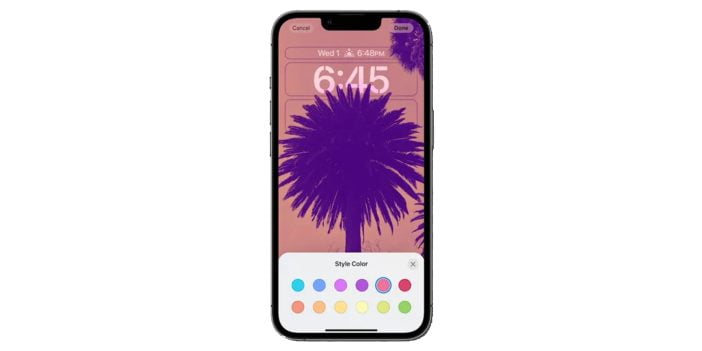
The headline iOS 16 change was the lock screen. Apple let users customize fonts, colours, and widgets, configure multiple lock screens with their own focus modes, and switch between them by swiping. Wallpapers got Pride-themed and weather/astronomy variants that animated through the day.
The 2026 view: the lock screen rework was the most consequential UI decision in iOS in years. Everything Apple added afterward sits on top of it. iOS 17’s StandBy mode extended the same widget-on-the-lock-screen pattern when the phone is charging on its side. iOS 18 added customizable home screen icons in 2024 — the same logic applied one screen deeper. The lock-screen system is the way most users now express device personalization, and the trail started here.
The other iOS 16 feature that aged well was iMessage edit and unsend. Apple set a 15-minute window for edits and a 2-minute window for unsends, with up to 30 days of recovery for deleted messages. The constraints made it work in practice. Apple’s official documentation on edit and unsend still describes the same behaviour in 2026. For context on how this fit into the broader messaging-edit moment, our earlier piece on Facebook Messenger’s unsend feature covers the prior generation of the same idea.
MacBook Air with M2
Apple unveiled a redesigned MacBook Air on the M2 chip at WWDC 2022, replacing the long-running wedge design with a flat-slab chassis closer to the 14-inch MacBook Pro. Launch specs: M2, 8 GB unified memory, 256 GB storage, MagSafe charging, a headphone jack, two Thunderbolt USB-4 ports, 2.7 lb weight, and a starting price of $1,199. A $1,499 mid-tier added a 10-core GPU and 512 GB storage. Apple announced the launch but slipped the on-sale date to July, citing supply constraints from then-ongoing COVID lockdowns in Shanghai that affected Quanta Computer production capacity.
The 2026 view: the M2 MacBook Air chassis became the template for everything that followed. Apple kept this exact body shape through the M3 MacBook Air refresh in March and the M4 refresh in March 2025. The wedge is gone for good. Pricing has shifted favourably for buyers — the M2 Air sells now around $999 through Apple’s education store and several major retailers, the M3 Air starts at $1,099, and the M4 Air starts at $999 with 16 GB unified memory as the new base (up from the original 8 GB). Apple effectively doubled the entry-level RAM and held the price line over three years.
The headphone jack and MagSafe both stayed in every subsequent revision. The two Thunderbolt ports remained the same count — Apple has not yet added a third on the Air, which remains the clearest hardware-positioning gap versus the MacBook Pro line.
iPadOS 16 and Stage Manager
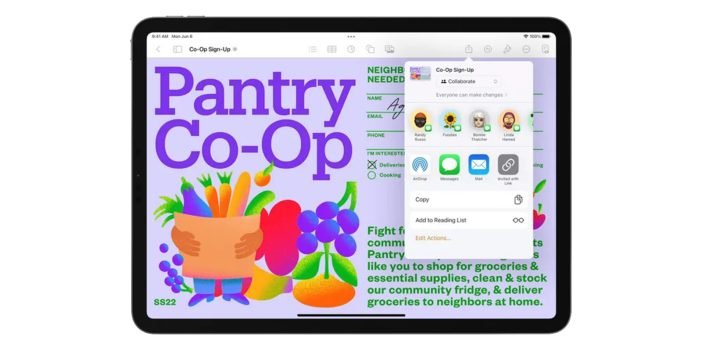
The biggest iPadOS 16 reveal was Stage Manager — overlapping, resizable windows on iPad for the first time, plus external display support that gave the iPad a desktop-style multi-monitor setup on the right hardware. Apple paired this with redesigned Home Screen, weather and whiteboard apps, and Passkey support in Safari.
The 2026 view: Stage Manager remains the most debated software feature Apple has shipped on iPad in years. It works well on an M-series iPad Pro paired with a large external display. It struggles on smaller iPads and on the iPad Air’s original M1 in some real-world workflows. Apple has iterated on it across iPadOS 17 and 18 — better keyboard shortcuts, smoother window resizing, fewer edge-case crashes — but has not solved the underlying tension that the iPad is being asked to do two contradictory things at once (touch-first OS and desktop-class multitasking). The honest take in 2026 is that Stage Manager is mature enough to use but still not the primary reason to choose an iPad over a MacBook for serious work.
The quieter announcements have aged better. Passkeys in Safari went from a Safari feature in iOS 16 to an industry-wide authentication standard pushed by Google, Microsoft, and the FIDO Alliance. The FIDO Alliance’s passkey adoption page shows the rollout has touched almost every major consumer site since 2023. Apple was early on this and benefited from the timing.
The M2 chip and what came next
The M2 itself was built on TSMC’s enhanced 5 nm process (officially N5P), with 20 billion transistors, an 8-core CPU, up to 10-core GPU, 100 GB/s memory bandwidth, and up to 24 GB unified memory. Apple claimed an 18% CPU performance lift and 35% GPU lift over the original M1 at the same power envelope. The chip also doubled the Neural Engine’s per-second operations and added hardware-accelerated ProRes encoding.
The 2026 view: the M2 was the second beat in what became a four-chip rhythm. The cadence:
| Chip | Released | Process | What changed |
|---|---|---|---|
| M1 | November 2020 | TSMC N5 | Apple Silicon launch |
| M2 | June 2022 (WWDC 2022) | TSMC N5P | 18% CPU / 35% GPU vs M1, expanded Neural Engine |
| M3 | October 2023 | TSMC N3B (3 nm) | First 3 nm Apple Silicon, hardware ray tracing |
| M4 | May 2024 (on iPad Pro first) | TSMC N3E (2nd-gen 3 nm) | Neural Engine doubled for Apple Intelligence, on-device LLM-class workloads |
Each chip family also branched into Pro, Max, and Ultra variants. The architectural decisions Apple made on M2 — particularly around the Neural Engine and ProRes hardware blocks — turned out to be the right early bets for the AI workloads that emerged across 2023–2024. Apple’s M4 newsroom announcement explicitly traces the lineage back to the M2’s Neural Engine.
For more on the run-up to WWDC 2022, see our earlier coverage of Apple’s Peek Performance Marchevent, which introduced the M1 Ultra and the Mac Studio as the high end of the M1 generation.
Apple Fitness app on iPhone
Tucked into the iOS 16 announcement was a decision that quietly changed Apple’s health strategy: the Apple Fitness app no longer required an Apple Watch. iPhone-only users could track activity, view rings, and use the app on the phone alone. The motion sensors Apple has built into the iPhone for years finally got exposed to the user-facing fitness layer.
The 2026 view: this announcement was underrated. Removing the Apple Watch as a hard requirement opened Fitness+ to a much larger US audience and was clearly the moment Apple’s health business started decoupling from a single hardware accessory. The data quality is lower without the Watch — heart rate is the main missing input — but for users tracking steps, workouts, and daily move goals, the iPhone-only experience is enough. Our earlier guide on Spotify’s Apple Watch app covers an adjacent Watch ecosystem moment.
watchOS 9
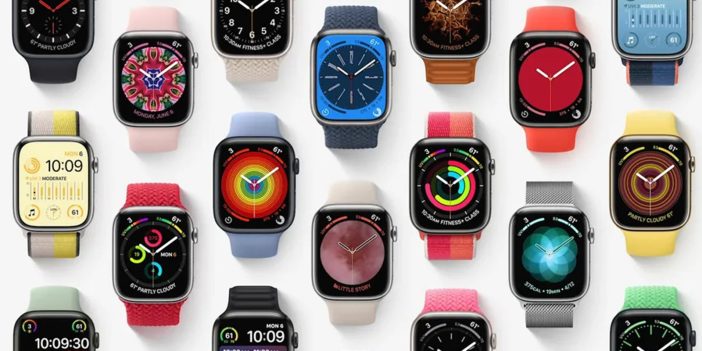
watchOS 9 brought new watch faces (Astronomy, Lunar, Playtime, Metropolitan), running-form metrics (vertical oscillation, ground contact time, stride length), and medication reminders. The Siri UI on Watch was redesigned with the same translucent material that came later to iOS and iPadOS. Atrial fibrillation history tracking was added for users diagnosed with the condition.
The 2026 view: the running-form metrics were the most quietly important addition. They moved Apple Watch from “step counter that also tells time” toward “wearable that gives real running-coach feedback.” Garmin had been doing this for years, but watchOS 9 brought it to a much larger user base. Medication reminders became foundational and now ship across watchOS 11 with stronger integration to iPhone Health and the Pharmacy partnership APIs.
watchOS 9 → 10 → 11 has been one of the steadier release lineages in Apple’s stack. The most visible change since 2022 was watchOS 10 (Sept 2023), which redesigned the navigation away from app-grid-first toward swipe-up-Smart-Stack-first. For practical Apple Watch usage today, see our piece on using Apple Health efficiently across iPhone and Apple Watch.
WWDC 2022 in 2026 hindsight
Three things from this keynote turned out to matter more than the day-one reception suggested:
- The iOS 16 lock screen. Foundational. Every iOS release since has built on it. The customization patterns Apple introduced are now a core part of how users express device personality.
- The M2’s Neural Engine bump. Set the trajectory that made Apple Intelligence possible on the M4 two years later. If Apple had not invested in NPU capacity here, the on-device generative AI features of 2024 would not have shipped on Apple Silicon.
- Passkey support in Safari. Looked like a small Safari feature; turned out to be one of the cleanest examples of Apple shipping early on what became an industry standard.
And two things aged less well:
- Stage Manager. Still divisive. The iPad has not become the desktop-replacement Apple keeps positioning it as, partly because Stage Manager has not fully lived up to the demo.
- M2 MacBook Air supply chain. The launch was hurt by the 2022 Shanghai lockdowns; production caught up by Q4 2022 but customer goodwill took longer to recover. The lesson did not generalize — Apple still concentrates iPhone/MacBook manufacturing heavily in China, with India-only Pro-line manufacturing only starting to ramp meaningfully in 2024.
The overall pattern of WWDC 2022 — incremental hardware, ambitious software, one quiet chip win, one polarising feature — has repeated each year since. It is now the WWDC formula. If you want the broader iPhone arc this keynote fits into, our Evolution of the iPhone (2007– traces the silicon and OS-side lineage in full.
FAQ
Is the M2 MacBook Air still sold in 2026?
Yes, as the entry-level option. Apple kept the M2 Air in the lineup when the M3 Air launched in March 2024 and again when the M4 Air launched in March 2025. Pricing has dropped — M2 Air starts at $999 in most markets in 2026, often lower through education and back-to-school promotions. The M4 Air at $999 is the better buy at the same price point, but the M2 Air is still adequate for typical productivity workloads.
Is iOS 16 still supported?
No. iOS 16 was succeeded by iOS 17 (autumn 2023), iOS 18 (autumn 2024), and iOS 19 (autumn 2025). Apple’s security updates for iOS 16 ended in late 2024. iOS 16 devices still launch and run apps, but new App Store submissions increasingly require iOS 17 or higher as a minimum.
Is Stage Manager on iPad worth using in 2026?
On an M1 or later iPad Pro with an external display, yes — it is genuinely the multi-window experience iPad has needed for years. On smaller iPads or non-Pro models, the answer is more conditional. Apple has improved Stage Manager every release since iPadOS 16 but has not solved the underlying tension between touch-first and desktop-class multitasking. Many serious iPad users in 2026 still toggle Stage Manager off for daily use.
M2 MacBook Air vs M4 MacBook Air — which should I buy?
M4 Air for almost every buyer. The M4 ships with 16 GB unified memory as the base (the M2 starts at 8 GB), supports the full Apple Intelligence feature set, and is priced at the same $999 starting point. The M2 Air is worth considering only if you find one heavily discounted in education or refurbished channels at $700 or below — and even then, the memory and AI feature gap will narrow the M2’s useful life faster than the M4’s.
What is the iMessage edit window from iOS 16?
15 minutes after sending for edits, 2 minutes for unsend. These windows have not changed since iOS 16 and continue to apply on iOS 17, 18, and 19. Edited messages show an Edited tag and the recipient can view the original by tapping the tag. Unsent messages disappear from both sides — Apple does not retain a copy.




Share Your Thoughts