

In this guide
NordVPN is worth shortlisting if you want a paid VPN with straightforward browser controls and the option to protect your other devices through native apps. Its Chrome extension makes location changes and privacy settings easy to reach. The purchase deserves more thought when you add a long prepaid term, higher renewal prices, and security extras you may already own.
Our verdict: Start with Basic if your priority is the VPN. Choose a higher tier for specific tools you will use, rather than the size of the discount. Chrome is convenient for browser traffic, but the native app is the better starting point for whole-device coverage. Our browser connection checks were mixed, so confirm that your everyday sites work on your own network before keeping a long subscription.
- What works well: Clear Chrome controls, useful website exclusions, and a subscription that supports up to 10 devices at once.
- Main drawbacks: A browser extension protects a narrower workload than the native app, renewal costs rise substantially, and a UK connection failed during our checks.
- Best fit: Someone who wants one paid VPN subscription across several devices and is willing to check the right app and plan.
- Look elsewhere if: You only need a free connection on one device, prefer a flat monthly price, or need proven streaming performance on a particular service.
Chrome extension or native app: choose the right protection
The most important setup decision happens before you choose a server. NordVPN describes its Chrome extension as a browser proxy. It covers Chrome traffic. The desktop or mobile VPN app covers the device’s other applications and connections as well. A connected browser extension does not establish protection for an email app, a game launcher, or another browser.
| What you want to protect | Better starting point | What to watch |
|---|---|---|
| Chrome browsing | Chrome extension | Other apps remain outside its browser-only scope. |
| Several apps on a computer or phone | Native VPN app | Check the controls available on your operating system. |
| A website that dislikes the VPN route | Website exclusions in Chrome | Excluded sites use the ordinary connection. |
| Selected native apps | Supported app split tunneling | An application exclusion differs from a website exclusion. |
That distinction changes how useful the extension is. It is convenient when you want to change the route for browsing without changing every application’s connection. It is a poor substitute for a system VPN when your main concern is everything a laptop does in the background. Our guide to how a VPN works explains the underlying privacy boundaries.
Using the Chrome extension
The main panel puts the selected location, connection status, and connection controls together. Search finds a country or city, while recent locations reduce the work of reconnecting. Once connected, the panel offers pause and disconnect controls. This is a useful layout for someone who wants to switch locations without opening a separate desktop window.
The settings are more important than the map. Chrome offers Auto-connect, a preferred location, Timezone spoofing, Exclude from VPN, a browser kill switch, WebRTC leak protection, and warnings. In our test profile, Auto-connect and the browser kill switch were off; WebRTC leak protection and warnings were on. Those are profile settings, so check yours rather than assuming that installation enables every protection.
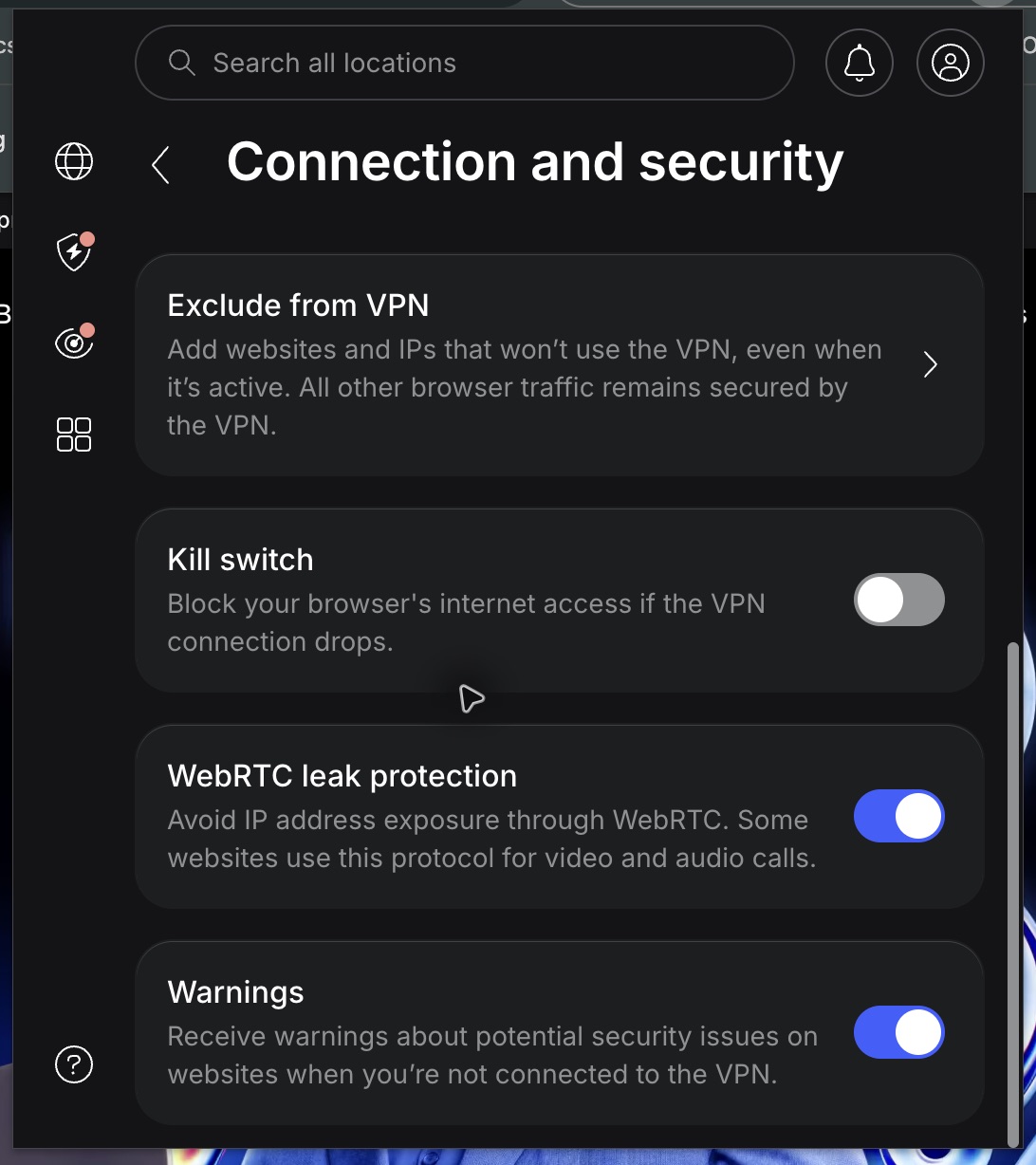
Website exclusions are useful for a site that needs your normal route. They also create an exception you need to remember. An excluded banking or work site does not become protected merely because the rest of Chrome displays a connected indicator. Review the exclusion list when you change how you use the browser.
Connection reliability: the part to confirm first
Our Chrome connection checks produced a mixed result. Karachi and New York reached the extension’s connected and Secured states. A UK attempt repeatedly retried and ended with a connection error. The controls were easy to use, but connection convenience and a working connection are separate buying considerations.
| Location selected | Result in Chrome | Practical takeaway |
|---|---|---|
| Karachi, Pakistan | Connected; Secured indicator | The extension established its reported connected state. |
| New York, United States | Connected; Secured indicator | The location switch reached its reported connected state. |
| United Kingdom | Retries followed by a connection error | The attempted route did not provide a usable connection. |
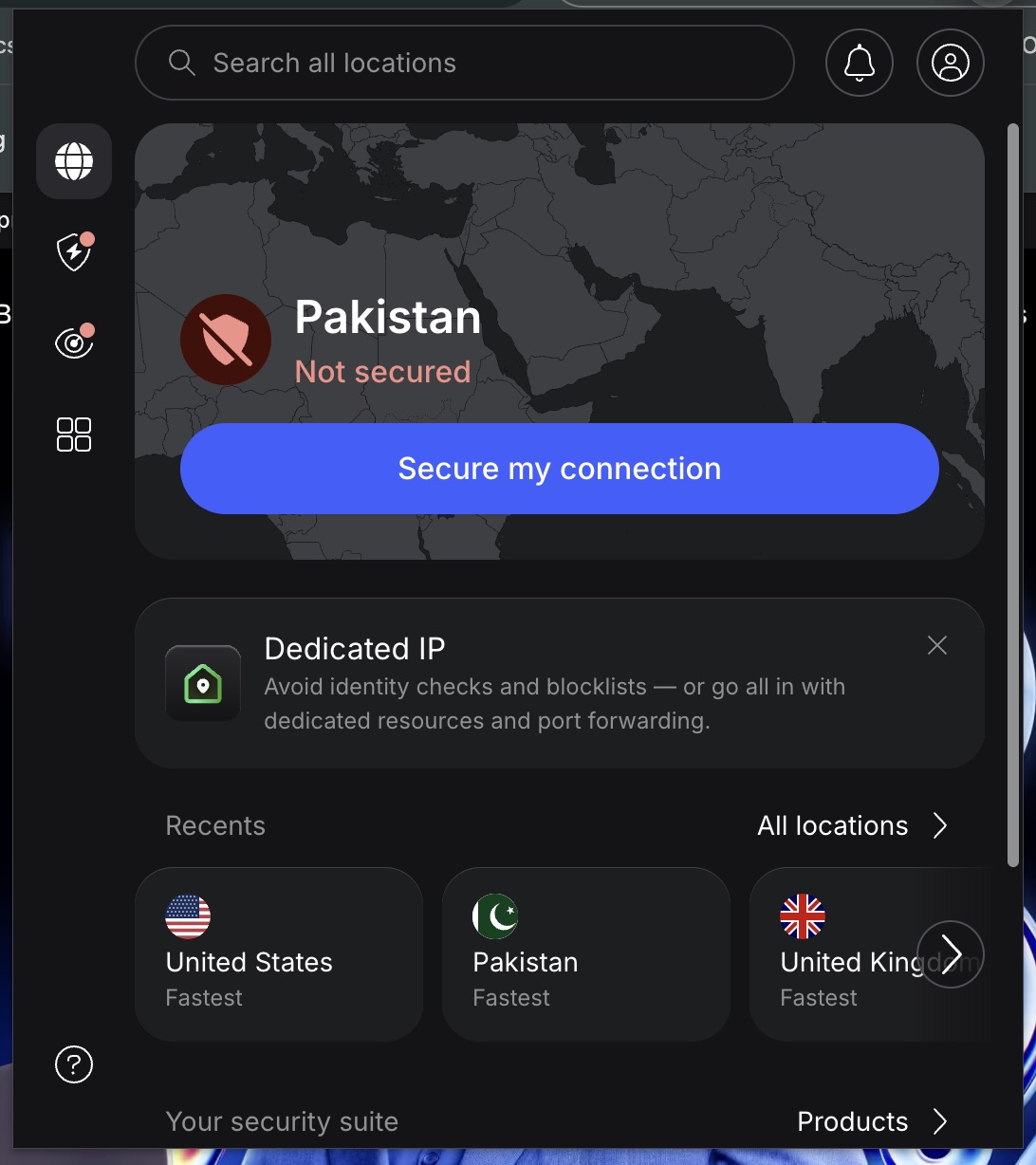
A connected indicator alone does not prove an independent exit location, sustained download speed, or access to a streaming service. These checks do not establish a speed ranking. The failed route also does not isolate whether the cause was the local network, the browser, or the selected connection. It is a reason to test your usual workload, not a reason to claim every NordVPN connection fails.
During a trial, check the sites you actually need: work tools, banking, video calls, and any streaming service you lawfully subscribe to. Check both the browser extension and the native app if you plan to use both. The pricing page advertises a 30-day money-back guarantee; read the applicable order and refund terms before treating it as a substitute for a short commitment.
Browser protection and next-gen antivirus
Chrome’s Protect panel showed Real-time protection enabled but also stated that an active VPN connection was required. This is an important setting to understand: switching a preference on did not mean the browser filter was active while disconnected.
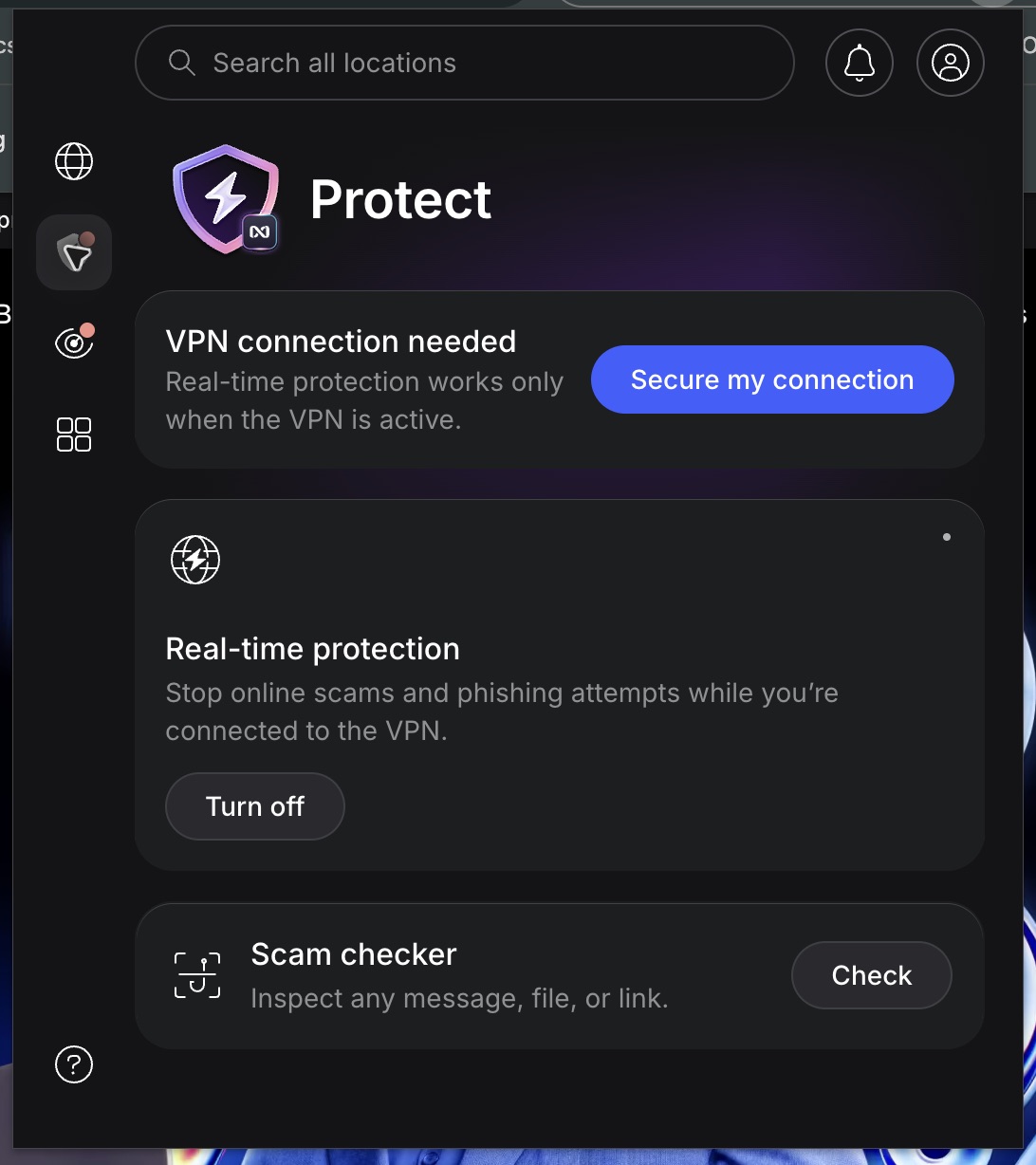
NordVPN markets its broader security suite as next-gen antivirus, following the Threat Protection Pro name. The advertised functions include protection against malicious sites and downloads, along with ad and tracker blocking. Availability depends on the plan, app, and platform. A browser filter and a desktop antivirus service should not be treated as interchangeable.
Buy the bundle if its extra tools replace services you need. If you already use a password manager, cloud storage, or a security suite you prefer, adding another version may create overlap rather than better value. The core VPN should be useful to you on its own.
Kill switch, split tunneling, and Meshnet
NordVPN’s kill-switch documentation distinguishes native-platform behavior. Windows has app-level and system-level choices. Closing selected apps and blocking an internet connection are different responses to a dropped VPN. Chrome’s browser kill-switch setting is a separate control and does not establish a system-wide interruption result.
For selective routing, NordVPN documents app split tunneling on Windows and Android, plus website exclusions in browser extensions. Match the control to what you are excluding. A browser rule for one site does not exclude or protect a separate native application.
Meshnet serves another purpose: connecting devices for uses such as file sharing and remote access. NordVPN says it is free and supports up to 10 personal devices and 50 external devices. It is useful to consider for a device-to-device workflow, but it is not a reason to assume that an ordinary VPN location provides remote access to your computer.
Privacy: useful outside scrutiny, with clear limits
NordVPN’s February 2026 no-logs announcement says Deloitte Lithuania completed its sixth overall independent assurance engagement. Procedures ran from November 10 through December 12, 2025, and the report was issued on December 12. The announcement describes a point-in-time engagement under ISAE 3000 (Revised).
That gives the no-logs claim more substance than a marketing badge alone. It still describes a defined scope and period. It does not guarantee every future system state, certify streaming access, or measure speed. Subscribers can find the original material in the Reports area.
A VPN also does not make a signed-in website forget who you are. An account name, cookies, and information you submit remain identifying signals. Use the VPN as one privacy tool alongside secure accounts and sensible browser settings, rather than expecting it to make every online action anonymous.
Pricing: the renewal bill matters more than the discount
The official pricing page displayed these US-dollar offers on October 31, 2026. The browser used for this review received Basic, Complete, and Complete Max; other regions can show different bundles, including Prime with Coveron. Offers, tax, and order terms can change. The monthly equivalent below requires the full 27-month payment upfront.
| Plan | First 27 months, upfront | Monthly equivalent | Annual renewal |
|---|---|---|---|
| Basic | $94.23 | $3.49 | $139.08 |
| Complete | $107.73 | $3.99 | $219.48 |
| Complete Max | $161.73 | $5.99 | $301.08 |
Basic is the sensible starting point for the VPN itself. In this offer, Complete adds $13.50 across the first 27 months, while its listed renewal costs $80.40 more per year than Basic. That is why a small introductory upgrade deserves a separate renewal decision. Complete Max lists a dedicated IP alongside the broader bundle; only pay for it if a static address solves a real need.
For perspective, Basic’s $139.08 annual renewal works out to $11.59 a month. Complete’s works out to $18.29 and Complete Max’s to $25.09. These are calculations from the displayed annual bills, not monthly subscription offers. Compare the total and billing period before you commit.
NordVPN versus a free or flat-price alternative
NordVPN’s appeal is the combination of a multi-device paid VPN and optional bundled tools. You can make a different trade-off if price structure matters more. Proton VPN Free lists one device and unlimited data. Mullvad lists a flat €5 monthly rate and up to five devices. These are plan comparisons, not a performance league table.
- Choose NordVPN’s Basic plan when its multi-device allowance and apps fit your needs and you accept the prepaid term and renewal bill.
- Consider Proton VPN Free for one-device use without a subscription bill. Its free offering is a different package from a paid VPN plan.
- Consider Mullvad if a flat monthly commitment matters more than a discounted long term or a bundle of other security products.
Our free VPN guide and paid VPN comparison offer more context. Choose from the workload you need to protect, the apps you will use, and the amount you are willing to pay after the first term.
Review notes
Chrome testing took place on macOS on October 31, 2026, covering controls, settings, and connection attempts in three locations. The original screenshots show those results. Feature and plan details come from the linked product documentation. Native-app performance, streaming playback, malware detection, leak resistance, and kill-switch interruption behavior are outside the tested results in this review.
Frequently asked questions
Does NordVPN’s Chrome extension protect the whole computer?
No. It covers Chrome traffic. Use the native VPN app when you also want to protect other applications and background connections.
Which NordVPN plan is the best starting point?
Basic is the starting point for the core VPN. Upgrade for specific tools you need, then compare the renewal bill separately from the introductory discount.
Does NordVPN guarantee access to a streaming service?
A connected VPN does not by itself establish working playback. Check the service, your subscription, the intended device, and the applicable terms. Streaming playback was not tested for this review.
Is the Chrome kill switch on automatically?
Our existing test profile had it off. Check the setting in your own extension. Browser and native-app kill switches cover different workloads.
The verdict: buy for the VPN you need, not the bundle size
NordVPN is a strong candidate for a multi-device VPN shortlist because its browser controls are approachable and its native apps broaden the coverage beyond Chrome. Basic is the clearest purchase for someone who primarily wants the VPN. The larger bundles need to earn their place through tools you will actually use.
The deciding caution is practical. Our Chrome checks included a failed UK connection, and the promotional monthly rate comes with a longer prepaid commitment and a higher annual renewal. Confirm everyday connectivity, choose the right app, and make the renewal price part of the decision from the start.





Share Your Thoughts