• Skip to primary navigation
  • Skip to main content
  • Skip to primary sidebar
  • Skip to footer
TechEngage

TechEngage®

Hands-on reviews, research-backed buying guides and technology news.

  • News
    • Internet & Social
    • Gadgets
    • Car Tech
    • Business
    • Science & Health
  • Reviews
  • Buying Guides
  • How-to
  • AI
  • Computing
    • Apps
    • Security
    • Gaming
  • More
    • Tools
    • Puzzles
    • Mobile
  • Launchpad
  • Sign in
TechEngage » Apps & Software

How to disable or deactivate a Facebook account

Avatar for Muhammad Abdullah Muhammad Abdullah Follow Muhammad Abdullah on X Published: Jun 3, 2021 · 4:32 AM ET Updated: May 3, 2022 · 5:57 AM ET

Deactivate Facebook account
Shares28FacebookTweetPinLinkedInPrint

Social media can get too much sometimes. Everything happens at once in life that you might not want to deal with all of the mess at once. It’s absolutely alright if you’re thinking of taking a break from all of it. For starters, did you know that you can deactivate your Facebook account without permanently deleting it? If you were looking for this, below are the simple steps following which you can deactivate your Facebook account.

Remember, disabling your Facebook account will remove your name and photos from most things you’ve shared. However, you’ll be able to continue using Messenger.

Here’s how to disable or deactivate Facebook account:

Open Facebook.com and click ‘Settings & Privacy’ button

Log in to your Facebook account and find an arrow down button on the upper right corner of the page near your profile picture. Click and select ‘Settings & Privacy’ and then click Settings. Here’s the path Arrow down button>Settings& Privacy>Settings
Open Facebook Settings

Navigate to ‘Your Facebook Information’ and scroll down to ‘Deactivate and Deletion’

After opening Settings, find ‘Your Facebook Information’ under ‘General’ and ‘Security Login.’Your Information On Facebook
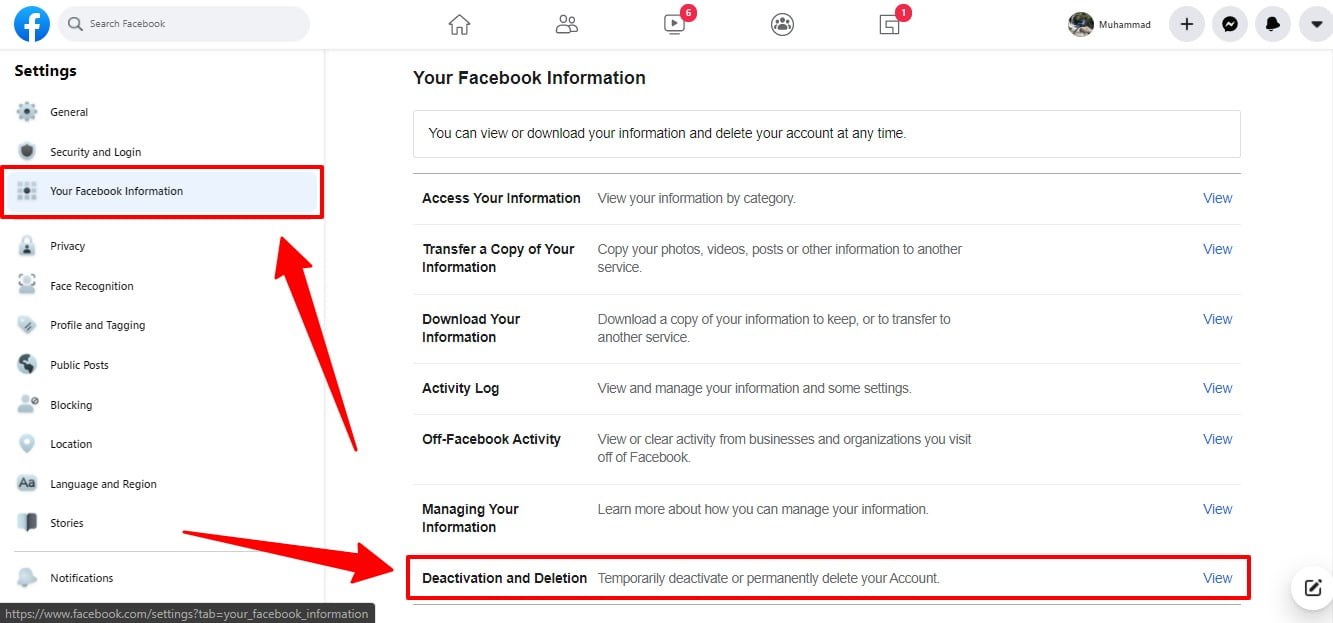
Open ‘Deactivation and Deletion’

After clicking ‘Deactivation and Deletion,’ you will find two options there.

Select ‘Deactivate Account’

Select ‘Deactivate Account’ and click ‘Continue to Account Deactivation.’Deactivate Facebook Account
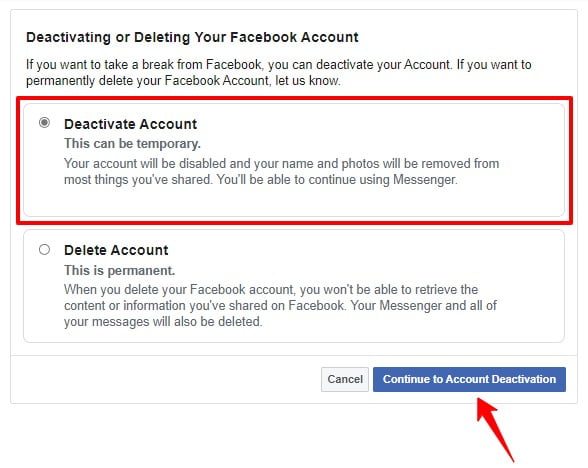
So, these were the simple steps you have to follow in order to disable your Facebook account. You can also delete your Facebook account completely, but if you’re planning to get back, disabling your account will be a wise move.


Related reading

  • Secret inbox in Facebook is hiding messages from you
  • How to control who can comment on your Instagram posts
  • How to hide Instagram like and view counts
  • How to activate Two-factor authentication (2FA) on Twitter
Something incorrect? Report an error in this article. Include a source if you have one; your name and email are optional.

Filed Under: Apps & Software Tagged With: Facebook, How-To, Social media

Related Stories

  • How To Make A Plan For Your ”Digital Assets” Before You Die

    How to make a plan for your ”digital assets” before you die

    Internet & Social MediaDec 21, 2018

  • Facebook Plans To Bring Clubhouse-Like Features In Its App

    Facebook plans to bring Clubhouse-like features in its app

    Apps & SoftwareApr 20, 2021

  • Facebook’S Like Button Bait And Switch: A History Of Meta’S Dark Patterns

    Facebook’s Like Button Bait and Switch: A History of Meta’s Dark Patterns

    Internet & Social MediaOct 11, 2026

Stay on top of technology

Get TechEngage reviews, buying guides and news in your feed.

Follow on Google News
Shares28FacebookTweetPinLinkedInPrint
Avatar for Muhammad Abdullah

Muhammad Abdullah

Senior Tech Correspondent

Muhammad Abdullah is a Senior Tech Correspondent at TechEngage. A computer scientist by training and a certified Growth Hacker, he covers mobile devices, apps, operating systems, social media, and gaming, turning complex digital trends into practical insights.

Reader Interactions

Share Your Thoughts Cancel reply

Please read our comment policy before submitting your comment. Your email address will not be used or published anywhere. You will only receive comment notifications if you opt to subscribe below.

Primary Sidebar

Google News

Get TechEngage in your feed

Reviews, news, and buying guides as they publish.

Follow on Google News

Recent Stories

  • United Spotify Seatback Illustration |
    Tech News & AnalysisUnited Adds Personal Spotify Accounts to Starlink Seatback ScreensNov 5, 2026
  • Zinstall Featured |
    Reviews & Buying GuidesZinstall WinWin Review: Move Apps and Files to a New PCNov 3, 2026
  • Coveron Review Light V3 |
    Reviews & Buying GuidesCoveron Review: Is Its Identity Protection Worth It?Oct 31, 2026
  • Nordvpn Review Light V3 |
    Reviews & Buying GuidesNordVPN Review: Features, Privacy and ValueOct 31, 2026
  • Keeper Business Review Light V2 |
    Reviews & Buying GuidesKeeper Business review: sharing, plans and admin toolsOct 31, 2026

More in Apps & Software

  • Russia Government Transition Open Source Linux Featured |
    Russia’s Linux Transition: Policies, Sanctions and LimitsOct 11, 2026
  • Windows Screen Recording Guide |
    How to Screen Record on Windows 11 With AudioOct 10, 2026
  • Chrome Tabs Reloading Techengage |
    How to Stop Chrome Tabs From ReloadingOct 10, 2026
  • 136181 7Effec8402C5Ea64 |
    Microsoft’s October 7 Surface Launch: Hardware and AISep 16, 2026
More Apps & Software stories →

Footer

Discover

  • About TechEngage
  • Company News & Updates
  • Our Team
  • Advertise
  • Send us a tip
  • Submit your company to TechEngage Launchpad Hot
  • TechEngage Brand Kit
  • Contact us
  • Tools & Calculators

Legal pages

  • Editorial Standards
  • Reviews Policy
  • Our Ethics
  • Corrections Policy
  • Affiliate Disclosure
  • Privacy Policy
  • Cookies Policy
  • Terms & Conditions
  • GDPR Compliance
  • Copyright & DMCA

Must reads

  • Best Mechanical Keyboards Under $100
  • Best USB-C Hubs
  • Best Portable SSDs
  • Best Gaming Graphics Cards (GPUs)
  • Best Long-Range Outdoor WiFi Extenders
  • Best Wireless CarPlay Adapters
  • Best Slack Alternatives
  • Best Long-Range Walkie-Talkies

Download our apps

TechEngage app coming soon on the App Store Available onChrome

© 2026 TechEngage®. All Rights Reserved. TechEngage® is a project of TechAbout LLC.

TechEngage® is a registered trademark in the United States under Trademark Number 6823709 and in the United Kingdom under Trademark Number UK00003417167. The publication is identified by ISSN 2690-3776 and OCLC Number 1139335774.

Contact team@techengage.com · WhatsApp +1 307 463 4505

Your analytics choice
Allow Google Analytics to help us understand readership? You can use the site without it and change this choice anytime.

Privacy details