• Skip to primary navigation
  • Skip to main content
  • Skip to primary sidebar
  • Skip to footer
TechEngage

TechEngage®

Hands-on reviews, research-backed buying guides and technology news.

  • News
    • Internet & Social
    • Gadgets
    • Car Tech
    • Business
    • Science & Health
  • Reviews
  • Buying Guides
  • How-to
  • AI
  • Computing
    • Apps
    • Security
    • Gaming
  • More
    • Tools
    • Puzzles
    • Mobile
  • Launchpad
  • Sign in
TechEngage » Mobile

What’s new in the iPad model of 2018?

Avatar for Nur Nur Published: May 29, 2018 · 5:02 PM ET Updated: Jan 28, 2019 · 7:06 PM ET

NewsNews report. Not a buying guide or hands-on product test.
What’s new in the iPad model of 2018?
FacebookTweetPinLinkedInPrint
It has a faster processor and supports Apple Pencil.

If you are planning to buy the newest iPad released by Apple, you should be ready to see a very familiar gadget. Yes, it’s a familiar iPad with a hand full of nice upgrades. The iPad was revealed two months back in March by Apple at a remarkable event in Chicago.

The new iPad unveils the idea of helping schools more in the teaching methodologies but how?

That’s vague. We can have fun with the new companion because of its fast processor and its support with the Apple pencil accompanied by exceptional accuracy. You can draw and doodle, something that your predecessors missed paying the same price for their iPads in 2017.
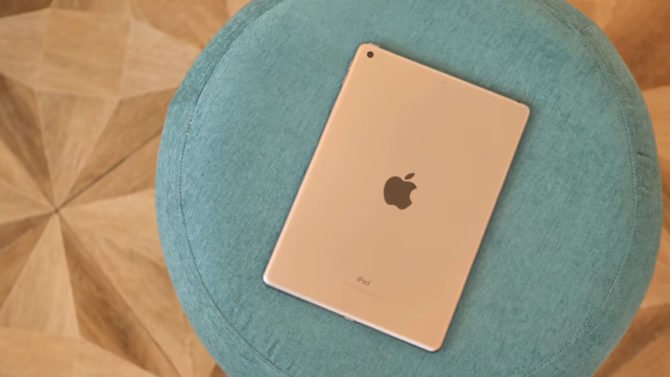
Apple Ipad 2018

The new iPad cost $329 which is almost the same as the last year’s model, as we mentioned earlier. However, 128GB and LTE variants cost more in addition to paying for a $99 for Apple pencil. It feels like Apple has missed the deal when you compare the iPad with its primary competitors like Chromebook, but for average customers, this is a cherry on the cake. They can get a top-notch branded tablet for as less as this price.

End of the day, they’ll be paying for a premium gadget that comes in competition with the ultra-budget Amazon Fire tablets which are of course out of the reach of many.

The screen of the new iPad remains as gorgeous as always. Although being without the fancy screen upgrades of iPad Pro, one will enjoy the world full of iOS applications. The Apple pencil support added for scrolling is chock-full of everything you need. With Apple pencil and maybe a keyboard along, you’ll reach the level of a midrange Windows laptop.

As a baseline, you should know that you’ll be getting the bulk of amazing features only at a fraction of price of the price of iPad’s step-up siblings.  Those who paid $500 for old iPads may regret the idea now because the new iPad runs circles around the older versions.

So, yeah, this iPad isn’t terribly exciting. But, it’s also pretty great.

Speed and Apple pencil, the only difference from 2017?

As we’ve mentioned before, the news that the new iPad can work with a stylus is a good one for the creative work lovers and doodlers. Not any different than the other stylus like Microsoft’s Surface pen, the Apple Pencil is very sensitive to pressure and makes you take a merry-go-round while using art apps and the built-in Notes and Pages applications. Not everyone has to spend money on the Apple pencil because your finger will do a good job for you for basic pdf annotations and instant writing. However, you can add the expense later if need be.
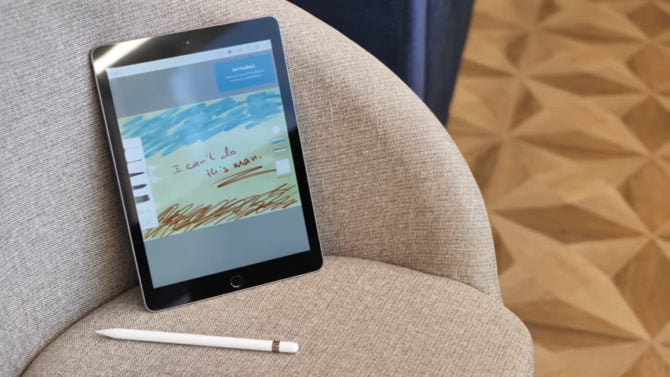
Apple Ipad 2018

iPad of 2017 performed exceptional in terms of speed and scrolling but yes, one won’t deny that it was a new processor embedded in the body of an old iPad. The new model solves this problem. Although iPads didn’t change a lot in their outlook and design over the years the new once thus seems catchier.

For many of us, the difference is hard to spot may be. The iPad 2018 has a fast processor of A10 and it beats almost every iPhone except the models of iPhone 8, iPhone 8 plus and iPhone X. For a device just being priced at $329, this is a great remark. The screen sizes 9.7 inches and has improved internal features.

One will realize after using the iPad for a couple of days that it is more than speed and the stylus. The iPad is a convenient usage option and operates swiftly when it comes to app loading and gaming standards. Its performance is praiseworthy even by iPad standards, as the benchmark indicated in our tests. The iPad has the first generation button that works fine for touch ID. The speed is greatly improved for LTE usage.

What’s more to add to good?

Significantly better than the Microsoft Surface Pro, the iPad has an excellent battery which lasted for 12 hours and 44 minutes in the three video streaming playback tests. This is more than what Apple claimed. Apple stated that the battery life for all current iPads is no lesser than 10 hours. If we go about the iPad Pro, that works even better and lasts even longer.

So we now know that a better processor and an Apple pencil are not the only good things. Although these are the major deviations from last year’s iPads. So those of us who are a stylus fan, they may feel free to upgrade to the new iPad and the rest can do well with the previous models may be.

The sleek and slim iPad, that costs half the price of the iPad Pro 2017, is an exciting gadget to bag but don’t expect a completely new companion to add to your desk. It just a make-uped 2017 iPad.


Something incorrect? Report an error in this article. Include a source if you have one; your name and email are optional.

Filed Under: Mobile, Tech News & Analysis Tagged With: Apple

Related Stories

  • Best wireless CarPlay adapters buying guide graphic with a car icon

    Best Wireless CarPlay Adapters in 2026: 6 Picks for Wired-CarPlay Cars

    Mobility & Car TechSep 14, 2026

  • Macbook Pro M5 Review: Performance, Battery Life, And Everything You Need To Know

    MacBook Pro M5 Review: Performance, Battery Life, and Everything You Need to Know

    Computing & HardwareApr 4, 2026

  • Iphone 18 Pro And Pro Max Available Today In 65+ Countries

    iPhone 18 Pro and Pro Max Available Today in 65+ Countries

    Tech News & AnalysisSep 18, 2026

Stay on top of technology

Get TechEngage reviews, buying guides and news in your feed.

Follow on Google News
FacebookTweetPinLinkedInPrint
Avatar for Nur

Nur

Smart Devices Reviewer

Nur ul ain Chaudhry is a Smart Devices Reviewer at TechEngage who covers smartphones, smart home gadgets, and wearables across more than 45 articles. A graduate of LUMS with a degree in Economics and Politics, she is known for interbrand comparisons and startup coverage, weighing products through both a technical and economic lens.

Joined TechEngage May 2018First article on TechEngage May 2018

Reader Interactions

Share Your Thoughts Cancel reply

Please read our comment policy before submitting your comment. Your email address will not be used or published anywhere. You will only receive comment notifications if you opt to subscribe below.

Primary Sidebar

Google News

Get TechEngage in your feed

Reviews, news, and buying guides as they publish.

Follow on Google News

Recent Stories

  • Windows Screen Recording Guide |
    Apps & SoftwareHow to Screen Record on Windows 11 With AudioOct 10, 2026
  • Chrome Tabs Reloading Techengage |
    Apps & SoftwareHow to Stop Chrome Tabs From ReloadingOct 10, 2026
  • Techengage Windows 11 File Backup |
    Computing & HardwareHow to Back Up Windows 11 Files to an External DriveOct 10, 2026
  • Techengage Ssd Enclosures |
    Computing & Hardware3 Best SSD Enclosures for USB-C and USB4Oct 10, 2026
  • Techengage Office Copilot Frontier |
    AIMicrosoft brings Office editing to Copilot, Frontier firstOct 10, 2026

More in Mobile

  • 136201 D34F78Ed5C3A7E7D |
    iPhone 18 Pro and Pro Max Available Today in 65+ CountriesSep 18, 2026
  • 136191 88Baadf6046749B8 |
    Samsung Starts One UI 9 (Android 17) Rollout on Galaxy S26 SeriesSep 17, 2026
  • TechEngage news graphic: iOS 27 Is Out With Siri AI, with an illustrated laptop and phone showing an AI assistant
    Apple Releases iOS 27 and macOS Golden Gate With Siri AISep 15, 2026
  • Lumia Series Jpg |
    Nokia Lumia History: Key Phones, Microsoft’s Deal and the EndSep 24, 2023
More Mobile stories →

Footer

Discover

  • About TechEngage
  • Company News & Updates
  • Our Team
  • Advertise
  • Send us a tip
  • Submit your company to TechEngage Launchpad Hot
  • TechEngage Brand Kit
  • Contact us
  • Tools & Calculators

Legal pages

  • Editorial Standards
  • Reviews Policy
  • Our Ethics
  • Corrections Policy
  • Affiliate Disclosure
  • Privacy Policy
  • Cookies Policy
  • Terms & Conditions
  • GDPR Compliance
  • Copyright & DMCA

Must reads

  • Best Mechanical Keyboards Under $100
  • Best USB-C Hubs
  • Best Portable SSDs
  • Best Gaming Graphics Cards (GPUs)
  • Best Long-Range Outdoor WiFi Extenders
  • Best Wireless CarPlay Adapters
  • Best Slack Alternatives
  • Best Long-Range Walkie-Talkies

Download our apps

TechEngage app coming soon on the App Store Available onChrome

© 2026 TechEngage®. All Rights Reserved. TechEngage® is a project of TechAbout LLC.

TechEngage® is a registered trademark in the United States under Trademark Number 6823709 and in the United Kingdom under Trademark Number UK00003417167. It is also ISSN protected under ISSN 2690-3776 and has OCLC Number 1139335774.

Contact team@techengage.com · WhatsApp +1-307-381-8801

Your analytics choice
Allow Google Analytics to help us understand readership? You can use the site without it and change this choice anytime.

Privacy details