• Skip to primary navigation
  • Skip to main content
  • Skip to primary sidebar
  • Skip to footer
TechEngage

TechEngage®

Technology Reviews, Guides & Analysis

  • News
  • AI
  • Mobile
  • Apps
  • Security
  • Reviews
  • More
    • Internet & Social
    • Computing
    • Gadgets
    • Gaming
    • Car Tech
    • Business
    • Science & Health
TechEngage » Mobile

iPad 2018 Review: Should we wait for the upgrades?

Avatar for Amnah Asghar Amnah Asghar Connect with Amnah Asghar on LinkedIn Published: July 30, 2018 Updated: January 28, 2019

ipad 2018
FacebookTweetPinLinkedInPrint

Disclosure: TechEngage is a participant in the Amazon Services LLC Associates Program, an affiliate advertising program designed to provide a means for sites to earn fees by linking to Amazon.com and affiliated sites. We may earn a commission when you buy through links on this page, at no extra cost to you. Our editorial picks are made independently of these partnerships.

After a hiatus, Apple launched its entry-level iPad 2018 this March which has left everyone wondering about what’s going to be in store for them in the latter half of 2018. Apple had us all waiting for its very first iPad for this year primarily because of the rumored face ID feature launch.

Was the iPad 2018 worth the wait? Let’s find that out in our detailed review which pretty much sums up everything from price to performance.

What’s new in it?

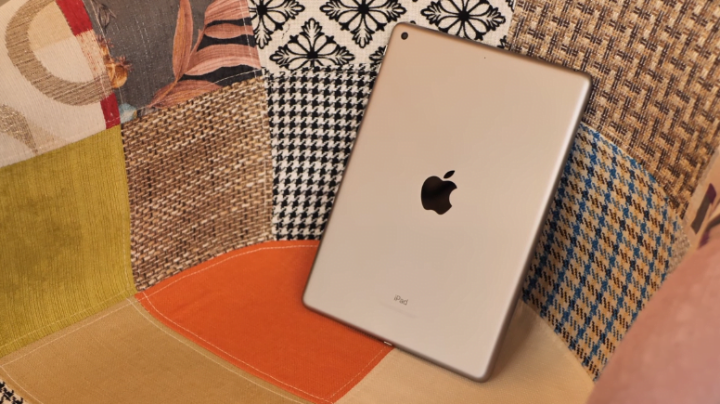
At the first glance, iPad 2018 looks no different than first iPad Air. Visually exquisite, this brand new iPad is not as sleek as iPad Pro. The tablet is chic and way too good for the price.

Also Read: MacBook Pro– Perfection at its best

A10 Processor

Having the same built, 2018 9.7 inch model has Apple A10 processor that works at an astonishingly faster speed than most of the iPhones out there except for iPhone 8, 8 plus and X. The outward appearance, however, has not changed much but that has never been the case with any of the previous Apple’s iPad upgrades.

Responsiveness

Since the iPad now has Pencil stylus too, iPad 2018 is a win for anyone who wants to get creative working on their gadget. Pencil support comes installed in the iSuite which works well with various Notes apps. Be it annotations on a PDF file or a picture, its responsiveness will never disappoint.

Ipad Review 2018

What is even great is that its responsiveness to finger, too, is not a letdown. If you don’t want to pay extra for the pencil can even skip it and use your finger. It may not be as good as a Pencil, of course, but you can always buy it later when you can afford it.

Improved LTE Speed

iPad 2018 is equipped with an LTE speed of 3000Mbps. For people who are always having conference calls on-the-go, this could be a good fit.

The Price

Its price range starts from $329 for a 32GB model. For 128GB and LTE cellular options, you will be charged $100 and $130 more respectively.

Considering the classy look that iPad 2018 has, the price seems reasonable. 2018 9.7 inch model comes in three colors; gold, space grey, and silver.

At the launch of this iPad, the speaker mentioned how the new gadget reflects Apple’s commitment to education. The schools are unsure of its utility to date. Other tablets in the market offer competitive pricing packages than 2018 9.7 inch model.

The pencil will still be costing you an extra $99 with schools getting a maximum discount of $10. You can buy iPadon Amazon.

Battery Life

Surprisingly, iPad 2018 has an extended battery life which is too good to be true for an iPad. Play as much as video games you like because not only does this iPad has a better battery life but games also load faster.

Ipad Review 2018

Basic Features

Here is a brief intro of the basic features that iPad 2018 has in store for you:

Inline drawing

Equipped with iOS 11.3, the users can smoothly draw or write text using either the pencil or their finger right after typing. The users can also search for their hand-written text through Spotlight search.

Ipad Review 2018

Keyboard Dock and Split

This feature allows you to split the keyboard in half, one section per side of the screen, for easy-typing using both the thumbs.

Slide Over and Split View

With the two new view options, the users can use two apps simultaneously. Just drag another app while one app is open from the dock. You can either slide one app over the other or split the two apps on the screen with a 50/50 and a 25/75 split option.

Ipad Review 2018

Also Read: The new Microsoft Surface Go comes with an external keyboard and touchpad

Control Center Access

iPad 2018 provides easy access to the control center in two ways. Users can either tap the home button twice or perform a long swipe from the bottom of the screen which takes them to the control center.

Users can also record a video of the screen from the control center. The screen recording feature comes with audio control. Turn the microphone on or off as you like.

Why should you go for it?

If you want a relatively faster working iPad equipped with a better processor and an option to use the pencil then iPad 2018 is just the right option for you. However, if you are still looking forward to facing ID feature, don’t settle for it as yet. Apple has a few launches lined up and rumor has it that the facial recognition feature is set to stun the audience sometime in September.

Our Verdict

There is no better value 9.7-inch tablet available in the market right now better than iPad 2018. However, if you want a much slimmer iPad than this, we recommend you to wait till September.

Until next time!

Suggested Reads:

  1. Adding iPhone Gestures to your Android – How To?
  2. Apple’s App Store store beats Google Play Store in revenue
  3. The basic differences between iPhone 8, 8 Plus and iPhone X
  4. 7 Reasons to choose an Android phone instead of Apple

TechEngage is a participant in the Amazon Services LLC Associates Program, an affiliate advertising program designed to provide a means for sites to earn advertising fees by advertising and linking to Amazon.com. As an Amazon Associate, TechEngage earns from qualifying purchases. Read our full Disclosure.

Filed Under: Mobile Tagged With: Apple, iPad, Review, tablet

Related Stories

  • Best Wireless Carplay Adapters In 2026: 6 Picks For Wired-Carplay Cars

    Best Wireless CarPlay Adapters in 2026: 6 Picks for Wired-CarPlay Cars

    Reviews & Buying GuidesSep 14, 2026

  • Macbook Pro M5 Review: Performance, Battery Life, And Everything You Need To Know

    MacBook Pro M5 Review: Performance, Battery Life, and Everything You Need to Know

    Computing & HardwareApr 4, 2026

  • Apple Releases Ios 27 And Macos Golden Gate With Siri Ai

    Apple Releases iOS 27 and macOS Golden Gate With Siri AI

    Tech News & AnalysisSep 15, 2026

FacebookTweetPinLinkedInPrint
Avatar for Amnah Asghar

Amnah Asghar

Consumer Tech Writer

Amnah Asghar is a Consumer Tech Writer at TechEngage who covers smartphones, health technology, automotive tech, gaming, and digital security. With close to 150 articles published, she has a talent for evaluating products from the perspective of real-world users and translating spec sheets into advice people can actually use.

Joined July 2018

Reader Interactions

Share Your Thoughts Cancel reply

Please read our comment policy before submitting your comment. Your email address will not be used or published anywhere. You will only receive comment notifications if you opt to subscribe below.

Primary Sidebar

Follow us on Google News

Recent Stories

  • Best Mechanical Keyboards Under 100 2026 |
    Reviews & Buying GuidesBest Mechanical Keyboards Under $100: 8 Picks for 2026Sep 15, 2026
  • Feat 1 |
    Tech News & AnalysisApple Releases iOS 27 and macOS Golden Gate With Siri AISep 15, 2026
  • Best Usb C Hubs 2026 |
    Reviews & Buying GuidesBest USB-C Hubs in 2026: 8 Picks for MacBook, Dual Monitors and TravelSep 14, 2026
  • Featured |
    Reviews & Buying GuidesBest Wireless CarPlay Adapters in 2026: 6 Picks for Wired-CarPlay CarsSep 14, 2026
  • Tesla Roadster October 1 Reveal Waco |
    Mobility & Car TechTesla Sets October 1 Roadster Reveal in Waco, Invites Reservation HoldersSep 14, 2026

More in Mobile

  • Battery Draining Apps Jpg |
    MobileTop 10 Battery Draining Apps to Avoid in 2026Oct 5, 2024
  • Gunnar Sigurdarson Pnogpcpc9No Unsplash Jpg |
    MobileThings to Do After Buying a New Smartphone: The Complete Setup GuideSep 24, 2023
  • Free Up Space On Android Jpeg |
    MobileHow to Free Up Space on Your Android Phone in 2026 (10 Practical Tips)Sep 24, 2023
  • Lumia Series Jpg |
    MobileNokia Lumia History: Every Model, the Microsoft Deal and Why It FailedSep 24, 2023
More Mobile stories →

Footer

Discover

  • About TechEngage
  • Company News & Updates
  • Our Team
  • Advertise
  • Send us a tip
  • Startup Submissions
  • TechEngage Brand Kit
  • Contact us
  • Tools

Legal pages

  • Reviews Guarantee & Methodology
  • Community Guidelines
  • Corrections Policy and Practice
  • Cookies Policy
  • Our Ethics
  • Disclaimer
  • GDPR Compliance
  • Privacy Policy
  • Terms and Conditions
  • Editorial Standards
  • Affiliate Disclosure
  • Copyright and DMCA Policy

Must reads

  • Best AirPods alternatives on Amazon
  • Best PC monitors for gaming on Amazon
  • Best family board games
  • Best video doorbells without subscription
  • Best handheld video game consoles
  • Best all-season tires for snow
  • Best mobile Wi-Fi hotspots
  • Best treadmills on Amazon

About TechEngage

TechEngage® is an independent technology publication covering tech news, reviews and buying guides since 2003.

Founded
2003
Publisher
TechAbout LLC
ISSN
2690-3776
Google NewsRSS feed

© 2026 TechEngage®. All Rights Reserved. TechEngage® is a project of TechAbout LLC.

TechEngage® is a registered trademark in the United States under Trademark Number 6823709 and in the United Kingdom under Trademark Number UK00003417167. It is also ISSN protected under ISSN 2690-3776 and has OCLC Number 1139335774.