

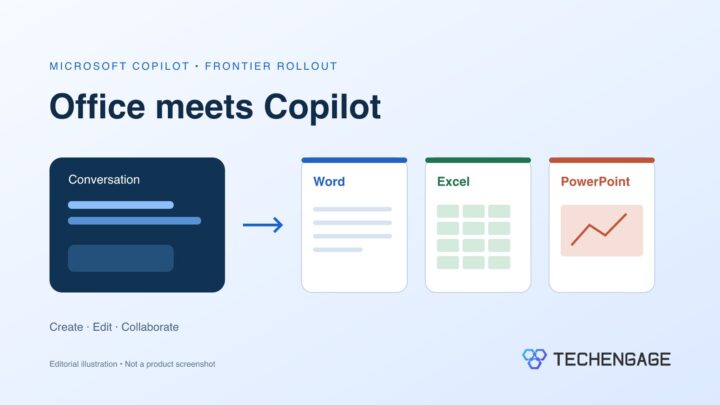
Microsoft began rolling out Word, Excel and PowerPoint editing inside its Copilot app on October 9, 2026, starting with Frontier customers. The change lets eligible users keep working on an Office file beside their AI conversation, including making direct edits and collaborating with colleagues.
For anyone who has copied an AI draft into a document and then spent time cleaning it up, that is the practical attraction: less shuffling between a chat window and the file the team actually uses. Access is the first thing to check, though. This is an early-access rollout, not an announcement that every Copilot account has the feature.
Office files stay beside the conversation
In its October 9 announcement, Microsoft says users can begin in Chat or Cowork, generate a file and continue refining it in the same workspace. Familiar editing controls sit alongside prompts, with comments, sharing and real-time coauthoring available in the file.
The app’s Library brings together recent Office files, pages and AI-generated images. Microsoft says files are stored in OneDrive and retain formatting, comments, sharing permissions and version history, along with organizational security and governance controls.
That continuity matters more than another way to generate a first draft. A project brief usually needs changes after the first response: a colleague corrects a date, someone adds a missing risk, and a manager rewrites the opening. Keeping those revisions in the working file could reduce the need to reconcile copies. Whether it saves time will depend on the quality of the draft and how well the editing experience fits a team’s existing process.
Who can try it now?
Microsoft identifies Frontier customers as the first group receiving Office in Copilot, in both Chat and Cowork. The announcement does not give a date for general availability.
The Frontier program provides preview features before wider release. Microsoft’s guidance for business users says to confirm a Microsoft 365 Copilot license, check that the organization has opted into Frontier, and sign in with a work account. Access and usage-based costs vary by feature, role and subscription.
If the editing tools are missing, check with your organization’s administrator before assuming the app is broken or purchasing a different plan. Frontier participation is an access condition, not a promise that every announced feature appears in every account at once.
Frontier vs general availability: who actually gets which channel
Microsoft’s admin documentation draws a cleaner line than the product blog. The following is from Get started with the Microsoft Frontier program and the related Standard and Deferred release page — work/school tenants, not a screenshot of our own tenant.
- Frontier (opt-in, pre-GA). Tenant-level. Default is No access. An admin can switch the tenant to All users or to Specific users and groups. Features are preview, can change or stop, and are not on GA SLAs. HIPAA BAA coverage is not included for Frontier experiences. Propagation can take up to three hours.
- Who can flip the switch. Microsoft lists these admin roles: AI Admin, Security Admin, or Office Apps Admin. The admin account itself also needs a corresponding license (for Copilot-related Frontier, a Microsoft Copilot / Microsoft 365 Copilot license) or some settings and agents stay hidden.
- Who sees Copilot Frontier features. Users need the matching license assigned. For Copilot-related Frontier, that is a Microsoft Copilot license; users without it are not shown those Frontier features. Microsoft 365 Copilot is an add-on on an eligible base plan (Microsoft cites examples such as Business Premium, E3, and E5). Confirm the current SKU on the purchase prerequisites tab — we are not inventing extra SKU names.
- Standard release. The default general availability channel. Supported GA features, Message Center / release-note communication, normal lifecycle.
- Deferred release. Same GA features, delayed about 30 days after Standard for major updates. Admins can add a limited number of user or group exceptions (Microsoft’s current cap is 100 users counting both individuals and members of added groups).
- You can combine them. A user can be in Frontier for pre-GA experiments and on Standard or Deferred for everything that is already GA. Frontier does not replace those GA channels.
- Agents have a second gate. Frontier enrollment does not override Agent settings. If an admin turned a Frontier agent off under Agent access, it stays off. Newly published Frontier agents (from March 29, 2026) are limited to Frontier-enrolled users; older Frontier agents can still appear for other Copilot-licensed users.
- Consumer / personal Microsoft accounts. The Learn articles above are Microsoft 365 admin-center workflows for work or school tenants. We did not find an equivalent documented “Copilot → Settings → Frontier” toggle for personal Microsoft 365 / Copilot consumer SKUs. If you are signed in with a personal account and do not see Office-in-Copilot, that is expected from the admin docs we can cite — not proof the consumer SKU will never get the feature.
Agent 365 Frontier is a different preview with extra license conditions (Microsoft’s Agent 365 page mentions Microsoft 365 E7 and a global admin enablement step). Do not treat an E7/Agent 365 requirement as the ticket for Office editing in the Copilot app. Office-in-Copilot’s documented gate is: Copilot license + Frontier enrollment + the feature having rolled to that tenant.
Notebooks has a separate rollout timetable
A second October 9 Copilot Notebooks update describes related features for project work. Microsoft lists Office editing, interactive reports and PDF creation as available in Frontier. Model choice and simple delegated tasks are also available there.
Other additions are still ahead. Creating a notebook from a description, scheduled task automations and updated audio overviews are due in the following weeks. Expanded support for Markdown, plain-text and rich-text references is already generally available, according to Microsoft.
Those distinctions matter if you are planning a workflow around the announcement. Editing a presentation in a notebook and scheduling a recurring presentation are different capabilities with different release timing. A feature shown in the announcement should not be treated as available merely because another part of the update has arrived.
What to check before using it for team work
Start with a routine document that you can compare against its source material. Check the facts, formulas and formatting, then confirm that comments and sharing behave as you expect before moving an important project into the workflow. Familiar Office controls make revision easier; they do not establish that an AI-generated answer is correct.
For spreadsheets, keep the underlying data task separate from the writing task. If you need to consolidate source files first, our guide to merging Excel files explains the available approaches. Getting that input right gives you a clearer basis for checking the output.
The immediate question for Microsoft 365 teams is whether this preview can remove a real handoff in their work. Broader access remains the next milestone to watch. TechEngage’s AI coverage follows the tools and changes affecting that decision.



Share Your Thoughts