• Skip to primary navigation
  • Skip to main content
  • Skip to primary sidebar
  • Skip to footer
TechEngage

TechEngage®

Hands-on reviews, research-backed buying guides and technology news.

  • News
    • Internet & Social
    • Gadgets
    • Car Tech
    • Business
    • Science & Health
  • Reviews
  • Buying Guides
  • How-to
  • AI
  • Computing
    • Apps
    • Security
    • Gaming
  • More
    • Tools
    • Puzzles
    • Mobile
  • Launchpad
  • Sign in
TechEngage » Apps & Software

Microsoft’s new Edge browser is now available for Windows, macOS, Android, and iOS

Avatar for Muhammad Abdullah Muhammad Abdullah Follow Muhammad Abdullah on X Published: Jan 16, 2020 · 5:04 AM ET Updated: Jan 17, 2020 · 7:18 PM ET

NewsNews report. Not a buying guide or hands-on product test.
microsoft edge chromium
New Edge Browser Logo / via Microsoft
Shares5FacebookTweetPinLinkedInPrint

Back in April 2019, Microsoft released a dev build of the Edge browser, announcing that they will be shifting Edge browser to Chromium-based browser tech. Well, now, the browser is out of beta and is officially available to download.

Windows 10 users will automatically get the new Edge replacing the built-in browser in the next updates; however, you can download the new Edge browser for macOS, Windows, Android, and iOS. The new Edge comes with many new useful features, including Microsoft’s appealing attempt to steal users from other browsers with their rewards program.

Some features like favorites, browser settings, contact info, passwords sync are inherited from Chrome since it’s based on Chromium. Some of the features like extension sync, history sync are not available for now.

But what makes the new Edge unique are features like Collections. You can add and organize your favorite websites using Collections for Edge feature. The new browser is focused on privacy and offers Basic, Balanced, and Strict mode to prevent users from tracking.
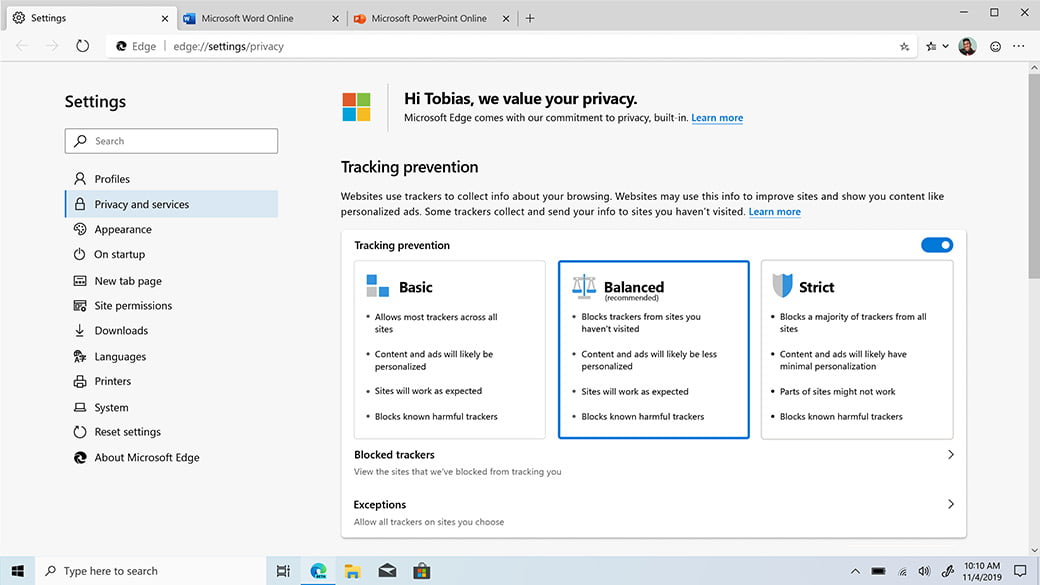
Edge Browser Privacy
Privacy Features in Microsoft Edge

The best part of the browser is Chrome extensions support. You will now be able to download all the extensions that are available in Chrome Web Store. Microsoft’s reward program that you could opt-in by using the Bing search engine, now available for Microsoft Edge users as well. You can also stream 4K videos with the new browser.

Even though Microsoft ended support for Windows 7, the browser will support the vintage OS for the time being. You can download the new Chromium-based Edge browser for Windows 8.1, Windows 8, Windows 7, macOS, iOS, and Android.

Something incorrect? Report an error in this article. Include a source if you have one; your name and email are optional.

Filed Under: Apps & Software, Tech News & Analysis Tagged With: Chromium, Microsoft Edge

Related Stories

  • Russia’S Government Transition To Open-Source Linux: From Putin’S 2010 Order To 2026

    Russia’s Government Transition to Open-Source Linux: From Putin’s 2010 Order to 2026

    Apps & SoftwareOct 11, 2026

  • How To Screen Record On Windows 11 With Audio

    How to Screen Record on Windows 11 With Audio

    Apps & SoftwareOct 10, 2026

  • How To Stop Chrome Tabs From Reloading

    How to Stop Chrome Tabs From Reloading

    Apps & SoftwareOct 10, 2026

Stay on top of technology

Get TechEngage reviews, buying guides and news in your feed.

Follow on Google News
Shares5FacebookTweetPinLinkedInPrint
Avatar for Muhammad Abdullah

Muhammad Abdullah

Senior Tech Correspondent

Muhammad Abdullah is a Senior Tech Correspondent at TechEngage and its most prolific author, with more than 320 published articles. A computer scientist by training and a certified Growth Hacker, he covers mobile devices, apps, operating systems, social media, and gaming, turning complex digital trends into practical insights.

Joined TechEngage October 2018First article on TechEngage October 2018

Reader Interactions

Share Your Thoughts Cancel reply

Please read our comment policy before submitting your comment. Your email address will not be used or published anywhere. You will only receive comment notifications if you opt to subscribe below.

Primary Sidebar

Google News

Get TechEngage in your feed

Reviews, news, and buying guides as they publish.

Follow on Google News

Recent Stories

  • Diagram showing a clip-on microphone, receiver and phone or camera recording setup.
    Reviews & Buying GuidesBest AI Voice Recorders for Calls and InterviewsOct 19, 2026
  • Meta Logo Facebook New Name |
    AIMeta Muse Review: What Its AI Agent Can Do and Where to Be CarefulOct 19, 2026
  • Nscale Anthropic Second Compute Deal |
    Tech News & AnalysisAnthropic and Nscale in Talks on Second $45B Compute Deal, Report SaysOct 19, 2026
  • Stellar Pst Repair Desktop Vs Online Techengage |
    Reviews & Buying GuidesStellar Repair for Outlook Review: Desktop vs. Online PST RepairOct 19, 2026
  • Health Conscious Home Cleaning Fana Anwar |
    Culture & LifestyleHow to Build a More Effective, Health-Conscious Home Cleaning RoutineOct 19, 2026

More in Apps & Software

  • Russia Government Transition Open Source Linux Featured |
    Russia’s Government Transition to Open-Source Linux: From Putin’s 2010 Order to 2026Oct 11, 2026
  • Windows Screen Recording Guide |
    How to Screen Record on Windows 11 With AudioOct 10, 2026
  • Chrome Tabs Reloading Techengage |
    How to Stop Chrome Tabs From ReloadingOct 10, 2026
  • 136181 7Effec8402C5Ea64 |
    What Microsoft Announced on October 7: Surface Laptop Ultra, RTX Spark Dev Box, and Windows AISep 16, 2026
More Apps & Software stories →

Footer

Discover

  • About TechEngage
  • Company News & Updates
  • Our Team
  • Advertise
  • Send us a tip
  • Submit your company to TechEngage Launchpad Hot
  • TechEngage Brand Kit
  • Contact us
  • Tools & Calculators

Legal pages

  • Editorial Standards
  • Reviews Policy
  • Our Ethics
  • Corrections Policy
  • Affiliate Disclosure
  • Privacy Policy
  • Cookies Policy
  • Terms & Conditions
  • GDPR Compliance
  • Copyright & DMCA

Must reads

  • Best Mechanical Keyboards Under $100
  • Best USB-C Hubs
  • Best Portable SSDs
  • Best Gaming Graphics Cards (GPUs)
  • Best Long-Range Outdoor WiFi Extenders
  • Best Wireless CarPlay Adapters
  • Best Slack Alternatives
  • Best Long-Range Walkie-Talkies

Download our apps

TechEngage app coming soon on the App Store Available onChrome

© 2026 TechEngage®. All Rights Reserved. TechEngage® is a project of TechAbout LLC.

TechEngage® is a registered trademark in the United States under Trademark Number 6823709 and in the United Kingdom under Trademark Number UK00003417167. It is also ISSN protected under ISSN 2690-3776 and has OCLC Number 1139335774.

Contact team@techengage.com · WhatsApp +1-307-381-8801

Your analytics choice
Allow Google Analytics to help us understand readership? You can use the site without it and change this choice anytime.

Privacy details