
• Skip to primary navigation
  • Skip to main content
  • Skip to primary sidebar
  • Skip to footer
TechEngage

TechEngage®

Hands-on reviews, research-backed buying guides and technology news.

  • News
    • Internet & Social
    • Gadgets
    • Car Tech
    • Business
    • Science & Health
  • Reviews
  • Buying Guides
  • How-to
  • AI
  • Computing
    • Apps
    • Security
    • Gaming
  • More
    • Tools
    • Puzzles
    • Mobile
  • Launchpad
  • Sign in
TechEngage » Apps & Software

Facebook Messenger rolls out threaded replies for conversations

Avatar for Rizwan Anwar Rizwan Anwar Published: Mar 21, 2019 · 2:08 PM ET Updated: Jan 13, 2020 · 6:25 PM ET

NewsNews report. Not a buying guide or hands-on product test.
A design of Facebook messenger threaded replies with messenger's logo
Design by Bisma / TechEngage
Shares60FacebookTweetPinLinkedInPrint

Facebook Messenger seems to be adding some new features with relatively little fanfare. First, they gave users a clever way of activating dark mode in the app, and now Messenger is letting users experiment with quoted replies.

Similar to WhatsApp, you can press on an individual message to bring up not just the usual emoji reactions, but also a new “reply” button. This will attach your response to the specific message you’re responding to and avoid confusion in large group conversations or with those who send multiples messages in quick succession.
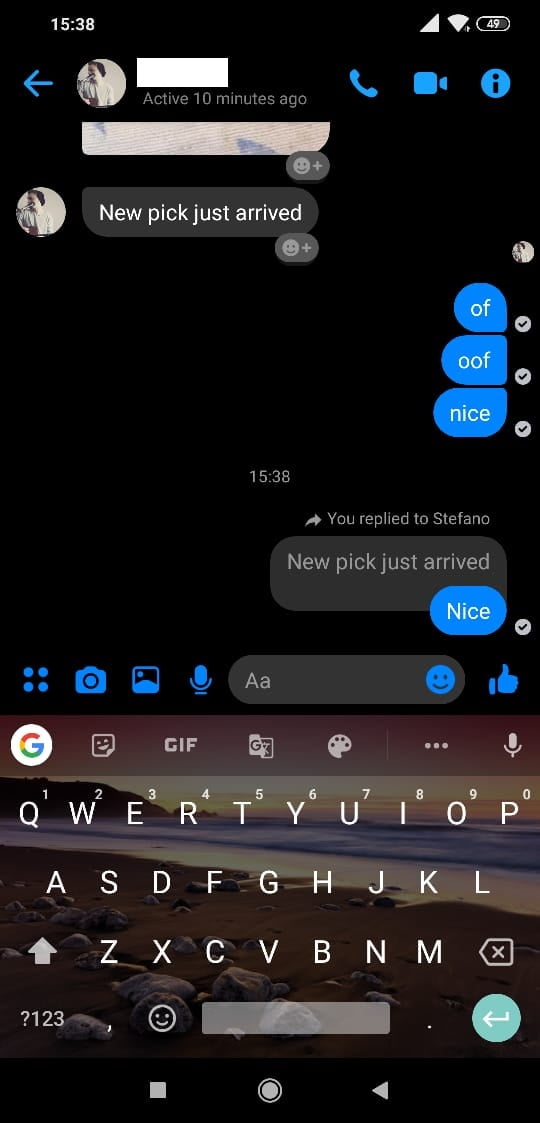
A Screenshot Of New Threaded Conversations On Messenger
Screenshots by Rizwan / TechEngage

When users press a message box, a new reply button will appear to the right of the box.
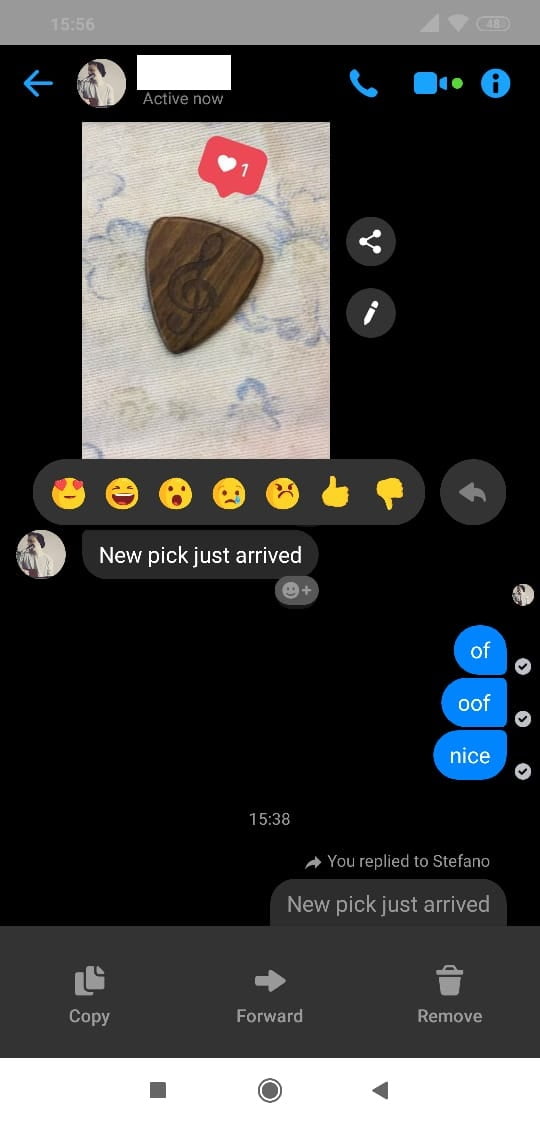
A Screenshot Of Threaded Conversation On Latest Facebook Messenger

It’s also worth mentioning that the feature is live in the web browser if you use Messenger’s dedicated site. You will see a reply button on the right side of the box you wish to reply to by hovering your mouse over that box.
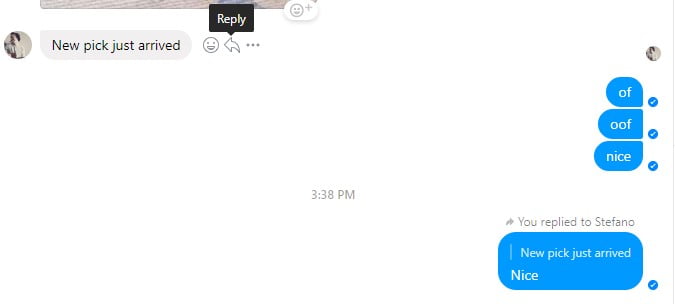
A Snapshot Of Conversation With Threaded Replies On Facebook Messenger

The feature has been present in WhatsApp for a very long time now, and it has finally made its way to Facebook Messenger. This should help with streamlining conversations and allowing for proper context when communicating with friends and family.

We can confirm that the feature is live now on both iOS and Android.

We can’t verify the version of the software as people on various versions of the app are reporting the feature, although we highly recommend updating your Messenger app on iOS or Android to the latest version if you aren’t able to access the feature.

Replying to specific messages makes it a whole lot easier to keep a track of conversations. Prior to this, it was difficult to discuss multiple things in a single conversation box.

Facebook owns WhatsApp, Instagram, and Messenger is already a part of the social media site’s ecosystem. Facebook did express interest in centralizing the chat experience between all 3 apps into a single space, so perhaps this move is a step towards preparing users for the eventual merge.


Something incorrect? Report an error in this article. Include a source if you have one; your name and email are optional.

Filed Under: Apps & Software, Tech News & Analysis Tagged With: Facebook, Facebook Messenger, Messages, News

Related Stories

  • Secret Inbox In Facebook Is Hiding Messages From You

    Secret inbox in Facebook is hiding messages from you

    Apps & SoftwareJun 17, 2019

  • 5 Best Text Messaging Apps For Android In 2026

    5 Best Text Messaging Apps for Android in 2026

    Apps & SoftwareApr 30, 2019

  • You Can Now Use Your Pc To Send And Receive Sms Messages

    You can now use your PC to send and receive SMS messages

    Consumer Tech & GadgetsJul 27, 2018

Stay on top of technology

Get TechEngage reviews, buying guides and news in your feed.

Follow on Google News
Shares60FacebookTweetPinLinkedInPrint
Avatar for Rizwan Anwar

Rizwan Anwar

Mobile & Gaming Reviewer

Rizwan Anwar is a Mobile and Gaming Reviewer at TechEngage who covers apps, smartphones, operating system updates, browsers, and gaming. He compares devices and software to help readers choose what fits their needs.

First article on TechEngage March 2019

Reader Interactions

Join the Discussion
  1. Avatar for Bilal AhmadBilal Ahmad says

    March 24, 2019

    Cool !

    Reply
  2. Avatar for santino achiechsantino achiech says

    March 31, 2020

    wonderful

    Reply

Share Your Thoughts Cancel reply

Please read our comment policy before submitting your comment. Your email address will not be used or published anywhere. You will only receive comment notifications if you opt to subscribe below.

Primary Sidebar

Google News

Get TechEngage in your feed

Reviews, news, and buying guides as they publish.

Follow on Google News

Recent Stories

  • United Spotify Seatback Illustration |
    Tech News & AnalysisUnited Adds Personal Spotify Accounts to Starlink Seatback ScreensNov 5, 2026
  • Zinstall Featured |
    Reviews & Buying GuidesZinstall WinWin Review: Move Apps and Files to a New PCNov 3, 2026
  • Coveron Review Light V3 |
    Reviews & Buying GuidesCoveron Review: Is Its Identity Protection Worth It?Oct 31, 2026
  • Nordvpn Review Light V3 |
    Reviews & Buying GuidesNordVPN Review: Features, Privacy and ValueOct 31, 2026
  • Keeper Business Review Light V2 |
    Reviews & Buying GuidesKeeper Business review: sharing, plans and admin toolsOct 31, 2026

More in Apps & Software

  • Russia Government Transition Open Source Linux Featured |
    Russia’s Linux Transition: Policies, Sanctions and LimitsOct 11, 2026
  • Windows Screen Recording Guide |
    How to Screen Record on Windows 11 With AudioOct 10, 2026
  • Chrome Tabs Reloading Techengage |
    How to Stop Chrome Tabs From ReloadingOct 10, 2026
  • 136181 7Effec8402C5Ea64 |
    Microsoft’s October 7 Surface Launch: Hardware and AISep 16, 2026
More Apps & Software stories →

Footer

Discover

  • About TechEngage
  • Company News & Updates
  • Our Team
  • Advertise
  • Send us a tip
  • Submit your company to TechEngage Launchpad Hot
  • TechEngage Brand Kit
  • Contact us
  • Tools & Calculators

Legal pages

  • Editorial Standards
  • Reviews Policy
  • Our Ethics
  • Corrections Policy
  • Affiliate Disclosure
  • Privacy Policy
  • Cookies Policy
  • Terms & Conditions
  • GDPR Compliance
  • Copyright & DMCA

Must reads

  • Best Mechanical Keyboards Under $100
  • Best USB-C Hubs
  • Best Portable SSDs
  • Best Gaming Graphics Cards (GPUs)
  • Best Long-Range Outdoor WiFi Extenders
  • Best Wireless CarPlay Adapters
  • Best Slack Alternatives
  • Best Long-Range Walkie-Talkies

Download our apps

TechEngage app coming soon on the App Store Available onChrome

© 2026 TechEngage®. All Rights Reserved. TechEngage® is a project of TechAbout LLC.

TechEngage® is a registered trademark in the United States under Trademark Number 6823709 and in the United Kingdom under Trademark Number UK00003417167. The publication is identified by ISSN 2690-3776 and OCLC Number 1139335774.

Contact team@techengage.com · WhatsApp +1-307-381-8801

Your analytics choice
Allow Google Analytics to help us understand readership? You can use the site without it and change this choice anytime.

Privacy details