


To take on Chromebooks and Chrome OS, Microsoft announced a new edition of Windows 11 designed for low-cost laptops. These laptops are for K-8 classrooms built exclusively for students and serve as an alternate to Google’s much popular Chromebooks.
The education industry is very competitive, and companies have been trying to secure their spot. Since the rise of Chromebooks, giants like Microsoft have struggled to get a good market share in this particular technology niche. Previously, in an attempt to take on Chrome OS and Chromebooks, the Redmont giant has tried releasing an S variant of the Windows operating system. The previous S variant of Windows restricted users to the Microsoft Store, which ended up in a mess, as the company’s store has known issue of limited apps.
Windows 11 SE supported certain third-party apps from a list maintained by Microsoft. School IT administrators managed installation. Students could use web apps through a browser.
Windows 11 SE will support Intel and AMD-powered devices from manufacturers like Acer, Dell, ASUS, Dynabook, Fujitsu, HP, Lenovo, JK-IP, and Positivo. In addition, Windows 11 SE will also run on Microsoft’s Surface Laptop SE, which Microsoft announced at $249.
How is Windows 11 SE is different from Windows 11 Pro Education?

Since there are other education editions of Windows 11 available, like Windows 11 Pro Education and Windows 11 Education, one might ask how Windows 11 SE is different from Windows 11 Pro Education edition? The notable difference that Microsoft has explained is that the new Windows 11 SE is designed for K-8 education and is a cloud-first edition of Windows 11. Therefore, the company focuses on schools and children with limited internet connection in and outside of the school.
Being a cloud-first edition of Windows 11, it is easier for students to access and save everything they do instantly on their laptops. Just like Chrome OS, where users can access everything on the go, users can log into their laptops and use Microsoft apps like Teams, Office, OneNote, Minecraft, and more. Microsoft is also bundling Windows 11 SE with the Microsoft Office apps, including Word, PowerPoint, Excel, OneNote, and OneDrive.
These apps can be used offline on Windows 11 SE devices as part of a Microsoft 365 license. OneDrive stores files locally, on each device, for students to access when they are offline. Once they’re back at school with internet access, Windows 11 SE will sync the offline changes automatically.
Approved apps included Chrome and Zoom. Schools could deploy them through their device management system.
The new edition of Windows 11 also allows IT admins to deploy and manage these devices from anywhere. This way, the devices always stay up to date with the help of Intune for Education, and the right apps can be delivered to every student.
Microsoft Surface Laptop SE
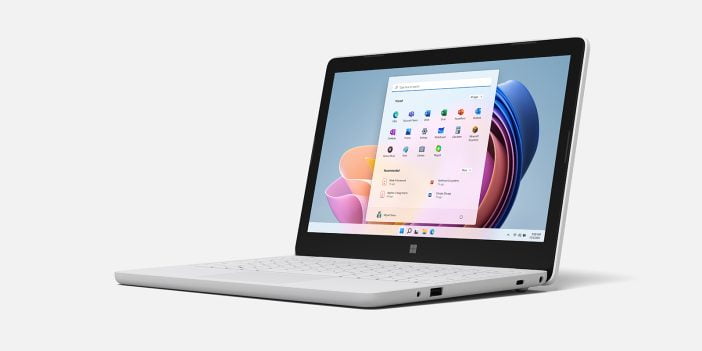
Along with a new edition of Windows 11, Microsoft has also unveiled a new Surface laptop for the SE edition. Microsoft announced it for K-8 classrooms at a starting price of $249. The specs include an 11.6” screen with a 720p front-facing HD camera and stereo speakers. In addition, Surface Laptop SE provides a battery life of up to 16 hours with typical use. The new laptop is highly repairable, allowing IT admins to repair machines on-site, saving time and money for schools.
Microsoft introduced Windows 11 SE to schools in 2021 and 2022. Version 24H2 was the last supported release. Support ended in October 2026.
Correction (Nov. 11, 2026) Earlier wording overstated third-party app support. Windows 11 SE limited installations to approved apps deployed by school administrators.




this weblog includes remarkable and truly excellent information in favor of visitors.