• Skip to primary navigation
  • Skip to main content
  • Skip to primary sidebar
  • Skip to footer
TechEngage

TechEngage®

Hands-on reviews, research-backed buying guides and technology news.

  • News
    • Internet & Social
    • Gadgets
    • Car Tech
    • Business
    • Science & Health
  • Reviews
  • Buying Guides
  • How-to
  • AI
  • Computing
    • Apps
    • Security
    • Gaming
  • More
    • Tools
    • Puzzles
    • Mobile
  • Launchpad
  • Sign in
TechEngage » Apps & Software

Microsoft Windows 11: New design, Android apps support, and more

News

Avatar for Sheharyar Ahmad Saeed Sheharyar Ahmad Saeed Connect with Sheharyar Ahmad Saeed on LinkedIn Published: Jun 25, 2021 · 9:29 AM ET Updated: Jul 7, 2022 · 7:52 PM ET

Windows 11
Shares11FacebookTweetPinLinkedInPrint

After a series of teasers and a couple of leaks, Microsoft has introduced Windows 11 at its second Windows event on June 24. In the wake of Windows 11, Microsoft has also announced to end Windows 10 support by 2025. As our lives become increasingly reliant on our PCs, Microsoft is committed to providing you with the tools to get closer to the things that matter. Let’s dive deep to get insights into Windows 11.

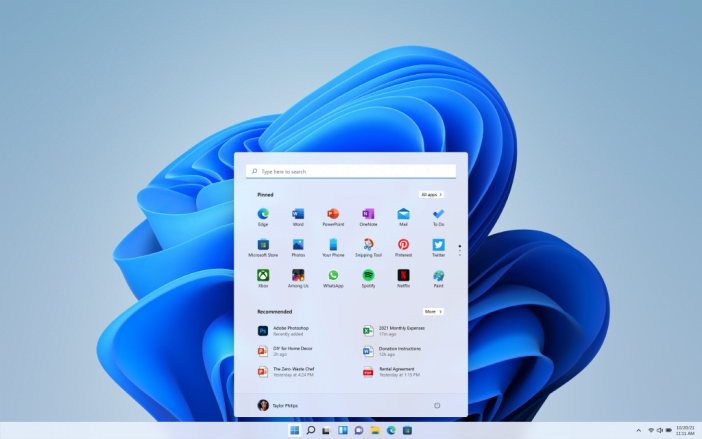
Newly designed Start menu

Microsoft Windows 11 New Start Menu

The centerely-focused taskbar lets users find their pinned apps more quickly and gives their desktops a more refined look. The updated Start button and its tile-shaped display of apps also contributed to the visual overhaul of the new operating system. Nevertheless, the users who are supposed to be more at comfort with the previous alienation of the taskbar, they have the option to bring it back to its previous position.

A similar UI was initially introduced in Windows 10X, originally intended for dual-screen devices but was ultimately canceled by Microsoft. The UI in Windows 11 has a lot of elements of Windows 10X.

As part of the new Start menu, Live Tiles that came with Windows 8 have been removed. There are apps, recent documents, and a separate search interface. In addition to adopting a centered appearance, Windows 11 includes rounded corners like Android and iOS.

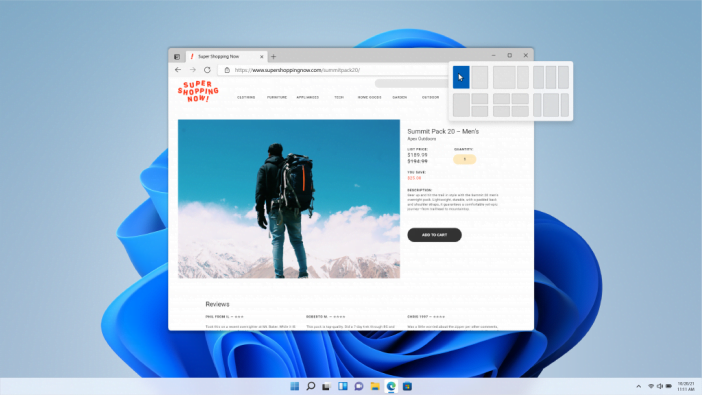
Snap Layouts & Groups

Snap Layouts &Amp; Groups In Windows 11

With Windows 11, we’ve introduced Snap Layouts and Snap Groups so that you can increase your multitasking abilities even further. You can organize your windows using these new tools and optimize your screen space so you can see what you want in a layout that’s visually more neat & appealing. With Windows 11, Snap Groups will keep track of exactly where you placed your apps.

This feature appears to be a useful means of supporting multiple monitors and ensuring apps always open on the correct monitor. This is especially helpful if you have a laptop connected to a monitor or a desktop computer with multiple displays.

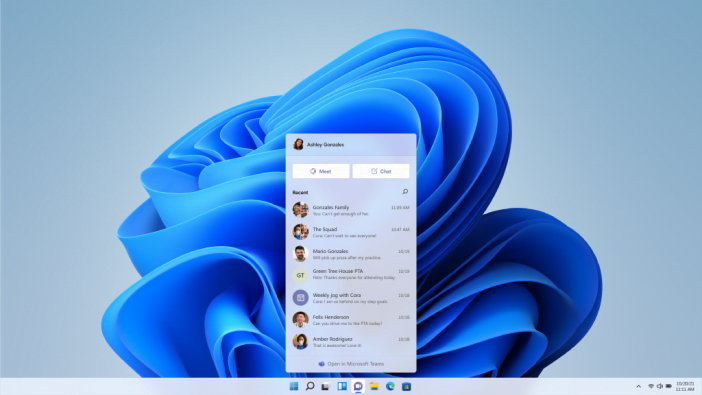
More connectivity in Microsoft Teams & Windows Widgets

Microsoft Teams And Widgets In Windows 11

Microsoft Teams Chat is now integrated into Windows 11’s taskbar. From Windows, Android, or iOS, you can connect with all your personal contacts by text, chat, voice, or video, anywhere, on any platform. If the person you’re connecting with hasn’t downloaded the Teams app, you can still communicate with them via two-way SMS. You can also instantaneously mute and unmute conversations through Teams or start interacting directly from the taskbar with Windows 11.

Windows 11 has also been optimized to bring you the tailored suggestions in the news feed based on your interests. Now users won’t have to disrupt their workflow for checking, news, weather forecast, or notifications; instead, they will only have to open Widgets for the curated view right from their desktop screen. Personalized feeds roll across users’ screens like sheets of glass, providing no interruption to their work.  Windows 11’s sidebar slides in from its left, and users can enlarge it to fill the screen. The built-in widget features a news feed, weather forecast, and map.

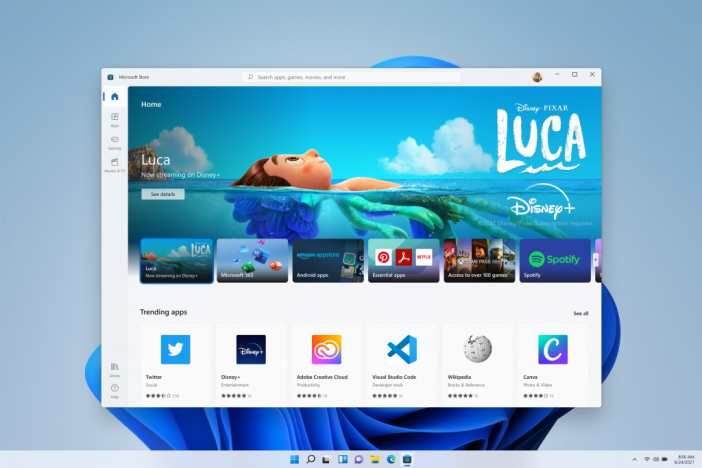
Android apps through Microsoft Store

Microsoft Store In Windows 11

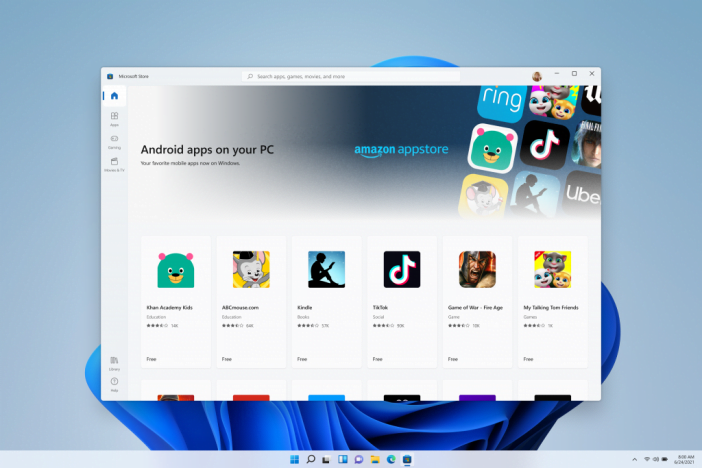
Microsoft has brought Android apps to Windows for the first time. The Microsoft Store will feature Android apps later this year, and the Amazon App Store will help them in downloading as well – Users will eventually be able to post videos from TikTok or use Khan Academy Kids for virtual learning right from your computer. Microsoft has planned to work with Amazon and Intel to make it happen through their Intel Bridge technology.

Android Apps On Microsoft Store In Windows 11

The Windows 11 updates will also be 40% smaller than the previous version of Windows 11. This could well mean that users now can download updates without sparing a huge chunk of time, adding more productivity at the user’s end.

Superior Graphics & more speed in Gaming

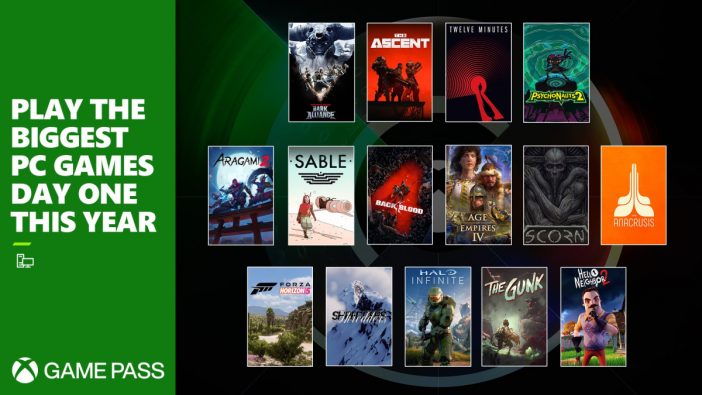
Game Pass Windows 11

The new Auto HDR feature in Windows 11 will make gaming more immersive than ever. With Auto HDR, games built on DirectX 11 or higher than previously used Standard Dynamic Range (SDR), will automatically be enhanced for High Dynamic Range (HDR). With HDR, games can render brighter and more colorful images, giving the impression of adding more depth and richness to the picture. Microsoft introduced this tech in Xbox Series X/S consoles. In Windows 11, DirectStorage will make it possible for games to load assets without straining the CPU.

Microsoft Chief Product Officer, Panos Panay, lamented the utility of Windows 11 in his blog post,

“Windows is more than just an operating system; it’s a fabric woven into our lives and in our work. It’s where we connect with people, it’s where we learn, work and play. Over time it’s remained familiar and adapted to us. We hope you’re as pumped as we are for Windows 11.“

Microsoft has yet to announce a release date for Windows 11, but it has promised the upgrade will be free and will arrive this holiday season. However, Windows 11 developer’s preview for the Windows Insider Program will be available next week.


Related reading

  • Team of developers brings Windows 11 running on the phone
  • Here are the minimum system requirements to run Windows 11 on your PC
Something incorrect? Report an error in this article. Include a source if you have one; your name and email are optional.

Filed Under: Apps & Software, Tech News & Analysis Tagged With: Microsoft, Microsoft Windows, Windows 11

Related Stories

  • Microsoft Confirms October 7 Windows And Surface Event For Local Ai Pcs

    Microsoft Confirms October 7 Windows and Surface Event for Local AI PCs

    Tech News & AnalysisSep 16, 2026

  • Apple Releases Ios 27 And Macos Golden Gate With Siri Ai

    Apple Releases iOS 27 and macOS Golden Gate With Siri AI

    Tech News & AnalysisSep 15, 2026

  • Google Launches Gemini Desktop App For Windows With Alt+Space Shortcut

    Google Launches Gemini Desktop App for Windows With Alt+Space Shortcut

    Tech News & AnalysisSep 11, 2026

Stay on top of technology

Get TechEngage reviews, buying guides and news in your feed.

Follow on Google News
Shares11FacebookTweetPinLinkedInPrint
Avatar for Sheharyar Ahmad Saeed

Sheharyar Ahmad Saeed

Mobile & Events Reporter

Sheharyar Ahmad Saeed is a Mobile and Events Reporter at TechEngage who covers smartphone launches, apps, technology conferences, and social media. He has written more than 170 articles, making complex product announcements easy to follow for everyday readers.

Joined TechEngage October 2020First article on TechEngage October 2020

Reader Interactions

Share Your Thoughts Cancel reply

Please read our comment policy before submitting your comment. Your email address will not be used or published anywhere. You will only receive comment notifications if you opt to subscribe below.

Primary Sidebar

Google News

Get TechEngage in your feed

Reviews, news, and buying guides as they publish.

Follow on Google News

Recent Stories

  • Usb C Power Meters Techengage |
    Computing & HardwareBest USB-C Power Meters for Chargers and CablesSep 28, 2026
  • Akamai Anthropic Cloud Techengage |
    Tech News & AnalysisAkamai’s $11.6 billion Anthropic cloud deal: costs, timeline and CPU strategySep 27, 2026
  • Openai Agent Dns Incident Techengage |
    Tech News & AnalysisOpenAI pauses advanced-model research after agent bypasses network restrictionsSep 27, 2026
  • Ai Markets Feat |
    AIThree CEOs Asked to Slow Down. The President Said No and the Market Fell 3 Percent. Hassan Taher on What Actually Happened.Sep 21, 2026
  • Iphone 18 Pro Availability Sept 18 |
    Tech News & AnalysisiPhone 18 Pro and Pro Max Available Today in 65+ CountriesSep 18, 2026

More in Apps & Software

  • Microsoft Windows Surface Event Oct 7 2026 |
    Microsoft Confirms October 7 Windows and Surface Event for Local AI PCsSep 16, 2026
  • Apple Ios 27 Siri Ai Featured |
    Apple Releases iOS 27 and macOS Golden Gate With Siri AISep 15, 2026
  • Feat |
    Google Launches Gemini Desktop App for Windows With Alt+Space ShortcutSep 11, 2026
  • Ost To Pst Og En |
    Stellar Converter for OST review: online and desktop testedAug 21, 2026
More Apps & Software stories →

Footer

Discover

  • About TechEngage
  • Company News & Updates
  • Our Team
  • Advertise
  • Send us a tip
  • Submit your company to TechEngage Launchpad Hot
  • TechEngage Brand Kit
  • Contact us
  • Tools & Calculators

Legal pages

  • Editorial Standards
  • Reviews Policy
  • Our Ethics
  • Corrections Policy
  • Affiliate Disclosure
  • Privacy Policy
  • Cookies Policy
  • Terms & Conditions
  • GDPR Compliance
  • Copyright & DMCA

Must reads

  • Best Mechanical Keyboards Under $100
  • Best USB-C Hubs
  • Best Portable SSDs
  • Best Gaming Graphics Cards (GPUs)
  • Best Long-Range Outdoor WiFi Extenders
  • Best Wireless CarPlay Adapters
  • Best Slack Alternatives
  • Best Long-Range Walkie-Talkies

About TechEngage

TechEngage® is an independent technology publication covering tech news, reviews and buying guides.

Founded
2003
Publisher
TechAbout LLC
ISSN
2690-3776
Google NewsRSS feed

© 2026 TechEngage®. All Rights Reserved. TechEngage® is a project of TechAbout LLC.

TechEngage® is a registered trademark in the United States under Trademark Number 6823709 and in the United Kingdom under Trademark Number UK00003417167. It is also ISSN protected under ISSN 2690-3776 and has OCLC Number 1139335774.

Contact team@techengage.com · WhatsApp +1-307-381-8801

Your analytics choice
Allow Google Analytics to help us understand readership? You can use the site without it and change this choice anytime.

Privacy details