

• Skip to primary navigation
  • Skip to main content
  • Skip to primary sidebar
  • Skip to footer
TechEngage

TechEngage®

Technology Reviews, Guides & Analysis

  • News
  • AI
  • Mobile
  • Apps
  • Security
  • Reviews
  • More
    • Internet & Social
    • Computing
    • Gadgets
    • Gaming
    • Car Tech
    • Business
    • Science & Health
TechEngage » Apps & Software

How to send disappearing photos and videos on WhatsApp

Avatar for Muhammad Abdullah Muhammad Abdullah Follow Muhammad Abdullah on X Published: November 1, 2021 Updated: January 7, 2024

WhatsApp View Once feature logo
Design by Muntaha / TechEngage
Shares20FacebookTweetPinLinkedInPrint

WhatsApp now has a long-awaited feature: users can send disappearing photos and videos that can only be viewed once.

On your phone, open a WhatsApp chat and follow the steps given below to send disappearing photos or videos on WhatsApp:

Here is how to send disappearing photos and videos in WhatsApp:

Step 1: Open any WhatsApp chat and click the clip icon inside the chat bar. A card with Document, Camera, Gallery, and other options will appear. Click Camera or Gallery to select any photo or video from your gallery.
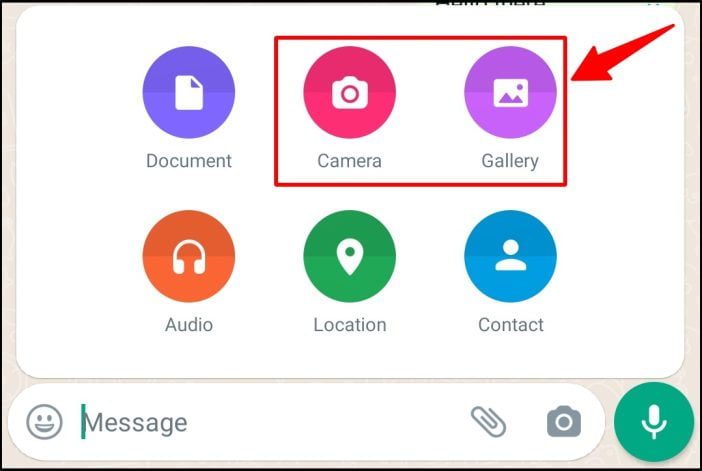
Disappearing Messages Guide Step 2

Step 2: The “1” icon will appear after selecting a media file. Click the “1” icon to enable disappearing photo/video mode in WhatsApp.

Click 1 Button In Whatsapp Chat

Step 3: Ignore this pop-up by pressing OK.

View Once Feature Whatsapp Pop Up

Step 4: Now, click and send the photo or video.

After sending the image, you’ll see that it shows 1 icon in the chat, meaning the viewer can only watch it once.
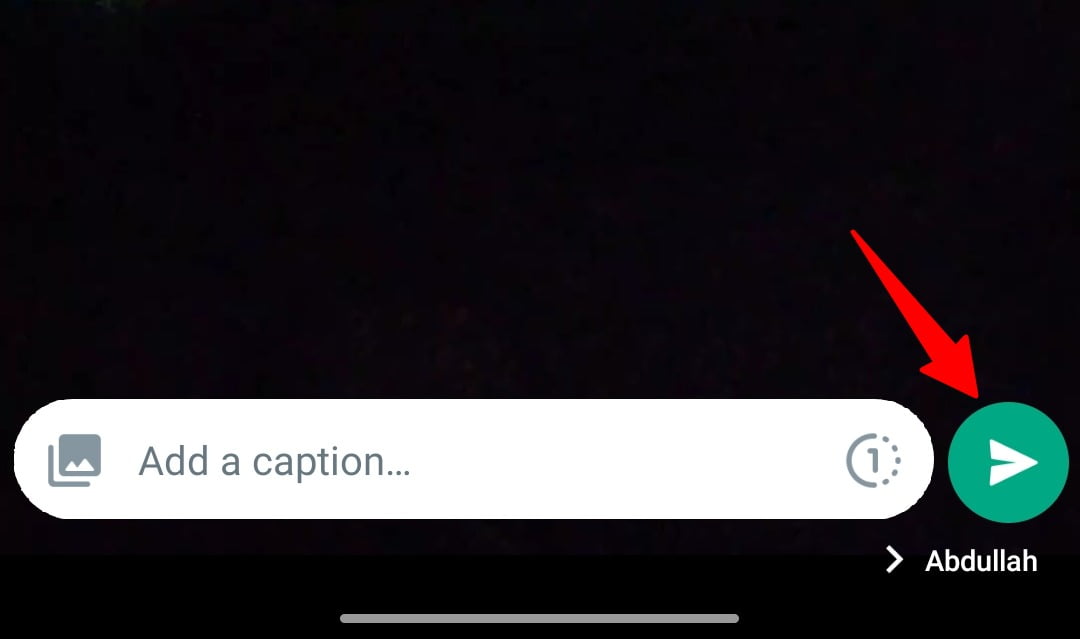
Click Send Button In Whatsapp

iPhone users follow similar steps. This is the appearance of the sent message.
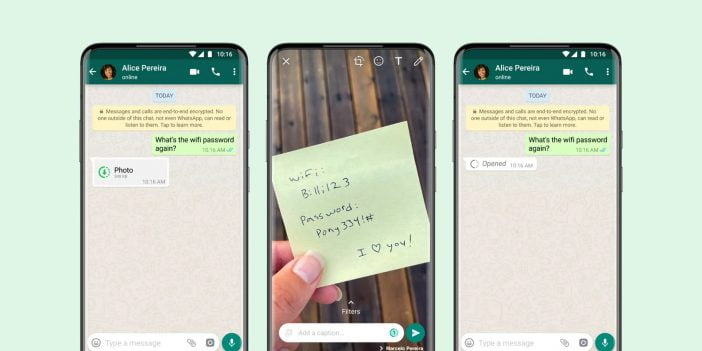
Whatsapp View Once Feature Update
WhatsApp View Once feature / Image via WhatsApp

Please note that this feature does not prevent others from capturing screenshots or recording videos using their phone’s screen recording feature or third-party applications.

According to WhatsApp, the encrypted messages also remain on the server for a few weeks on their servers. So, if someone reports the chat or that particular photo or video, the company will still have access to the files and CAN view them if needed.

The View Once feature can be included in backups. If the recipient creates a backup before opening the image or video, a copy of that file will be stored and restored.



Related reading

  • How to use multiple WhatsApp accounts on Android [Video]
  • How to secure WhatsApp with fingerprint lock on Android and iOS
  • How to send disappearing messages in WhatsApp

Filed Under: Apps & Software Tagged With: How-To, Photos, Videos, WhatsApp

Related Stories

  • Top 10 Battery Draining Apps To Avoid In 2026

    Top 10 Battery Draining Apps to Avoid in 2026

    MobileOct 5, 2024

  • The Benefits Of Having A Small Air Compressor For Flat Tires

    The Benefits of Having a Small Air Compressor for Flat Tires

    Mobility & Car TechSep 27, 2024

  • Apple Releases Ios 27 And Macos Golden Gate With Siri Ai

    Apple Releases iOS 27 and macOS Golden Gate With Siri AI

    Tech News & AnalysisSep 15, 2026

Shares20FacebookTweetPinLinkedInPrint
Avatar for Muhammad Abdullah

Muhammad Abdullah

Senior Tech Correspondent

Muhammad Abdullah is a Senior Tech Correspondent at TechEngage with over 320 published articles spanning social media platforms, mobile apps, operating systems, and industry events. A computer scientist turned tech writer and certified Growth Hacker, Abdullah breaks down complex digital trends into practical insights readers can act on.

Joined October 2018

Reader Interactions

Share Your Thoughts Cancel reply

Please read our comment policy before submitting your comment. Your email address will not be used or published anywhere. You will only receive comment notifications if you opt to subscribe below.

Primary Sidebar

Follow us on Google News

Recent Stories

  • Best Mechanical Keyboards Under 100 2026 |
    Reviews & Buying GuidesBest Mechanical Keyboards Under $100: 8 Picks for 2026Sep 15, 2026
  • Feat 1 |
    Tech News & AnalysisApple Releases iOS 27 and macOS Golden Gate With Siri AISep 15, 2026
  • Best Usb C Hubs 2026 |
    Reviews & Buying GuidesBest USB-C Hubs in 2026: 8 Picks for MacBook, Dual Monitors and TravelSep 14, 2026
  • Featured |
    Reviews & Buying GuidesBest Wireless CarPlay Adapters in 2026: 6 Picks for Wired-CarPlay CarsSep 14, 2026
  • Tesla Roadster October 1 Reveal Waco |
    Mobility & Car TechTesla Sets October 1 Roadster Reveal in Waco, Invites Reservation HoldersSep 14, 2026

More in Apps & Software

  • Feat |
    Tech News & AnalysisGoogle Launches Gemini Desktop App for Windows With Alt+Space ShortcutSep 11, 2026
  • Ost To Pst Og En |
    Apps & SoftwareStellar Converter for OST Review: Online and Desktop Tools, TestedAug 21, 2026
  • Best Free Vpns Jpg |
    Apps & Software4 Best Free VPNs for 2026Sep 7, 2024
  • Top Best Calendar Apps Jpg |
    Apps & Software9 Best Calendar Apps in 2026May 24, 2024
More Apps & Software stories →

Footer

Discover

  • About TechEngage
  • Company News & Updates
  • Our Team
  • Advertise
  • Send us a tip
  • Startup Submissions
  • TechEngage Brand Kit
  • Contact us
  • Tools

Legal pages

  • Reviews Guarantee & Methodology
  • Community Guidelines
  • Corrections Policy and Practice
  • Cookies Policy
  • Our Ethics
  • Disclaimer
  • GDPR Compliance
  • Privacy Policy
  • Terms and Conditions
  • Editorial Standards
  • Affiliate Disclosure
  • Copyright and DMCA Policy

Must reads

  • Best AirPods alternatives on Amazon
  • Best PC monitors for gaming on Amazon
  • Best family board games
  • Best video doorbells without subscription
  • Best handheld video game consoles
  • Best all-season tires for snow
  • Best mobile Wi-Fi hotspots
  • Best treadmills on Amazon

About TechEngage

TechEngage® is an independent technology publication covering tech news, reviews and buying guides since 2003.

Founded
2003
Publisher
TechAbout LLC
ISSN
2690-3776
Google NewsRSS feed

© 2026 TechEngage®. All Rights Reserved. TechEngage® is a project of TechAbout LLC.

TechEngage® is a registered trademark in the United States under Trademark Number 6823709 and in the United Kingdom under Trademark Number UK00003417167. It is also ISSN protected under ISSN 2690-3776 and has OCLC Number 1139335774.
