• Skip to primary navigation
  • Skip to main content
  • Skip to primary sidebar
  • Skip to footer
TechEngage

TechEngage®

Hands-on reviews, research-backed buying guides and technology news.

  • News
    • Internet & Social
    • Gadgets
    • Car Tech
    • Business
    • Science & Health
  • Reviews
  • Buying Guides
  • How-to
  • AI
  • Computing
    • Apps
    • Security
    • Gaming
  • More
    • Tools
    • Puzzles
    • Mobile
  • Launchpad
  • Sign in
TechEngage » Apps & Software

iOS 15 update is now available for iPhone 6s and later

Avatar for Amna Jawaid Amna Jawaid Connect with Amna Jawaid on LinkedIn Published: Sep 22, 2021 · 2:28 AM ET Updated: Jun 29, 2022 · 9:14 PM ET

NewsNews report. Not a buying guide or hands-on product test.
ios-196a4867
Shares10FacebookTweetPinLinkedInPrint

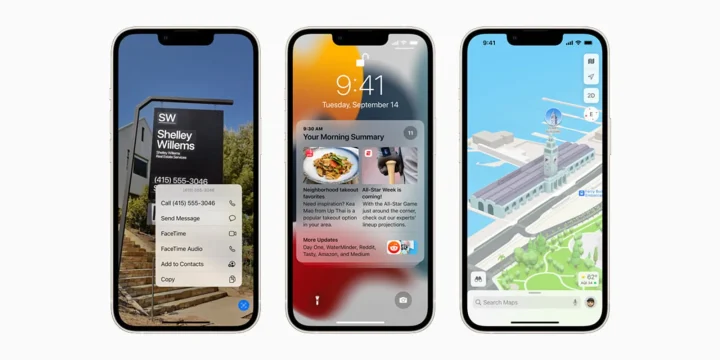
Apple has finally released iOS 15 to the supported devices, including a five-year-old iPhone 6s. The operating system was announced back in Juneat WWDC. iOS 15 adds new ways to remain connected, significant updates to help users focus and explore, and intelligent features to help people get more done with their iPhones. New features like Live Text use on-device intelligence to expose relevant information, Maps upgrades give entirely new ways to navigate the world, and much more. iOS 15 is available as a free software upgrade for iPhone 6s and later devices now.

FaceTime is much more advanced than ever, allowing users to stay in touch with anyone at any time. FaceTime audio and visual features have been updated to make conversations seem more realistic and lifelike. In addition, FaceTime calls may now be joined through a web browser on Android or Windows smartphones other than Apple devices. FaceTime calls made through the web are end-to-end encrypted, ensuring that privacy is not affected.

Images, Safari, Apple News, Music, Apple Podcasts, and the Apple TV app all have a new section called Shared with You that shows photos, articles, music, and other information shared by friends and family in Messages. For example, in the Photos app, Shared with You automatically shows shared photos, news stories in Apple News, and other relevant content in the associated app. The Shared with You section identifies who sent the material and allows you to access the corresponding message and resume the conversation quickly. Focus is a new feature in iOS 15 that helps users decrease distraction by filtering notifications depending on what they want to focus on.

Other features like a fresh new look for notifications, redesigned browsing with Safari, accurate navigation with Apple maps, new keys, and state IDs added to Apple Wallet, and much more are now out to provide an outstanding and meaningful user experience.

With a new multitasking experience that is even more accessible, new widget layouts for the Home Screen, the App Library, additional ways to collect thoughts with Quick Note, and FaceTime upgrades for more natural video conversations, iPadOS 15 brings new features that extend the versatility of iPad even further. As of today, iPadOS 15 is available as a free software upgrade.

Working with multiple apps is now easier than ever with iPadOS 15. In addition, a new multitasking option displays at the top of applications, allowing you to switch between Split View or Slide Over quickly. Other significant features updates include organizing and personalizing iPad with widgets and the App library, capturing thoughts with quick notes, enhancements for more natural FaceTimes calls, the latest tools to find and focus, and a completely fresh new look for notifications.


Something incorrect? Report an error in this article. Include a source if you have one; your name and email are optional.

Filed Under: Apps & Software, Tech News & Analysis Tagged With: Apple iOS, iOS, iOS 15, iPadOS, iPadOS 15, News

Related Stories

  • Googlebook Shows How Android 17 And Gemini Intelligence Could Reshape Google’S Ecosystem

    Googlebook Shows How Android 17 and Gemini Intelligence Could Reshape Google’s Ecosystem

    AIMay 16, 2026

  • How To Screen Record On Windows 11 With Audio

    How to Screen Record on Windows 11 With Audio

    Apps & SoftwareOct 10, 2026

  • How To Stop Chrome Tabs From Reloading

    How to Stop Chrome Tabs From Reloading

    Apps & SoftwareOct 10, 2026

Stay on top of technology

Get TechEngage reviews, buying guides and news in your feed.

Follow on Google News
Shares10FacebookTweetPinLinkedInPrint
Avatar for Amna Jawaid

Amna Jawaid

Digital Media Journalist

Amna Jawaid is a journalist specializing in digital media who writes for TechEngage on apps and software, technology news, mobile devices, and science and health tech.

Joined TechEngage September 2021First article on TechEngage September 2021

Reader Interactions

Share Your Thoughts Cancel reply

Please read our comment policy before submitting your comment. Your email address will not be used or published anywhere. You will only receive comment notifications if you opt to subscribe below.

Primary Sidebar

Google News

Get TechEngage in your feed

Reviews, news, and buying guides as they publish.

Follow on Google News

Recent Stories

  • Windows Screen Recording Guide |
    Apps & SoftwareHow to Screen Record on Windows 11 With AudioOct 10, 2026
  • Chrome Tabs Reloading Techengage |
    Apps & SoftwareHow to Stop Chrome Tabs From ReloadingOct 10, 2026
  • Techengage Windows 11 File Backup |
    Computing & HardwareHow to Back Up Windows 11 Files to an External DriveOct 10, 2026
  • Techengage Ssd Enclosures |
    Computing & Hardware3 Best SSD Enclosures for USB-C and USB4Oct 10, 2026
  • Techengage Office Copilot Frontier |
    AIMicrosoft brings Office editing to Copilot, Frontier firstOct 10, 2026

More in Apps & Software

  • Windows Screen Recording Guide |
    How to Screen Record on Windows 11 With AudioOct 10, 2026
  • Chrome Tabs Reloading Techengage |
    How to Stop Chrome Tabs From ReloadingOct 10, 2026
  • 136181 7Effec8402C5Ea64 |
    What Microsoft Announced on October 7: Surface Laptop Ultra, RTX Spark Dev Box, and Windows AISep 16, 2026
  • TechEngage news graphic: iOS 27 Is Out With Siri AI, with an illustrated laptop and phone showing an AI assistant
    Apple Releases iOS 27 and macOS Golden Gate With Siri AISep 15, 2026
More Apps & Software stories →

Footer

Discover

  • About TechEngage
  • Company News & Updates
  • Our Team
  • Advertise
  • Send us a tip
  • Submit your company to TechEngage Launchpad Hot
  • TechEngage Brand Kit
  • Contact us
  • Tools & Calculators

Legal pages

  • Editorial Standards
  • Reviews Policy
  • Our Ethics
  • Corrections Policy
  • Affiliate Disclosure
  • Privacy Policy
  • Cookies Policy
  • Terms & Conditions
  • GDPR Compliance
  • Copyright & DMCA

Must reads

  • Best Mechanical Keyboards Under $100
  • Best USB-C Hubs
  • Best Portable SSDs
  • Best Gaming Graphics Cards (GPUs)
  • Best Long-Range Outdoor WiFi Extenders
  • Best Wireless CarPlay Adapters
  • Best Slack Alternatives
  • Best Long-Range Walkie-Talkies

Download our apps

TechEngage app coming soon on the App Store Available onChrome

© 2026 TechEngage®. All Rights Reserved. TechEngage® is a project of TechAbout LLC.

TechEngage® is a registered trademark in the United States under Trademark Number 6823709 and in the United Kingdom under Trademark Number UK00003417167. It is also ISSN protected under ISSN 2690-3776 and has OCLC Number 1139335774.

Contact team@techengage.com · WhatsApp +1-307-381-8801

Your analytics choice
Allow Google Analytics to help us understand readership? You can use the site without it and change this choice anytime.

Privacy details