

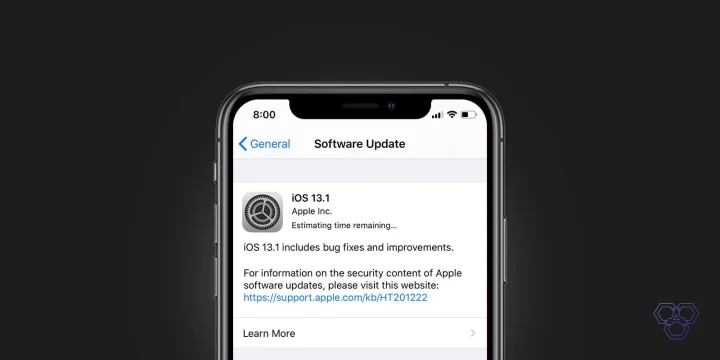
Apple rolls out iOS 13.1 update which brings new features, including an enhanced AirDrop. The new iOS update also fixes a lot of bugs that users were experiencing with iOS 13. Apple also releases the new iPadOS for iPads with productivity and connectivity tools to the iPad.
iOS 13.1 not only activates iPadOS for compatible iPads but also has new features such as enhanced AirDrop, the option to share the arrival time (ETA) with Apple Maps and changes for other native apps such as Shortcuts with new automation features.
Previously iPadOS and iOS 13.1 was scheduled to release on September 30th, but because of bugs in iOS 13, Apple moved the date to September 24th.
iOS 13 was a mess when released for iPhones. There were tons of bugs that our Editor in Chief, Muhammad Abdullah noticed and shared in his post. The phone freezes, there were glitches and many other issues.
iOS 13.1 release notes by Apple
iOS 13.1 includes bug fixes and improvements, including AirDrop with Ultra Wideband technology on iPhone 11, iPhone 11 Pro, and iPhone 11 Pro Max, suggested automations in the Shortcuts app, and the ability to share ETA in Maps.
AirDrop
- Ability to select who you want to AirDrop to by pointing from one iPhone 11, iPhone 11 Pro, or iPhone 11 Pro Max to another using the new U1 chip with Ultra Wideband technology for spatial awareness
Shortcuts
- Suggested automations in the Gallery personalized to your daily routine
- Personal and home automations for automatically running shortcuts based on triggers
- Home app support for shortcuts as advanced actions in the Automation tab
Maps
- Share ETA to send your estimated time of arrival while your route is in progress
Battery Health
- Optimized battery charging to slow the rate of battery aging by reducing the time your iPhone spends fully charged
- Performance management feature for iPhone XR, iPhone XS and iPhone XS Max to prevent the device from unexpectedly shutting down, including the option to disable this feature if an unexpected shutdown occurs
- Notifications for when Battery Health is unable to verify if a new, genuine Apple battery is in iPhone XR, iPhone XS, iPhone XS Max and later
This update also includes bug fixes and other improvements. This update:
- Adds a link to the Me tab in Find My to allow a guest to sign in and locate a missing device
- Includes notifications for when the display on your iPhone is unable to be verified as a new, genuine Apple display in iPhone 11, iPhone 11 Pro, and iPhone 11 Pro Max
- Addresses issues in Mail that could cause incorrect download counts, missing senders and subjects, difficulty selecting or flagging threads, duplicate notifications or overlapping fields
- Fixes an issue in Mail that may prevent background downloading of email messages
- Addresses an issue that could prevent Memoji from correctly tracking facial expressions in Messages
- Fixes an issue where photos might not display in the Messages details view
- Fixes an issue in Reminders that prevented some users from sharing iCloud lists
- Resolves an issue in Notes where Exchange notes may not show up in search results
- Addresses an issue in Calendar where birthday events could appear multiple times
- Addresses an issue that could prevent third-party sign in screens from appearing in the Files app
- Fixes an issue that could cause Camera orientation to appear rotated when swiping to it from the Lock screen
- Addresses an issue that could cause the display to sleep while interacting with the Lock screen
- Resolves issues where app icons could appear as blank or as a different app on the Home screen
- Resolves an issue that could prevent supported wallpapers from switching appearances when changing between Light and Dark modes
- Addresses stability issues when signing out of iCloud from Passwords & Accounts in Settings
- Fixes an issue where signing in to update Apple ID settings could fail repeatedly
- Fixes an issue that could prevent the device from vibrating when connecting to a charger
- Addresses an issue that could cause people and groups in the Share Sheet to appear blurred
- Fixes an issue that could prevent alternate words from displaying when tapping on a misspelled word
- Resolves an issue where multilingual typing could stop working
- Addresses an issue that could prevent switching back to the QuickType keyboard after using a third-party keyboard
- Fixes an issue that could prevent the edit menu from appearing when selecting text
- Fixes an issue where Siri may not read Messages in CarPlay
- Addresses an issue that could prevent sending a message using third party messaging apps in CarPlay
For information on the security content of Apple software updates, please visit this website: https://support.apple.com/kb/HT201222
Why do you need to install iOS 13.1?
As I mentioned before, iOS 13.1 brings crucial several bug fixes and new features to iPhones. Here’s what you need to know:
- Fixes a critical security bug that allows anyone to view the contacts of an iPhone user during a FaceTime call without unlocking the phone using Siri’s easy voiceover function.
- Introduces the ETA function to Maps, enabling iPhone users to share their anticipated arrival time with their family and friends right inside the applications.
- Fixes a location permission bug which changed the privacy setting to “Ask Next Time” if a user had never selected to share their location details for an app.
- Shortcuts app is now smarter and suggests automation for your routine.
- Brings a new feature to Apple Music that allows the user to see the lyrics to the song that is playing in a Karaoke style format.
iPadOS is not a new operating system but a refined version of iOS designed for the iPads, so it is instead a version of iOS 13 with steroids.
iPadOS includes features such as the connecting with external storage unit; connect a wireless remote control or use a keyboard and mouse.
iPadOS compatible iPads:
iPadOS is compatible with the latest Apple iPads. Here are all the models that support iPadOS:
- iPad Pro 12.9-inch
- iPad Pro 11-inch
- iPad Pro 10.5-inch
- iPad Pro 9.7-inch
- iPad 5th, 6th, and 7th gen
- 5th gen iPad mini
- iPad mini 4
- iPad Air 3rd gen
- iPad Air 2


Share Your Thoughts