

In this guide
For everyday video calls, start with the Logitech C920x. Choose the Logitech StreamCam if you record or stream at 1080p and want 60 fps, or the NexiGo N980P when a wider view matters. The NexiGo N930E adds a small built-in light for a compact desk setup.
An external webcam is worth buying when it solves a specific problem: awkward camera placement, limited detail, a narrow picture or the need to record smoother motion. A recent laptop camera may already be good enough for meetings. Before replacing it, try better front lighting and raise it to eye level.
Disclosure: As an Amazon Associate, TechEngage earns from qualifying purchases.
Compare the webcams
| Webcam | Best fit | Maximum Full HD frame rate | Main advantage | Main limitation |
|---|---|---|---|---|
| Logitech C920x | Everyday calls | 30 fps | Autofocus and a straightforward USB-A connection | No 1080p60 mode |
| NexiGo N980P | Wider group shots | 60 fps | 120° advertised field of view | Wide framing includes more of your room |
| Logitech StreamCam | Streaming and vertical recording | 60 fps | Autofocus and landscape/portrait mounting | Needs a suitable USB connection for full performance |
| NexiGo N930E | A desk with little room for a light | 30 fps | Built-in ring light and autofocus | Light stays close to the lens; no 1080p60 |
1. Logitech C920x: best for everyday video calls

| Price & Details | |
|---|---|
| Price | $67.90 |
| Rating on Amazon | 4.6 out of 5 stars |
| Brand | Logitech |
| Buy at Amazon | Check availability on Amazon |
Product data updated: 29 October 2026 - 9:44
Best for: A single person who needs an external camera for meetings, interviews or lessons.
Keep in mind: Full HD capture tops out at 30 fps. Choose a 60 fps model if smoother recorded motion is a priority.
The C920x is a sensible starting point for an ordinary desk. It provides 1080p video, autofocus and two built-in microphones without asking you to build a streaming setup around it. Its USB-A connection is convenient for a desktop; a USB-C-only laptop needs a suitable adapter or hub.
The mounting clip lets you position the camera independently of the laptop screen, and a tripod thread gives you another option. That flexibility can be as useful as the resolution: you can keep a natural eye-level angle while working on an external monitor.
It is not a 4K camera or a 1080p60 model. Use it for calls and straightforward recordings, with a light in front of you rather than a bright window behind you. The microphones are convenient, but a headset keeps the microphone closer to your mouth when the room is noisy.
Pros: 1080p capture; autofocus; built-in microphones; monitor and tripod mounting.
Cons: 30 fps at Full HD; USB-C-only computers need an adapter; room sound still matters.
2. NexiGo N980P: best for wide-angle group shots

| Price & Details | |
|---|---|
| Price | $54.99 |
| Rating on Amazon | 4.4 out of 5 stars |
| Brand | NexiGo |
| Buy at Amazon | Check availability on Amazon |
Product data updated: 29 October 2026 - 9:44
Best for: Two people sharing a camera, or a presentation where more of the room needs to fit.
Keep in mind: The wide view also shows more background. It is less convenient for a tight, single-person portrait.
The N980P is the wide-angle choice. NexiGo specifies a 120° field of view and up to 1080p at 60 fps, making it useful when a narrower camera cuts someone out of a shared call. Place people near the center and preview the edges before settling on a position.
Its adjustable base offers more freedom to aim the camera, and it supports a standard quarter-inch tripod mount. A tripod is not included. For a fixed desk position, set the framing once and check it in the app you actually use, rather than relying only on the operating system’s camera preview.
Choose it for a stationary setup rather than automatic focus tracking. Set the focus and preview the picture at your usual sitting distance. Its main reasons to choose it are the wide composition and 60 fps capability; a normal meeting may not transmit at that frame rate.
Pros: Wide field of view; 1080p60 capability; adjustable base; tripod compatibility.
Cons: More background in the picture; no dependable autofocus promise; no privacy cover listed in the technical specifications.
3. Logitech StreamCam: best for 1080p streaming and portrait video

| Price & Details | |
|---|---|
| Price | $99.99 |
| Discount | 41% |
| Rating on Amazon | 4.4 out of 5 stars |
| Brand | Logitech |
| Buy at Amazon | Check availability on Amazon |
Product data updated: 29 October 2026 - 9:50
Best for: Creators who want Full HD at 60 fps and the option to mount the camera vertically.
Keep in mind: Use a suitable USB 3.1 Gen 1 connection for full performance. USB-C describes the plug shape, not the speed of every port or adapter.
StreamCam is the more useful Logitech pick here when recording is part of your routine. It supports 1080p at 60 fps and autofocus, and its mounting options suit both landscape and portrait compositions. That is handy for a desk used for calls one day and vertical video the next.
The connection deserves attention before you buy. Logitech specifies USB 3.1 Gen 1 and notes that USB 2.0 limits operation to 720p at 30 fps. A slow hub or unsuitable adapter can therefore remove much of the reason to choose this camera. Check your computer’s port specification, not just whether the connector fits.
Its 78° diagonal view is more focused on a desk user than the NexiGo N980P’s wide view. Set the desired resolution and frame rate in your recording software, and make a short test clip. Auto-framing and other software features depend on the compatible software and settings; do not assume every calling app exposes the same controls.
Pros: 1080p60; autofocus; portrait and landscape mounting; a less expansive view than the N980P.
Cons: No 4K capture; full performance depends on the USB connection; software features vary by setup.
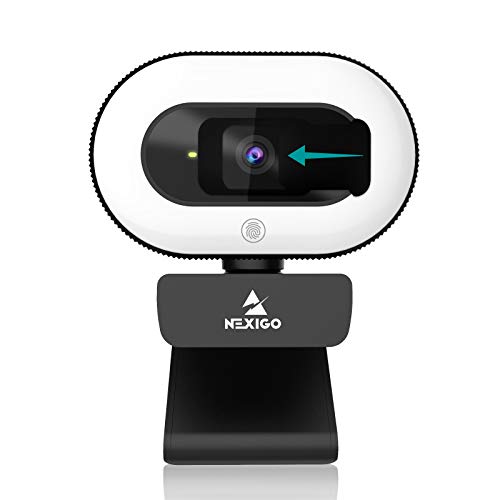
4. NexiGo N930E: best for a compact camera-and-light setup
| Price & Details | |
|---|---|
| Price | $49.99 |
| Rating on Amazon | 4.4 out of 5 stars |
| Brand | NexiGo |
| Buy at Amazon | Check availability on Amazon |
Product data updated: 29 October 2026 - 10:08
Best for: A desk where you want a little front lighting without adding a separate lamp stand.
Keep in mind: The small ring light is close to the lens. It can reflect in glasses and cannot replace careful room lighting.
The N930E combines a 1080p camera, autofocus and an adjustable ring light in one unit. That makes it worth considering when space is tight and your face is dimmer than the background. Start with a low light setting and adjust it while watching the preview.
NexiGo lists a 75° field of view, a supplied privacy cover and quarter-inch tripod compatibility. Its Full HD capture is 30 fps, so this is a meeting-focused alternative to the N980P rather than a substitute for its 60 fps mode. A separate tripod is an extra purchase.
Choose it for convenience, not because a built-in light guarantees a better picture than every unlit webcam. If you already have a well-positioned desk light, the ring light may add little. Turn it off when it creates distracting reflections, and compare the preview with your existing camera before the return window closes.
Pros: Built-in light; autofocus; included privacy cover; compact desk arrangement.
Cons: No 1080p60 mode; close-to-lens lighting can cause reflections; tripod not included.
Choose the features you will actually use
For meetings, start with framing and lighting. A camera that sits at eye level and exposes your face properly is more useful than extra pixels in a dark room. Check the result in your meeting app: account settings, bandwidth and the service itself can limit transmitted resolution.
For recording, decide between detail and motion. All four picks here top out at Full HD. Sixty frames per second can make gestures and movement look smoother, but it does not automatically fix audio sync or make a stream better. A 4K model makes more sense when you need extra cropping room or a higher-resolution local recording.
For shared calls, consider the view. A wide camera can fit more people, but it can also make each face smaller and reveal more of the room. A narrower view is often easier for one person. Check diagonal, horizontal and vertical field-of-view measurements before comparing numbers from different brands.
For software controls, check your exact system. Basic video capture and optional vendor utilities are different things. Confirm current operating-system support before buying for a particular feature. Do not assume Windows, macOS and Linux expose identical focus, framing or firmware controls.
Get a better picture before spending more
Place a soft light in front of you, slightly to one side, and avoid sitting directly in front of a bright window. Clean the lens and raise the camera to roughly eye level. Record a short clip with ordinary movement, then check focus, exposure and sound rather than judging a frozen preview.
Select the webcam explicitly in your calling or recording app. If the picture is soft or the frame rate is lower than expected, check the selected resolution, available lighting and USB connection. Try connecting directly to the computer before blaming the camera or replacing it.
Choose the microphone separately from the camera. A headset or well-positioned external microphone can reduce how much room sound is picked up. Our guide to recording better sound explains the setup considerations. If you use desktop speakers during calls, watch for echo and keep their volume reasonable.
For a laptop with limited connections, choose a USB-C hub with the data capability your camera needs. A charging port alone is not enough. Keep the camera on a stable mount and leave enough cable slack that moving the laptop does not pull it off the screen.
Frequently asked questions
Which webcam should I buy for everyday video calls?
The Logitech C920x is a straightforward option for 1080p calls. Choose the NexiGo N930E if an integrated light would help your desk setup. First check whether better lighting and camera placement solve the problem with your existing webcam.
Is 60 fps necessary for Zoom or Teams?
Not usually. It is more useful for compatible local recording or streaming with visible movement. Calling services can limit the frame rate and resolution, so buying a 60 fps camera does not guarantee a 60 fps call.
Can Logitech StreamCam record in 4K?
No. StreamCam supports up to Full HD 1080p at 60 fps. Logitech specifies a suitable USB 3.1 Gen 1 connection for full performance; a USB 2.0 connection limits its available modes.
Which webcam is best for fitting two people in the picture?
The NexiGo N980P has the widest advertised field of view among these picks, at 120°. Preview the framing and keep faces near the center. A wider view also includes more background and can make people look smaller.
Does every laptop need an external webcam?
No. Many built-in cameras are adequate for calls, particularly in good lighting. An external model is most useful when you need a different camera position, wider framing, a specific recording mode or a clear improvement over the camera you already have.




Share Your Thoughts