• Skip to primary navigation
  • Skip to main content
  • Skip to primary sidebar
  • Skip to footer
TechEngage

TechEngage®

Hands-on reviews, research-backed buying guides and technology news.

  • News
    • Internet & Social
    • Gadgets
    • Car Tech
    • Business
    • Science & Health
  • Reviews
  • Buying Guides
  • How-to
  • AI
  • Computing
    • Apps
    • Security
    • Gaming
  • More
    • Tools
    • Puzzles
    • Mobile
  • Launchpad
  • Sign in
TechEngage » Internet & Social Media

How to Get Verified on X/Twitter

Avatar for Muhammad Abdullah Muhammad Abdullah Follow Muhammad Abdullah on X Published: Apr 5, 2023 · 4:46 PM ET Updated: May 16, 2026 · 1:00 AM ET

How to get verified on Twitter
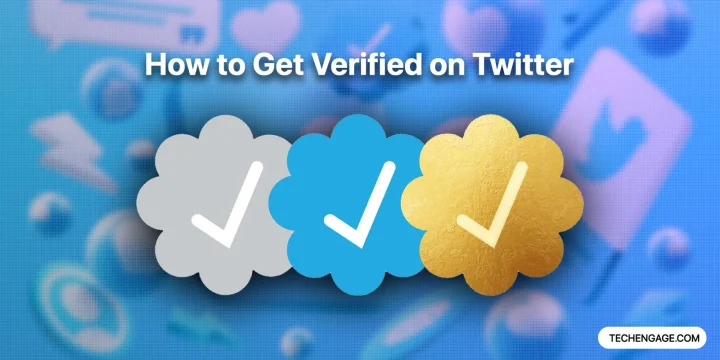
Twitter verified badges, illustrated by Hashim / TechEngage
FacebookTweetPinLinkedInPrint

Once upon a time, getting a blue checkmark on Twitter was something only celebs and notable people could do. Then, in 2022, Elon Musk bought the company and shook things up.

One of the biggest changes Musk made on Twitter since the introduction of Twitter Blue was the ability for anyone to get a blue checkmark and become verified for a fee of $8. On top of that, he decided to remove legacy verified blue badges on April 1st and made other changes.

But you might be wondering, “How can I get that blue/gold/grey badge? Can I just pay for it?” Hold on there. We’re almost there. I’ve included some screenshots and steps to guide you through the process of obtaining that coveted blue badge.

Before proceeding, you should know that previously, there were certain conditions for getting verified on Twitter, meaning not everyone could be verified. However, those limitations no longer apply. Although previous regulations are no longer necessary, Twitter still verifies accounts based on new eligibility criteria.

Table of Contents

  1. Price for Blue, Gold, and Grey Badges
  2. Apply for Twitter verified from desktop
  3. Apply for Twitter verified from your phone
  4. Twitter Gold Badge for Organizations (Govt. and Businesses)

Price for Blue, Gold, and Grey Badges

This is the price you’ll have to pay for each badge on Twitter.

Badge TypePrice per month
Blue Badge$8, $11
Gold, Grey Badges$1,000, $50 per account

Apply for Twitter verified from desktop

Twitter Blue On Web

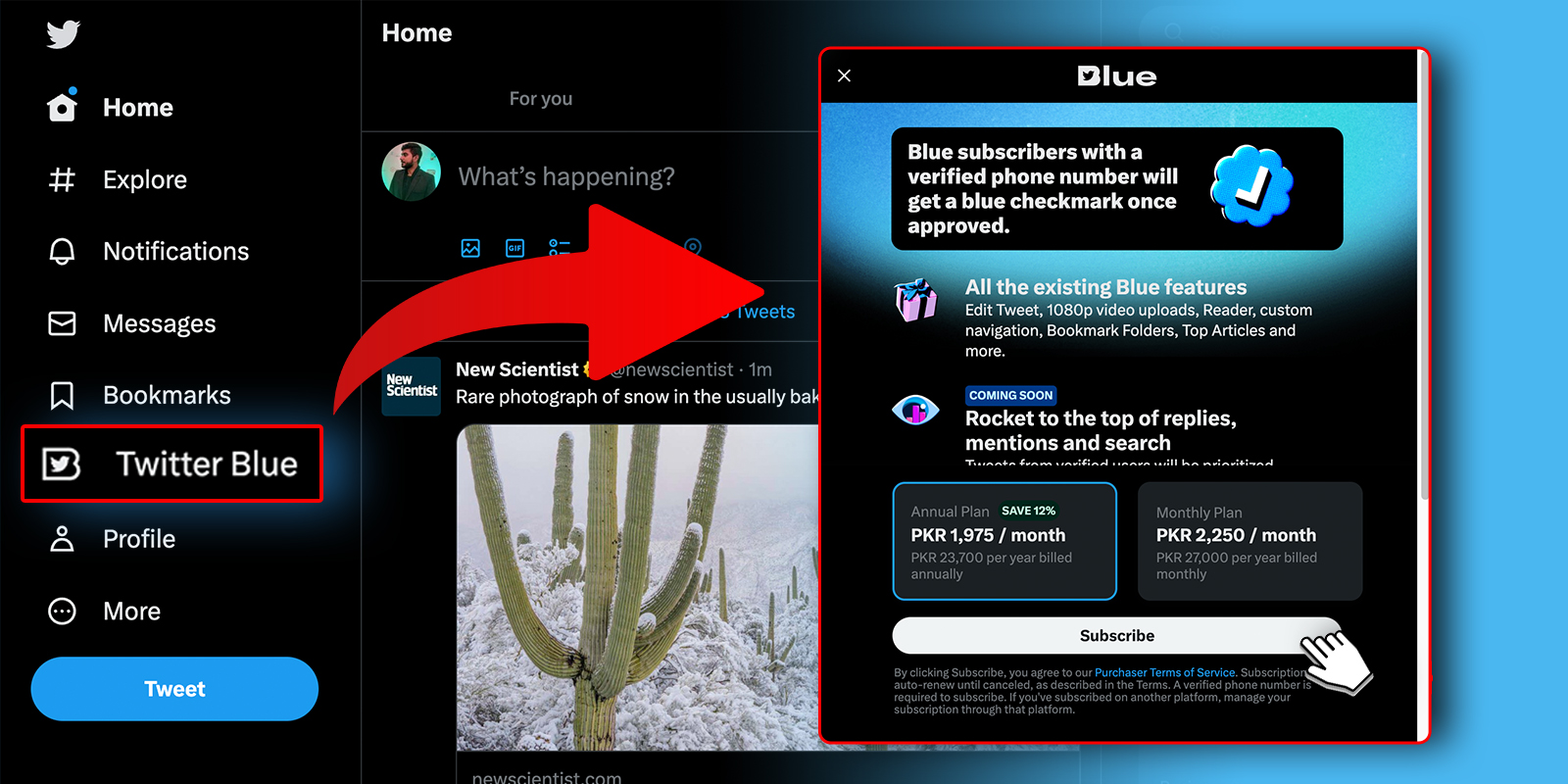
  1. Go to the Twitter website and log in to your account.
  2. Click “Twitter Blue” from the left panel
  3. A Blue subscription screen will appear
  4. Choose a monthly or yearly package of your choice
  5. Review the benefits of Twitter Blue and click on “Subscribe.”
  6. Follow the prompts to enter your payment information and complete the subscription process.
  7. Once your subscription is confirmed, you can start enjoying the benefits of Twitter Blue, such as access to exclusive features like Undo Tweet and Bookmark Folders.

Apply for Twitter verified from your phone
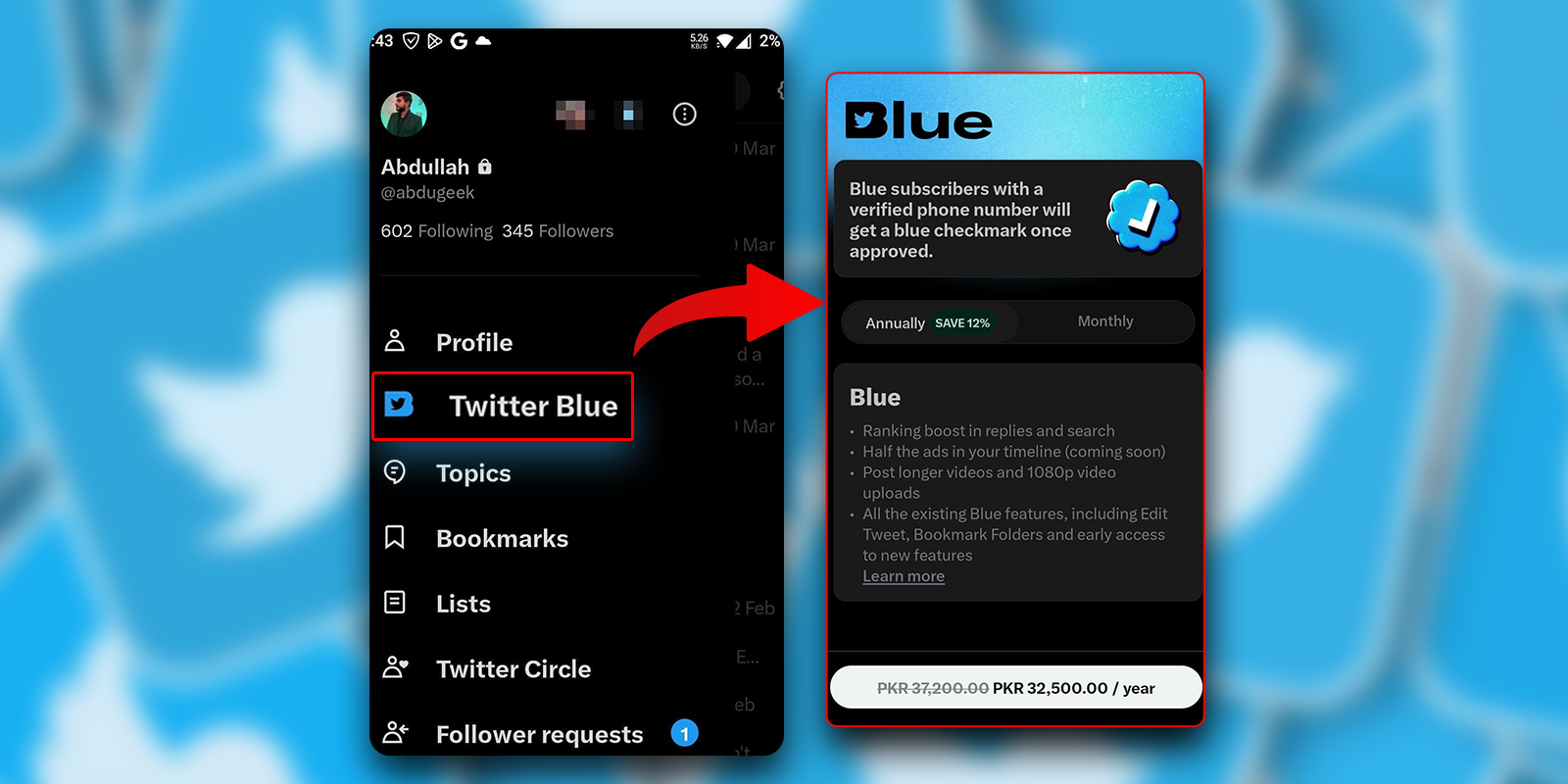
Twitter Blue Screenshot For Phone

  1. Open the Twitter app on your phone (iPhone/Android).
  2. Tap on your profile picture in the top left corner to access the side menu.
  3. Scroll down and tap on “Twitter Blue.”
  4. A subscription screen will appear.
  5. Review the benefits of Twitter Blue and tap on “Subscribe.”
  6. Follow the prompts to enter your payment information and complete the subscription process.
  7. Once your subscription is confirmed, you can enjoy the benefits of Twitter Blue, such as access to exclusive features like Undo Tweet and Bookmark Folders.

*Please note that the availability of Twitter Blue may vary depending on your location. If you don’t see the option to subscribe to Twitter Blue, it may not yet be available in your region.

Twitter Gold Badge for Organizations (Govt. and Businesses)

Twitter Gold Verified Badge For $1,000

If you’re an organization (a business or a government account) looking for a Gold verified badge. Just follow this link and apply for verification. If approved, you’ll have to pay $1,000/month for a Gold badge and $50/month per account for any linked accounts.

This is how you can get a verified blue badge on Twitter by paying $8 (on the web), $11 (on mobile phones), and $1,000/month for verified government and business accounts. It is recommended that you go with the web version subscription to avoid the Google and Apple store fees, which is why Twitter Blue is expensive on smartphones.

Something incorrect? Report an error in this article. Include a source if you have one; your name and email are optional.

Filed Under: Internet & Social Media Tagged With: How-To, Twitter, Twitter Blue

Related Stories

  • Amazon Selling: How To Overcome Common Challenges

    Amazon Selling: How to Overcome Common Challenges

    Internet & Social MediaFeb 6, 2024

  • Whatsapp Now Supports Up To Four Phones

    WhatsApp now supports up to four phones

    Internet & Social MediaApr 27, 2023

  • Twitter Blue: How To Sign Up, Pricing, Features

    Twitter Blue: How to sign up, pricing, features

    Internet & Social MediaMar 28, 2023

Stay on top of technology

Get TechEngage reviews, buying guides and news in your feed.

Follow on Google News
FacebookTweetPinLinkedInPrint
Avatar for Muhammad Abdullah

Muhammad Abdullah

Senior Tech Correspondent

Muhammad Abdullah is a Senior Tech Correspondent at TechEngage and its most prolific author, with more than 320 published articles. A computer scientist by training and a certified Growth Hacker, he covers mobile devices, apps, operating systems, social media, and gaming, turning complex digital trends into practical insights.

Joined TechEngage October 2018First article on TechEngage October 2018

Reader Interactions

Share Your Thoughts Cancel reply

Please read our comment policy before submitting your comment. Your email address will not be used or published anywhere. You will only receive comment notifications if you opt to subscribe below.

Primary Sidebar

Google News

Get TechEngage in your feed

Reviews, news, and buying guides as they publish.

Follow on Google News

Recent Stories

  • Akamai Anthropic Cloud Techengage |
    Tech News & AnalysisAkamai’s $11.6 billion Anthropic cloud deal: costs, timeline and CPU strategySep 27, 2026
  • Openai Agent Dns Incident Techengage |
    Tech News & AnalysisOpenAI pauses advanced-model research after agent bypasses network restrictionsSep 27, 2026
  • Ai Markets Feat |
    AIThree CEOs Asked to Slow Down. The President Said No and the Market Fell 3 Percent. Hassan Taher on What Actually Happened.Sep 21, 2026
  • Iphone 18 Pro Availability Sept 18 |
    Tech News & AnalysisiPhone 18 Pro and Pro Max Available Today in 65+ CountriesSep 18, 2026
  • Best Portable Monitors 2026 |
    Reviews & Buying GuidesBest Portable Monitors in 2026: 8 Picks for Travel, Work, and PlaySep 18, 2026

More in Internet & Social Media

  • Amazon Com Spend Less Smile More |
    Amazon Selling: How to Overcome Common ChallengesFeb 6, 2024
  • Whatsapp Now Supports Up To Four Phones Jpg |
    WhatsApp now supports up to four phonesApr 27, 2023
  • How To Subscribe Twitter Blue Jpg |
    Twitter Blue: How to sign up, pricing, featuresMar 28, 2023
  • Youtube Logo Controls Jpg |
    How to record high-quality sound for your YouTube channelMar 28, 2023
More Internet & Social Media stories →

Footer

Discover

  • About TechEngage
  • Company News & Updates
  • Our Team
  • Advertise
  • Send us a tip
  • Submit your company to TechEngage Launchpad Hot
  • TechEngage Brand Kit
  • Contact us
  • Tools & Calculators

Legal pages

  • Editorial Standards
  • Reviews Policy
  • Our Ethics
  • Corrections Policy
  • Affiliate Disclosure
  • Privacy Policy
  • Cookies Policy
  • Terms & Conditions
  • GDPR Compliance
  • Copyright & DMCA

Must reads

  • Best Mechanical Keyboards Under $100
  • Best USB-C Hubs
  • Best Portable SSDs
  • Best Gaming Graphics Cards (GPUs)
  • Best Long-Range Outdoor WiFi Extenders
  • Best Wireless CarPlay Adapters
  • Best Slack Alternatives
  • Best Long-Range Walkie-Talkies

About TechEngage

TechEngage® is an independent technology publication covering tech news, reviews and buying guides.

Founded
2003
Publisher
TechAbout LLC
ISSN
2690-3776
Google NewsRSS feed

© 2026 TechEngage®. All Rights Reserved. TechEngage® is a project of TechAbout LLC.

TechEngage® is a registered trademark in the United States under Trademark Number 6823709 and in the United Kingdom under Trademark Number UK00003417167. It is also ISSN protected under ISSN 2690-3776 and has OCLC Number 1139335774.

Contact [email protected] · WhatsApp +1-307-381-8801

Your analytics choice
Allow Google Analytics to help us understand readership? You can use the site without it and change this choice anytime.

Privacy details