• Skip to primary navigation
  • Skip to main content
  • Skip to primary sidebar
  • Skip to footer
TechEngage

TechEngage®

Hands-on reviews, research-backed buying guides and technology news.

  • News
    • Internet & Social
    • Gadgets
    • Car Tech
    • Business
    • Science & Health
  • Reviews
  • Buying Guides
  • How-to
  • AI
  • Computing
    • Apps
    • Security
    • Gaming
  • More
    • Tools
    • Puzzles
    • Mobile
  • Launchpad
  • Sign in
TechEngage » Consumer Tech & Gadgets

Yeelight Ceiling Lights: Features, Controls and Buying Advice

Check the exact Yeelight model, brightness, controls and electrical requirements before choosing a ceiling light. Features differ across the range.

Avatar for Nur Nur Published: Jul 11, 2018 · 7:51 AM ET Substantively reviewed: Sep 27, 2026

Yeelight Ceiling Lights: Features, Controls and Buying Advice
FacebookTweetPinLinkedInPrint

Disclosure: TechEngage is a participant in the Amazon Services LLC Associates Program, an affiliate advertising program designed to provide a means for sites to earn fees by linking to Amazon.com and affiliated sites. We may earn a commission when you buy through links on this page, at no extra cost to you. Our editorial picks are made independently of these partnerships.

Best for: A ceiling light with adjustable white light and convenient app or remote controls, provided the chosen model supports the features you need.

Yeelight sells several ceiling-light models with different brightness levels, dimensions and controls. Match the model on the product label to its manual before choosing a fixture for your room.

Why the model number matters

Brightness varies by model. Yeelight’s Luna ceiling-light page, for example, lists a 0.1–1,800-lumen range and 2700–6500K color temperature. Those specifications apply to that model, not every Yeelight ceiling light.

Look for the model identifier on the product label, box, invoice or the device information in its app. Match that identifier to the manufacturer’s manual, including the regional version. A retailer title such as “Xiaomi smart light” is not sufficiently precise.

What to verify before ordering

Check Why it matters
Exact model and regional version Establishes which specification sheet, electrical rating and support documentation apply.
Dimensions, mounting and electrical requirements Determines whether the fixture is suitable for the intended ceiling and local installation.
Brightness and dimming range Helps assess the room’s needs without assuming every model has the same light output.
White-temperature control versus RGB color Adjustable warm/cool white light does not by itself mean a fixture can produce colored light.
Included controls and smart-home support A remote, app, hub or voice-assistant integration should be confirmed for that exact package.
Warranty and replacement support The seller’s regional coverage and remedy matter if a mains-powered fixture develops a fault.

Smart features should solve a specific problem

For a reading area, consider the light reaching your chair or desk. For a bedroom, low-level dimming and controls you can reach from bed may matter more. Room size, ceiling height and wall colors also affect how bright a fixture feels.

Ask how the model behaves after power is cut at the wall, whether the physical controls remain useful without internet access, and whether any desired automation requires a hub or account. Check the manual rather than extrapolating from another Yeelight device.

Google Assistant and IFTTT integration depends on the model and service. Confirm the functions you intend to use before paying.

Installation and everyday usability

A ceiling fixture connected to mains wiring deserves a proper installation assessment. Follow the exact product manual and use a qualified installer where required; do not treat app pairing instructions as an electrical installation guide. Confirm the fixture is appropriate for the location and supply before fitting it.

After installation, check whether the room is evenly lit, the lowest setting is comfortable, and the controls behave as expected after switching the wall power off and on.

Support and model information

Keep the invoice and model number for warranty or compatibility questions. Yeelight support can help identify the correct manual for your fixture.

Choose a replacement smart bulb if you want to keep an existing compatible lamp. Choose a complete ceiling fixture if you want to replace the fitting itself; compare its installation requirements and room coverage before ordering.

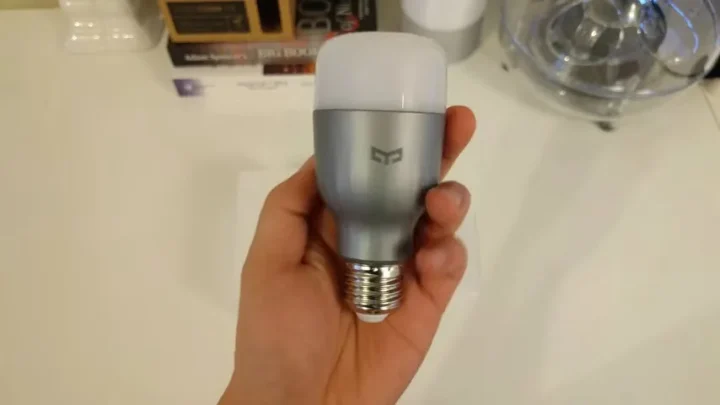
Alternative for an existing lamp: a smart bulb

Check Yeelight smart bulb availability on Amazon

Affiliate link: TechEngage may earn a commission from qualifying purchases. The linked Amazon offer is for a Yeelight smart bulb, not the ceiling fixture discussed above. Check the model, fitting and current availability before ordering.

How this was evaluated

Model-specific manufacturer information informs this buying guide. Brightness, controls and installation requirements differ across the range.

Something incorrect? Report an error in this article. Include a source if you have one; your name and email are optional.

TechEngage is a participant in the Amazon Services LLC Associates Program, an affiliate advertising program designed to provide a means for sites to earn advertising fees by advertising and linking to Amazon.com. As an Amazon Associate, TechEngage earns from qualifying purchases. Read our full Disclosure.

Filed Under: Consumer Tech & Gadgets, Reviews & Buying Guides Tagged With: Review

Related Stories

  • Travel Power Banks: Six Options For Phones And Laptops

    Travel Power Banks: Six Options for Phones and Laptops

    Consumer Tech & GadgetsSep 16, 2026

  • Best Long-Range Walkie-Talkies: 10 Radios For Different Needs

    Best Long-Range Walkie-Talkies: 10 Radios for Different Needs

    Consumer Tech & GadgetsSep 24, 2023

  • How To Replace Your Refrigerator Water Filter: Complete Guide With Troubleshooting

    How to Replace Your Refrigerator Water Filter: Complete Guide With Troubleshooting

    Consumer Tech & GadgetsJun 21, 2023

Stay on top of technology

Get TechEngage reviews, buying guides and news in your feed.

Follow on Google News
FacebookTweetPinLinkedInPrint
Avatar for Nur

Nur

Smart Devices Reviewer

Nur ul ain Chaudhry is a Smart Devices Reviewer at TechEngage who covers smartphones, smart home gadgets, and wearables. A graduate of LUMS with a degree in Economics and Politics, she is known for interbrand comparisons and startup coverage, weighing products through both a technical and economic lens.

First article on TechEngage May 2018

Reader Interactions

Share Your Thoughts Cancel reply

Please read our comment policy before submitting your comment. Your email address will not be used or published anywhere. You will only receive comment notifications if you opt to subscribe below.

Primary Sidebar

Google News

Get TechEngage in your feed

Reviews, news, and buying guides as they publish.

Follow on Google News

Recent Stories

  • United Spotify Seatback Illustration |
    Tech News & AnalysisUnited Adds Personal Spotify Accounts to Starlink Seatback ScreensNov 5, 2026
  • Zinstall Featured |
    Reviews & Buying GuidesZinstall WinWin Review: Move Apps and Files to a New PCNov 3, 2026
  • Coveron Review Light V3 |
    Reviews & Buying GuidesCoveron Review: Is Its Identity Protection Worth It?Oct 31, 2026
  • Nordvpn Review Light V3 |
    Reviews & Buying GuidesNordVPN Review: Features, Privacy and ValueOct 31, 2026
  • Keeper Business Review Light V2 |
    Reviews & Buying GuidesKeeper Business review: sharing, plans and admin toolsOct 31, 2026

More in Consumer Tech & Gadgets

  • Diagram showing a clip-on microphone, receiver and phone or camera recording setup.
    Best AI Voice Recorders for Calls and InterviewsOct 19, 2026
  • Health Conscious Home Cleaning Fana Anwar |
    How to Build a More Effective, Health-Conscious Home Cleaning RoutineOct 19, 2026
  • Google Home Local Matter Hue |
    Google Home update brings local Matter control to Hue lightsOct 15, 2026
  • Diagram showing a clip-on microphone, receiver and phone or camera recording setup.
    Best Wireless Lavalier Microphones for Phones and CamerasOct 10, 2026
More Consumer Tech & Gadgets stories →

Footer

Discover

  • About TechEngage
  • Company News & Updates
  • Our Team
  • Advertise
  • Send us a tip
  • Submit your company to TechEngage Launchpad Hot
  • TechEngage Brand Kit
  • Contact us
  • Tools & Calculators

Legal pages

  • Editorial Standards
  • Reviews Policy
  • Our Ethics
  • Corrections Policy
  • Affiliate Disclosure
  • Privacy Policy
  • Cookies Policy
  • Terms & Conditions
  • GDPR Compliance
  • Copyright & DMCA

Must reads

  • Best Mechanical Keyboards Under $100
  • Best USB-C Hubs
  • Best Portable SSDs
  • Best Gaming Graphics Cards (GPUs)
  • Best Long-Range Outdoor WiFi Extenders
  • Best Wireless CarPlay Adapters
  • Best Slack Alternatives
  • Best Long-Range Walkie-Talkies

Download our apps

TechEngage app coming soon on the App Store Available onChrome

© 2026 TechEngage®. All Rights Reserved. TechEngage® is a project of TechAbout LLC.

TechEngage® is a registered trademark in the United States under Trademark Number 6823709 and in the United Kingdom under Trademark Number UK00003417167. The publication is identified by ISSN 2690-3776 and OCLC Number 1139335774.

Contact team@techengage.com · WhatsApp +1-307-381-8801

Your analytics choice
Allow Google Analytics to help us understand readership? You can use the site without it and change this choice anytime.

Privacy details