

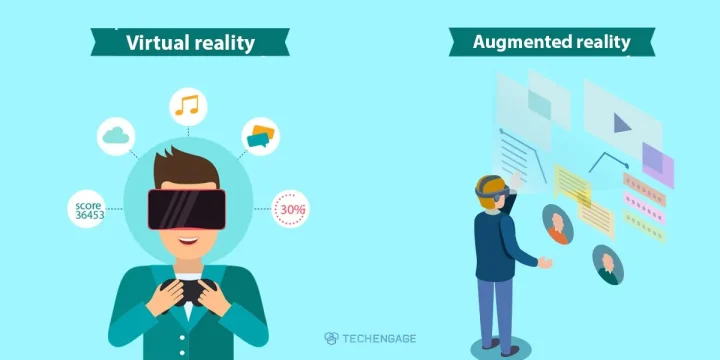
People still use “VR” and “AR” as if they were the same goggles. They are not. Virtual reality replaces what you see. Augmented reality keeps the real room and draws on top of it. Mixed reality sits in the middle — and that is where most of the interesting headsets landed.
You do not need a philosophy degree. You need to know which word matches the device in the box, so you do not buy a game headset expecting laptop windows, or a phone feature expecting a cinema around your head.
VR vs AR vs mixed reality
Virtual reality: replace the room
Virtual reality (VR) blocks the real world and puts you in a rendered one. Close the passthrough, and your living room is gone. That is a Quest game, a PSVR2 cockpit, or a seated sim. Controllers (or tracked hands) become your hands. The point is presence: your brain accepts the new space long enough to play, train, or watch.
VR is still the right word for “I put on a headset and I am somewhere else.” It is a poor word for Pokémon GO, store furniture previews, or snap-on navigation arrows. Those never hid the street.
Augmented reality: keep the room, add a layer
Augmented reality (AR) starts with the real environment and adds digital objects or labels. The classic consumer version is phone AR: the camera feed plus a creature, a sofa, or a measurement stick. IKEA-style furniture preview and Google’s / Apple’s AR measure tools are the same idea.
Phone AR is cheap because you already own the hardware. It is also limited: one hand holds a slab, tracking glitches in bad light, and nobody wears a phone on their face for an hour. When people say “AR is better because you still see the room,” they are usually talking about this — not about a $3,500 headset.
Optical AR glasses (a transparent lens with a projected overlay) are the version science fiction promised. Enterprise headsets and a few consumer experiments exist; they are not what most people should buy instead of a phone.
Mixed reality and spatial computing
Mixed reality (MR) is VR hardware that can see the room and drop objects onto your real table. Color passthrough cameras reconstruct the space; software anchors a game board on the carpet or a browser window on the wall. Apple calls its version spatial computing on Vision Pro. Meta’s Quest 3 does the same idea at a game-first price, with softer passthrough.
MR is why the old “VR needs goggles, AR needs a phone” split is incomplete. A Quest 3 title that lets you punch virtual robots in your actual kitchen is not phone AR and not classic VR. It is both cameras and a headset.
Hardware you will actually see
- Meta Quest 3 / Quest 3S: standalone VR plus usable mixed reality. This is the default “I want to try games and fitness” purchase. No PC required.
- Apple Vision Pro: high-resolution passthrough, spatial windows, tight Apple-device integration. A productivity and media device that can go immersive. Not the value pick for Beat Saber.
- PlayStation VR2: console VR for a PS5. Best when you already live on that couch. See also how headset gaming sits next to PC vs console gaming.
- PC VR: still the path for the highest-end sim and Steam libraries. You are buying a headset and a GPU.
- Phone AR: free with the phone you have. Use it for try-before-you-buy furniture, quick measures, and the occasional game.
- Camera glasses: useful for photos and assistants. Do not confuse them with hologram AR.
Skip dead product nostalgia when you shop. Gear VR, Daydream, and the original Google Glass are history lessons, not shopping lists.
Which one is better?
None of them “wins.” They solve different jobs:
- Want games, fitness, social rooms, a library that exists today: VR / MR on a Quest-class headset.
- Want giant Mac / iPad-style screens and will pay for display quality: Vision Pro.
- Want a label on a real object for ten seconds: phone AR. Buy nothing.
- Want factory or medical overlays on a transparent lens: that is a specialist AR purchase, not a weekend Amazon order.
Motion sickness is real in VR and in some MR. Sit for the first sessions, use a fan, and stop when the sweat starts — the headset is not a stamina test. Kids need the vendor’s age guidance and a clear play space, not a hallway.
If you already stream video around the house, a headset is a different job from a TV cast. Keep the cheap living-room path — VLC to Chromecast still wins for a couch — and treat VR as the thing you put on your face on purpose.
FAQs
Is Apple Vision Pro VR or AR?
It is mixed reality / spatial computing. Cameras pass the real room through to the displays and then pin digital windows and objects on top. You can also go fully immersive. It is not a phone-AR toy, and it is not a Quest-style game headset.
Is Pokémon GO still a fair AR example?
Yes — phone AR: the camera feed plus digital creatures. It is still the example most people have actually used. It is not what a Quest 3 passthrough game or Vision Pro workspace feels like.
Do I need a PC for VR?
Not for Meta Quest 3 / 3S or PlayStation VR2 (the latter needs a PS5). PC VR still exists for the highest-end PC games and sim pit setups. Buy the headset that matches the box you already own.
Are smart glasses the same as AR?
Usually not. Camera glasses (for example Meta’s Ray-Ban line) capture photos and run assistants. They do not draw stable holograms in your living room. True optical AR glasses are still mostly enterprise or early consumer experiments.
Which should I buy first?
If you want games and fitness under a mainstream budget, a Quest-class headset. If you want spatial Mac / iPad windows and will pay a premium, Vision Pro. If you only want navigation arrows on a phone, you already have AR — do not buy a headset for that.




Share Your Thoughts