• Skip to primary navigation
  • Skip to main content
  • Skip to primary sidebar
  • Skip to footer
TechEngage

TechEngage®

Hands-on reviews, research-backed buying guides and technology news.

  • News
    • Internet & Social
    • Gadgets
    • Car Tech
    • Business
    • Science & Health
  • Reviews
  • Buying Guides
  • How-to
  • AI
  • Computing
    • Apps
    • Security
    • Gaming
  • More
    • Tools
    • Puzzles
    • Mobile
  • Launchpad
  • Sign in
TechEngage » Apps & Software

How CMMS software streamlines your work order system

Avatar for Ali Raza Ali Raza Published: Sep 1, 2020 · 6:00 AM ET Updated: Feb 23, 2021 · 12:03 AM ET

ExplainerExplainer based on official documentation and named sources. Not a product comparison.
Workers in a factory
Shares3FacebookTweetPinLinkedInPrint
Computerized Maintenance Management software, otherwise known as CMMS, is a robust software designed to make the process of tracking and managing maintenance tasks easier to reduce the complex nature of maintenance management and lower the chances of human error. The application ensures that all-important and relevant data is digitized, which reduces complex paperwork and makes it easy to access any necessary details when needed, thus reducing administrative burden as the manual process is eliminated. When put in simple terms, you need to make use of CMMS software if you are looking to reduce costs, decrease wasted time, and increase efficiency and productivity.

What is CMMS?

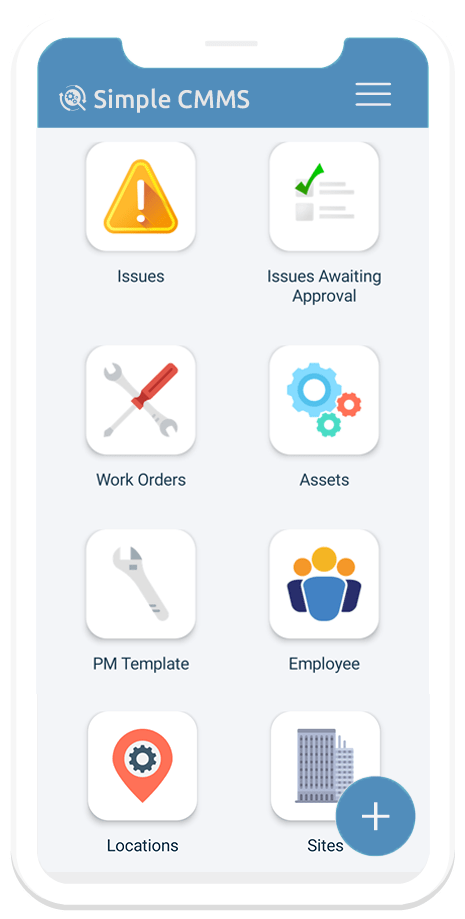
A computerized Maintenance Management System is a mobile and cloud application that simplifies enterprise assets and equipment, maintenance schedules, inventory, work order routing, and reporting. It helps employees operate more efficiently and provides management with real-time visibility into assets and maintenance plans. It allows you to manage maintenance data over multiple work locations easily. Using this software, you can access all information through the mobile or web app for real-time visibility. Word Image 9 | CMMS software is highly customizable- thus allows you to conveniently configure and meet your organization’s specific needs like changing field names, adding modules, workflows, and notifications, etc. Its robust reporting system empowers decision-makers to operate more effectively with real-time access to the required data. When they need it, the built-in administrative control allows for managing permissions to access information and perform certain tasks.
Benefits of using CMMS

Besides helping you save time and money and improve health and safety, multiple benefits come with CMMS software. Firstly, it enables you to reduce downtime in various ways. You can effectively handle costly maintenance backlogs as the software balances resource and maintenance costs to prevent extreme backlogs. Secondly, it increases the reliability of aging assets. The maintenance of assets is extremely crucial in any institution to prevent the financial strain of replacing old assets with new assets. This is done through efficient collecting, accessing, and using an asset’s historical data. With this data, it is easy to identify the trends in the performance of any asset. The third benefit of using CMMS software is that you can gain control over inventory. If you do not have a solid hold on your inventory, the chances are that you will run into extremely costly problems. When you use this tool, you can purchase, monitor, and organize inventory parts to avoid such costly problems. Another notable benefit is that you can increase efficiency through the optimization of your maintenance schedules. If you have maintenance schedules, you can waste less time, lessen the wastage of resources, and reduce money wasting. Using this software, you can automate work requests, which ultimately eliminates the need to translate work orders and track operators manually.

Keep eyes on employees’ safety too.

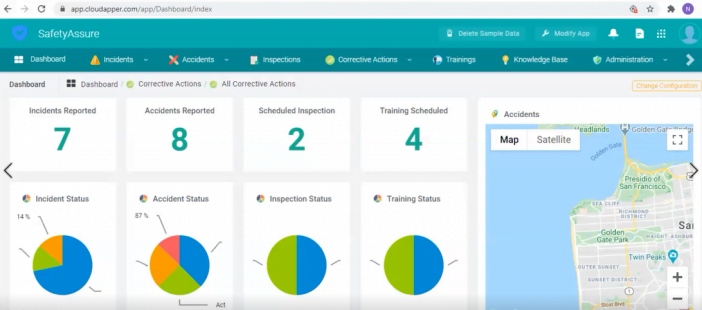
Employees are the key factor for business productivity. An employee can only provide the best output when proper safety measurements are taken for the workplace. Ultimately, safety hazards cause reduced work hours. In 2017 alone, 104 million work hours were lost due to work-related injuries found by the National Safety Council. Pie Charts To prevent your firm from falling into victimhood on such occasions, use workplace safety compliance management applications. It helps to establish a safer workplace without pulling the burden of administration. It is a convenient mobile application that enables employees to ledger incidents, accidents, near misses, and near observations on the go despite where these events are noticed. Your resolving team can easily schedule audits, identify the issues, initiate corrective actions, and create benchmarks with detailed reporting. This way, you can comply with safety standards, avoid penalties, and lower operational costs without a sweat.


Software for Work Order Management in schools

Using a paper-work based system has many disadvantages. It is inefficient to assign specific staff members, communicate with people who have submitted requests or locate assets and equipment throughout school sites. When using customized software within the work environment, you can assign multiple work orders to multiple people as soon as tasks present themselves. This saves time as staff members are not all working on the same tasks as they have been equally distributed to ensure faster and more efficient task performance. It allows you to implement modules such as customer management, which helps identify efficient rollout strategies and set training courses for your facility staff. Streamlining the efficiency of work orders results in better customer service. The implementation of preventative maintenance and strategies of planning equipment purchases allows you to access any data at any time. CMMS software makes your staff’s jobs much easier and provides your facilities maintenance staff with the opportunity to become more productive, which benefits your institution as a whole.

Related reading

  • Donald Trump Succeeded in Launching the Truth Social App in the U.S.
  • 5 Reasons Why You Need a Construction Inventory System
  • Business Software That Can Help
  • Zenchat: A team messenger with built-in task management
Something incorrect? Report an error in this article. Include a source if you have one; your name and email are optional.

Filed Under: Apps & Software

Related Stories

  • Russia’S Government Transition To Open-Source Linux: From Putin’S 2010 Order To 2026

    Russia’s Government Transition to Open-Source Linux: From Putin’s 2010 Order to 2026

    Apps & SoftwareOct 11, 2026

  • How To Screen Record On Windows 11 With Audio

    How to Screen Record on Windows 11 With Audio

    Apps & SoftwareOct 10, 2026

  • How To Stop Chrome Tabs From Reloading

    How to Stop Chrome Tabs From Reloading

    Apps & SoftwareOct 10, 2026

Stay on top of technology

Get TechEngage reviews, buying guides and news in your feed.

Follow on Google News
Shares3FacebookTweetPinLinkedInPrint
Avatar for Ali Raza

Ali Raza

Business & Cybersecurity Analyst

Ali Raza is a Business and Cybersecurity Analyst at TechEngage with more than 180 published articles covering enterprise technology, business and fintech, cybersecurity, and software tools. His reporting connects business strategy with the technology behind it to help readers make informed decisions.

Earliest archived byline May 2010

Reader Interactions

Join the Discussion
  1. Avatar for behnam.khalilibehnam.khalili says

    January 30, 2021

    Hi
    mighty professor
    Please send me the original version of the software

    Reply

Share Your Thoughts Cancel reply

Please read our comment policy before submitting your comment. Your email address will not be used or published anywhere. You will only receive comment notifications if you opt to subscribe below.

Primary Sidebar

Google News

Get TechEngage in your feed

Reviews, news, and buying guides as they publish.

Follow on Google News

Recent Stories

  • Diagram showing a clip-on microphone, receiver and phone or camera recording setup.
    Reviews & Buying GuidesBest AI Voice Recorders for Calls and InterviewsOct 19, 2026
  • Meta Logo Facebook New Name |
    AIMeta Muse Review: What Its AI Agent Can Do and Where to Be CarefulOct 19, 2026
  • Nscale Anthropic Second Compute Deal |
    Tech News & AnalysisAnthropic and Nscale in Talks on Second $45B Compute Deal, Report SaysOct 19, 2026
  • Stellar Pst Repair Desktop Vs Online Techengage |
    Reviews & Buying GuidesStellar Repair for Outlook Review: Desktop vs. Online PST RepairOct 19, 2026
  • Health Conscious Home Cleaning Fana Anwar |
    Culture & LifestyleHow to Build a More Effective, Health-Conscious Home Cleaning RoutineOct 19, 2026

More in Apps & Software

  • Russia Government Transition Open Source Linux Featured |
    Russia’s Government Transition to Open-Source Linux: From Putin’s 2010 Order to 2026Oct 11, 2026
  • Windows Screen Recording Guide |
    How to Screen Record on Windows 11 With AudioOct 10, 2026
  • Chrome Tabs Reloading Techengage |
    How to Stop Chrome Tabs From ReloadingOct 10, 2026
  • 136181 7Effec8402C5Ea64 |
    What Microsoft Announced on October 7: Surface Laptop Ultra, RTX Spark Dev Box, and Windows AISep 16, 2026
More Apps & Software stories →

Footer

Discover

  • About TechEngage
  • Company News & Updates
  • Our Team
  • Advertise
  • Send us a tip
  • Submit your company to TechEngage Launchpad Hot
  • TechEngage Brand Kit
  • Contact us
  • Tools & Calculators

Legal pages

  • Editorial Standards
  • Reviews Policy
  • Our Ethics
  • Corrections Policy
  • Affiliate Disclosure
  • Privacy Policy
  • Cookies Policy
  • Terms & Conditions
  • GDPR Compliance
  • Copyright & DMCA

Must reads

  • Best Mechanical Keyboards Under $100
  • Best USB-C Hubs
  • Best Portable SSDs
  • Best Gaming Graphics Cards (GPUs)
  • Best Long-Range Outdoor WiFi Extenders
  • Best Wireless CarPlay Adapters
  • Best Slack Alternatives
  • Best Long-Range Walkie-Talkies

Download our apps

TechEngage app coming soon on the App Store Available onChrome

© 2026 TechEngage®. All Rights Reserved. TechEngage® is a project of TechAbout LLC.

TechEngage® is a registered trademark in the United States under Trademark Number 6823709 and in the United Kingdom under Trademark Number UK00003417167. It is also ISSN protected under ISSN 2690-3776 and has OCLC Number 1139335774.

Contact team@techengage.com · WhatsApp +1-307-381-8801

Your analytics choice
Allow Google Analytics to help us understand readership? You can use the site without it and change this choice anytime.

Privacy details