• Skip to primary navigation
  • Skip to main content
  • Skip to primary sidebar
  • Skip to footer
TechEngage

TechEngage®

Technology Reviews, Guides & Analysis

  • Cryptocurrency
  • Science
    • Energy
    • Environment
    • Health
    • Space
  • Apps
  • More
    • Opinion
    • Noteworthy
    • Culture
    • Events
    • Deals
    • Startups
      • Startup Submissions
  • Videos
  • Tools
TechEngage » World of Tech

Presidential Alert causes rage in many!

Avatar for Areen Zahra Areen Zahra Follow Areen Zahra on Twitter Updated: January 18, 2019

presidential alert message
FacebookTweetPinLinkedInPrintEmail

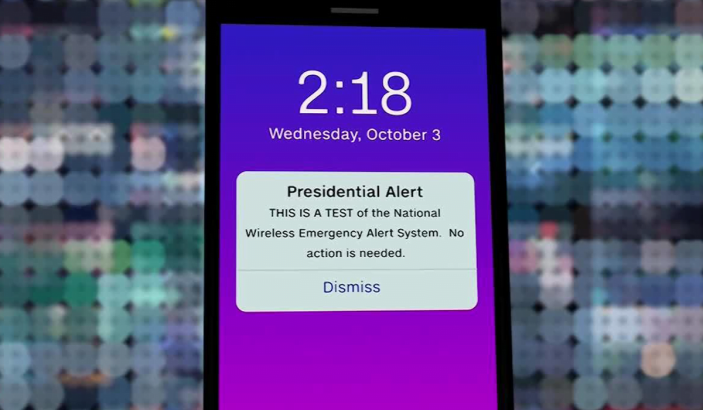
Wednesday 2:18 P.M. EST the entire US buzzed and beeped with a pop-up notification (alert message) on their phones. Yes, we are talking about the recent Presidential Alert message that has taken the internet by storm.

This alert drill carried out on Wednesday ideally hit the 225 billion cell phones with an annoying beep and vibration.

People all over twitter and other forums are talking about the test conducted by the “National Wireless Emergency Alert System”. This system is designed to generate alerts in case of any natural disaster; terrorist attack or an unpleasant incident. The system at once makes a notification that goes out to everyone simultaneously. This alert drill carried out on Wednesday hit the 225 million cell phones with an annoying beep and vibration. It took around 30 minutes for the alert to reach almost every smartphone.

The alert has a tone and vibration just like weather alerts. The only difference is that you cannot opt out of the Presidential Alerts just like you would in AMBER or weather alerts. Sources tell that FEMA would be in contact with the cellular network companies to gather feedback about the drill once they are done with it. Moreover, this alert system has nothing to do with the privacy of people.

The Federal Emergency Management Agency is an active entity behind this alert system. So if you think that this alert message is coming straight from the white house or trump himself, then you are wrong. Anybody responsible from the president’s team would inform FEMA about the news that they have to spread and only then FEMA would generate a notification/alert using the National Wireless Emergency System.
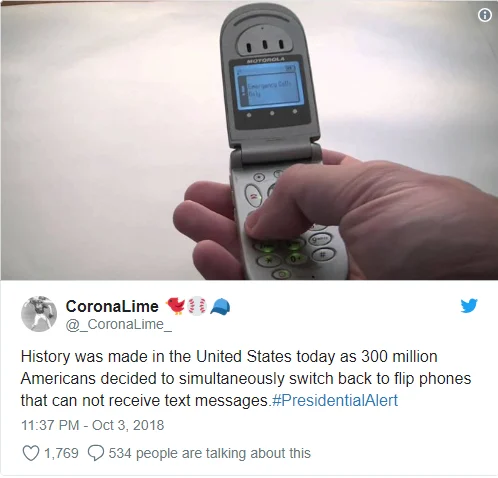
Coronallime Tweet

To the disappointment of many, there is no way you can turn off these notifications on your smartphones. You have to always and forever deal with these alerts. This thing didn’t sit well with many as people took social media to talk and complain about these ‘imposed’ alerts. The rage has already led to multiple lawsuits filed against these alerts. Many think that not being able to opt out from this notification violates the US law.

We hope this agitation calms down soon!

Published: October 4, 2018 Updated: January 18, 2019

Filed Under: World of Tech Tagged With: news, Presidential alert

Related Stories

  • The Synesthesia Mask

    The Synesthesia Mask

  • 5 Amazing Technologies That You Must Know About

    5 Amazing Technologies That You Must Know About

  • A Preview Of The Iphone 7

    A Preview of The iPhone 7

FacebookTweetPinLinkedInPrintEmail
Avatar for Areen Zahra

Areen Zahra

Auto & AI Reporter

Areen Zahra is an Auto and AI Reporter at TechEngage, writing about automotive technology, mobile apps, artificial intelligence, and transportation innovation across more than 130 articles. An IT professional by training, Areen is drawn to the intersection of mobility and machine intelligence, where she tracks how algorithms are reshaping the way we move and live.

Joined November 2018

Reader Interactions

Share Your Thoughts Cancel reply

Please read our comment policy before submitting your comment. Your email address will not be used or published anywhere. You will only receive comment notifications if you opt to subscribe below.

Primary Sidebar

TechEngage-Apple-News TechEngage-Google-News

Recent Stories

  • The Complete History of the Internet: From ARPANET to AI (Visual Timeline)
  • The 10 Best-Selling Cars of All Time [Infographic]
  • Best Gaming Graphics Cards (GPUs): 8 Picks From Budget to Enthusiast
  • Best Long-Range Outdoor WiFi Extenders: 8 Tested Picks for Reliable Coverage
  • Best AM Radios for Long-Distance Reception: 10 Tested Picks

Footer

Discover

  • About TechEngage
  • Newsroom
  • Our Team
  • Advertise
  • Send us a tip
  • Startup Submission Questionnaire
  • Brand Kit
  • Contact us

Legal pages

  • Reviews Guarantee & Methodology
  • Community Guidelines
  • Corrections Policy and Practice
  • Cookies Policy
  • Our Ethics
  • Disclaimer
  • GDPR Compliance
  • Privacy Policy
  • Terms and Conditions

Must reads

  • Best AirPods alternatives on Amazon
  • Best PC monitors for gaming on Amazon
  • Best family board games
  • Best video doorbells without subscription
  • Best handheld video game consoles
  • Best all-season tires for snow
  • Best mobile Wi-Fi hotspots
  • Best treadmills on Amazon

Download our apps

TechEngage app coming soon on App Store

© 2026 TechEngage®. All Rights Reserved. TechEngage® is a project of TechAbout LLC.

TechEngage® is a registered trademark in the United States under Trademark Number 6823709 and in the United Kingdom under Trademark Number UK00003417167. It is also ISSN protected under ISSN 2690-3776 and has OCLC Number 1139335774.