
• Skip to primary navigation
  • Skip to main content
  • Skip to primary sidebar
  • Skip to footer
TechEngage

TechEngage®

Hands-on reviews, research-backed buying guides and technology news.

  • News
    • Internet & Social
    • Gadgets
    • Car Tech
    • Business
    • Science & Health
  • Reviews
  • Buying Guides
  • How-to
  • AI
  • Computing
    • Apps
    • Security
    • Gaming
  • More
    • Tools
    • Puzzles
    • Mobile
  • Launchpad
  • Sign in
TechEngage » Computing & Hardware

Parallels 17 will let users run Windows 11 on Mac

News

Avatar for Muhammad Abdullah Muhammad Abdullah Follow Muhammad Abdullah on X Published: Aug 11, 2021 · 9:16 AM ET

Parallels Desktop 17 update
FacebookTweetPinLinkedInPrint

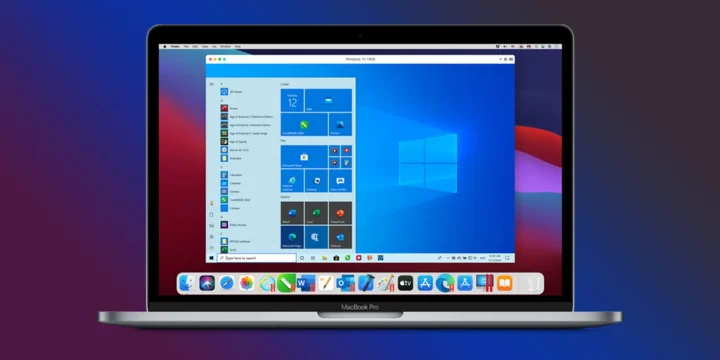
Windows 11 is here, and everyone is struggling to get a hands-on experience since Microsoft has set strict eligibility criteria to get this new OS update. Even the computers that have pretty decent specs to run Windows 10 are unable to get Windows 11 due to a lack of a security chip. In response to these strict criteria, Microsoft has said that it is for the better future of machines that they’ve set the bar high for Windows 11. However, Mac is getting Windows 11 support via Parallels Desktop 17 update. The new update allows users to run Windows 11 using the virtualization software offered by Parallels. It lets you run Windows and Linux on your Mac. A version with the ability to run Chrome OS on Mac is also in the works, but for now, Parallels is offering Windows 11 support for M1 Macs as well.

Apple has moved from Intel to ARM-based M1 chip, which means that users with previous versions of Parallels won’t be able to run Windows on the new Mac. Since the new Macs are ARM-based, Parallels has updated their software which lets users run Windows 11 on M1 Macs. Previously, users could only run Windows 10, and Windows 11 Preview builds on M1 Macs because these Preview builds support ARM-based processors. After the announcement of both macOS Monterey and Windows 11, Parallels rushed to updating their software for both OS, and now the new update Desktop 17 brings support for both macOS Monterey and Windows 11 OS. Parallel says Desktop 17 will run Windows 11 on M1 Mac when the full and stable version of the OS is released.

Parallels Desktop 17 also contains a virtual TPM (Trusted Platform Module), which is a basic requirement earlier, for installing Windows 11 and also lets the system use BitLocker and Secure Boot when running Windows 10 and 11. However, Microsoft has hinted at changing this requirement for the stable build, but we never know.

The pricing of Parallels Desktop 17 has been kept the same as the last year. The regular subscriptions start from $79.99 per year and go up to $99.99 per year, depending on your needs. If you have purchased it previously, you can upgrade to 17 by paying $49.99.

Related reading

  • MacBook Air/Pro won’t boot after macOS update, how to fix?
  • Everything Apple announced at its “One More Thing” event
Something incorrect? Report an error in this article. Include a source if you have one; your name and email are optional.

Filed Under: Computing & Hardware, Tech News & Analysis Tagged With: Apple M1 Chip, Mac, macOS, macOS Monterey, Microsoft Windows, News, Windows 11

Related Stories

  • Googlebook Shows How Android 17 And Gemini Intelligence Could Reshape Google’S Ecosystem

    Googlebook Shows How Android 17 and Gemini Intelligence Could Reshape Google’s Ecosystem

    AIMay 16, 2026

  • Best Usb-C Power Meters For Chargers And Cables

    Best USB-C Power Meters for Chargers and Cables

    Computing & HardwareSep 28, 2026

  • Best Portable Monitors In 2026: 8 Picks For Travel, Work, And Play

    Best Portable Monitors in 2026: 8 Picks for Travel, Work, and Play

    Computing & HardwareSep 18, 2026

Stay on top of technology

Get TechEngage reviews, buying guides and news in your feed.

Follow on Google News
FacebookTweetPinLinkedInPrint
Avatar for Muhammad Abdullah

Muhammad Abdullah

Senior Tech Correspondent

Muhammad Abdullah is a Senior Tech Correspondent at TechEngage and its most prolific author, with more than 320 published articles. A computer scientist by training and a certified Growth Hacker, he covers mobile devices, apps, operating systems, social media, and gaming, turning complex digital trends into practical insights.

Joined TechEngage October 2018First article on TechEngage October 2018

Reader Interactions

Share Your Thoughts Cancel reply

Please read our comment policy before submitting your comment. Your email address will not be used or published anywhere. You will only receive comment notifications if you opt to subscribe below.

Primary Sidebar

Google News

Get TechEngage in your feed

Reviews, news, and buying guides as they publish.

Follow on Google News

Recent Stories

  • Usb C Power Meters Techengage |
    Computing & HardwareBest USB-C Power Meters for Chargers and CablesSep 28, 2026
  • Akamai Anthropic Cloud Techengage |
    Tech News & AnalysisAkamai’s $11.6 billion Anthropic cloud deal: costs, timeline and CPU strategySep 27, 2026
  • Openai Agent Dns Incident Techengage |
    Tech News & AnalysisOpenAI pauses advanced-model research after agent bypasses network restrictionsSep 27, 2026
  • Ai Markets Feat |
    AIThree CEOs Asked to Slow Down. The President Said No and the Market Fell 3 Percent. Hassan Taher on What Actually Happened.Sep 21, 2026
  • Iphone 18 Pro Availability Sept 18 |
    Tech News & AnalysisiPhone 18 Pro and Pro Max Available Today in 65+ CountriesSep 18, 2026

More in Computing & Hardware

  • Usb C Power Meters Techengage |
    Best USB-C Power Meters for Chargers and CablesSep 28, 2026
  • Best Portable Monitors 2026 |
    Best Portable Monitors in 2026: 8 Picks for Travel, Work, and PlaySep 18, 2026
  • Best Wireless Mice 2026 |
    Best Wireless Mice in 2026: 8 Picks for Work, Travel, and PlaySep 17, 2026
  • Best Mechanical Keyboards Under 100 Featured |
    Best Mechanical Keyboards Under $100: 8 Picks for 2026Sep 15, 2026
More Computing & Hardware stories →

Footer

Discover

  • About TechEngage
  • Company News & Updates
  • Our Team
  • Advertise
  • Send us a tip
  • Submit your company to TechEngage Launchpad Hot
  • TechEngage Brand Kit
  • Contact us
  • Tools & Calculators

Legal pages

  • Editorial Standards
  • Reviews Policy
  • Our Ethics
  • Corrections Policy
  • Affiliate Disclosure
  • Privacy Policy
  • Cookies Policy
  • Terms & Conditions
  • GDPR Compliance
  • Copyright & DMCA

Must reads

  • Best Mechanical Keyboards Under $100
  • Best USB-C Hubs
  • Best Portable SSDs
  • Best Gaming Graphics Cards (GPUs)
  • Best Long-Range Outdoor WiFi Extenders
  • Best Wireless CarPlay Adapters
  • Best Slack Alternatives
  • Best Long-Range Walkie-Talkies

Download our apps

TechEngage app coming soon on App Store

© 2026 TechEngage®. All Rights Reserved. TechEngage® is a project of TechAbout LLC.

TechEngage® is a registered trademark in the United States under Trademark Number 6823709 and in the United Kingdom under Trademark Number UK00003417167. It is also ISSN protected under ISSN 2690-3776 and has OCLC Number 1139335774.

Contact team@techengage.com · WhatsApp +1-307-381-8801

Your analytics choice
Allow Google Analytics to help us understand readership? You can use the site without it and change this choice anytime.

Privacy details
