

Future generations won’t experience the tales of our time through history books but through visual media. YouTube started as a passion project but has become the largest source of free, high-quality, compelling video content. From online education and history lessons to gaming channels and an ungodly amount of funny cat videos – YouTube has it all. The sheer popularity of the video-sharing platform has billions of viewers hooked. However, YouTube is only limited because you need an active internet connection to enjoy it.
Although we’ve come a long way, thanks to extended wireless connectivity worldwide, you still might want to download YouTube videos in HD and watch them offline. As long as you’re planning to use these YouTube videos for personal use, it shouldn’t be a problem with Google. YouTube even promotes this by allowing you to save videos for offline viewing on the mobile app version. But the same courtesy isn’t extended to desktop users, which is the inspiration behind so many YouTube downloaders out there.
Also read: Best YouTube to MP3 Converters
One such useful tool to download and watch YouTube videos offline in Full-HD is SnapDownloader. But what makes SnapDownloader any better than the dozens of other contenders out there?
Features of SnapDownloader
Rather than ranting about what makes SnapDownloader better, we took a closer look at the alternatives first. Here’s everything that the other YouTube downloader services are incapable of, and that’s exactly where SnapDownloader seems to shine.
1. Ultra-HD support
A large majority of the YouTube video downloading service providers will max out at either 720p HD video quality or step up to 1080p Full-HD at most. SnapDownloader takes it up a notch with 8K video downloading capability at 60 frames per second. You also have the ability to dial it down a notch and pick any video resolution all the way down to 144p for low-quality and low file size videos.
2. YouTube, Facebook, Vimeo, & more
While the YouTube downloaders do serve the primary purpose of fetching videos from YouTube, sometimes you’d want content from other social media and video sharing platforms as well. SnapDownloader takes a no holds barred approach to video downloading, extending its support across not just YouTube, but other popular video sharing platforms such as Instagram, Facebook, Dailymotion, and hundreds of others.
3. No personal data collected
A fair number of video downloader services require you to sign up and collect personal data, which might later be used for targeted advertising. SnapDownloader skips past all of this menace and sticks to what you expect it to do, free of any advertisements whatsoever.
4. Live MP3 converter
In most cases, a downloader tool either allows you to download a YouTube video or convert it to an audio file. SnapDownloader is among the few service providers that manage to fit both of those features into one.
5. Seamless interface
Several installable YouTube downloaders and online services tend to complicate the simple process with pop-ups and a finicky interface. In our opinion, SnapDownloader manages to have one of the most simplified UI, with no distracting elements involved.
6. Download in bulk
A powerful feature that the majority of YouTube video downloaders miss out on is the ability to download multiple YouTube videos at once. SnapDownloader natively allows you to download entire playlists, channels, and videos seamlessly. Moreover, you can download videos in bulk by pasting up to 15 video links to be downloaded at once.
How to download YouTube in HD with SnapDownloader
Once you’re confident that SnapDownloader is the best way to download videos from YouTube in high definition, here’s what you need to do:
Step 1: Install SnapDownloader on your computer
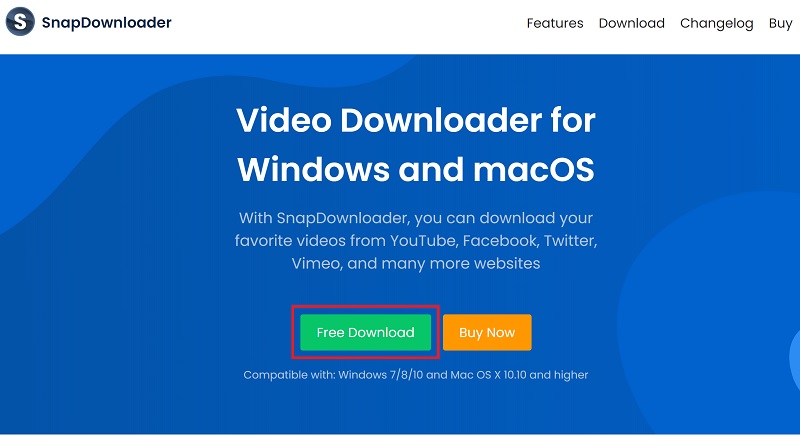
- Open a web browser and navigate to snapdownloader.com.
- Press the Free Download button and download the version for PC or Mac based on your operating system.
- Launch the installer to begin installing SnapDownloader on your computer.
Step 2: Download YouTube videos in HD with SnapDownloader
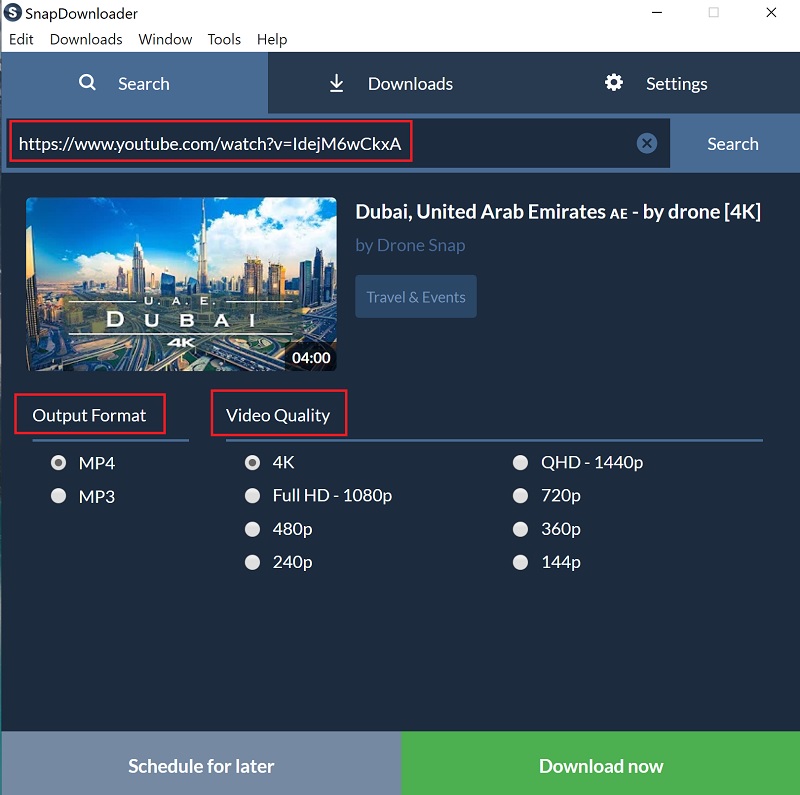
- Open SnapDownloader, paste the video link that you want to download and press the Search button. The search bar can also be used to enter a keyword and look up a video on YouTube.
- Select the video’s output format (MP4/MP3) and the video quality that you wish to download. Once selected, press the Download now button.
- SnapDownloader will now begin to download the video. You will be able to view the download details, such as the file size, download speed, and estimated time left.
Now, all that you have to do is to wait for SnapDownloader to finish downloading the video. Once done, double-click on the video to begin watching it or simply open it from the folder where it was saved.
Wrapping Up
There’s no denying the fact that YouTube is one of the best sources to find interesting videos. If you stumble upon a video that you wish to download, then SnapDownloader is the only tool that you need to get the job done.
Although the software isn’t free to use past its free trial period of 24 hours, the fact that it does what it claims, and offers a 30-day refund guarantee, makes it one worth the asking price of $19.99 for lifetime access to the software and unlimited support from the customer service.
Is SnapDownloader going to be your very best friend for downloading high-quality videos directly from YouTube, Facebook, Vimeo, and several other platforms? We’d love to know your thoughts, so reach out to us in the comments section below.





Share Your Thoughts