• Skip to primary navigation
  • Skip to main content
  • Skip to primary sidebar

TechEngage®

Connecting mankind with technology

  • News
  • Reviews
  • Cryptocurrency
  • How-to
  • Roundups
  • Science
    • Energy
    • Environment
    • Health
    • Space
  • Apps
  • More
    • Opinion
    • Noteworthy
    • Culture
    • Events
    • Deals
    • Startups
      • Startup Submissions
  • Videos
  • Tools

Control the Skydio R1 with your Apple Watch

Fana Anwar Fana Anwar Updated: June 9, 2019

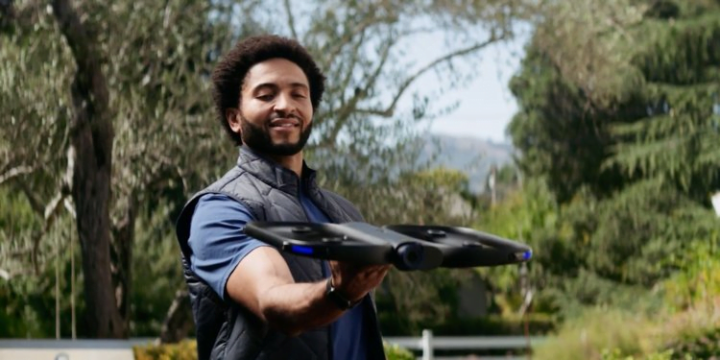
Skydio R1 Self-flying Drone
FacebookTweetPinLinkedInPrintEmail

Is that a bird? A plane? Superman maybe? Well, it is a self-flying drone.

With automated piloting and advanced obstacle avoidance, the Skydio R1’s artificial intelligence and 13 cameras allow it to, in essence, fly on its own.

Skydio announced that it would be releasing an app on the Apple Watch that will enable owners to control, launch and even manually fly the R1 drone. When one thinks of drones, no one thinks of Apple. However, they are selling the R1 in their stores for $2000.

Also read: History of Apple Watches

Marketing Manager of Skydio Products, Kyle Russell said,

”As someone lucky enough to have been using Skydio R1 since we launched, I’ve never had more fun with the drone than in the months we’ve been internally testing our Apple Watch app,”

He further added:

”It’s one thing to have a drone avoid obstacles while filming you autonomously, but there’s something surreal in being able to tell this robot what to do from my wrist and then stop worrying about it or fussing with it immediately. It is so much nicer to lower your wrist than to fumble with putting a phone in a pants pocket or bag.
Choosing who the drone should film by tapping on people’s faces on your Watch feels like an app from a few years in the future”.

The quadcopter can be launched from the ground by using an Android or iOS app. It has over a dozen cameras that allow it to equip the best camera techniques required for the shot, that can be adjusted by the Apple Watch to get the best results. It enables users to capture the vantage point of the drone while allowing them more time to do things other than manning a drone.

Previously, this could have just as well been done from your phone, but now it is almost as easy as flicking your wrist.
This post was originally published on October 18, 2018 and was updated on June 9, 2019.

Filed Under: Apps, Robotics Tagged With: Skydio

Related Stories

  • How to lock Netflix profiles in 2025

    How to lock Netflix profiles in 2025

  • Get Night Sight mode on your Pixel phone

    Get Night Sight mode on your Pixel phone

  • How to use multiple WhatsApp accounts on Android [Video]

    How to use multiple WhatsApp accounts on Android [Video]

FacebookTweetPinLinkedInPrintEmail

About Fana Anwar

Reader Interactions

Share Your Thoughts Cancel reply

Please read our comment policy before submitting your comment. Your email address will not be used or published anywhere. You will only receive comment notifications if you opt to subscribe below.

Primary Sidebar

Become a contributor

We are accepting contributor applications. All applications will be decided in 3 days after applying. To learn more visit the contributors page.
TextSheet Alternative

6 Top Alternatives to Textsheet for 2025

Muhammad Zeshan Sarwar October 5, 2024

battery draining apps

Top 10 battery draining apps to avoid 2025

Muhammad Abdullah October 5, 2024

Recent Stories

  • 6 Top Alternatives to Textsheet for 2025
  • Top 10 battery draining apps to avoid 2025
  • The Benefits of Having a Small Air Compressor for Flat Tires
  • 4 Best Free VPNs for 2025
  • 9 Best Calendar Apps in 2025

Discover

  • About us
  • Newsroom
  • Staff
  • Advertise
  • Send us a tip
  • Startup Submission Questionnaire
  • Brand Kit
  • Contact us

© 2025 TechEngage®. All Rights Reserved. TechEngage® is a project of TechAbout LLC.

TechEngage® is a registered trademark in the United States under Trademark Number 6823709 and in the United Kingdom under Trademark Number UK00003417167. It is also ISSN protected under ISSN 2690-3776 and has OCLC Number 1139335774.

  • Terms & Conditions
  • Privacy Policy
