• Skip to primary navigation
  • Skip to main content
  • Skip to primary sidebar
  • Skip to footer
TechEngage

TechEngage®

Hands-on reviews, research-backed buying guides and technology news.

  • News
    • Internet & Social
    • Gadgets
    • Car Tech
    • Business
    • Science & Health
  • Reviews
  • Buying Guides
  • How-to
  • AI
  • Computing
    • Apps
    • Security
    • Gaming
  • More
    • Tools
    • Puzzles
    • Mobile
  • Launchpad
  • Sign in
TechEngage » Apps & Software

How to Use Apple Health Efficiently on iPhone and Apple Watch?

How-To

Avatar for Syed Hassan Zaman Syed Hassan Zaman Connect with Syed Hassan Zaman on LinkedIn Published: Apr 5, 2022 · 3:34 AM ET

How to Use Apple Health Efficiently on iPhone and Apple Watch?
Credit: Apple
Shares5FacebookTweetPinLinkedInPrint
Apple is working to bring health, prosperity, and advanced technology to customers around the world. Since the dawn of humanity, health has always remained the priority. Because without rigorous health, no human being can survive the difficulties of life. So, Apple introduced Apple Health on almost all Apple devices. It provides the most sophisticated devices. Apple has stunning features to immerse the users in virtual reality. However, Apple Health remained a peripheral topic in a pile of other topics. Despite having access through the iPhone and Apple Watch, most customers are not fully aware of the Apple Health features. Indeed, overwhelming information can be troublesome for most users. So, in this rich blog, we will delve deep into Apple Health and tell you how you can use it more efficiently.

How to use Apple Health?

Apple Health is fairly easy to use. You need to set up the profile first. Apple Health will need the basic information such as your name, sex, and date of birth. You don’t need to worry if you mistakenly put some wrong information. To change and edit the information, you can tap on the Apple ID photo. It will help you to change the information and add a new one. After going through the profile, the Health App would need the health details. In this step, you need to fill in the information such as skin type, blood type, and medications.
2 |
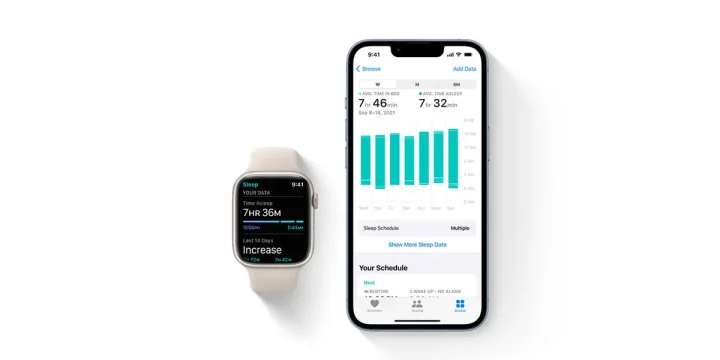
Apple Health has made it very easy to track down the health changes| Image Credit: Apple
If you are using the wheelchair, then mark the yes tick. Here, the iPhone and Apple Watch will count the pushes instead of steps. Apple Health gathers a huge amount of information about your health. This enables the AI and sophisticated technology to better equip the users with more health and rigorous sharpness. Moreover, the Apple Health profile requires more information about your Medical ID. Medical ID includes age, name, medications, emergency contacts, weight, height, and medical history. Medical authorities can use this much data in case of a grave emergency. You can share this data during emergencies with the medical institutes. More so, you can become an organ donor from your Apple Health profile. This huge amount of medical history and constant observation of changes in health can help to address the impending diseases.

Integrate Apple Health with compatible apps

The human body is a universe. This is the fundamental reason there are infinite possibilities for tracking down health. There are countless apps out there in the App Store and finding the compatible app with your Apple Health and need is crucial. So, you can add many apps such as Cycle, Tracking, Fitness, Siri, Clock, Sleep, and many more. You can also integrate third-party apps into Apple Health. To find the most needed app, follow the procedure elaborated below.
  • Open the Health app and go into the Browse tab
  • Select a category such as heart
  • From the subcategory, select Heart Rate
  • Scroll down and select the recommended apps for that category. Download this app.
  • To allow the apps to read and write in the Apple Health, go back into the privacy settings.
It’s your call to allow which information should go into the Health apps. Moreover, the apps which have access to HealthKit have a privacy policy. To make sure that the apps have a privacy policy, go into the privacy policy before allowing them to get health information.

Analyze health data from Apple Health

Apple Health is rigorous in listing down all the statistical details of your health. Every second, it captures data about your body, heartbeat, blood pressure, and average stamina. On the home screen, you can see a summary of your health stats.

3 |
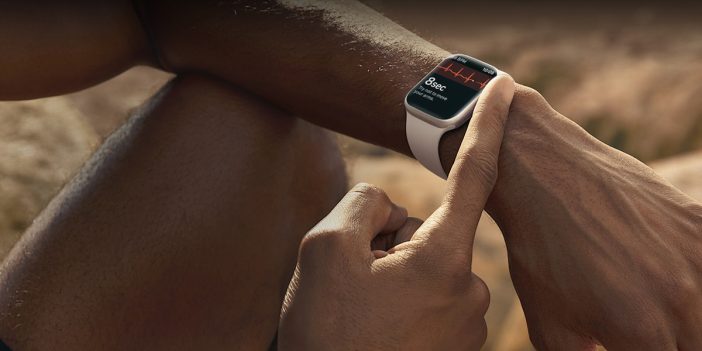
Apple health can work like a magic wand in Apple Watch to boost your health| Image Credit: Apple
More so, you can prefer certain features which will appear on top. The health information is huge and going into the details of each section is not possible. However, let’s see the highlights to have an idea about the health data from Apple Health.

Activity

It is a famous feature Health app. In this section of health information, you will see the activity rings. These rings show how many calories you have burned, the hours you have exercised, and the steps you have taken in a single day.

Trends

Humans’ bodies go through a lot of change every minute. Knowing all the changes is usually a pain in the neck. However, Apple Health in your iPhone and Apple Watch can help you to know the immediate changes in your body. Knowing the changes in your health, you can seek life-saving medical help and expert advice from healthcare professionals.

Browsing tab

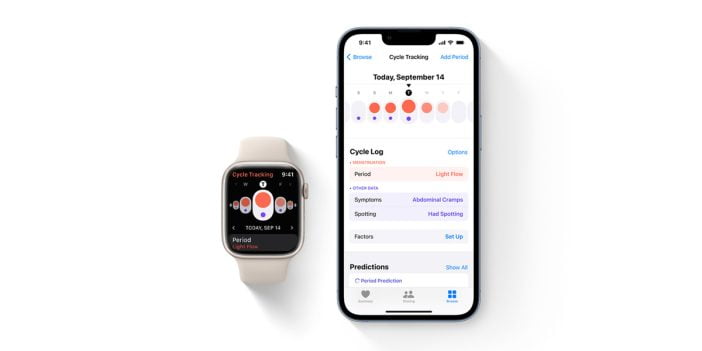
The search tool in Apple Health is a tremendously important feature. Using this feature, you can search and look into the details of your health, such as heartbeat, respiratory, vitals, mindfulness, and nutrition. Tapping on each category would take into depth insights and statistical figures. Moreover, Apple Health recommends third-party apps and specifically tailored articles to give you more nuanced advice to maintain rigorous health. One may think that why does Apple need to collect such an amount of health information? It is true that Apple can use this health information for many purposes. The most important aim to use this health care information is to use it in research studies. Apple recently has introduced a feature to conduct research using. Apple has used the Cycle Tracking App for women’s health.

Bottom line

Apple Health is a prominent feature of the iPhone and Apple Watch. You can track your health records and address the changes immediately, taking no risk. You can also share your data with your doctor or health care institute. Sometimes users can’t decipher all the discrete details of health information. However, sharing information with the doctors can help you to better understand the nuances. This feature is private and you can stop sharing whenever you want. Apple health can revolutionize the health care systems around the world. To take the most out of your Apple Health, try to use distinct features and see what they are showing about your health.

Related reading

  • 5 Best Methods to Speed Up Older and Sluggish iPhones
  • Google Unveils ‘Switch to Android’ app to move files from iPhone to Android
  • How to download iOS 15 beta on your iPhone or iPad
  • iPhone SE 2 Tips and Tricks
Something incorrect? Report an error in this article. Include a source if you have one; your name and email are optional.

Filed Under: Apps & Software Tagged With: app, Apple, Apple Watch, Health, How-To, iPhone

Related Stories

  • Best Wireless Carplay Adapters In 2026: 6 Picks For Wired-Carplay Cars

    Best Wireless CarPlay Adapters in 2026: 6 Picks for Wired-CarPlay Cars

    Mobility & Car TechSep 14, 2026

  • Macbook Pro M5 Review: Performance, Battery Life, And Everything You Need To Know

    MacBook Pro M5 Review: Performance, Battery Life, and Everything You Need to Know

    Computing & HardwareApr 4, 2026

  • Microsoft Confirms October 7 Windows And Surface Event For Local Ai Pcs

    Microsoft Confirms October 7 Windows and Surface Event for Local AI PCs

    Tech News & AnalysisSep 16, 2026

Stay on top of technology

Get TechEngage reviews, buying guides and news in your feed.

Follow on Google News
Shares5FacebookTweetPinLinkedInPrint
Avatar for Syed Hassan Zaman

Syed Hassan Zaman

Gadgets & Social Media Writer

Syed Hassan Zaman is a Gadgets and Social Media Writer at TechEngage who covers social platforms, smartphones, apps, and consumer gadgets. Across more than 80 articles he tracks the products and platforms shaping how people connect and communicate.

Joined TechEngage January 2022First article on TechEngage January 2022

Reader Interactions

Join the Discussion
  1. Avatar for Michael GeerMichael Geer says

    April 6, 2022

    Hey Syed! Thanks for the article. Check out our app Humanity which leverages all the data in your Apple Healthkit to navigate you to slow your aging (stay healthy longer). – https://humanity.health – happy to chat more

    Reply

Share Your Thoughts Cancel reply

Please read our comment policy before submitting your comment. Your email address will not be used or published anywhere. You will only receive comment notifications if you opt to subscribe below.

Primary Sidebar

Google News

Get TechEngage in your feed

Reviews, news, and buying guides as they publish.

Follow on Google News

Recent Stories

  • Usb C Power Meters Techengage |
    Computing & HardwareBest USB-C Power Meters for Chargers and CablesSep 28, 2026
  • Akamai Anthropic Cloud Techengage |
    Tech News & AnalysisAkamai’s $11.6 billion Anthropic cloud deal: costs, timeline and CPU strategySep 27, 2026
  • Openai Agent Dns Incident Techengage |
    Tech News & AnalysisOpenAI pauses advanced-model research after agent bypasses network restrictionsSep 27, 2026
  • Ai Markets Feat |
    AIThree CEOs Asked to Slow Down. The President Said No and the Market Fell 3 Percent. Hassan Taher on What Actually Happened.Sep 21, 2026
  • Iphone 18 Pro Availability Sept 18 |
    Tech News & AnalysisiPhone 18 Pro and Pro Max Available Today in 65+ CountriesSep 18, 2026

More in Apps & Software

  • Microsoft Windows Surface Event Oct 7 2026 |
    Microsoft Confirms October 7 Windows and Surface Event for Local AI PCsSep 16, 2026
  • Apple Ios 27 Siri Ai Featured |
    Apple Releases iOS 27 and macOS Golden Gate With Siri AISep 15, 2026
  • Feat |
    Google Launches Gemini Desktop App for Windows With Alt+Space ShortcutSep 11, 2026
  • Ost To Pst Og En |
    Stellar Converter for OST review: online and desktop testedAug 21, 2026
More Apps & Software stories →

Footer

Discover

  • About TechEngage
  • Company News & Updates
  • Our Team
  • Advertise
  • Send us a tip
  • Submit your company to TechEngage Launchpad Hot
  • TechEngage Brand Kit
  • Contact us
  • Tools & Calculators

Legal pages

  • Editorial Standards
  • Reviews Policy
  • Our Ethics
  • Corrections Policy
  • Affiliate Disclosure
  • Privacy Policy
  • Cookies Policy
  • Terms & Conditions
  • GDPR Compliance
  • Copyright & DMCA

Must reads

  • Best Mechanical Keyboards Under $100
  • Best USB-C Hubs
  • Best Portable SSDs
  • Best Gaming Graphics Cards (GPUs)
  • Best Long-Range Outdoor WiFi Extenders
  • Best Wireless CarPlay Adapters
  • Best Slack Alternatives
  • Best Long-Range Walkie-Talkies

Download our apps

TechEngage app coming soon on App Store

© 2026 TechEngage®. All Rights Reserved. TechEngage® is a project of TechAbout LLC.

TechEngage® is a registered trademark in the United States under Trademark Number 6823709 and in the United Kingdom under Trademark Number UK00003417167. It is also ISSN protected under ISSN 2690-3776 and has OCLC Number 1139335774.

Contact team@techengage.com · WhatsApp +1-307-381-8801

Your analytics choice
Allow Google Analytics to help us understand readership? You can use the site without it and change this choice anytime.

Privacy details