• Skip to primary navigation
  • Skip to main content
  • Skip to primary sidebar
  • Skip to footer
TechEngage

TechEngage®

Hands-on reviews, research-backed buying guides and technology news.

  • News
    • Internet & Social
    • Gadgets
    • Car Tech
    • Business
    • Science & Health
  • Reviews
  • Buying Guides
  • How-to
  • AI
  • Computing
    • Apps
    • Security
    • Gaming
  • More
    • Tools
    • Puzzles
    • Mobile
  • Launchpad
  • Sign in
TechEngage » Apps & Software

macOS Big Sur is now available to download

Avatar for Sheharyar Ahmad Saeed Sheharyar Ahmad Saeed Connect with Sheharyar Ahmad Saeed on LinkedIn Published: Nov 13, 2020 · 9:45 AM ET Updated: Feb 2, 2021 · 7:07 AM ET

NewsNews report. Not a buying guide or hands-on product test.
macOS Big Sur image
Designed by Saad Khalid / TechEngage
FacebookTweetPinLinkedInPrint

macOS Big Sur is the latest version of Apple’s most advanced operating system for Macs. After its official announcement, it is now available to Mac users as a free software update. It is mainly designed to sort out new Macs’ compatibility issues and get the maximum out of Apple’s M1 silicon chip. These Macs include MacBook Air, MacBook Pro, and Mac mini — announced by the company at its “One More Thing” event.

The macOS Big Sur aims to enhance key apps like Safari, Messages, Maps with a new bold design. Here we will narrow down and focus on the significant changes that macOS Big Sur has brought to Macs.

What’s new in the design after macOS Big Sur?
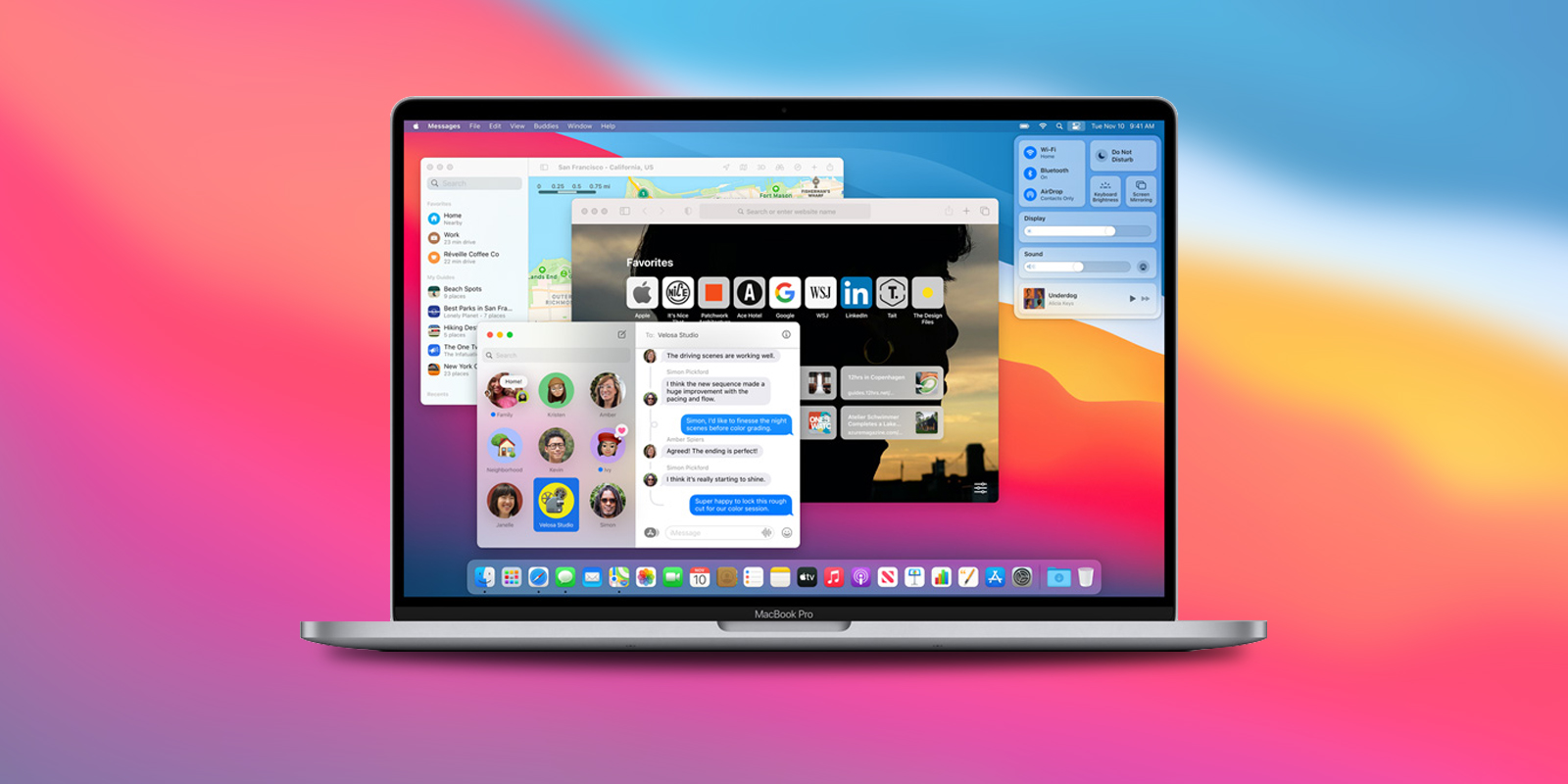
Macos Big Sur On Macbook
Image: Apple

Like the iPhones, now Apple has also brought a Control Center in its latest macOS version. The Control Center comprises multiple features related to common utility usages like volume, screen, brightness, Wi-Fi, Bluetooth, and so forth. From this addition, everyone, whether it is the first time Mac user or a veteran pro, can reap the benefit. Users can see and make a change in these commonly tweaked features at a glance.

Those who don’t want to use this quick setting change feature can retain its previous position, i.e., menu bar. This design update can be well seen in the context of Apple’s efforts to bring iPhone-like utilities to the Macs. Besides this navigation facility, the palette of colors, materials, and windows’ curvature also confronted a change in them.

Safari’s new makeover

Mac users have already been enjoying the 50% faster-loading speed of frequently visited websites in Safari than Chrome, courtesy of its JavaScript engine running at the backend. The M1, along with macOS Big Sur, overshadowed the previous generation laptops and delivered 1.5 times more speed and 2x responsive rate than the JavaScript.

Popular streaming platforms like Netflix and YouTube are modified to exhibit a 4K HDR display. Users can now preview the web page by hovering over the redesigned tabs. The start page of Safari is now more customizable as users can add their personal background picture, reading list, and iCloud Tabs on the page. New seven languages have been added, which could well mean that Safari can now translate entire web pages into seven new languages.

In a bid to update user privacy features, Safari introduced an innovative new Privacy Report feature that tells users in the form of an instant snapshot of the number of trackers Safari browser has overturned for users’ security. These trackers are mean to perform profiling of users on the web. Moreover, new tools like data breach password monitoring always keep an eye on the saved passwords that seem vulnerable and may have been compromised in the future.

Revamped Maps & Messages

There are plenty of changes introduced in the Messaging app like pinning the conversation, redesigned search, balloons, confetti, and customized emojis with automatically generated Memoji stickers. This will bring an even more engaging and expressive experience.

The Look Around feature in Maps offers an interactive 360-degree view of the destination, and new comprehensive indoor maps help navigate major airports and shopping malls. The bicycle and electric vehicle tours can be routed on a Mac and sent straight to the iPhone while you’re on the go. Users can discover places to explore and things to do with Guides from the brands they endorse and make personalized guides to favorite restaurants, parks, and holiday ideas to share with friends and family.


Related reading

  • How to download macOS Catalina
  • How to Get Apple One: Every Plan, Perk, and Money-Saving Trick Explained
Something incorrect? Report an error in this article. Include a source if you have one; your name and email are optional.

Filed Under: Apps & Software, Tech News & Analysis Tagged With: Apple, Apple MacOS, macOS, macOS Big Sur, Safari Browser

Related Stories

  • Everything Apple Announced At Its “One More Thing” Event

    Everything Apple announced at its “One More Thing” event

    Computing & HardwareNov 11, 2020

  • Apple Unveils Macos Big Sur (11.0)

    Apple unveils macOS Big Sur (11.0)

    Apps & SoftwareJun 23, 2020

  • Apple Releases Ios, Ipados 14.5, Macos 11.3 And Watchos 7.4 Update

    Apple releases iOS, iPadOS 14.5, macOS 11.3 and watchOS 7.4 update

    Apps & SoftwareApr 27, 2021

Stay on top of technology

Get TechEngage reviews, buying guides and news in your feed.

Follow on Google News
FacebookTweetPinLinkedInPrint
Avatar for Sheharyar Ahmad Saeed

Sheharyar Ahmad Saeed

Mobile & Events Reporter

Sheharyar Ahmad Saeed is a Mobile and Events Reporter at TechEngage who covers smartphone launches, apps, technology conferences, and social media. His reporting makes complex product announcements easy to follow for everyday readers.

Reader Interactions

Share Your Thoughts Cancel reply

Please read our comment policy before submitting your comment. Your email address will not be used or published anywhere. You will only receive comment notifications if you opt to subscribe below.

Primary Sidebar

Google News

Get TechEngage in your feed

Reviews, news, and buying guides as they publish.

Follow on Google News

Recent Stories

  • Eu Digital Fairness Act Illustration |
    Tech News & AnalysisEU Proposes New Controls for Autoplay and SubscriptionsNov 11, 2026
  • Nordvpn Black Friday 2026 Campaign |
    DealsNordVPN Black Friday 2026 Deal Offers Up to 78% Off and 3 Extra MonthsNov 11, 2026
  • Anthropic Ipo Illustration |
    Tech News & AnalysisAnthropic Starts IPO Roadshow With a Proposed $70 to $78 Share PriceNov 10, 2026
  • Australia Ai Safety Illustration |
    Tech News & AnalysisAustralia Plans AI Safety Regulator and Fast Incident ReportingNov 10, 2026
  • Instagram Teen Accounts Illustration |
    Tech News & AnalysisInstagram Expands AI Age Checks for Teen Accounts WorldwideNov 10, 2026

More in Apps & Software

  • Russia Government Transition Open Source Linux Featured |
    Russia’s Linux Transition: Policies, Sanctions and LimitsOct 11, 2026
  • Windows Screen Recording Guide |
    How to Screen Record on Windows 11 With AudioOct 10, 2026
  • Chrome Tabs Reloading Techengage |
    How to Stop Chrome Tabs From ReloadingOct 10, 2026
  • 136181 7Effec8402C5Ea64 |
    Microsoft’s October 7 Surface Launch: Hardware and AISep 16, 2026
More Apps & Software stories →

Footer

Discover

  • About TechEngage
  • Company News & Updates
  • Our Team
  • Advertise
  • Send us a tip
  • Submit your company to TechEngage Launchpad Hot
  • TechEngage Brand Kit
  • Contact us
  • Tools & Calculators

Legal pages

  • Editorial Standards
  • Reviews Policy
  • Our Ethics
  • Corrections Policy
  • Affiliate Disclosure
  • Privacy Policy
  • Cookies Policy
  • Terms & Conditions
  • GDPR Compliance
  • Copyright & DMCA

Must reads

  • Best Mechanical Keyboards Under $100
  • Best USB-C Hubs
  • Best Portable SSDs
  • Best Gaming Graphics Cards (GPUs)
  • Best Long-Range Outdoor WiFi Extenders
  • Best Wireless CarPlay Adapters
  • Best Slack Alternatives
  • Best Long-Range Walkie-Talkies

Download our apps

TechEngage app coming soon on the App Store Available onChrome

© 2026 TechEngage®. All Rights Reserved. TechEngage® is a project of TechAbout LLC.

TechEngage® is a registered trademark in the United States under Trademark Number 6823709 and in the United Kingdom under Trademark Number UK00003417167. The publication is identified by ISSN 2690-3776 and OCLC Number 1139335774.

Contact team@techengage.com · WhatsApp +1 307 463 4505

Your analytics choice
Allow Google Analytics to help us understand readership? You can use the site without it and change this choice anytime.

Privacy details