• Skip to primary navigation
  • Skip to main content
  • Skip to primary sidebar
  • Skip to footer
TechEngage

TechEngage®

Hands-on reviews, research-backed buying guides and technology news.

  • News
    • Internet & Social
    • Gadgets
    • Car Tech
    • Business
    • Science & Health
  • Reviews
  • Buying Guides
  • How-to
  • AI
  • Computing
    • Apps
    • Security
    • Gaming
  • More
    • Tools
    • Puzzles
    • Mobile
  • Launchpad
  • Sign in
TechEngage » Business & Fintech

Latest Opera browser for desktop adds Web 3 and crypto wallet

Avatar for Rizwan Anwar Rizwan Anwar Published: Apr 10, 2019 · 2:26 AM ET

NewsNews report. Not a buying guide or hands-on product test.
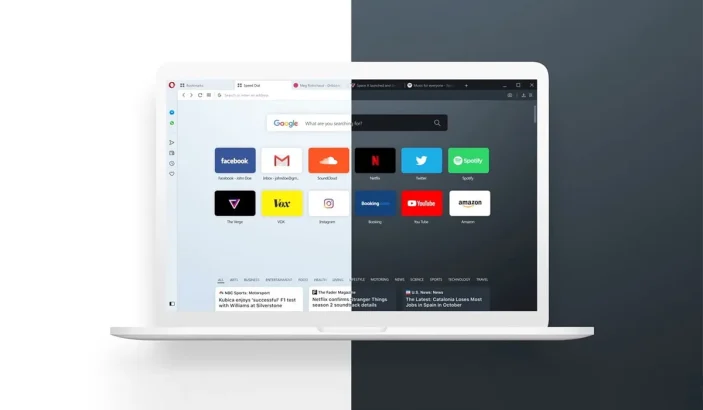
A design of Opera browser with dark and light mode enabled
FacebookTweetPinLinkedInPrint

Opera has made their browser one more reason for you to consider a new main web browser. With the latest version of Opera for Windows, Mac, and Linux, the company has integrated a crypto wallet into the browser, a native ad-block, snip tool, and plenty more features in the latest version of the web browser.

Opera on Android has for a long while getting a lot of great features, which includes Web 3 technologies – Crypto wallet. It’s time that Opera showed the desktop version the same love.

Out now on Linux, Windows, and Mac, the latest version of Opera Browser offers a host of great features.

For any other browser, a lot of these features would require downloading, installing, and signing up for various extensions, but with the latest version of Opera, you’re able to take screenshots, run a VPN, Ad-blocker, and choose a dark mode or light mode!

The latest version of the browser is ready to download and use on your respective OS. It only takes a few seconds to migrate your data from your existing web browser to use Opera as a second home!

A built-in crypto wallet is the most significant addition to carryout cryptocurrency exchange. This is especially convenient for crypto users in 2019.

While we are waiting for Chrome to get dark mode on Windows, and Microsoft to release their new and improved Edge browser, Opera seems to have thought ahead of the curve and focused on integrating a lot of much needed and popular features conveniently within the browser.

You can get the latest version of Opera for desktop from the download page. From there, install the browser, and you’re all set to go!

Something incorrect? Report an error in this article. Include a source if you have one; your name and email are optional.

Filed Under: Business & Fintech, Tech News & Analysis Tagged With: Cryptocurrency, macOS, Microsoft Windows, Opera, web browser

Related Stories

  • Steve Jobs’ Legacy: Memorials, Statues & Tributes Worldwide

    Steve Jobs’ Legacy: Memorials, Statues & Tributes Worldwide

    Business & FintechApr 9, 2026

  • The Biggest Apple Product Controversies And How They Responded

    The Biggest Apple Product Controversies and How They Responded

    Business & FintechApr 9, 2026

  • Anthropic And Nscale In Talks On Second $45B Compute Deal, Report Says

    Anthropic and Nscale in Talks on Second $45B Compute Deal, Report Says

    Tech News & AnalysisOct 19, 2026

Stay on top of technology

Get TechEngage reviews, buying guides and news in your feed.

Follow on Google News
FacebookTweetPinLinkedInPrint
Avatar for Rizwan Anwar

Rizwan Anwar

Mobile & Gaming Reviewer

Rizwan Anwar is a Mobile and Gaming Reviewer at TechEngage who covers apps, smartphones, operating system updates, browsers, and gaming. Across more than 70 articles he compares devices and software to help readers choose what fits their needs.

Joined TechEngage February 2019First article on TechEngage March 2019

Reader Interactions

Share Your Thoughts Cancel reply

Please read our comment policy before submitting your comment. Your email address will not be used or published anywhere. You will only receive comment notifications if you opt to subscribe below.

Primary Sidebar

Google News

Get TechEngage in your feed

Reviews, news, and buying guides as they publish.

Follow on Google News

Recent Stories

  • Diagram showing a clip-on microphone, receiver and phone or camera recording setup.
    Reviews & Buying GuidesBest AI Voice Recorders for Calls and InterviewsOct 19, 2026
  • Meta Logo Facebook New Name |
    AIMeta Muse Review: What Its AI Agent Can Do and Where to Be CarefulOct 19, 2026
  • Nscale Anthropic Second Compute Deal |
    Tech News & AnalysisAnthropic and Nscale in Talks on Second $45B Compute Deal, Report SaysOct 19, 2026
  • Stellar Pst Repair Desktop Vs Online Techengage |
    Reviews & Buying GuidesStellar Repair for Outlook Review: Desktop vs. Online PST RepairOct 19, 2026
  • Health Conscious Home Cleaning Fana Anwar |
    Culture & LifestyleHow to Build a More Effective, Health-Conscious Home Cleaning RoutineOct 19, 2026

More in Business & Fintech

  • Steve Jobs Legacy Memorials Statues Tributes Featured |
    Steve Jobs’ Legacy: Memorials, Statues & Tributes WorldwideApr 9, 2026
  • Biggest Apple Product Controversies Featured |
    The Biggest Apple Product Controversies and How They RespondedApr 9, 2026
  • App Developer Woman Jpg |
    How to Make an App Without Experience: A Practical GuideJun 10, 2023
  • Blog13 Jpg |
    Technology Blogs for Guest Posting: 35 Publications Open to WritersMay 20, 2023
More Business & Fintech stories →

Footer

Discover

  • About TechEngage
  • Company News & Updates
  • Our Team
  • Advertise
  • Send us a tip
  • Submit your company to TechEngage Launchpad Hot
  • TechEngage Brand Kit
  • Contact us
  • Tools & Calculators

Legal pages

  • Editorial Standards
  • Reviews Policy
  • Our Ethics
  • Corrections Policy
  • Affiliate Disclosure
  • Privacy Policy
  • Cookies Policy
  • Terms & Conditions
  • GDPR Compliance
  • Copyright & DMCA

Must reads

  • Best Mechanical Keyboards Under $100
  • Best USB-C Hubs
  • Best Portable SSDs
  • Best Gaming Graphics Cards (GPUs)
  • Best Long-Range Outdoor WiFi Extenders
  • Best Wireless CarPlay Adapters
  • Best Slack Alternatives
  • Best Long-Range Walkie-Talkies

Download our apps

TechEngage app coming soon on the App Store Available onChrome

© 2026 TechEngage®. All Rights Reserved. TechEngage® is a project of TechAbout LLC.

TechEngage® is a registered trademark in the United States under Trademark Number 6823709 and in the United Kingdom under Trademark Number UK00003417167. It is also ISSN protected under ISSN 2690-3776 and has OCLC Number 1139335774.

Contact team@techengage.com · WhatsApp +1-307-381-8801

Your analytics choice
Allow Google Analytics to help us understand readership? You can use the site without it and change this choice anytime.

Privacy details