
• Skip to primary navigation
  • Skip to main content
  • Skip to primary sidebar
  • Skip to footer
TechEngage

TechEngage®

Hands-on reviews, research-backed buying guides and technology news.

  • News
    • Internet & Social
    • Gadgets
    • Car Tech
    • Business
    • Science & Health
  • Reviews
  • Buying Guides
  • How-to
  • AI
  • Computing
    • Apps
    • Security
    • Gaming
  • More
    • Tools
    • Puzzles
    • Mobile
  • Launchpad
  • Sign in
TechEngage » Computing & Hardware

Microsoft has Unveiled New 3D Emojis for Teams, Office, and Windows

Avatar for Syed Hassan Zaman Syed Hassan Zaman Connect with Syed Hassan Zaman on LinkedIn Published: Feb 16, 2022 · 4:25 AM ET

NewsNews report. Not a buying guide or hands-on product test.
Microsoft has Unveiled New 3D Emojis for Teams, Office, and Windows
Credit: Microsoft
Shares37FacebookTweetPinLinkedInPrint
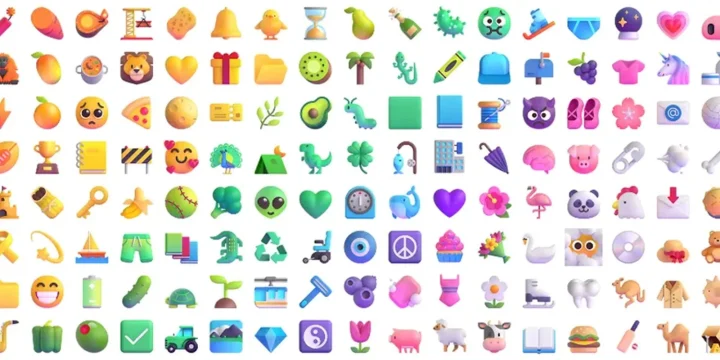
When the world is developing into virtual reality and converging the reality to the virtual world, then Microsoft can’t miss the chance. People are shifting their businesses, studies, and entertainment to the virtual world. In augmented reality honest expression is important. In real life and interactions, we are free to express our thoughts through uttering and body language. However, in the virtual world, these things were missing. Since the announcement of 3D emojis in Microsoft, things are now taking a new turn. Covid-19 has helped us to realize the importance of emojis and other symbols to display our feelings. Although there are many things to fix, still the incorporation of 3D emojis in Microsoft is a tremendous step towards more real-world experience. So, let’s know what are the essential features of the 3D emoji and what they can bring for the masses.

Microsoft 3D emojis

Microsoft has over 1800 emojis to provide a seamless and immersive experience. To bring more dynamism, exhilaration, and sensation, Microsoft has updated the current emojis to the 3D version. Smart refreshing designs and fluent intricate expression will involve the users more. Kaushal Mehta is a member of Microsoft teams who said that “Users will see a new take on most of the previous Teams emojis, along with some new picks.” There are many 3D smiley emojis that can transfer your real thoughts, ideas, and feelings to the other person in no time. This is a technological transformation in the workplace environment and study teams. To make things more robust, clear, and easy to transfer, 3D emojis can start a new era of digital communication.

How to enable the 3D emojis in Microsoft?

The glimmering 3D emojis are accessible in Windows 10, macOS, Edge, Internet Explorer, Android, Linux, and many other platforms. If you are finding it difficult to locate the new emojis, then try to go into the Microsoft Teams settings. Then go into the about and public preview. Here you can enable the 3D emojis. However, IT admins may need to enable the preview features first, then they can have seamless access across all the platforms, such as iOS, macOS, and all supported browsers.

What is the importance of 3D emojis in communication?

Sometimes you are feeling tense and sometimes light. In this crucial age, where the world is taking a drastic shift towards the virtual world, the need to express feelings, intentions, and observations more humanely and germanely is a basic necessity. Numerous students and workers are using the Microsoft teams and office. So, the need to express more translucently is very important for outstanding results in any project. The users of Microsoft teams around the world can work efficiently if they are clear in their discussions and elaborations over the imminent issues. Microsoft has advanced the world of tech towards more real-world experience. 3D emojis can give a more personalized experience to the users.

3D emojis can bring more levity to professional discussion

The combination of 3D emojis and text can bring marvelous results. In the workplace environment, everyone is strained, stressed, and preoccupied with work. So, a little chat with the 3D emojis can bring life into the dead discussion. Honest discussion, fair play, and obvious expressions can bring more clarity and fill the gaps in communication. Thus, it can remove the obstacles of misunderstanding for better results. Introducing 3d emojis can reflect our sincere humanity, and this is the chief aim of Microsoft. Emotional honesty and playfulness are important to avoid scuffles. That’s why innovative 3D emojis are paramountly important for 21st-century academics and the workplace environment.

Wrap up

Fluent 3D emoji is a journey towards a more augmented experience. Microsoft has brought its promise of introducing 3D emojis to life. But Windows 11 is still sitting in limbo. Instead of introducing 3D emojis in Windows 11, Microsoft has unveiled 2D emojis. However, on all other platforms, 3D emojis are available. This can unite the workers, enhance productivity, and bring more auspicious results for diverse teams around the world. The step is commendable and Microsoft has made tremendous progress. Its value increased from $705billion in 2018 to $1.5 trillion in 2020. Microsoft will certainly keep on its struggle to remain relevant where the metaverse is jostling the tech giants throughout the world.

Related reading

  • Microsoft will unveil “the Future of Hybrid Work” feature of Windows 11 on 5th April
  • Microsoft announces Windows 11 SE and Surface Laptop SE for students
  • Microsoft Surface Pro 8: 120Hz display, Thunderbolt and more
  • Microsoft announces powerful Surface Laptop Studio to replace Surface Book
Something incorrect? Report an error in this article. Include a source if you have one; your name and email are optional.

Filed Under: Computing & Hardware, Tech News & Analysis Tagged With: Microsoft, Microsoft Teams, News

Related Stories

  • Microsoft Brings Office Editing To Copilot, Frontier First

    Microsoft brings Office editing to Copilot, Frontier first

    AIOct 10, 2026

  • Googlebook Shows How Android 17 And Gemini Intelligence Could Reshape Google’S Ecosystem

    Googlebook Shows How Android 17 and Gemini Intelligence Could Reshape Google’s Ecosystem

    AIMay 16, 2026

  • 3 Best Ssd Enclosures For Usb-C And Usb4

    3 Best SSD Enclosures for USB-C and USB4

    Computing & HardwareOct 10, 2026

Stay on top of technology

Get TechEngage reviews, buying guides and news in your feed.

Follow on Google News
Shares37FacebookTweetPinLinkedInPrint
Avatar for Syed Hassan Zaman

Syed Hassan Zaman

Gadgets & Social Media Writer

Syed Hassan Zaman is a Gadgets and Social Media Writer at TechEngage who covers social platforms, smartphones, apps, and consumer gadgets. Across more than 80 articles he tracks the products and platforms shaping how people connect and communicate.

Joined TechEngage January 2022First article on TechEngage January 2022

Reader Interactions

Share Your Thoughts Cancel reply

Please read our comment policy before submitting your comment. Your email address will not be used or published anywhere. You will only receive comment notifications if you opt to subscribe below.

Primary Sidebar

Google News

Get TechEngage in your feed

Reviews, news, and buying guides as they publish.

Follow on Google News

Recent Stories

  • Windows Screen Recording Guide |
    Apps & SoftwareHow to Screen Record on Windows 11 With AudioOct 10, 2026
  • Chrome Tabs Reloading Techengage |
    Apps & SoftwareHow to Stop Chrome Tabs From ReloadingOct 10, 2026
  • Techengage Windows 11 File Backup |
    Computing & HardwareHow to Back Up Windows 11 Files to an External DriveOct 10, 2026
  • Techengage Ssd Enclosures |
    Computing & Hardware3 Best SSD Enclosures for USB-C and USB4Oct 10, 2026
  • Techengage Office Copilot Frontier |
    AIMicrosoft brings Office editing to Copilot, Frontier firstOct 10, 2026

More in Computing & Hardware

  • Techengage Ssd Enclosures |
    3 Best SSD Enclosures for USB-C and USB4Oct 10, 2026
  • Techengage Windows 11 File Backup |
    How to Back Up Windows 11 Files to an External DriveOct 10, 2026
  • Techengage Usb C Sd Card Readers |
    4 Best USB-C SD Card Readers for Photos and VideoOct 10, 2026
  • Illustration of a USB-C Ethernet adapter connecting a laptop to a blue network cable.
    Best USB-C Ethernet Adapters for MacBook and WindowsOct 8, 2026
More Computing & Hardware stories →

Footer

Discover

  • About TechEngage
  • Company News & Updates
  • Our Team
  • Advertise
  • Send us a tip
  • Submit your company to TechEngage Launchpad Hot
  • TechEngage Brand Kit
  • Contact us
  • Tools & Calculators

Legal pages

  • Editorial Standards
  • Reviews Policy
  • Our Ethics
  • Corrections Policy
  • Affiliate Disclosure
  • Privacy Policy
  • Cookies Policy
  • Terms & Conditions
  • GDPR Compliance
  • Copyright & DMCA

Must reads

  • Best Mechanical Keyboards Under $100
  • Best USB-C Hubs
  • Best Portable SSDs
  • Best Gaming Graphics Cards (GPUs)
  • Best Long-Range Outdoor WiFi Extenders
  • Best Wireless CarPlay Adapters
  • Best Slack Alternatives
  • Best Long-Range Walkie-Talkies

Download our apps

TechEngage app coming soon on the App Store Available onChrome

© 2026 TechEngage®. All Rights Reserved. TechEngage® is a project of TechAbout LLC.

TechEngage® is a registered trademark in the United States under Trademark Number 6823709 and in the United Kingdom under Trademark Number UK00003417167. It is also ISSN protected under ISSN 2690-3776 and has OCLC Number 1139335774.

Contact team@techengage.com · WhatsApp +1-307-381-8801

Your analytics choice
Allow Google Analytics to help us understand readership? You can use the site without it and change this choice anytime.

Privacy details
