
• Skip to primary navigation
  • Skip to main content
  • Skip to primary sidebar
  • Skip to footer
TechEngage

TechEngage®

Hands-on reviews, research-backed buying guides and technology news.

  • News
    • Internet & Social
    • Gadgets
    • Car Tech
    • Business
    • Science & Health
  • Reviews
  • Buying Guides
  • How-to
  • AI
  • Computing
    • Apps
    • Security
    • Gaming
  • More
    • Tools
    • Puzzles
    • Mobile
  • Launchpad
  • Sign in
TechEngage » Mobile

Millions of websites won’t work on over 30% of Android phones in 2021 — here’s why

Avatar for Sheharyar Ahmad Saeed Sheharyar Ahmad Saeed Connect with Sheharyar Ahmad Saeed on LinkedIn Published: Nov 9, 2020 · 9:03 AM ET

NewsNews report. Not a buying guide or hands-on product test.
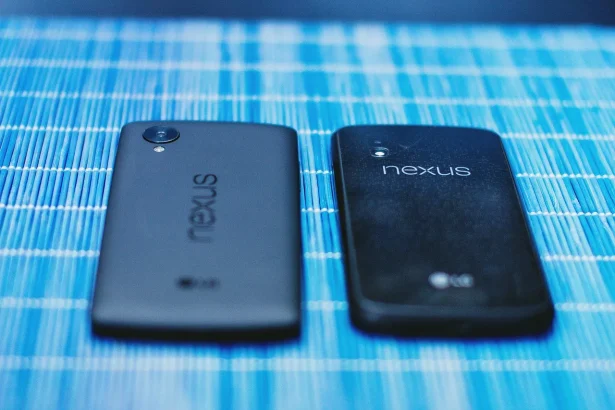
Google Nexus phones
Shares5FacebookTweetPinLinkedInPrint

The widely preferred certificate authority, Let’s Encrypt, is parting its way from another authority IdenTrust. Except for its own root certificate, Let’s Encrypt has been using a cross-signed certificate from IdenTrust. However, the partnership will be ended by September 1, 2021.

This transition would cause a problem for millions of websites on over 30% of Android devices. The heart of the problem lies in the compatibility issue. The devices that are running Android 7.1.1 or older version will be facing a problem in loading. The root certificate of Let’s Encrypt will provide support to the updated versions, and thus devices with the older version still tend to rely on cross-signatures from authorities like former IdenTrust.

Five years ago, when Let’s Encrypt launched, that’s exactly what we did. We got a cross-signature from IdenTrust. Their “DST Root X3” had been around for a long time, and all the major software platforms trusted it already: Windows, Firefox, macOS, Android, iOS, and a variety of Linux distributions. That cross-signature allowed us to start issuing certificates right away, and have them be useful to a lot of people. Without IdenTrust, Let’s Encrypt may have never happened and we are grateful to them for their partnership. Meanwhile, we issued our own root certificate (“ISRG Root X1”) and applied for it to be trusted by the major software platforms.

via Let’s Encrypt

In its announcement, Let’s Encrypt dubbed its decision as the company is standing on its own two feet. According to statistics drawn from Android Studio, over 34% of Android devices worldwide are operating version 7.1 or older. So after January, a huge amount of sites and apps might face security and compatibility problems.

Google has been the torchbearer and constantly urging the website developers to obtain an SSL certificate for the domain directly from a Certificate Authority. Secure Sockets Layer or simply SSL is a type of digital certificate that renders authentication for a website and provides an encrypted connection. Google has also endorsed the services of Let’s Encrypt and ask users to obtain a free SSL certificate from this popular Certificate Authority. As per the Google Transparency Report, 95% of website traffic over the search engine is now encrypted on its network.

At first, the certificate was only necessary for e-commerce websites where users need to give their confidential details, but since more or less every website now asks for user’s information hence the Google made it mandatory for websites to obtain an SSL certificate.

Workaround for the problem

The answer to this problem is also suggested by some experts to install and use Mozilla’s Firefox browser on these older version devices because it utilizes its own root certificate list to check online web pages. As of the time of writing, Firefox Mobile is supporting Android 5.0 and above. But still, the apps that are likely to depend on older certificates will not be able to take advantage of this patch.

Related reading

  • Huawei announces Nova 4 with a 48 MP rear camera
  • 12 cool Android tricks without rooting Android phone
  • Android 11: Chat bubbles, new features, privacy enhancements, and more
  • Beware! This wallpaper will soft-brick your Android phone
Something incorrect? Report an error in this article. Include a source if you have one; your name and email are optional.

Filed Under: Mobile, Tech News & Analysis Tagged With: Android, Android Smartphones, News, SSL Certificates, Website

Related Stories

  • Googlebook Shows How Android 17 And Gemini Intelligence Could Reshape Google’S Ecosystem

    Googlebook Shows How Android 17 and Gemini Intelligence Could Reshape Google’s Ecosystem

    AIMay 16, 2026

  • Iphone 18 Pro And Pro Max Available Today In 65+ Countries

    iPhone 18 Pro and Pro Max Available Today in 65+ Countries

    Tech News & AnalysisSep 18, 2026

  • Samsung Starts One Ui 9 (Android 17) Rollout On Galaxy S26 Series

    Samsung Starts One UI 9 (Android 17) Rollout on Galaxy S26 Series

    Tech News & AnalysisSep 17, 2026

Stay on top of technology

Get TechEngage reviews, buying guides and news in your feed.

Follow on Google News
Shares5FacebookTweetPinLinkedInPrint
Avatar for Sheharyar Ahmad Saeed

Sheharyar Ahmad Saeed

Mobile & Events Reporter

Sheharyar Ahmad Saeed is a Mobile and Events Reporter at TechEngage who covers smartphone launches, apps, technology conferences, and social media. He has written more than 170 articles, making complex product announcements easy to follow for everyday readers.

Joined TechEngage October 2020First article on TechEngage October 2020

Reader Interactions

Share Your Thoughts Cancel reply

Please read our comment policy before submitting your comment. Your email address will not be used or published anywhere. You will only receive comment notifications if you opt to subscribe below.

Primary Sidebar

Google News

Get TechEngage in your feed

Reviews, news, and buying guides as they publish.

Follow on Google News

Recent Stories

  • Google Home Local Matter Hue |
    Consumer Tech & GadgetsGoogle Home update brings local Matter control to Hue lightsOct 15, 2026
  • Windows Screen Recording Guide |
    Apps & SoftwareHow to Screen Record on Windows 11 With AudioOct 10, 2026
  • Chrome Tabs Reloading Techengage |
    Apps & SoftwareHow to Stop Chrome Tabs From ReloadingOct 10, 2026
  • Techengage Windows 11 File Backup |
    Computing & HardwareHow to Back Up Windows 11 Files to an External DriveOct 10, 2026
  • Techengage Ssd Enclosures |
    Computing & Hardware3 Best SSD Enclosures for USB-C and USB4Oct 10, 2026

More in Mobile

  • 136201 D34F78Ed5C3A7E7D |
    iPhone 18 Pro and Pro Max Available Today in 65+ CountriesSep 18, 2026
  • 136191 88Baadf6046749B8 |
    Samsung Starts One UI 9 (Android 17) Rollout on Galaxy S26 SeriesSep 17, 2026
  • TechEngage news graphic: iOS 27 Is Out With Siri AI, with an illustrated laptop and phone showing an AI assistant
    Apple Releases iOS 27 and macOS Golden Gate With Siri AISep 15, 2026
  • Lumia Series Jpg |
    Nokia Lumia History: Key Phones, Microsoft’s Deal and the EndSep 24, 2023
More Mobile stories →

Footer

Discover

  • About TechEngage
  • Company News & Updates
  • Our Team
  • Advertise
  • Send us a tip
  • Submit your company to TechEngage Launchpad Hot
  • TechEngage Brand Kit
  • Contact us
  • Tools & Calculators

Legal pages

  • Editorial Standards
  • Reviews Policy
  • Our Ethics
  • Corrections Policy
  • Affiliate Disclosure
  • Privacy Policy
  • Cookies Policy
  • Terms & Conditions
  • GDPR Compliance
  • Copyright & DMCA

Must reads

  • Best Mechanical Keyboards Under $100
  • Best USB-C Hubs
  • Best Portable SSDs
  • Best Gaming Graphics Cards (GPUs)
  • Best Long-Range Outdoor WiFi Extenders
  • Best Wireless CarPlay Adapters
  • Best Slack Alternatives
  • Best Long-Range Walkie-Talkies

Download our apps

TechEngage app coming soon on the App Store Available onChrome

© 2026 TechEngage®. All Rights Reserved. TechEngage® is a project of TechAbout LLC.

TechEngage® is a registered trademark in the United States under Trademark Number 6823709 and in the United Kingdom under Trademark Number UK00003417167. It is also ISSN protected under ISSN 2690-3776 and has OCLC Number 1139335774.

Contact team@techengage.com · WhatsApp +1-307-381-8801

Your analytics choice
Allow Google Analytics to help us understand readership? You can use the site without it and change this choice anytime.

Privacy details
