

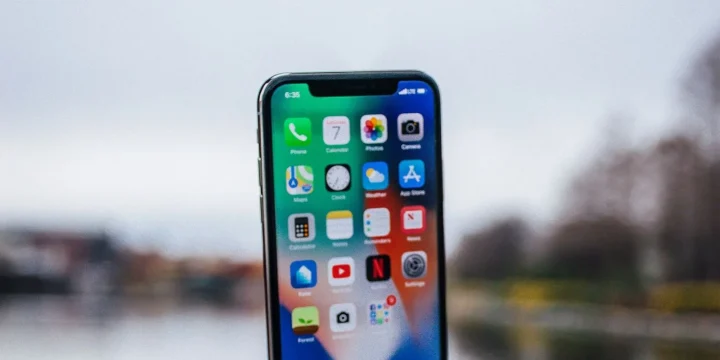
Are you getting tired of using your worn-out iPhone 6? Perhaps it’s served you well for many years, but you’re beginning to spot some issues like shorter battery life, slower processing speeds, and maybe you’ve been having issues getting it to charge when you plug it in. These are all pretty normal occurrences for a smartphone that’s been used for quite a few years, even if you’ve been careful and looked after it well. Smartphones do naturally deteriorate, and if you’ve been feeling just a little jealous of your friends showing off their new iPhone 11 handsets, then it’s natural that you might be thinking about getting an upgrade.
But before you upgrade your iPhone, there are several factors to think about to make sure that you are getting the right handset for your needs, and of course, your budget. iPhones certainly don’t come cheap, whether you’re purchasing one outright or getting one on a monthly contract, so it’s definitely worth putting some homework in to discover which is the best model and specs for you.
1. How much do you want to spend?
First of all, set a budget for how much you want to spend on your new iPhone. There are plenty of newer options available if you upgrade from an old iPhone 6 or even an iPhone 7, so you don’t have to jump at the latest release. If you want something fairly new but not as expensive as the iPhone 11, it might be worth looking into options for getting an iPhone XS or iPhone XR, which are a couple of years old but still a lot newer are currently using. Having a firm budget in mind – either for what you want to pay in total or what you’re willing to spend each month on a contract – will help you narrow down your options when shopping.
2. Do you want a fixed contract?
Secondly, you’ll need to think about whether or not you want to get your smartphone as part of a contract deal. Contracts tend to last around 18-24 months, depending on the network and involve a monthly fee that includes the cost of the handset and the number of minutes, data, and texts you’ll get so that you can spread the cost out. Bear in mind that most mobile networks and retailers who provide contracts will run a credit check to determine whether or not you can sign up, so keep this in mind before you apply. If you have poor credit, you may be rejected or asked to pay an upfront fee to secure the contract.
If you don’t mind purchasing the phone outright or are thinking of purchasing the handset on a hire purchase deal, then the best SIM-only deals are a good option to consider. These are often much cheaper on a month-by-month basis than a contract deal, and you can get a lot more for your money.
3. Brand new or refurbished?
Another consideration to make is whether or not you want to buy your phone brand new or get a handset that has been refurbished to a high standard. If you want to opt for a SIM-only deal, then a refurbished iPhone might be an ideal option for buying the handset outright at a much cheaper cost. You can often choose from different standards of refurbishment; Pristine is usually the closest to brand-new that you can get, and you’ll barely be able to notice the difference, while ‘Good’ means that while the phone is working well and does not have any obvious cracks in the screen, there might be a couple of little scuffs and marks on it. These can usually easily be covered with a case if you’re not too bothered about getting a used phone and want the best handset at the best price.
If you decide to purchase a refurbished iPhone, consider the retailer you’re purchasing from. Apple does refurbish their own devices, or you can find refurbished tech on sites like eBay or Music Magpie. Most of the time, you can rest assured that the handset is in great working condition, but it’s worth opting for a warranty if one’s available.
4. Storage space:
As an Apple user, you’ll already be aware that you can’t expand your iPhone’s physical memory with an SD card, so we’re assuming this isn’t really important to you. However, it’s worth considering the memory size of the iPhone you’re purchasing. You’ll be glad to hear that since the older iPhones that came with a minimum of 16GB, Apple has scrapped the smaller memory options, and now the minimum you can get for the newer handset options is 32GB. 64GB is a good choice for everyday use, but if you expect to download many apps and take bunches of photos, you might want to treat yourself to 128GB or even more.
Another good option for expanding your storage space as an iPhone user is by signing up for iCloud. Every iPhone user has an iCloud account as standard, and you can set this up for cloud storage, too. Once you’ve done this, you can then go to your settings and instruct your smartphone to back-up your iPhone to iCloud daily, which stores all your photographs, documents, contacts, emails, texts, and more in the cloud. You can purchase inexpensive cloud storage plans starting from just a couple of pounds per month to expand your storage, which is ideal if you need to free up storage space on your smartphone.
5. Accessories:
Finally, consider the accessories that you are going to use for your new iPhone. When upgrading from an older model like the iPhone 5 or iPhone 6, one of the biggest things that you will probably notice is that the headphone jack has disappeared. Yes, that’s right, Apple was the first smartphone manufacturer to do away with the 3.5mm aux port so that they could make their handsets slimmer and sleeker. This isn’t a problem if you plan to use the headphones that come with your handset, as they will have a lightning connector. But if you have another set of headphones that you want to use or want to connect your phone to your car radio with an aux cable, you’ll need to purchase an adaptor. This features a lightning port on one end and an aux-in the other so that you can easily connect your phone to an aux cable or headphones.
iPhones are some of the sturdiest and most reliable handsets, so it’s no surprise that you’ve been using your older model for years. But if its’ time to treat yourself to a newer handset, keep these factors in mind to decide on the right one for you.


Share Your Thoughts