
• Skip to primary navigation
  • Skip to main content
  • Skip to primary sidebar
  • Skip to footer
TechEngage

TechEngage®

Hands-on reviews, research-backed buying guides and technology news.

  • News
    • Internet & Social
    • Gadgets
    • Car Tech
    • Business
    • Science & Health
  • Reviews
  • Buying Guides
  • How-to
  • AI
  • Computing
    • Apps
    • Security
    • Gaming
  • More
    • Tools
    • Puzzles
    • Mobile
  • Launchpad
  • Sign in
TechEngage » Apps & Software

Chrome Changes Its Logo for the First Time in Eight Years

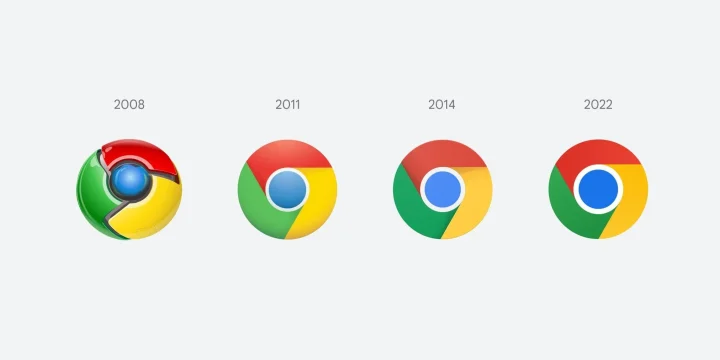
Google is refreshing the Chrome logo for the first time since 2014, an eight-year gap. The 2022 design keeps the familiar red, green and yellow segments around a blue center, with subtler changes to shadows, proportions and color.

Avatar for Syed Hassan Zaman Syed Hassan Zaman Connect with Syed Hassan Zaman on LinkedIn Published: Feb 7, 2022 · 2:16 AM ET

NewsNews report. Not a buying guide or hands-on product test.
Chrome Changes Its Logo for the First Time in Eight Years
Credit: Elvin Hu
Shares9FacebookTweetPinLinkedInPrint

Google is refreshing the Chrome logo for the first time since 2014, an eight-year gap. The 2022 design keeps the familiar red, green and yellow segments around a blue center, with subtler changes to shadows, proportions and color.

What looks different?

The blue center is larger and the shadows between the main color segments are removed. The overall shape stays recognizable, so the change is easier to see when the old and new icons are placed side by side.

Chrome designer Elvin Hu shared the redesign and explained how the team adjusted the icon for different operating systems.

Why the icon varies by platform

The Windows version uses a more visible gradient, while the ChromeOS version uses brighter colors without gradients. The macOS icon has a more dimensional appearance to fit the surrounding app icons. These are variations of the 2022 design, not separate browser products.

A familiar design with smaller changes

Chrome’s early icon had a more three-dimensional appearance. Later versions moved toward a flatter design while retaining the same recognizable color arrangement. The 2022 refresh continues that approach rather than introducing a new symbol.

The revised icon is appearing in Chrome Canary ahead of the wider rollout. A changed icon does not itself change browsing performance or account settings; the visual treatment is the main difference discussed here.

Related reading

  • How to watch videos in Picture-in-Picture mode on Chrome
  • Chrome for iOS updated with 'dark mode'
  • How to Find and Remove Harmful Software Using Chrome
Something incorrect? Report an error in this article. Include a source if you have one; your name and email are optional.

Filed Under: Apps & Software, Tech News & Analysis Tagged With: Chrome, Google chrome, Twitter

Related Stories

  • How To Stop Chrome Tabs From Reloading

    How to Stop Chrome Tabs From Reloading

    Apps & SoftwareOct 10, 2026

  • Googlebook Shows How Android 17 And Gemini Intelligence Could Reshape Google’S Ecosystem

    Googlebook Shows How Android 17 and Gemini Intelligence Could Reshape Google’s Ecosystem

    AIMay 16, 2026

  • Tech Platforms Killed By Bad Redesigns: From Digg V4 To Twitter’S Rebrand

    Tech Platforms Killed by Bad Redesigns: From Digg v4 to Twitter’s Rebrand

    Internet & Social MediaApr 9, 2026

Stay on top of technology

Get TechEngage reviews, buying guides and news in your feed.

Follow on Google News
Shares9FacebookTweetPinLinkedInPrint
Avatar for Syed Hassan Zaman

Syed Hassan Zaman

Gadgets & Social Media Writer

Syed Hassan Zaman is a Gadgets and Social Media Writer at TechEngage who covers social platforms, smartphones, apps, and consumer gadgets. Across more than 80 articles he tracks the products and platforms shaping how people connect and communicate.

Joined TechEngage January 2022First article on TechEngage January 2022

Reader Interactions

Share Your Thoughts Cancel reply

Please read our comment policy before submitting your comment. Your email address will not be used or published anywhere. You will only receive comment notifications if you opt to subscribe below.

Primary Sidebar

Google News

Get TechEngage in your feed

Reviews, news, and buying guides as they publish.

Follow on Google News

Recent Stories

  • Diagram showing a clip-on microphone, receiver and phone or camera recording setup.
    Reviews & Buying GuidesBest AI Voice Recorders for Calls and InterviewsOct 19, 2026
  • Meta Logo Facebook New Name |
    AIMeta Muse Review: What Its AI Agent Can Do and Where to Be CarefulOct 19, 2026
  • Nscale Anthropic Second Compute Deal |
    Tech News & AnalysisAnthropic and Nscale in Talks on Second $45B Compute Deal, Report SaysOct 19, 2026
  • Stellar Pst Repair Desktop Vs Online Techengage |
    Reviews & Buying GuidesStellar Repair for Outlook Review: Desktop vs. Online PST RepairOct 19, 2026
  • Health Conscious Home Cleaning Fana Anwar |
    Culture & LifestyleHow to Build a More Effective, Health-Conscious Home Cleaning RoutineOct 19, 2026

More in Apps & Software

  • Russia Government Transition Open Source Linux Featured |
    Russia’s Government Transition to Open-Source Linux: From Putin’s 2010 Order to 2026Oct 11, 2026
  • Windows Screen Recording Guide |
    How to Screen Record on Windows 11 With AudioOct 10, 2026
  • Chrome Tabs Reloading Techengage |
    How to Stop Chrome Tabs From ReloadingOct 10, 2026
  • 136181 7Effec8402C5Ea64 |
    What Microsoft Announced on October 7: Surface Laptop Ultra, RTX Spark Dev Box, and Windows AISep 16, 2026
More Apps & Software stories →

Footer

Discover

  • About TechEngage
  • Company News & Updates
  • Our Team
  • Advertise
  • Send us a tip
  • Submit your company to TechEngage Launchpad Hot
  • TechEngage Brand Kit
  • Contact us
  • Tools & Calculators

Legal pages

  • Editorial Standards
  • Reviews Policy
  • Our Ethics
  • Corrections Policy
  • Affiliate Disclosure
  • Privacy Policy
  • Cookies Policy
  • Terms & Conditions
  • GDPR Compliance
  • Copyright & DMCA

Must reads

  • Best Mechanical Keyboards Under $100
  • Best USB-C Hubs
  • Best Portable SSDs
  • Best Gaming Graphics Cards (GPUs)
  • Best Long-Range Outdoor WiFi Extenders
  • Best Wireless CarPlay Adapters
  • Best Slack Alternatives
  • Best Long-Range Walkie-Talkies

Download our apps

TechEngage app coming soon on the App Store Available onChrome

© 2026 TechEngage®. All Rights Reserved. TechEngage® is a project of TechAbout LLC.

TechEngage® is a registered trademark in the United States under Trademark Number 6823709 and in the United Kingdom under Trademark Number UK00003417167. It is also ISSN protected under ISSN 2690-3776 and has OCLC Number 1139335774.

Contact team@techengage.com · WhatsApp +1-307-381-8801

Your analytics choice
Allow Google Analytics to help us understand readership? You can use the site without it and change this choice anytime.

Privacy details
