• Skip to primary navigation
  • Skip to main content
  • Skip to primary sidebar
  • Skip to footer
TechEngage

TechEngage®

Hands-on reviews, research-backed buying guides and technology news.

  • News
    • Internet & Social
    • Gadgets
    • Car Tech
    • Business
    • Science & Health
  • Reviews
  • Buying Guides
  • How-to
  • AI
  • Computing
    • Apps
    • Security
    • Gaming
  • More
    • Tools
    • Puzzles
    • Mobile
  • Launchpad
  • Sign in
TechEngage » Apps & Software

How to Download the iOS 15 Beta

Avatar for Muhammad Abdullah Muhammad Abdullah Follow Muhammad Abdullah on X Published: Jul 1, 2021 · 7:11 AM ET

From the archive. This article was originally published in 2021 and is kept for reference. Some details may be out of date.
iOS 15 first public beta
FacebookTweetPinLinkedInPrint

The iOS 15 and iPadOS 15 public beta programs have ended. Do not install those old betas; consult Apple’s beta program for supported releases and installation requirements.

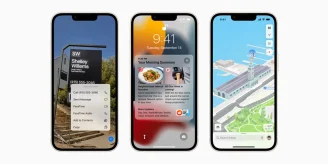
In a surprise announcement, Apple has released iOS 15 first public beta for supported iPhones and iPads. The company announced iOS 15 at WWDC 2021, and a stable build won’t be available till this fall. However, you don’t have to be a developer to try out the new iOS 15 early, but you have to be able to bear bugs and crashes patiently. So, if you are willing to do that, go ahead and install the iOS 15 beta on your device. If you don’t have a spare iOS device, it is NOT RECOMMENDED to install any beta software on a primary device. If you have a spare phone or tablet, you can try out the beta build on it. One more thing…Before proceeding, make sure you have enough battery or keep your iPhone or iPad connected to the charger.

Installing iOS 15/iPadOS 15 beta on your iPhone/iPad:
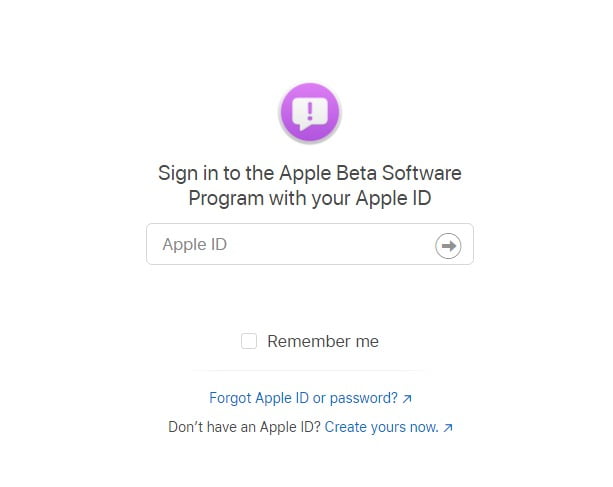
Ios Beta Sign Up Program
Sign Up Screen for iOS Beta Program / Image via Apple
  1. Open Apple’s beta software program site on your iPhone using Safari browser. Then, follow the prompts and complete sign up for the beta for your iPhone or iPad using your Apple ID.
  2. After signing in using your Apple ID, select iOS and enroll your device for iOS 15 beta in the “Get started” section. Read through the instructions available on Apple’s portal and create a backup before proceeding.
  3. After you’re done with the backup, click the “Download profile” button and install the beta profile on your device. Allow the pop-up to download the configuration profile.
  4. Now, open the Settings app and select beta profile near the top of the screen. Approve the installation, and your device will restart afterward. Your device will reboot, and after that, you can install beta software updates as a regular software update.
  5. Navigate to Settings>General>Software Update, and you can download updates from there. Make sure that your phone is charged or keep the charger connected once the update is happening.
After installing the beta build, you might not see all the promised iOS 15 features. This build is meant for developers to test their apps before the official rollout of iOS 15. So, it will be buggy. Enjoy iOS 15 beta!

Related reading

  • How to get iOS 15 now
  • Google Unveils ‘Switch to Android’ app to move files from iPhone to Android
  • How to Use Apple Health Efficiently on iPhone and Apple Watch?
  • How to rearrange your apps in iOS 13
Something incorrect? Report an error in this article. Include a source if you have one; your name and email are optional.

Filed Under: Apps & Software Tagged With: Apple, How-To, iOS, iOS 15, iPad, iPhone

Related Stories

  • How To Get Ios 15 Now

    How to get iOS 15 now

    Apps & SoftwareSep 22, 2021

  • Wwdc 2021: Everything Apple Announced So Far

    WWDC 2021: Everything Apple announced so far

    Tech News & AnalysisJun 8, 2021

  • Ios 15 Update Is Now Available For Iphone 6S And Later

    iOS 15 update is now available for iPhone 6s and later

    Apps & SoftwareSep 22, 2021

Stay on top of technology

Get TechEngage reviews, buying guides and news in your feed.

Follow on Google News
FacebookTweetPinLinkedInPrint
Avatar for Muhammad Abdullah

Muhammad Abdullah

Senior Tech Correspondent

Muhammad Abdullah is a Senior Tech Correspondent at TechEngage. A computer scientist by training and a certified Growth Hacker, he covers mobile devices, apps, operating systems, social media, and gaming, turning complex digital trends into practical insights.

Reader Interactions

Share Your Thoughts Cancel reply

Please read our comment policy before submitting your comment. Your email address will not be used or published anywhere. You will only receive comment notifications if you opt to subscribe below.

Primary Sidebar

Google News

Get TechEngage in your feed

Reviews, news, and buying guides as they publish.

Follow on Google News

Recent Stories

  • Eu Digital Fairness Act Illustration |
    Tech News & AnalysisEU Proposes New Controls for Autoplay and SubscriptionsNov 11, 2026
  • Nordvpn Black Friday 2026 Campaign |
    DealsNordVPN Black Friday 2026 Deal Offers Up to 78% Off and 3 Extra MonthsNov 11, 2026
  • Anthropic Ipo Illustration |
    Tech News & AnalysisAnthropic Starts IPO Roadshow With a Proposed $70 to $78 Share PriceNov 10, 2026
  • Australia Ai Safety Illustration |
    Tech News & AnalysisAustralia Plans AI Safety Regulator and Fast Incident ReportingNov 10, 2026
  • Instagram Teen Accounts Illustration |
    Tech News & AnalysisInstagram Expands AI Age Checks for Teen Accounts WorldwideNov 10, 2026

More in Apps & Software

  • Russia Government Transition Open Source Linux Featured |
    Russia’s Linux Transition: Policies, Sanctions and LimitsOct 11, 2026
  • Windows Screen Recording Guide |
    How to Screen Record on Windows 11 With AudioOct 10, 2026
  • Chrome Tabs Reloading Techengage |
    How to Stop Chrome Tabs From ReloadingOct 10, 2026
  • 136181 7Effec8402C5Ea64 |
    Microsoft’s October 7 Surface Launch: Hardware and AISep 16, 2026
More Apps & Software stories →

Footer

Discover

  • About TechEngage
  • Company News & Updates
  • Our Team
  • Advertise
  • Send us a tip
  • Submit your company to TechEngage Launchpad Hot
  • TechEngage Brand Kit
  • Contact us
  • Tools & Calculators

Legal pages

  • Editorial Standards
  • Reviews Policy
  • Our Ethics
  • Corrections Policy
  • Affiliate Disclosure
  • Privacy Policy
  • Cookies Policy
  • Terms & Conditions
  • GDPR Compliance
  • Copyright & DMCA

Must reads

  • Best Mechanical Keyboards Under $100
  • Best USB-C Hubs
  • Best Portable SSDs
  • Best Gaming Graphics Cards (GPUs)
  • Best Long-Range Outdoor WiFi Extenders
  • Best Wireless CarPlay Adapters
  • Best Slack Alternatives
  • Best Long-Range Walkie-Talkies

Download our apps

TechEngage app coming soon on the App Store Available onChrome

© 2026 TechEngage®. All Rights Reserved. TechEngage® is a project of TechAbout LLC.

TechEngage® is a registered trademark in the United States under Trademark Number 6823709 and in the United Kingdom under Trademark Number UK00003417167. The publication is identified by ISSN 2690-3776 and OCLC Number 1139335774.

Contact team@techengage.com · WhatsApp +1 307 463 4505

Your analytics choice
Allow Google Analytics to help us understand readership? You can use the site without it and change this choice anytime.

Privacy details