

In this guide
Our verdict: Keeper is a strong shortlist for businesses that need managed password sharing and a deliberate access model. Its team, role and shared-folder settings saved consistently in our tests. Budget against the tier that supplies your required controls: the Enterprise trial exposes capabilities that should not be assumed to come with Business or Starter.
| Useful strengths | Decisions to make before buying |
|---|---|
| Separate teams, role policies and folder permissions | Which controls require Enterprise? |
| Saved restrictions and shared records persisted | Which reporting and monitoring add-ons are needed? |
| Clear ownership and management choices in shared folders | Does a regular member behave as the policy intends? |
A clear separation between teams and policies
Keeper separates sharing groups from the rules applied to users. Teams organize people for shared-folder access, while roles define policy and administrative capabilities. That is a useful structure for a company where a working group needs shared credentials but should not automatically gain control of the password system.
Creating a test team was straightforward. Its restriction on record re-sharing remained enabled after switching away and reopening it. Separate options for record editing and a privacy screen were also visible. Keeper’s role and permission documentation explains how teams and roles relate.
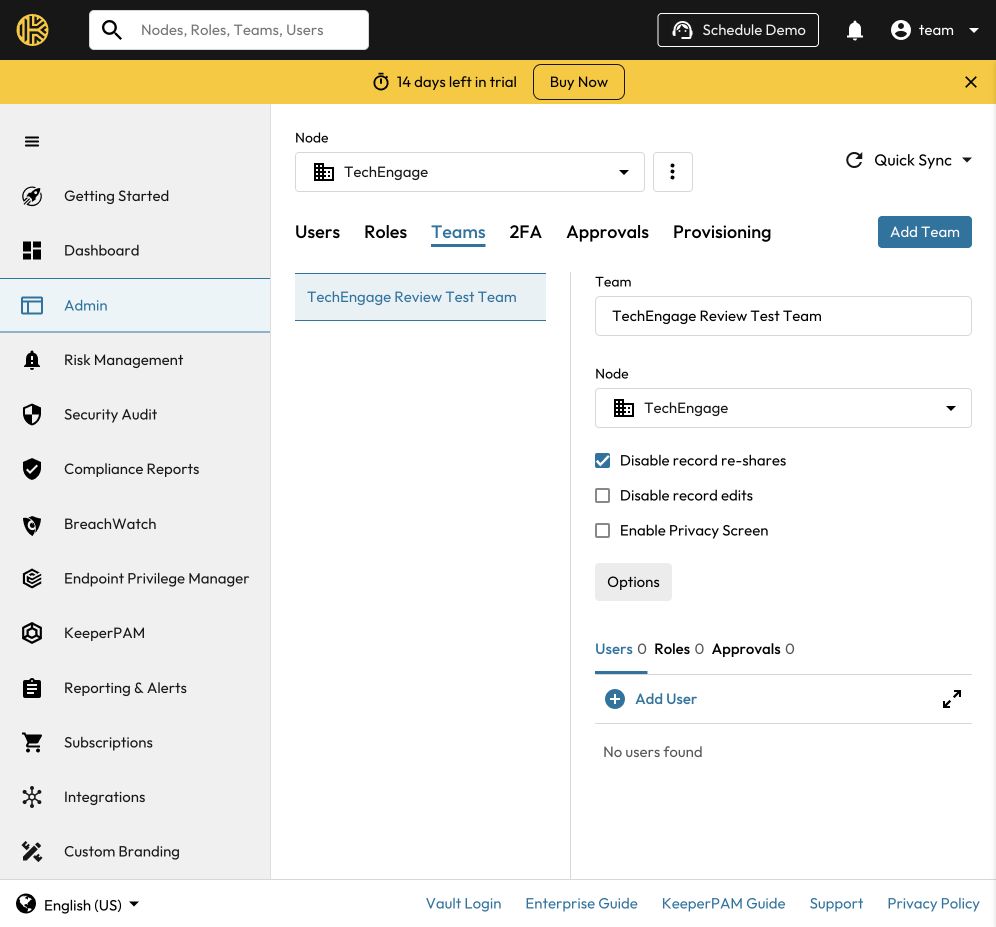
The distinction matters when planning access. Group membership, permission to manage a shared folder and permission to change a record are different decisions. Keeper exposes those decisions separately, which gives an administrator flexibility but also makes a deliberate access design important.
Shared folders make the permission layers visible
A shared folder held a synthetic login with its username, website and notes intact after saving and reopening. The password remained masked in the main view. Adding the empty test team to that folder also saved successfully.
The folder exposed separate User Permissions and Record Permissions controls. Its saved defaults were No User Permissions and View Only, while the owner retained Can Manage Users & Records. Keeper also warned that individual record permissions can override folder defaults. An administrator needs to read these layers together rather than assume that one label describes every member’s access.
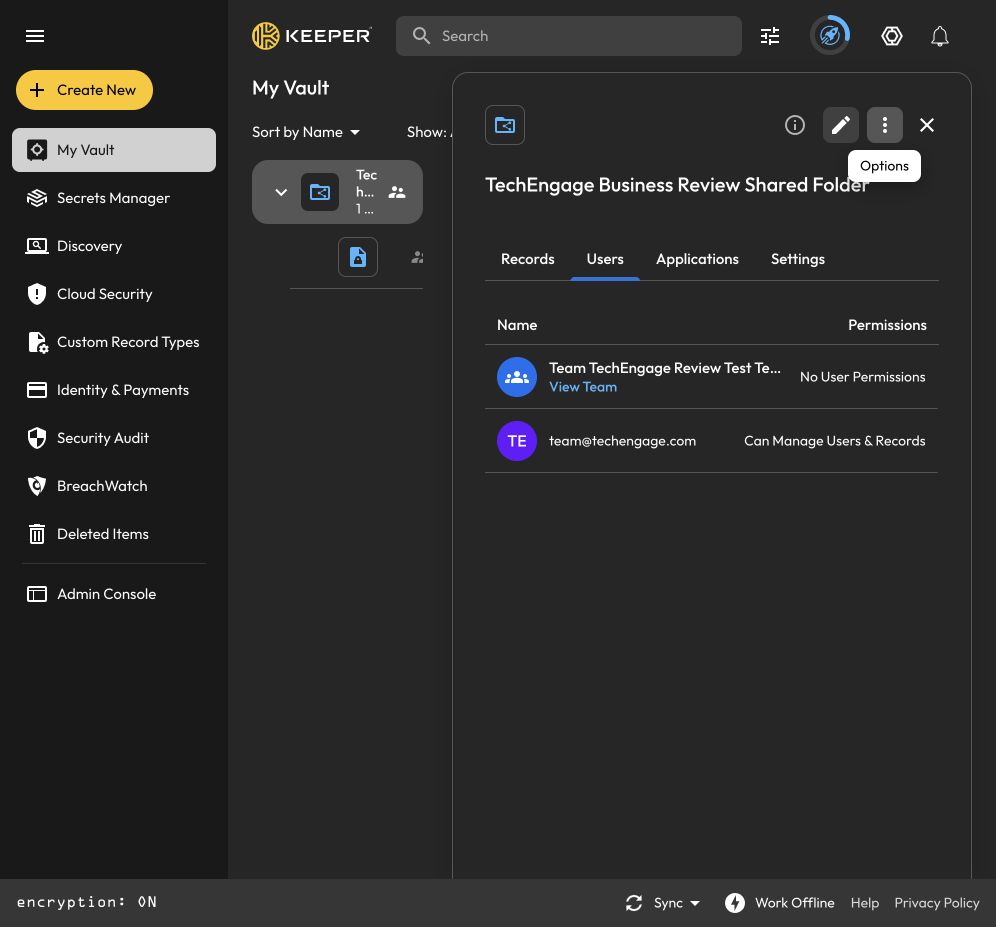
These checks establish that the configuration and record persisted. An empty team cannot demonstrate what an ordinary member can actually read, edit or re-share. Member-side permission enforcement and offboarding were not tested, so those remain essential checks before a company-wide rollout.
A useful distinction in the sharing documentation is that user-management permissions govern adding or removing people and records, while record permissions govern viewing, editing and sharing an item. No User Permissions therefore should not be read as a blanket statement that a member can see nothing. Check the effective record permissions as well.
Detailed role controls, with a paid-plan boundary
A separate, unassigned role retained an export restriction after saving and reopening. Turning off Can export from vault left the import options enabled. The role had no administrative permissions and was not applied to the default policy.
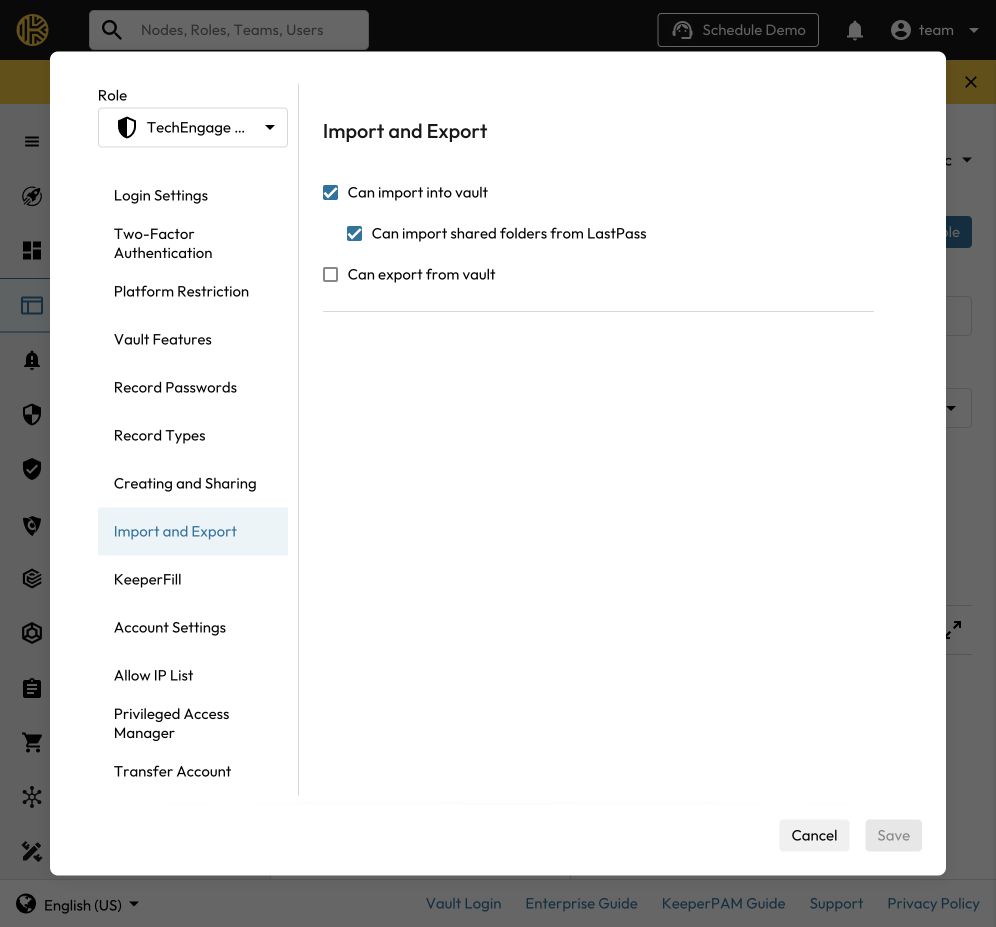
The policy interface also exposed sections for login requirements, multifactor authentication, platform restrictions, record types, sharing, KeeperFill and account settings. This is a detailed administrative interface, but the test used Keeper Enterprise Trial. Its available controls do not establish that every feature is included in a paid Business subscription.
An export restriction is also narrower than complete data-loss prevention. Someone who can read a credential may still be able to copy it or photograph it. Test the intended restrictions with a regular member and the actual applications your team uses.
Reporting is useful to evaluate separately
The reporting trial provided activity views and filters for users, event types, dates and displayed columns. Policy-change categories included team creation, role creation and role-policy changes. The interface stated that report data is delayed by 15 minutes and results are limited to the last 1,000 events.
That delay matters during an investigation. The test did not verify delivery of the newly generated events after the delay, long-term retention or an external logging integration. Advanced Reporting & Alerts and Compliance Reporting should be evaluated as separate paid features, rather than assumed to come with the Business base price.
Starter, Business and Enterprise: match the tier to the job
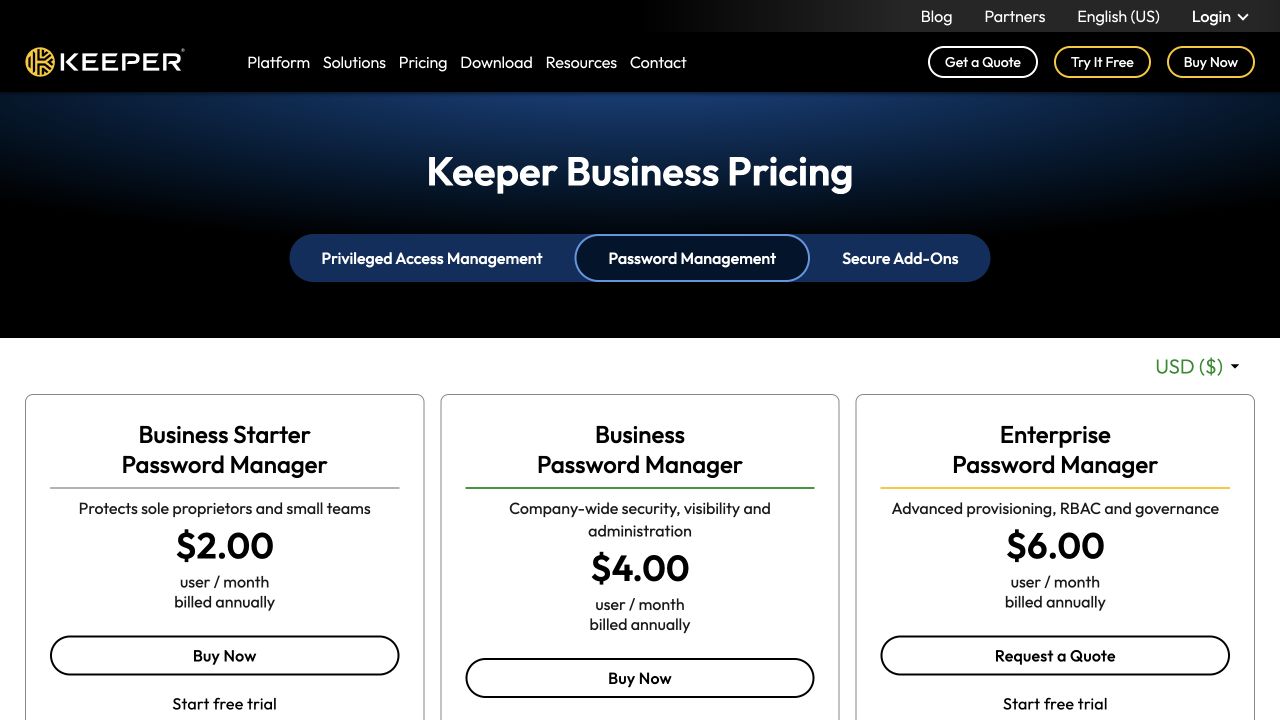
The Business signup supplied an Enterprise trial with several add-on trials active. Use it to explore the platform, then compare the paid package separately. The official plan comparison placed shared team folders, delegated administration and a Family benefit in Business, with advanced provisioning, SSO and RBAC under Enterprise.
| Plan | Per user / month* | Ten users / year* | Published scope to compare |
|---|---|---|---|
| Starter | $2 | $240 | Five to ten users; vault, admin console and credential sharing |
| Business | $4 | $480 | Shared team folders, delegated administration and Family benefit |
| Enterprise | $6 | $720 | Advanced provisioning, SSO/SAML and RBAC |
A ten-person team that requires SSO should compare the Enterprise example of $720 per year with its requirements, rather than plan around Starter’s $240 headline total. Advanced reporting, compliance reporting and other optional modules can increase the bill. Ask for the configuration you intend to deploy, including its storage, support and renewal terms.
Encryption and administration are separate responsibilities
Keeper documents client-side encryption with record and folder keys, alongside authorization for administrative operations. An admin console is therefore not a substitute for understanding who can manage users, share records or perform a vault transfer. Our tests checked configuration persistence, not the cryptographic implementation or an employee-vault transfer.
Keep company credentials in the organization’s intended shared structure. Design ownership and recovery before an employee leaves, and avoid mixing that decision with the separate household vault described in our Keeper Personal review.
The rollout checks that matter most
Before buying at scale, invite an ordinary test member and check the effective permissions from that person’s side. A setting that saves successfully is only the first half of the test. Confirm whether the member can view, edit, copy, re-share and export the intended record, then repeat after access is removed.
For offboarding, plan for company-owned records to remain available to the team and for former employees to lose access. Rotate credentials that the departing person knew or could have copied; removing vault access cannot erase a remembered or previously exported password. Include both access removal and credential rotation in the offboarding process.
If reporting is a requirement, generate known events and verify that they arrive after the stated delay. Then check the retention and external logging configuration you actually need. A dashboard with filters is not proof of complete event delivery or a successful SIEM integration.
Who should shortlist Keeper for a team?
Best for: organizations that want a dedicated password-administration console and are prepared to plan shared-folder access and policies carefully. The tested configuration controls were consistent when saved and reopened.
Keep in mind: these results support a shortlist, rather than a full deployment recommendation. A rollout still needs real member onboarding, permission checks, offboarding and the required browser or mobile clients. Review Keeper’s Business plans and trial against that workflow, especially if SSO or advanced reporting is a requirement.
How we tested
TechEngage ran automated browser tests on macOS on October 31, 2026, using Keeper Enterprise Trial, one administrator, an empty team, an unassigned role and a synthetic shared-folder login. The checks covered saved configuration and record persistence. Member enforcement, employee lock/offboarding, SSO, directory sync, alerts, external logging, mobile apps and browser-extension autofill were outside the completed tests.




Share Your Thoughts