

• Skip to primary navigation
  • Skip to main content
  • Skip to primary sidebar
  • Skip to footer
TechEngage

TechEngage®

Hands-on reviews, research-backed buying guides and technology news.

  • News
    • Internet & Social
    • Gadgets
    • Car Tech
    • Business
    • Science & Health
  • Reviews
  • Buying Guides
  • How-to
  • AI
  • Computing
    • Apps
    • Security
    • Gaming
  • More
    • Tools
    • Puzzles
    • Mobile
  • Launchpad
  • Sign in
TechEngage » Apps & Software

Cocospy Review: iPhone Monitoring App Guide

Avatar for Ali Raza Ali Raza Published: Dec 27, 2019 · 1:05 PM ET Updated: May 16, 2026 · 1:01 AM ET

Cocospy App Review
FacebookTweetPinLinkedInPrint

Have you been chasing the best spy apps for iPhones with minimal results? Well, we are here to declare your search is over. iPhones have provided a spying headache to all developers until they found a way to counter the problem.

Now, we have applications that will tell you everything the target is doing on that iDevice. The best part is that they don’t require any download or installation. They are also safe to use since they don’t demand a jailbreak.

Let’s see how one of them works and how you can use it to spy on the targeted iPhone users.

Part 1: Cocospy Spy App for iPhones

Indeed, this is the best iPhone spying application that we have come across. You should check it out since it also works on Android phones. Millions of people have used Cocospy in more than 190 countries. The numbers are still expanding.

Now, we need to look at what makes Cocospy one of the best spying apps on the market. First, it does not require any downloading, installation, or jailbreaking when spying on iPhones. All you need are the targeted device’s iCloud credentials to monitor it.

Some of the things you need to ensure involve turning on the iCloud syncing and turning off the two-step verification. Once all that is done on the targeted iPhone, spying will be seamless.

Https://Www.cocospy.com/Blog/Wp-Content/Uploads/Cocospy-Most-Powerful-Phone-Spy-Solution.jpg

Once you obtain the iCloud login details, you can register an account with Cocospy and start spying online. That implies you will not need to touch the phone when setting up the application.

After acquiring it, Cocospy shows the results via an online dashboard. It’s fully compatible with all browsers, which means you can use the nearest internet-enabled device to view. The panel is also secure to make sure that you are the only one who can see the results.

Cocospy does not store the results in its cloud. Therefore, you are the only one who can access the spying updates. If you need more information about how Cocospy works, you can read everything from Clickfree to get the insights.

After setting up Cocospy, here is what you get to see remotely:

Part 2: Cocospy iPhone Spying Features

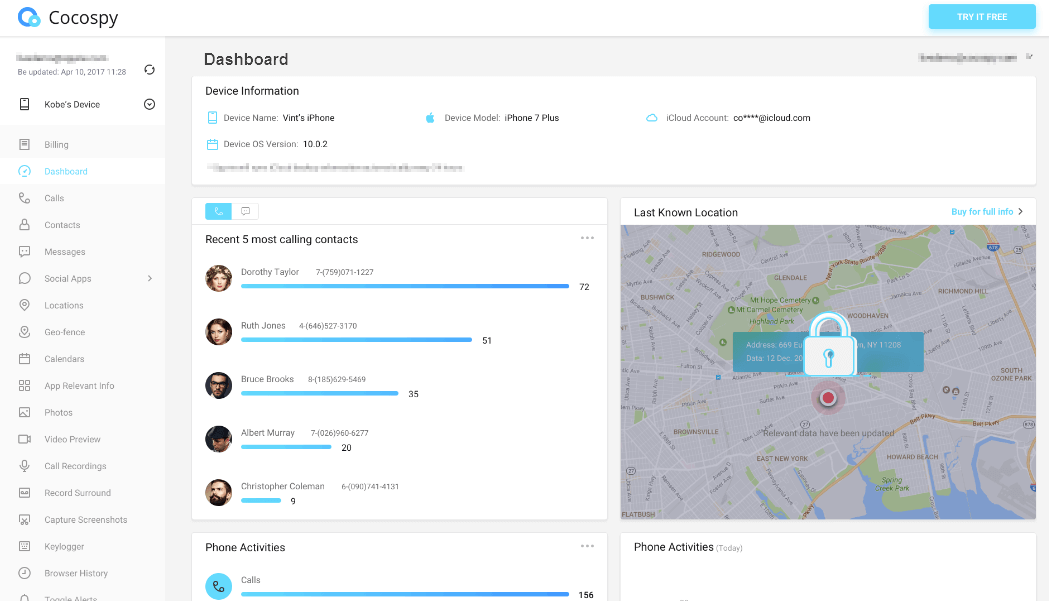
These are the features that you will see on the dashboard:

  • All the saved contacts
  • All the messages and iMessages including the deleted ones for the latter
  • Real-time location and history of all the other visited places
  • Geofencing alerts when the target goes to restricted zones
  • WhatsApp and LINE messages
  • Installed applications where you get to see all the third-party social media platforms
  • Stored photos and videos
  • SIM Card information and location
  • iPhone Keylogger: Records all the typed details on the iPhone. Use it to collect the target’s usernames and passwords.

For more information about the features, check the main website. Here is how you can use one of the best spy apps for iPhone to spy remotely.

Part 3: How to Start Spying on iPhones Using Cocospy Solution

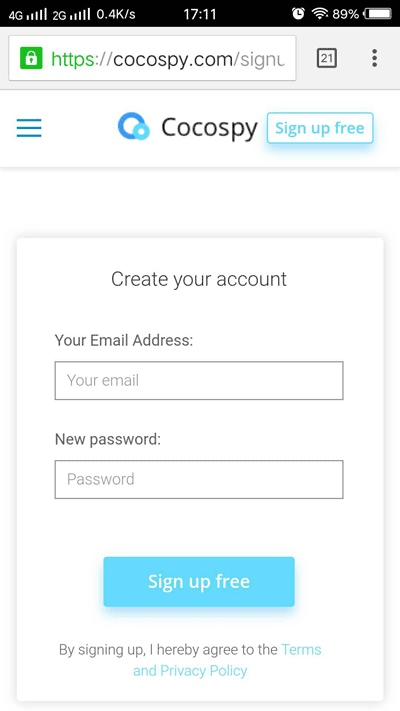
Step 1: Visit the Cocospy website and register an account with your email address and a password. Next, choose the Apple icon to see the available plans.
Https://Www.cocospy.com/Images/Sign-Up.png

Step 2: Select the plan that suits your spying plans and proceed to make a purchase. You will immediately receive a confirmation email with the setup instructions, receipt, and login details.

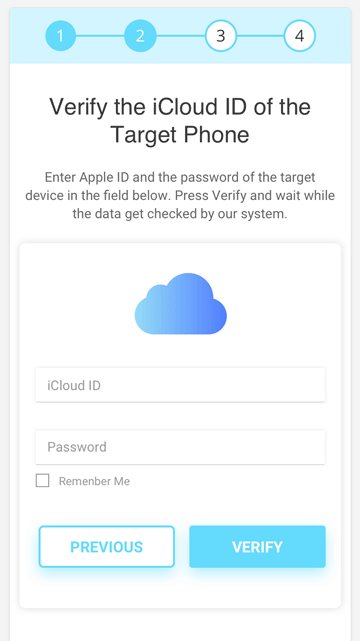
Step 3: After the email, login to your Cocospy account and verify the target’s iCloud ID. Next, choose the device you want to spy and wait for the synchronization.
Https://Www.cocospy.com/Images/Verify-Icloud.png

Step 4: Is the syncing complete? If yes, then you will see the dashboard. It will have all the features we have discussed above and more.
Https://Www.cocospy.com/Images/Dashboard.png

To spy on the iPhone, click on each of the options in the left menu.

Part 4: Why Use Cocospy to Spy on iPhones?

You may have already come across other apps that can spy on iPhones as well. However, here is where Cocospy wins over the others:

  1. Quick set up: It takes less than 5 minutes to register with Cocospy and start spying.
  2. No jailbreak: You don’t need to tamper with the iPhone’s OS to spy on it.
  3. 100% stealth mode: Since it uses the iCloud ID to spy on the phone, Cocospy is never detected.
  4. Real-time results: You get to see the results as soon as they happen. No delays whatsoever.
  5. Reliable app: It does not consume the battery while syncing the information. It’s also secure in that you are the only one who can access the information.
  6. Remote uninstallation: If you don’t need to use Cocospy anymore, you can uninstall it remotely via the control panel.

Conclusion

Once you have the iCloud ID of the iPhone you want to spy on, that’s all Cocospy needs. It will spy on the phone without touching it. The best part is that it does not ask for jailbreak. That even makes it easier to spy on iPhones than anyone thought before.

So, if there is one spy app that you need to grab before this year ends, it’s the Cocospy application.


Related reading

  • WiFi Map App Review: Features, Pricing, Safety, and Whether It Is Worth It
  • Wondershare HiPDF – The ultimate online PDF tool for all your needs
  • FamiSafe review: Keep an eye on kid’s devices
Something incorrect? Report an error in this article. Include a source if you have one; your name and email are optional.

Filed Under: Apps & Software, Reviews & Buying Guides Tagged With: Review, Spy Apps

Related Stories

  • Macbook Pro M5 Review: Performance, Battery Life, And Everything You Need To Know

    MacBook Pro M5 Review: Performance, Battery Life, and Everything You Need to Know

    Computing & HardwareApr 4, 2026

  • How To Screen Record On Windows 11 With Audio

    How to Screen Record on Windows 11 With Audio

    Apps & SoftwareOct 10, 2026

  • How To Stop Chrome Tabs From Reloading

    How to Stop Chrome Tabs From Reloading

    Apps & SoftwareOct 10, 2026

Stay on top of technology

Get TechEngage reviews, buying guides and news in your feed.

Follow on Google News
FacebookTweetPinLinkedInPrint
Avatar for Ali Raza

Ali Raza

Business & Cybersecurity Analyst

Ali Raza is a Business and Cybersecurity Analyst at TechEngage with more than 180 published articles covering enterprise technology, business and fintech, cybersecurity, and software tools. His reporting connects business strategy with the technology behind it to help readers make informed decisions.

Joined TechEngage March 2009First article on TechEngage May 2010

Reader Interactions

Join the Discussion
  1. Avatar for JacyJacy says

    February 19, 2020

    You can’t turn off two step verification once u enable it after two weeks it’s permanent. If someone knows how leave the info!

    Reply
  2. Avatar for BonBon says

    April 30, 2020

    This can not work for iPhone and customer service is the worst. They are selling something that they know
    Can’t work and won’t refund your money.

    Reply

Share Your Thoughts Cancel reply

Please read our comment policy before submitting your comment. Your email address will not be used or published anywhere. You will only receive comment notifications if you opt to subscribe below.

Primary Sidebar

Google News

Get TechEngage in your feed

Reviews, news, and buying guides as they publish.

Follow on Google News

Recent Stories

  • Google Home Local Matter Hue |
    Consumer Tech & GadgetsGoogle Home update brings local Matter control to Hue lightsOct 15, 2026
  • Windows Screen Recording Guide |
    Apps & SoftwareHow to Screen Record on Windows 11 With AudioOct 10, 2026
  • Chrome Tabs Reloading Techengage |
    Apps & SoftwareHow to Stop Chrome Tabs From ReloadingOct 10, 2026
  • Techengage Windows 11 File Backup |
    Computing & HardwareHow to Back Up Windows 11 Files to an External DriveOct 10, 2026
  • Techengage Ssd Enclosures |
    Computing & Hardware3 Best SSD Enclosures for USB-C and USB4Oct 10, 2026

More in Apps & Software

  • Windows Screen Recording Guide |
    How to Screen Record on Windows 11 With AudioOct 10, 2026
  • Chrome Tabs Reloading Techengage |
    How to Stop Chrome Tabs From ReloadingOct 10, 2026
  • 136181 7Effec8402C5Ea64 |
    What Microsoft Announced on October 7: Surface Laptop Ultra, RTX Spark Dev Box, and Windows AISep 16, 2026
  • TechEngage news graphic: iOS 27 Is Out With Siri AI, with an illustrated laptop and phone showing an AI assistant
    Apple Releases iOS 27 and macOS Golden Gate With Siri AISep 15, 2026
More Apps & Software stories →

Footer

Discover

  • About TechEngage
  • Company News & Updates
  • Our Team
  • Advertise
  • Send us a tip
  • Submit your company to TechEngage Launchpad Hot
  • TechEngage Brand Kit
  • Contact us
  • Tools & Calculators

Legal pages

  • Editorial Standards
  • Reviews Policy
  • Our Ethics
  • Corrections Policy
  • Affiliate Disclosure
  • Privacy Policy
  • Cookies Policy
  • Terms & Conditions
  • GDPR Compliance
  • Copyright & DMCA

Must reads

  • Best Mechanical Keyboards Under $100
  • Best USB-C Hubs
  • Best Portable SSDs
  • Best Gaming Graphics Cards (GPUs)
  • Best Long-Range Outdoor WiFi Extenders
  • Best Wireless CarPlay Adapters
  • Best Slack Alternatives
  • Best Long-Range Walkie-Talkies

Download our apps

TechEngage app coming soon on the App Store Available onChrome

© 2026 TechEngage®. All Rights Reserved. TechEngage® is a project of TechAbout LLC.

TechEngage® is a registered trademark in the United States under Trademark Number 6823709 and in the United Kingdom under Trademark Number UK00003417167. It is also ISSN protected under ISSN 2690-3776 and has OCLC Number 1139335774.

Contact team@techengage.com · WhatsApp +1-307-381-8801

Your analytics choice
Allow Google Analytics to help us understand readership? You can use the site without it and change this choice anytime.

Privacy details
