

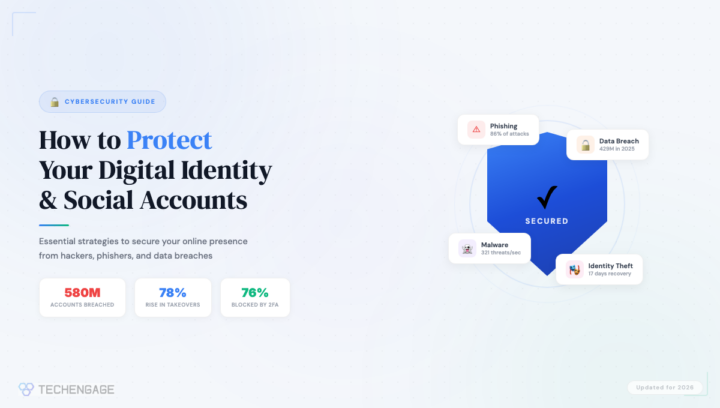
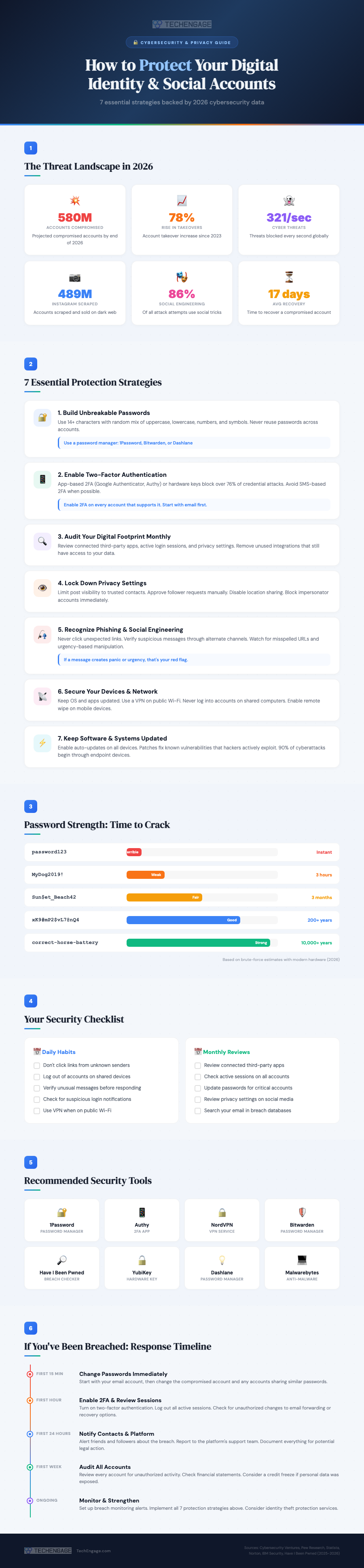
Identity theft and account takeovers aren’t theoretical risks anymore. In 2025 alone, roughly 429 million social media accounts were compromised globally, and that figure is projected to climb past 580 million by the end of 2026. Account takeover attempts have surged 78% since 2023. The average person who loses control of a social media account spends 17 days trying to recover it, and not everyone succeeds.
The uncomfortable reality is that most breaches aren’t the result of sophisticated hacking. Social engineering, where attackers manipulate people rather than systems, accounts for 86% of attempted attacks. That means the biggest vulnerability isn’t your software. It’s your habits. The good news? Fixing those habits doesn’t require a computer science degree. It requires awareness and a handful of practices that take minutes to implement but can save you months of recovery headaches.
Here’s a comprehensive guide to protecting both your broader digital identity and your social media accounts specifically, updated with the latest data and tools for 2026.
The Current Threat Landscape
Before diving into protection strategies, understanding what you’re up against helps explain why each step matters. According to data from Cybersecurity Ventures and IBM Security, the threat landscape has evolved significantly in just the past few years.
Cybersecurity systems now block approximately 321 threats per second globally. Despite that, nearly 489 million Instagram accounts have been scraped and listed for sale on dark web marketplaces. The attackers aren’t just targeting celebrities or executives. They target anyone whose account can be leveraged to reach a broader trust network, which means virtually everyone with a social media presence.
Mark Reynolds, a former security architect, put it well when he noted that today’s platforms are technically more secure than ever, but hackers have shifted their focus to exploiting the human element. That’s why the strategies below focus as much on behavior as they do on technology.
1. Build Passwords That Can’t Be Cracked
This advice has been around since the early days of the internet, but most people still get it wrong. A Pew Research study found that 25% of adults admit to using passwords that are too simple because they’re easier to remember. That shortcut is exactly what attackers count on.
A strong password in 2026 means a minimum of 14 characters using a random mix of uppercase letters, lowercase letters, numbers, and special symbols. Dictionary words, pet names, birthdays, and any personal information that could be found on your social profiles are off limits. The password “MyDog2019!” feels secure but can be cracked in hours by modern hardware. Meanwhile, a randomly generated string like “xK9#mP2$vL7@nQ4” would take centuries.
The practical solution is a password manager. Tools like 1Password, Bitwarden, and Dashlane generate unique, complex passwords for every account and store them securely. You only need to remember one master password. The managers handle everything else, including flagging accounts where your password has appeared in known data breaches.
2. Enable Two-Factor Authentication Everywhere
Two-factor authentication (2FA) adds a second verification step beyond your password. Even if an attacker steals your credentials, they can’t access your account without the second factor. Data shows 2FA blocks over 76% of credential-based attacks, making it one of the single most effective security measures available.
Not all 2FA is created equal, though. SMS-based codes are the weakest option because phone numbers can be spoofed through SIM-swapping attacks. App-based authenticators like Google Authenticator or Authy are significantly more secure. Hardware security keys like YubiKey offer the strongest protection of all, generating cryptographic codes that can’t be intercepted remotely.
Start with your email account, as that’s the skeleton key to every other account since password resets go through email. Then enable 2FA on every social media platform, banking app, and cloud service you use.
3. Audit Your Digital Footprint Monthly
Over time, most people accumulate a surprising number of third-party apps and services connected to their social media accounts. That fitness tracker you tried once? It still has access to your Facebook data. The quiz app from three years ago? Still connected to your Twitter profile. Each of these connections is a potential vulnerability.
Set a monthly calendar reminder to review your connected apps on every platform. On Facebook, go to Settings > Apps and Websites. On Instagram, check Settings > Apps and Websites. On Google, visit myaccount.google.com/permissions. Remove anything you don’t actively use. While you’re there, review active login sessions and sign out of any devices you don’t recognize.
This monthly audit takes about fifteen minutes and dramatically reduces your attack surface. Think of it as digital hygiene, something that’s tedious but essential, like flossing.
4. Lock Down Your Privacy Settings
Social media platforms default to sharing more information publicly than most users realize. Your birthday, email address, phone number, location, and friend list can all be visible to strangers depending on your settings. Attackers harvest this information for targeted phishing attempts and security question answers.
On every platform, limit post visibility to trusted contacts rather than the public. Approve follower and friend requests manually rather than accepting everyone. Disable location sharing on posts. Block impersonator accounts the moment you spot them and report them to the platform. Never publicly share your home address, travel plans while you’re still away, or identifying documents.
Each platform handles privacy settings differently, so you’ll need to check each one individually. The time investment is small, but the protection is significant.
5. Learn to Spot Phishing and Social Engineering
Since social engineering drives 86% of attack attempts, recognizing manipulation tactics is arguably your most important skill. Phishing has evolved far beyond obvious Nigerian prince emails. Modern phishing attempts use convincing replicas of legitimate platforms, personalized details scraped from your social profiles, and urgency-driven language designed to bypass rational thinking.
The red flags to watch for include: messages that create a sense of urgency or panic, links with slightly misspelled domain names (faceb00k.com instead of facebook.com), requests for login credentials via email or direct message, and any communication asking you to bypass your normal security procedures. Legitimate companies never ask for your password via email or message.
When in doubt, never click a link from an unexpected message. Instead, open your browser manually and navigate to the platform directly. If the notification was real, you’ll see it there. If it wasn’t, you just avoided a breach.
6. Secure Your Devices and Network
Your accounts are only as secure as the devices you use to access them. An estimated 90% of cyberattacks begin through compromised endpoint devices, meaning your phone, laptop, or tablet. Keeping your operating system and apps updated is the single easiest way to close known vulnerabilities that attackers actively exploit.
Enable auto-updates on every device. Use a reputable VPN service when connecting to public Wi-Fi networks at coffee shops, airports, or hotels. Without a VPN, even basic attackers on the same network can intercept your data, including login credentials. Never log into sensitive accounts on shared or public computers, and enable remote wipe capability on your phone in case it’s lost or stolen.
Back up your most important content and data offline or to encrypted cloud storage. If ransomware hits or an account is permanently lost, your backups ensure you don’t lose everything.
7. Use Social Media Wisely
This final strategy ties everything together. Being thoughtful about what you share, who you interact with, and how you use social platforms is the foundation that makes every other protection strategy effective.
Avoid publishing personally identifiable information like your home address, phone number, or financial details on any social platform. Be selective about who you accept connection requests from, as fake profiles are a primary tool for social engineering. Don’t click on links from strangers, even if they appear to be from platforms you trust. Watch out for “clickjacking” attacks where seemingly innocent content hides malicious links underneath.
Treat every interaction on social media with a baseline level of healthy skepticism. If something seems too good to be true, too urgent, or too emotional, that’s precisely when you should slow down and verify before acting.
What to Do If You’ve Been Breached
Despite the best precautions, breaches happen. How quickly and effectively you respond makes the difference between a minor inconvenience and a major crisis. Here’s the response timeline that security professionals recommend.
First 15 minutes: Change your passwords immediately. Start with your email account (since that’s the recovery gateway for everything else), then the compromised account, then any accounts that shared similar passwords. Use your password manager to generate new, unique passwords for each.
First hour: Enable two-factor authentication on every account you haven’t already secured. Log out all active sessions from your account settings. Check for unauthorized changes to email forwarding rules, recovery phone numbers, and backup email addresses, as attackers often modify these to maintain access even after you change passwords.
First 24 hours: Notify your contacts that your account was compromised, so they don’t fall for messages the attacker may have sent while they had access. Report the breach to the platform’s support team. Document everything with screenshots for potential legal follow-up.
First week: Review all your accounts for unauthorized activity. Check financial statements if any payment information was linked. Consider a credit freeze if personal identification data was exposed. Sign up for Have I Been Pwned breach monitoring alerts.
The Bottom Line
Protecting your digital identity in 2026 comes down to consistent habits rather than technical expertise. Strong passwords managed by dedicated software. Two-factor authentication on every account. Monthly audits of your connected apps and privacy settings. Healthy skepticism toward unexpected messages. Updated devices and secure network connections. And fundamental caution about what you share online.
None of these steps are difficult individually. The challenge is maintaining them consistently. But in a world where 321 cyber threats are blocked every second and social engineering attacks grow more sophisticated by the month, these habits aren’t optional. They’re the price of existing safely in the digital world.





Share Your Thoughts