

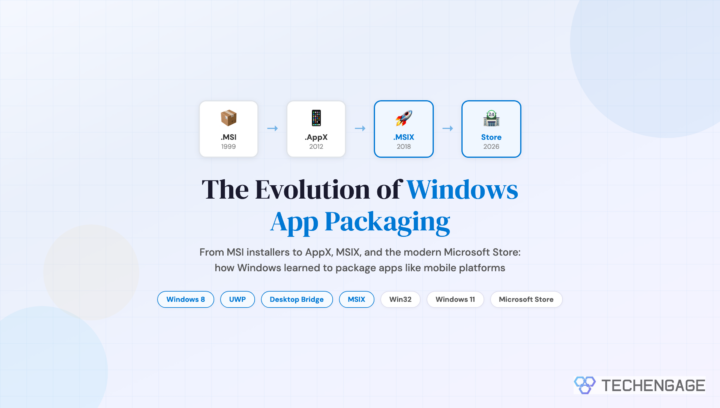
In April 2011, the first leaked details about a new application packaging format for Windows 8 surfaced online. It was called AppX, and the tech press treated it as a curiosity: Microsoft was building a document reader that happened to use a new file format. The bigger story, which almost nobody recognized at the time, was that Microsoft had just fired the starting gun on the most significant change to how Windows handles software installation since the .MSI installer debuted in 1999.
Fifteen years later, that early AppX experiment has evolved into MSIX, the packaging format that Microsoft now pushes as the standard for all Windows applications. The journey from .MSI to .AppX to .MSIX tells a broader story about how the desktop operating system tried (and sometimes failed) to learn from mobile platforms, Mac OS X, and its own painful history with DLL hell, registry bloat, and broken uninstallers.
The Problem That Needed Solving
To understand why AppX and MSIX exist, you need to understand what was wrong with the old model.
Windows applications have historically been installed by running an executable (.exe) or Windows Installer package (.msi) that scatters files across Program Files, writes entries into the Windows Registry, installs shared DLLs into system directories, and sometimes modifies system configuration files. Uninstalling is supposed to reverse all of this, but rarely does so completely. After a few years of installing and removing software, a typical Windows machine accumulates orphaned registry keys, leftover files, and conflicting DLL versions that degrade performance and cause mysterious crashes.
This was not a problem Apple had. Mac OS X, since its launch in 2001, used application bundles: self-contained .app directories that held everything an application needed inside a single folder. Installing meant dragging the .app to your Applications folder. Uninstalling meant dragging it to the trash. No registry. No scattered DLLs. No installer wizards asking you where to put things.
When the iPhone App Store launched in 2008 and Android Market followed, mobile platforms took the concept further with sandboxed, containerized apps that couldn’t interfere with each other or the operating system. Microsoft watched this happen and recognized the implications. If Windows wanted to compete in a world moving toward tablets and touch interfaces (which is exactly where Windows 8 was headed), it needed a modern app packaging model.
AppX and Windows 8: The First Attempt (2012)
Windows 8, released in October 2012, introduced the AppX format alongside the new “Metro” (later called “Modern”) user interface. AppX packages were containerized, sandboxed application bundles that declared their capabilities upfront, installed cleanly, updated atomically, and uninstalled without leaving residue. They ran in their own isolated environment with limited access to the file system and other applications.
The concept was sound. The execution was polarizing.
Microsoft paired AppX with the Windows Store, a centralized marketplace clearly inspired by Apple’s App Store and Google Play. But the Windows Store at launch was sparse, buggy, and ignored by major developers. The fundamental problem was that AppX apps were restricted to the new Metro/Modern API, meaning existing Win32 desktop applications (which comprised roughly 99% of all Windows software) couldn’t use the format. Developers had to write entirely new applications using Windows Runtime (WinRT) APIs, and most simply didn’t bother.
Windows 8’s broader failure (the jarring dual-interface design, the removal of the Start button, weak tablet hardware) meant that AppX adoption was dismal. By the time Windows 8.1 shipped in October 2013, the Store had fewer than 100,000 apps, compared to over a million each on iOS and Android. Most of the Windows Store offerings were low-quality clones or ad-stuffed wrappers around websites.
Windows 10 and the Universal Windows Platform
Windows 10, launched in July 2015, tried to fix the app gap with the Universal Windows Platform (UWP). The pitch was compelling: write one app that runs on Windows 10 PCs, tablets, phones, Xbox, HoloLens, and IoT devices. UWP apps used an updated version of AppX packaging with additional capabilities, including adaptive UI scaling and broader API access.
Microsoft poured resources into UWP. They rebuilt their own apps (Mail, Calendar, Photos, Calculator) as UWP applications. They offered incentives to developers. They even tried bridging technologies to convert existing apps:
Project Centennial (Desktop Bridge) was the most significant of these. Announced at Build 2015 and shipped in 2016, Desktop Bridge allowed developers to package existing Win32 (.exe and .msi) applications as AppX packages. The Win32 app ran in a lightweight container that virtualized registry and file system writes, giving it some of the clean install/uninstall benefits of native UWP apps while keeping full Win32 API access. This was the crucial compromise: you didn’t have to rewrite your app; you just had to repackage it.
Desktop Bridge brought real software to the Microsoft Store for the first time. Spotify, iTunes, and eventually major Adobe and Autodesk applications became available as AppX-packaged Win32 apps. The app quality problem didn’t disappear overnight, but the trajectory shifted.
MSIX: The Format Microsoft Got Right (2018)
At Build 2018, Microsoft announced MSIX, a new packaging format that combined the best elements of MSI, AppX, and Desktop Bridge into a single standard. MSIX was Microsoft’s admission that having multiple packaging formats was confusing and that the industry needed one format that handled both modern and legacy applications.
What makes MSIX different from earlier approaches:
Container-based installation. Like AppX, MSIX apps install into isolated containers. Registry writes, file system changes, and environment modifications are virtualized. The operating system tracks exactly what the package installed, so removal is always clean and complete.
Full Win32 support. Unlike the original AppX, MSIX natively supports Win32 applications without requiring them to be rewritten. Any .exe or .msi installer can be converted to MSIX using the MSIX Packaging Tool.
Differential updates. MSIX supports block-level differential updates, meaning only changed portions of an app get downloaded during updates. For large applications, this cuts update sizes by 60-80% compared to full reinstalls.
Cross-platform potential. While primarily a Windows technology, MSIX was designed with extensibility that has allowed experimental support on other platforms through the open-source MSIX SDK.
Enterprise deployment. MSIX integrates with Microsoft Intune, SCCM (now Microsoft Configuration Manager), and Group Policy for managed deployment. This enterprise focus is where MSIX found its strongest adoption, because IT departments desperately wanted the clean install/uninstall behavior that .MSI never reliably delivered.
The Microsoft Store Transformation
The Windows Store (rebranded to Microsoft Store) went through its own parallel evolution. The Windows 8 and early Windows 10 Store was widely ridiculed for poor curation, scam apps, and a confusing interface. Microsoft made two critical changes that turned it around.
First, in June 2021, Microsoft announced that the redesigned Windows 11 Microsoft Store would accept any application format: Win32 (.exe, .msi), MSIX, PWA (Progressive Web Apps), and even apps with third-party commerce engines (meaning developers could keep 100% of revenue if they used their own payment system). This was a direct response to criticism of Apple’s App Store policies and the Epic Games lawsuit.
Second, Microsoft began actively curating and featuring quality applications. By 2023, major browsers (Firefox, Opera, Brave), development tools (Visual Studio Code, Windows Terminal), and creative applications (Affinity suite, DaVinci Resolve) were available through the Store. The scam app problem diminished significantly after Microsoft implemented stricter review policies and automated scanning.
As of 2026, the Microsoft Store is a legitimate distribution channel that most major developers support, though many still offer direct downloads as well. It’s not the dominant distribution method that Apple’s App Store is on macOS, but it’s no longer the embarrassment it was in 2012.
MSIX App Attach and Azure Virtual Desktop
One of MSIX’s most important use cases isn’t on physical desktops at all. Azure Virtual Desktop (AVD) uses a feature called MSIX App Attach that dynamically delivers applications to virtual machines without installing them in the traditional sense. The MSIX container is mounted as a virtual disk at login, and the app appears instantly available. At logoff, it detaches cleanly.
For enterprises running virtual desktop infrastructure, this is transformative. Application updates no longer require rebuilding golden images or pushing installers to hundreds of VMs. You update the MSIX container once, and every virtual session gets the new version at next login. IT teams that manage large AVD deployments consistently cite MSIX App Attach as one of the platform’s most valuable features.
Where Things Stand in 2026
Fifteen years after that first AppX leak, the Windows app packaging situation is clearer than it’s ever been, though not without lingering complexity.
MSIX is the recommended standard for new application packaging. Microsoft’s documentation, tooling, and enterprise features all point toward MSIX. Windows 11’s built-in handling of MSIX packages is smooth, with one-click install and guaranteed clean removal.
MSI isn’t going anywhere. Millions of enterprise applications still use .MSI installers, and Microsoft continues to support them fully. The realistic path for most organizations is gradual MSIX adoption for new applications and repackaging of existing ones as resources allow.
UWP is effectively deprecated. Microsoft stopped encouraging new UWP development around 2021, steering developers toward WinUI 3 and the Windows App SDK instead. Existing UWP apps continue to work, but the framework’s ambition of true cross-device universality never materialized after Windows Phone died in 2017.
Package managers have entered the picture. Windows Package Manager (winget), released in 2020 and now built into Windows 11, brings Linux-style command-line package management to Windows. You can install most popular applications with a single command (e.g., winget install Firefox), and winget handles both MSIX and traditional installers behind the scenes. It’s changed how power users and IT administrators deploy software.
The irony of the whole journey is that the original 2011 vision was essentially correct. Applications should be self-contained, sandboxed, easy to install, and clean to remove. Mac OS X had proven this worked in 2001. But getting the massive Windows ecosystem, with its 30+ years of backward compatibility baggage, to adopt that model took over a decade of false starts, format wars, and painful lessons.
Related reading on TechEngage:
- Russia’s Government Transition to Open-Source Linux
- Why Kids Should Learn to Code
- Google Censorship: The Search Giant’s History of Content Control



Just so you know, Linux has had this WAY before Apple… centralized repositories full of software packages. A popular distribution of Linux, Ubuntu, for example, has an “app store” called the Ubuntu Software Center where you download package files called Debian Packages,file format “.deb”(Debian is another Linux distro). There are many other linux package managers, such as Synaptic, apt-get, etc. which have been around longer. You can even download packages from the Internet or add Personal Package Archives (PPAs) to add more packages to the repositories. An advantage to this design is that updates are all done in ONE PLACE not many different update programs for every possible application on your computer. This also adds security and makes installing programs MUCH EASIER. I’m glad that Microsoft is finally adding a package manager to Windows.