

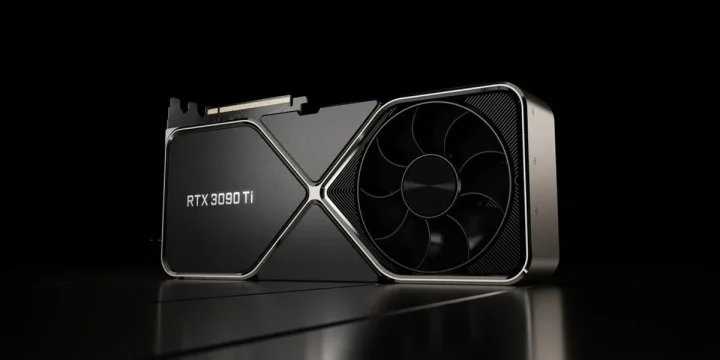
NVIDIA’s GeForce RTX 3090 Ti arrived in March 2022 as the absolute fastest consumer GPU money could buy. Built on a fully unlocked GA102 die, it packed 10,752 CUDA cores, 24GB of blazing-fast GDDR6X memory, and enough raw horsepower to handle 8K gaming, professional 3D rendering, and AI workloads without breaking a sweat. The card launched at $1,999 and sat at the very top of NVIDIA’s Ampere lineup until the RTX 4090 took the crown seven months later.
Now that the RTX 30 series has been phased out of production, the 3090 Ti occupies an interesting spot in the GPU market. New-old-stock units still pop up on Amazon and other retailers, while the used market offers them at steep discounts from the original MSRP. For buyers who need massive VRAM without paying RTX 4090 or 5090 prices, the 3090 Ti remains a genuinely compelling option — especially for creative professionals running memory-hungry workloads in Blender, DaVinci Resolve, or training machine learning models.
| Details | Information |
|---|---|
| Price | $2,099.99 |
| Discount | – |
| Rating on Amazon | out of 5 stars – Out of reviews. |
| Brand | NVIDIA |
| Buy Now | Buy on Amazon |
This deep dive covers everything about the RTX 3090 Ti: verified specifications, real-world performance numbers, power requirements you absolutely need to plan for, and an honest assessment of whether this discontinued flagship still makes sense to buy in 2026.
Table of Contents
RTX 3090 Ti specifications breakdown
The RTX 3090 Ti uses NVIDIA’s fully enabled GA102 GPU die — every single shader module active, nothing disabled or cut down. That translates to 10,752 CUDA cores spread across 84 streaming multiprocessors, 336 third-generation Tensor cores for AI acceleration, and 84 second-generation RT cores for hardware ray tracing. The base clock sits at 1,560 MHz with a boost clock reaching 1,860 MHz, though most aftermarket models from brands like ASUS, EVGA, and MSI pushed boost clocks even higher out of the box.
Memory is where the 3090 Ti flexed hardest at launch. NVIDIA paired it with 24GB of Micron GDDR6X running at 21 Gbps across a 384-bit bus. That combination delivers just over 1 TB/s of memory bandwidth — the first consumer GeForce card in history to crack that barrier. For context, the standard RTX 3090 topped out at 936 GB/s. That extra bandwidth matters most in professional applications: large scene rendering, AI model training, and video editing timelines with multiple 8K streams.
NVIDIA rated the card at 40 shader TFLOPs, 320 Tensor TFLOPs, and 78 RT TFLOPs. On paper, those numbers represented a modest bump over the standard 3090, but the real gains came from the higher memory bandwidth and slightly elevated clocks working together under sustained loads.
Gaming and creative performance
At launch, NVIDIA claimed the RTX 3090 Ti was 64 percent faster than the RTX 3080 Ti and roughly 9 to 11 percent faster than the standard RTX 3090. Independent benchmarks from Tom’s Hardware and TechPowerUp confirmed those numbers were mostly accurate in rasterization workloads, with the gap widening in ray-traced titles where the extra RT cores and bandwidth made a measurable difference.
For gaming at 4K with ray tracing enabled, the 3090 Ti handled titles like Cyberpunk 2077, Control, and Metro Exodus at frame rates that stayed above 60 fps with DLSS active. At 8K resolution — a use case NVIDIA specifically marketed — the card could maintain playable frame rates in less demanding titles, though 8K gaming remains more of a tech demo than a practical daily experience even now.
The creative workload story was arguably stronger. In Blender’s BMW benchmark, the 3090 Ti consistently outperformed the standard 3090 by 10 to 15 percent. DaVinci Resolve users working with 8K RAW footage saw noticeably smoother timeline scrubbing thanks to the 1 TB/s memory bandwidth. Machine learning researchers appreciated the 24GB VRAM ceiling — large enough to fine-tune substantial language models and train image generation networks without immediately running into out-of-memory errors.
Content creators running Cinema 4D, Maya, or Unreal Engine 5 projects also benefited from the fully unlocked die. Complex scenes with millions of polygons rendered faster, and viewport performance stayed smooth during modeling sessions that would choke cards with less memory or bandwidth.
Power supply and system requirements
Here is where the RTX 3090 Ti demands serious planning. The card draws 450 watts TDP — a massive jump from the standard RTX 3090’s 350W and nearly double the RTX 3080’s 320W. NVIDIA officially recommends an 850-watt power supply at minimum, and many experienced builders suggest going to 1000W for comfortable headroom, especially if you’re running a high-end CPU alongside it.
NVIDIA switched the power connector to a single 16-pin PCIe Gen 5 plug on the Founders Edition. Since virtually no power supply in 2022 shipped with native 16-pin cables, NVIDIA included a dongle adapter that converts three 8-pin PCIe power connectors into the single 16-pin. Aftermarket models from ASUS, MSI, and others stuck with triple 8-pin configurations, sidestepping the adapter issue entirely.
The card itself is a triple-slot design. Founders Edition measures 336mm long and requires at least three expansion slots of clearance. Some aftermarket variants — particularly the ASUS ROG Strix and EVGA FTW3 — are even larger. Before purchasing, physically measure your case interior and confirm the card fits. Also check that your motherboard’s top PCIe x16 slot isn’t blocked by a large CPU cooler tower.
Thermal output at 450W is substantial. A well-ventilated case with strong front-to-back airflow is essential. Users with smaller mid-tower cases may experience thermal throttling unless they upgrade their case fan configuration or consider an aftermarket model with a hybrid liquid cooling solution, like the ASUS ROG Strix LC variant.
RTX 3090 Ti vs. RTX 4090 — how they compare
The RTX 4090 launched in October 2022 at $1,599 — four hundred dollars less than the 3090 Ti’s MSRP — and outperformed it by 50 to 70 percent depending on the workload. That kind of generational leap made the 3090 Ti’s value proposition collapse almost overnight. The 4090 achieved those gains while drawing the same 450W, thanks to the much more efficient Ada Lovelace architecture and TSMC’s 4nm process node.
Both cards share 24GB of VRAM, which keeps the 3090 Ti relevant for memory-bound professional tasks. If your workload hits a VRAM ceiling at 12GB or 16GB but doesn’t need the 4090’s raw compute speed, the 3090 Ti at current used prices (roughly $800 to $1,200) offers the same memory capacity for significantly less money. That’s the main argument for buying one today.
Where the 4090 pulls ahead decisively is power efficiency, DLSS 3 frame generation support (the 3090 Ti only supports DLSS 2), and AV1 hardware encoding. If you stream or produce video content, the 4090’s dual AV1 encoders represent a meaningful workflow upgrade that the 3090 Ti simply cannot match.
Should you buy the RTX 3090 Ti in 2026?
The honest answer depends entirely on your budget and what you plan to do with it. For pure gaming, the RTX 4070 Ti Super and RTX 4080 Super deliver comparable or better frame rates at lower power consumption and much lower prices. Buying a 3090 Ti strictly for gaming in 2026 is hard to justify unless you find one at a genuinely steep discount.
For professional and creative work, the calculus shifts. That 24GB of GDDR6X at 1 TB/s bandwidth remains excellent for Blender, Stable Diffusion, LLM fine-tuning, and scientific computing. Used 3090 Ti cards at current market rates undercut the cheapest 24GB alternatives by a wide margin. If VRAM capacity is your primary concern and you can tolerate the higher power draw, a used 3090 Ti is one of the best value propositions in the professional GPU space right now.
One practical concern: buying a discontinued GPU means no warranty on used units and a shrinking pool of new-old-stock. Check seller return policies carefully, and stress test any used card immediately after receiving it. Run Furmark or 3DMark Time Spy Extreme for at least 30 minutes to verify stability and confirm the card hasn’t been damaged by crypto mining or poor thermal management.
| Details | Information |
|---|---|
| Price | $2,099.99 |
| Discount | – |
| Rating on Amazon | out of 5 stars – Out of reviews. |
| Brand | NVIDIA |
| Buy Now | Buy on Amazon |
FAQs
What was the original price of the RTX 3090 Ti?
NVIDIA set the RTX 3090 Ti Founders Edition MSRP at $1,999 when it launched on March 29, 2022. Aftermarket models from ASUS, MSI, EVGA, and Gigabyte ranged from $1,999 to over $2,500 depending on the cooling solution and factory overclock. Today, remaining new-old-stock units sell for around $1,700 to $1,800 on Amazon, while used cards on eBay typically go for $800 to $1,200 depending on condition.
Is the RTX 3090 Ti still good for gaming in 2026?
The RTX 3090 Ti handles 4K gaming at high settings in every current title. Ray tracing performance is solid with DLSS 2 enabled, and the 24GB VRAM buffer means texture streaming issues are nonexistent even at maximum quality. The main limitation is that it lacks DLSS 3 frame generation, which newer titles increasingly leverage for a smoother experience. For gamers who don’t care about frame generation, the 3090 Ti performs within striking distance of the RTX 4080 in most scenarios.
How much power does the RTX 3090 Ti actually use?
NVIDIA rates the TDP at 450 watts, and real-world testing confirms the card regularly draws between 400W and 470W under full load depending on the workload and whether power limits have been adjusted. An 850W power supply is the bare minimum — a 1000W unit is the safer choice if your CPU draws over 125W. The card also generates significant heat, so strong case airflow is a must.
RTX 3090 Ti vs RTX 3090 — what’s the actual difference?
The RTX 3090 Ti unlocks the full GA102 die (10,752 CUDA cores vs. 10,496), runs faster GDDR6X at 21 Gbps vs. 19.5 Gbps, and delivers 1,008 GB/s memory bandwidth compared to 936 GB/s. It also draws 450W vs. 350W. In practice, the 3090 Ti is about 9 to 11 percent faster in games and 10 to 15 percent faster in creative workloads like Blender rendering. Whether that margin justifies the power increase depends on your priorities and power supply headroom.





Very nice..very useful and informative content