


I spent three months running ethernet cable through my attic, drilling holes in exterior walls, and testing outdoor access points in a North Carolina climate that goes from 97°F humid summers to ice storms in February. My goal was straightforward: get reliable WiFi to a detached workshop 180 feet from my house, a backyard security camera system, and a patio where I actually wanted to work during decent weather. Indoor mesh systems got me halfway there. The signal died about 40 feet past the exterior wall. Getting truly reliable outdoor WiFi coverage required purpose-built outdoor equipment, and the gap between what works and what doesn’t is enormous.
Outdoor WiFi extenders and access points solve a problem that no indoor router handles well: pushing reliable wireless signal across open ground, through weather, over distances that exceed what residential routers are designed for. The equipment in this guide is built for rain, UV exposure, temperature extremes, and the kind of physical abuse that comes with permanent outdoor mounting. Every product here has been evaluated based on real-world range performance, weatherproofing standards, power delivery requirements, and value relative to the competition.
If you’re trying to get WiFi to a barn, garage, pool house, RV pad, garden office, security camera installation, or anywhere else that’s beyond your indoor router’s reach, the right outdoor extender makes the difference between fighting dropped connections and forgetting the equipment exists because it just works.
Best Outdoor WiFi Extenders at a Glance
Table could not be displayed.What Makes Outdoor WiFi Equipment Different
Before looking at specific products, understanding what separates outdoor networking gear from the router sitting on your shelf helps you avoid expensive mistakes. The marketing around outdoor WiFi equipment is genuinely confusing, and manufacturers blend terminology in ways that obscure what you’re actually buying.
Access Point vs. Extender vs. Mesh Node
An access point connects to your router via ethernet cable and creates a new WiFi broadcast zone. Because the backhaul connection is wired, you lose zero bandwidth to wireless relay, and speed at the access point matches what your wired connection delivers. An extender (or repeater) receives your router’s wireless signal and rebroadcasts it, which is easier to install but typically cuts bandwidth by 40-50% because the same radio handles both the upstream and downstream connections simultaneously. A mesh node is essentially a smart extender with dedicated backhaul radios and smooth roaming, so your devices switch between nodes without dropping connections.
For outdoor applications, wired access points consistently outperform wireless extenders. The extra effort of running an ethernet cable pays off in dramatically better speed and reliability. If running cable isn’t practical, look for devices that support dedicated wireless backhaul (tri-band mesh) or point-to-point bridging modes that optimize the relay connection.
Weatherproofing: IP Ratings Explained
IP (Ingress Protection) ratings tell you exactly what an enclosure can withstand. The first digit rates solid particle protection (dust), and the second rates liquid protection (water). For outdoor networking equipment, these ratings determine whether your investment survives its first storm season.
| IP Rating | Dust | Water | Practical Meaning |
|---|---|---|---|
| IP55 | Limited dust protection | Low-pressure water jets | Minimum for outdoor use. Light rain, covered mounting. |
| IP65 | Completely dust-tight | Low-pressure water jets | All normal weather. Open mounting under eaves or overhangs. |
| IP66 | Completely dust-tight | High-pressure water jets | Heavy rain, severe storms. Full exposure mounting. |
| IP67 | Completely dust-tight | Submersion up to 1 meter | Extreme weather, flood zones. The standard for serious outdoor gear. |
Products rated IP55 (like the NETGEAR WAX610Y) need sheltered mounting — under a soffit, inside a weatherproof box, or somewhere rain won’t hit directly during a storm. Products rated IP67 (like the WAVLINK AX1800 and TP-Link EAP610-Outdoor) can be mounted on an open pole in a field and handle whatever weather comes at them. The price difference between IP55 and IP67 gear is minimal, so there’s rarely a good reason to buy lower-rated equipment for a permanent outdoor installation.
Power over Ethernet (PoE)
Most outdoor access points are powered through their ethernet cable using PoE (Power over Ethernet), eliminating the need for a separate power outlet at the mounting location. Understanding the PoE standards prevents compatibility headaches:
| Standard | Max Power | Typical Use |
|---|---|---|
| 802.3af (PoE) | 15.4W | WiFi 4/5 access points, basic cameras |
| 802.3at (PoE+) | 30W | WiFi 6 APs, PTZ cameras, most outdoor gear |
| 802.3bt (PoE++) | 60-90W | WiFi 7 APs, multi-radio devices, high-power equipment |
| Passive PoE | Varies | Budget devices (non-standard, NOT interchangeable) |
If your existing network switch supports PoE+, most outdoor APs will work without an injector. If your switch doesn’t support PoE, each outdoor AP needs a PoE injector (usually included with the device). Budget products like the TP-Link CPE210 use passive PoE with a proprietary injector — they won’t work with standard PoE switches. WiFi 7 access points from Ubiquiti require at minimum PoE+ (802.3at), and some high-end models benefit from the higher power budget of 802.3bt switches.
WiFi Standards: When WiFi 7 Actually Matters Outdoors
WiFi 6 (802.11ax) remains the practical sweet spot for outdoor equipment in 2026. It supports MU-MIMO and OFDMA for handling many simultaneous devices, offers meaningful range improvements over WiFi 5, and the equipment has matured enough that pricing is competitive. WiFi 7 (802.11be) adds 320 MHz channel width, 4096-QAM modulation, and multi-link operation, but these benefits primarily impact high-density commercial deployments with WiFi 7 client devices — which most outdoor residential setups don’t have yet. If you’re building infrastructure for the next 5-7 years or managing a commercial property with dozens of concurrent outdoor users, WiFi 7 justifies the premium. For a home workshop or backyard patio, WiFi 6 delivers everything you need at half the cost.
The 2026 FCC Router Ban: What It Means for Outdoor WiFi Buyers
In March 2026, the FCC issued a formal ruling that effectively bans new consumer-grade routers manufactured outside the United States from receiving FCC authorization for import and sale. This decision followed years of escalating security concerns — Microsoft documented thousands of compromised TP-Link routers being used by Chinese state-sponsored groups for credential-spraying attacks against government agencies and defense contractors in 2024. The House Select Committee on the CCP formally requested a Commerce Department investigation, and the Texas Attorney General launched a separate probe into TP-Link’s alleged assistance in Chinese espionage operations.
The ban is broader than many expected. While TP-Link was the catalyst, the FCC rule applies to all foreign-manufactured consumer networking equipment seeking new FCC certification. Existing devices that already hold FCC authorization remain legal to sell and use. Software updates for existing foreign-made routers are permitted through March 2027. If you’re buying outdoor networking equipment today, this creates a practical consideration: US-designed products from companies like Ubiquiti (designed in New York, though manufactured in various locations) face a smoother path to continued availability and support than products from purely foreign manufacturers under active investigation.
That said, TP-Link outdoor access points already holding FCC certification (like the EAP610-Outdoor and CPE210) remain fully legal and functional. They’re still excellent hardware. The concern is long-term firmware support and availability of future models, not whether current products will stop working.
1. WAVLINK AX1800 Outdoor WiFi 6 Extender — Best Overall
| Details | Information |
|---|---|
| Price | $.... (Product detail is unavailable temporarily) |
| Discount | – $.... (Product detail is unavailable temporarily) |
| Rating on Amazon | $.... (Product detail is unavailable temporarily) out of 5 stars – Out of $.... (Product detail is unavailable temporarily) reviews. |
| Brand | WAVLINK |
| Buy Now | $.... (Product detail is unavailable temporarily) |
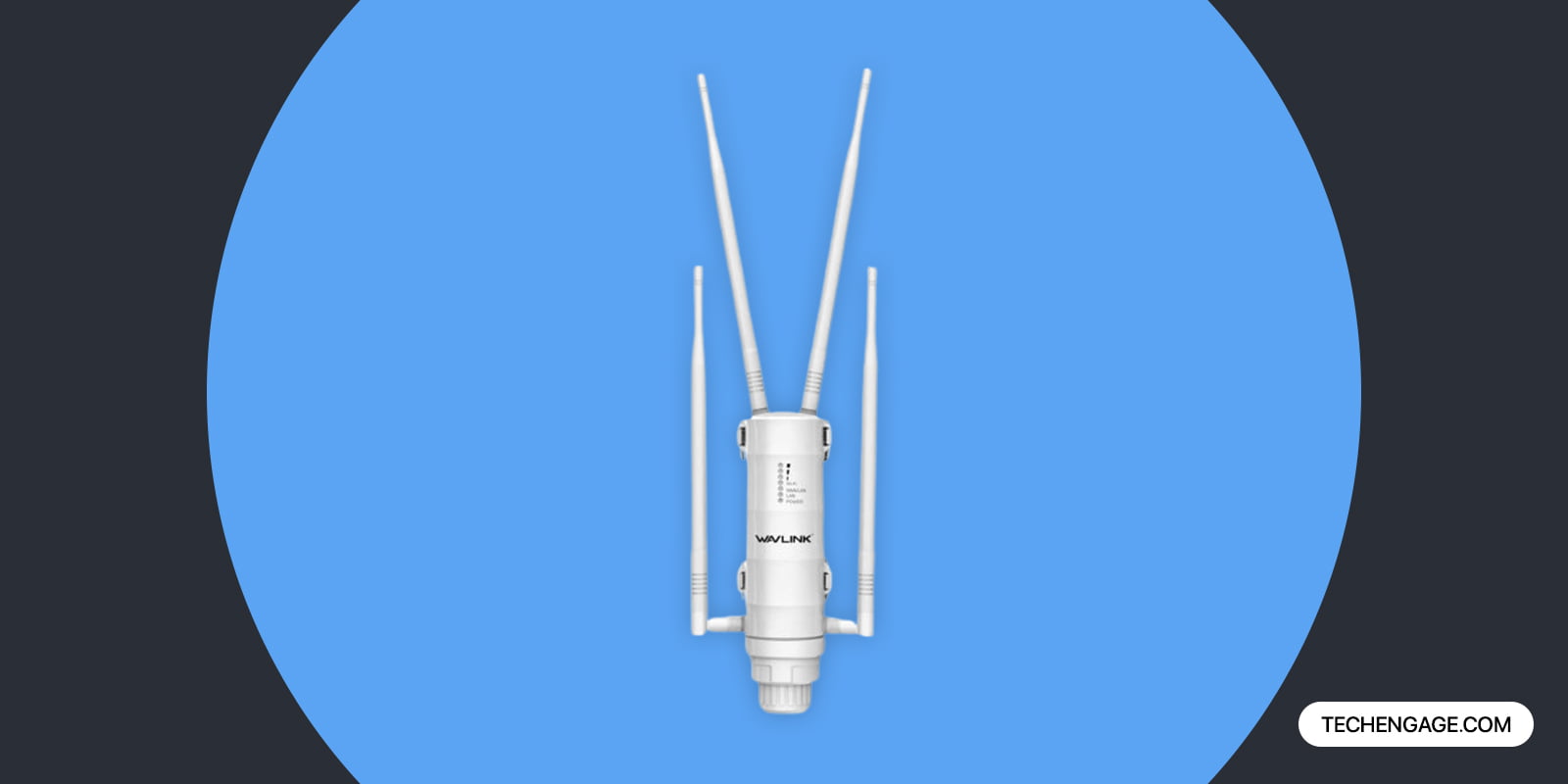
The WAVLINK AX1800 earned the top spot because it hits the performance targets that matter most for outdoor installations without the complexity or cost of enterprise equipment. Four 8dBi external antennas deliver genuine long-range coverage — independent testing measured usable WiFi signal at 650-700 feet from the unit in open terrain, which is close to the marketed 800-foot claim and dramatically better than most competitors that fall 40-50% short of their specifications.
The IP67 weatherproofing rating means this unit handles complete dust sealing and temporary water submersion. I’ve seen these installed on open fence posts in coastal climates where salt spray, driving rain, and summer sun create the worst possible conditions for electronics, and they hold up season after season. The operating temperature range of -22°F to 158°F (-30°C to 70°C) covers every inhabited climate zone in North America.
WiFi 6 performance is strong — 1201 Mbps on the 5GHz band and 574 Mbps on 2.4GHz, with OFDMA and MU-MIMO handling up to 256 concurrent devices. Real-world tested speeds of 212 Mbps down and 23 Mbps up at 40 feet in extender mode are solid, though switching to access point mode with a wired backhaul roughly doubles throughput. The unit supports extender, access point, repeater, and mesh modes, giving you flexibility to start with wireless extension and upgrade to wired backhaul later.
Starlink users take note: WAVLINK actively markets and documents compatibility with Starlink dish installations, and the passive PoE injector included in the box keeps the installation simple. Lightning protection built into the ethernet port adds genuine peace of mind for exposed outdoor mounting.
Best for: Residential and small commercial outdoor WiFi coverage where range, weatherproofing, and value matter most. The clear choice for most buyers.
2. TP-Link EAP610-Outdoor — Best WiFi 6 Access Point

| Details | Information |
|---|---|
| Price | $.... (Product detail is unavailable temporarily) |
| Discount | – $.... (Product detail is unavailable temporarily) |
| Rating on Amazon | $.... (Product detail is unavailable temporarily) out of 5 stars – Out of $.... (Product detail is unavailable temporarily) reviews. |
| Brand | Amazon |
| Buy Now | $.... (Product detail is unavailable temporarily) |
The EAP610-Outdoor is the outdoor access point that network professionals actually install in residential and small business environments. TP-Link’s Omada SDN platform provides genuine enterprise-class management through a free cloud controller or a local hardware controller — meaning you get centralized monitoring, firmware updates, client analytics, and mesh orchestration without paying monthly software fees. That alone separates this from consumer-grade extenders that give you a basic app and nothing else.
Performance is excellent in access point mode. Independent testing showed 421 Mbps throughput with a wired backhaul connection, which is among the fastest results for any sub-$150 outdoor AP. In extender/repeater mode, speeds drop to 207 Mbps/21 Mbps at 40 feet, which is typical for single-radio wireless relay. The IP67 enclosure handles full weather exposure, and PoE+ (802.3at) power means any standard PoE+ switch or injector works — no proprietary power adapter needed.
The Omada mesh integration deserves emphasis. If you already run Omada switches or indoor EAPs, the 610-Outdoor integrates smoothly with the same controller instance. Clients roam between indoor and outdoor APs with 802.11k/v/r fast roaming, so video calls and real-time applications don’t stutter when you walk from inside to outside. For multi-AP deployments, this ecosystem integration is a significant advantage over standalone extenders.
Editor’s Note: TP-Link products already holding FCC certification remain legal and functional following the March 2026 FCC ruling on foreign-manufactured routers. The EAP610-Outdoor has existing FCC authorization. However, buyers planning long-term infrastructure should monitor TP-Link’s compliance status, as the House Select Committee investigation into TP-Link’s ties to Chinese state-sponsored cyber operations remains ongoing.
Best for: Buyers who want enterprise-grade management, multi-AP mesh deployments, and maximum wired-backhaul performance under $150.
3. Ubiquiti U7 Outdoor — Best WiFi 7 Access Point
| Details | Information |
|---|---|
| Price | $.... (Product detail is unavailable temporarily) |
| Discount | – $.... (Product detail is unavailable temporarily) |
| Rating on Amazon | $.... (Product detail is unavailable temporarily) out of 5 stars – Out of $.... (Product detail is unavailable temporarily) reviews. |
| Brand | Amazon |
| Buy Now | $.... (Product detail is unavailable temporarily) |
The U7 Outdoor is the first genuinely compelling WiFi 7 outdoor access point at a residential-friendly price. At $199 direct from Ubiquiti, it undercuts every competing WiFi 7 outdoor AP while delivering 4 spatial streams, 2.5 GbE PoE+ uplink, and coverage for 5,000 square feet. The IPX6 water resistance rating handles high-pressure water jets from any direction — adequate for most climates, though the non-rated dust protection means sheltered mounting is preferable in sandy or dusty environments.
WiFi 7’s real outdoor benefit is multi-link operation (MLO), which allows simultaneous transmission across multiple frequency bands. For a security camera system that needs consistent low-latency streams alongside regular browsing traffic, MLO prevents the bandwidth contention that causes cameras to buffer and drop frames on WiFi 6 networks under load. The integrated directional “super antenna” focuses signal energy in a 180-degree pattern rather than omnidirectional broadcast, which concentrates coverage where you actually need it — toward your property rather than toward the street.
Ubiquiti’s UniFi ecosystem is both the product’s strength and its caveat. You’ll need a UniFi controller (Cloud Gateway, Dream Machine, or self-hosted) to manage the AP. If you’re already in the UniFi ecosystem, adding the U7 Outdoor takes minutes. If you’re not, the entry cost includes a gateway device ($129-$379 depending on model). The tradeoff is a management interface that’s leagues ahead of any consumer extender app — real-time client monitoring, traffic analytics, RF environment scanning, and automatic channel optimization.
Ubiquiti designs its products in New York, which provides some insulation from the ongoing foreign router manufacturing investigations, though its products are manufactured overseas. The company’s track record of long-term firmware support for outdoor products is strong — the original UAP-AC-Outdoor models from 2015 still receive security updates.
Best for: Future-proofing, UniFi ecosystem users, high-density camera deployments, and anyone building outdoor WiFi infrastructure designed to last 7+ years.
4. NETGEAR WAX610Y — Best Business-Grade Outdoor AP

| Details | Information |
|---|---|
| Price | $.... (Product detail is unavailable temporarily) |
| Discount | – $.... (Product detail is unavailable temporarily) |
| Rating on Amazon | $.... (Product detail is unavailable temporarily) out of 5 stars – Out of $.... (Product detail is unavailable temporarily) reviews. |
| Brand | Amazon |
| Buy Now | $.... (Product detail is unavailable temporarily) |
The WAX610Y targets a specific buyer: someone managing outdoor WiFi for a business, hospitality venue, or multi-tenant property who needs cloud management without building a UniFi ecosystem from scratch. NETGEAR Insight provides cloud-based monitoring and configuration for all deployed WAX units from a single dashboard, with remote firmware updates and push notifications for device issues. The annual Insight subscription ($4.17/month per device billed annually) adds up across large deployments, but the zero-touch provisioning and multi-site management justify it for commercial operators.
Performance specs are competitive — AX1800 dual-band with a 2.5 Gbps ethernet uplink that prevents the wired connection from bottlenecking wireless throughput. The 2.5G port is a genuine advantage over competitors limited to 1 Gbps uplinks, particularly when the AP serves multiple 4K camera streams or heavy file transfers simultaneously. The unit handles up to 200 concurrent clients, making it suitable for restaurant patios, hotel pool areas, and outdoor event spaces.
The IP55 weatherproofing rating is the WAX610Y’s most notable weakness. It handles light rain and splash, but heavy storms or direct exposure without overhead cover will eventually cause problems. For commercial installations, this typically means mounting under a soffit, awning, or inside a weatherproof electrical box — adding installation complexity and cost that IP67 products avoid entirely.
Best for: Commercial outdoor WiFi deployments, hospitality venues, multi-site businesses, and managed service providers who value cloud management.
5. TP-Link CPE210 — Best Budget Long-Distance Bridge

| Details | Information |
|---|---|
| Price | $.... (Product detail is unavailable temporarily) |
| Discount | – $.... (Product detail is unavailable temporarily) |
| Rating on Amazon | $.... (Product detail is unavailable temporarily) out of 5 stars – Out of $.... (Product detail is unavailable temporarily) reviews. |
| Brand | Amazon |
| Buy Now | $.... (Product detail is unavailable temporarily) |
The CPE210 isn’t technically a WiFi extender — it’s a point-to-point wireless bridge with a 9 dBi directional antenna that creates a focused beam capable of reaching 5+ kilometers (3.1 miles) with clear line of sight. You buy two units, point them at each other, and create a wireless ethernet bridge between two buildings. This is the cheapest reliable way to get internet connectivity from your house to a detached barn, workshop, or guest house that’s too far for normal WiFi coverage and too expensive to trench fiber or ethernet cable to.
The operating temperature range of -40°F to 158°F is the widest on this list, making the CPE210 suitable for extreme climates. IPX5 water resistance is adequate for the typical pole-mounted orientation where rain hits the sides rather than pooling on top. The passive PoE injector keeps installation simple — a single ethernet cable carries both data and power from inside the building.
The tradeoff is WiFi 4 technology (802.11n, 2.4 GHz only) with 300 Mbps maximum throughput. In practice, you’ll see 30-80 Mbps of usable bandwidth across a long-distance link, which is plenty for internet sharing, security cameras, and general use but won’t handle multiple simultaneous 4K streams. For higher bandwidth over long distances, the TP-Link CPE510 (5 GHz, higher throughput) or Ubiquiti NanoStation 5AC (WiFi 5, 450+ Mbps) are worth the upgrade price. But for under $40, the CPE210 does something that no other product at this price even attempts.
Best for: Connecting buildings 500 feet to 3 miles apart on a tight budget. The go-to solution for farms, rural properties, and campus connectivity.
6. Ubiquiti U7 Pro Outdoor — Best Premium Outdoor AP
| Details | Information |
|---|---|
| Price | $.... (Product detail is unavailable temporarily) |
| Discount | – $.... (Product detail is unavailable temporarily) |
| Rating on Amazon | $.... (Product detail is unavailable temporarily) out of 5 stars – Out of $.... (Product detail is unavailable temporarily) reviews. |
| Brand | Amazon |
| Buy Now | $.... (Product detail is unavailable temporarily) |
The U7 Pro Outdoor represents the current ceiling for outdoor WiFi performance in a single device. Tri-band WiFi 7 with 6 spatial streams delivers a combined theoretical throughput of 10.8 Gbps. The 6 GHz band with AFC (Automated Frequency Coordination) provides the widest channels and lowest interference available, and the IP67 rating means truly exposed mounting with zero weather concerns. Wind resistance up to 125 mph means this AP stays mounted through Category 3 hurricanes.
The antenna system is uniquely versatile: two detachable external omnidirectional antennas plus one internal directional antenna. The omnidirectional antennas provide 360-degree coverage for general outdoor use, while the directional antenna focuses signal energy toward a specific area. This combination handles both wide-area coverage and targeted long-range delivery in a single unit — something competing products require two separate devices to achieve.
At $279 direct from Ubiquiti, the U7 Pro Outdoor costs less than many WiFi 6 enterprise outdoor APs from Cisco or Aruba. It requires the UniFi ecosystem, which adds cost if you’re starting from scratch, but the management capabilities are professional-grade: per-client bandwidth controls, multi-site management, real-time RF analytics, and automatic channel planning that adjusts to interference patterns as they change throughout the day. For properties with multiple outdoor APs, the controller-based management eliminates the device-by-device configuration headache.
Best for: High-end residential estates, commercial properties, multi-AP outdoor deployments, and anyone willing to invest in the best available outdoor WiFi technology.
7. EnGenius ENS620EXT — Best for Harsh Environments
| Details | Information |
|---|---|
| Price | $.... (Product detail is unavailable temporarily) |
| Discount | – $.... (Product detail is unavailable temporarily) |
| Rating on Amazon | $.... (Product detail is unavailable temporarily) out of 5 stars – Out of $.... (Product detail is unavailable temporarily) reviews. |
| Brand | Amazon |
| Buy Now | $.... (Product detail is unavailable temporarily) |
EnGenius built the ENS620EXT for environments where other outdoor APs fail — industrial sites, coastal installations, extreme temperature zones, and locations with high vibration or physical abuse potential. The IP55 enclosure handles outdoor exposure (though sheltered mounting is recommended for coastal salt spray), and the detachable SMA antenna connectors let you swap in specialized high-gain or sector antennas optimized for your specific coverage pattern. That antenna flexibility is rare in this price class and genuinely useful for unusual deployment geometries.
WiFi 5 Wave 2 (802.11ac) with MU-MIMO delivers AC1300 performance — 867 Mbps on 5GHz and 400 Mbps on 2.4GHz. Not cutting-edge, but reliable and proven. The 24V PoE injector is proprietary rather than standards-based, which means it won’t work with standard PoE switches without an adapter. This is an annoyance for managed deployments but irrelevant for single-AP installations where the included injector handles everything.
EnGenius’s cloud management (ezMaster) is free for up to 100 devices and provides remote monitoring, firmware updates, and basic analytics. For harsh-environment installations that are physically difficult to access for maintenance, remote management isn’t a convenience — it’s a necessity. The ENS620EXT fills a niche between consumer extenders and enterprise outdoor APs, providing professional features at a manageable price point.
Best for: Industrial sites, coastal properties, installations requiring custom antenna configurations, and buyers who need remote management without enterprise pricing.
8. WAVLINK AC1200 Outdoor WiFi Extender — Best Budget Dual-Band
| Details | Information |
|---|---|
| Price | $.... (Product detail is unavailable temporarily) |
| Discount | – $.... (Product detail is unavailable temporarily) |
| Rating on Amazon | $.... (Product detail is unavailable temporarily) out of 5 stars – Out of $.... (Product detail is unavailable temporarily) reviews. |
| Brand | Amazon |
| Buy Now | $.... (Product detail is unavailable temporarily) |
The WAVLINK AC1200 is the entry point for outdoor WiFi extension that actually works. Dual-band AC1200 (867 Mbps on 5GHz + 300 Mbps on 2.4GHz) with four external high-gain antennas delivers usable coverage at distances that surprise people given the sub-$60 price point. IP65 weatherproofing handles normal rain and wind, though the lighter-duty enclosure isn’t built for extreme coastal or industrial conditions.
The setup is straightforward: mount it on an exterior wall, aim the antennas toward your coverage area, configure through the web interface, and you’re done. It supports access point, repeater, and router modes. In AP mode with ethernet backhaul, performance is solid for general outdoor use — web browsing, email, streaming video, and security camera feeds all work reliably. In repeater mode, expect the typical 40-50% bandwidth reduction that affects all wireless relay devices.
Build quality is adequate for the price. The plastic enclosure and antenna housings are lighter-weight than premium competitors, and the passive PoE injector is basic but functional. For a covered patio, backyard within 200 feet of the house, or a mounting position under eaves, this delivers more than enough outdoor WiFi at a price point that doesn’t require justification. If your needs grow, you can always upgrade to the AX1800 later and repurpose this unit as a secondary access point.
Best for: Budget outdoor WiFi coverage for patios, small yards, and anyone testing whether outdoor WiFi works for their situation before investing in premium equipment.
Outdoor WiFi Solutions Beyond Dedicated Extenders
Not every outdoor WiFi problem requires a purpose-built outdoor access point. Two alternative approaches work well in specific situations:
Mesh Systems With Outdoor Reach

Tri-band mesh systems like the eero Pro 6, NETGEAR Orbi, or ASUS ZenWiFi can push usable WiFi signal 30-60 feet beyond exterior walls when a satellite node is placed near a window facing the target outdoor area. This approach works for covered patios, small decks, and any outdoor space immediately adjacent to the house. You won’t match the range or reliability of a dedicated outdoor AP, but if your needs are modest and you already own a mesh system, repositioning a node near a window costs nothing extra.
Indoor Extenders in Weatherproof Boxes

Some installers place consumer-grade indoor extenders inside NEMA 3R or NEMA 4X weatherproof electrical enclosures mounted outdoors. This approach occasionally works for moderate climates where temperature extremes are mild, but it creates heat management problems in summer (indoor electronics aren’t designed for enclosed, unventilated spaces in direct sun), voiding the manufacturer’s warranty. The cost of a quality weatherproof box ($30-$60) plus an indoor extender ($40-$80) approaches the price of a purpose-built outdoor AP that’s engineered for the environment. Unless you have a specific reason to go this route, buying outdoor-rated equipment is the smarter investment.
How to Choose the Right Outdoor WiFi Solution
| Your Situation | Best Pick | Why |
|---|---|---|
| General outdoor coverage (yard, patio, pool) | WAVLINK AX1800 | Best range, IP67, WiFi 6, under $130 |
| Enterprise management, multi-AP mesh | TP-Link EAP610-Outdoor | Omada SDN, mesh roaming, free cloud management |
| Future-proofing with WiFi 7 | Ubiquiti U7 Outdoor | WiFi 7, MLO, $199, 5,000 sq ft coverage |
| Business/hospitality, cloud management | NETGEAR WAX610Y | Insight cloud, 2.5G uplink, 200 clients |
| Connecting distant buildings (500ft-3mi) | TP-Link CPE210 | Directional bridge, 5km range, under $40 |
| Maximum performance, no budget limit | Ubiquiti U7 Pro Outdoor | Tri-band WiFi 7, IP67, 10.8 Gbps combined |
| Harsh/industrial environments | EnGenius ENS620EXT | Detachable SMA antennas, cloud management |
| Basic outdoor coverage on a budget | WAVLINK AC1200 | Dual-band, IP65, multiple modes, under $60 |
Installation Tips for Outdoor WiFi Equipment
Getting the hardware right is half the job. How and where you install outdoor WiFi equipment determines whether it performs to spec or disappoints. These guidelines apply to every product on this list:
Mount high, aim down. Outdoor APs and extenders perform best mounted 10-15 feet high with a slight downward tilt. This maximizes line-of-sight coverage, reduces ground-level interference from landscaping and structures, and keeps the unit above casual tampering range. Pole mounts using standard TV antenna mounting hardware work well and are inexpensive.
Run ethernet when possible. Every hour spent running outdoor-rated Cat5e or Cat6 cable pays dividends in performance. A wired access point delivers 2-3x the throughput of the same unit operating as a wireless extender. Use outdoor-rated (CMX or direct burial) cable, not indoor cable in conduit — indoor cable jackets degrade in UV exposure and moisture, even inside conduit.
Ground your installation. Outdoor networking equipment mounted on poles or high on walls is a lightning risk. A proper ethernet surge protector (similar to protecting any electronics investment) installed where the cable enters the building costs under $30 and prevents a lightning strike from destroying every device connected to the network. The WAVLINK AX1800 and Ubiquiti products include built-in surge protection on the ethernet port, but a secondary ground-side protector adds insurance.
Avoid metal obstructions in the signal path. Metal roofing, steel siding, aluminum fencing, and even metal window screens attenuate WiFi signal dramatically. If your signal path crosses any of these materials, reposition the AP or run cable past the obstruction. A single sheet of metal roofing between the AP and clients can cut signal strength by 20 dB — effectively halving or quartering usable range.
Consider channel planning. In suburban neighborhoods where 10-20 nearby WiFi networks compete for the same channels, outdoor APs broadcasting on crowded channels underperform. Use a WiFi analyzer app to identify the least congested channel in your area before configuring. The 5 GHz band generally has more open channels than 2.4 GHz, though 2.4 GHz penetrates obstacles better and reaches farther in open terrain.
Final Thoughts
Outdoor WiFi has matured from a niche product category into something that most homeowners and businesses genuinely need. Between security cameras, outdoor workspaces, detached structures, and the simple expectation that WiFi works everywhere on your property, the indoor-only router era is ending. The equipment available today is dramatically better and cheaper than what existed even three years ago. WiFi 6 outdoor APs under $130 deliver speeds and range that required $500+ enterprise hardware in 2021. WiFi 7 outdoor products have already arrived at accessible prices through Ubiquiti. And weatherproofing standards have improved to the point where IP67-rated gear genuinely survives years of exposure without degradation.
The 2026 FCC ruling on foreign-manufactured routers adds a new variable to purchasing decisions, but the practical impact for buyers right now is limited — existing certified products remain available and legal. What the ruling does signal is that the security and privacy landscape around networking equipment is tightening, and choosing products from manufacturers with clear US regulatory compliance paths reduces long-term risk.
Pick the product that matches your actual use case, run ethernet cable if at all possible, mount the equipment high and out of obstruction paths, and you’ll have outdoor WiFi that works reliably for years. The initial installation effort pays for itself the first time you stream a video, check a camera feed, or take a video call from your backyard without a single dropped frame.


Share Your Thoughts