
• Skip to primary navigation
  • Skip to main content
  • Skip to primary sidebar

TechEngage®

Connecting mankind with technology

  • News
  • Reviews
  • Cryptocurrency
  • How-to
  • Roundups
  • Science
    • Energy
    • Environment
    • Health
    • Space
  • Apps
  • More
    • Opinion
    • Noteworthy
    • Culture
    • Events
    • Deals
    • Startups
      • Startup Submissions
  • Videos
  • Tools

Apple brings password manager to iCloud for Windows in the latest update

Muhammad Abdullah Muhammad Abdullah Follow Muhammad Abdullah on Twitter August 17, 2021

iCloud logo
Shares11FacebookTweetPinLinkedInPrintEmail

If you are an Apple user and also own a Windows device but find it hard to manage passwords on both platforms, there’s a piece of good news for you. Now, you can get a full password manager built in the latest version of iCloud for Windows, thanks to the new iCloud update. Previously, users could only access photos, videos, and files using the iCloud app on their Windows PC. After the latest update, iCloud for Windows lets you use the password management feature.
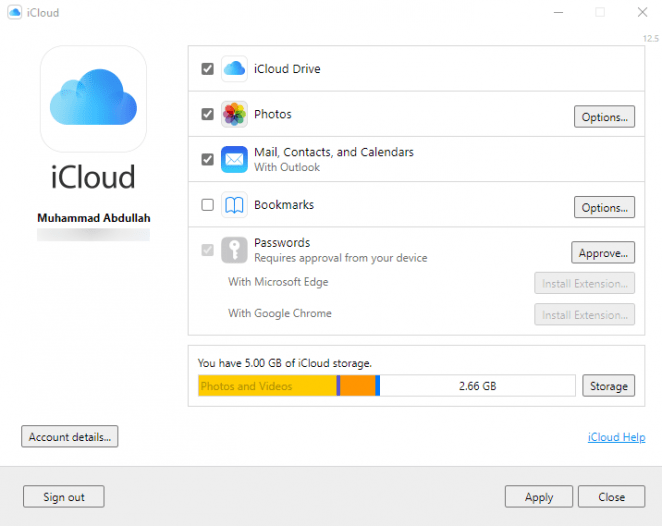
iCloud for Windows
iCloud for Windows version 12.5 / Screenshot @abdugeek

You can get iCloud version 12.5 for Windows from Microsoft Store. Using the new password management tool, you can add, edit, copy, paste, delete and find any passwords. Earlier, users were not able to access passwords stored in the iCloud keychain. Now they can access all the stored passwords with just a click. However, you need to authorize this feature from your Mac or iPhone before it’s made available on the iCloud app for Windows. In addition, users can use the app in conjunction with Google Chrome or Microsoft Edge using an extension. The extension will enable users to quickly autofill passwords while surfing online.

Regarding the security of user passwords, Apple says that the iCloud app stores all passwords on your computer in encrypted form and transfers them to browser extensions via a secure channel. It also synchronizes usernames and passwords from websites, excluding passwords from applications and credit card numbers.

iCloud’s new feature is an exciting feature for Apple users who also use Windows PCs. It will make your life easy if you use both platforms frequently.


Filed Under: Apps Tagged With: Apple, iCloud, Microsoft Store, Microsoft Windows, Password Manager, Security

Related Stories

  • Apple is hosting a session in Hong Kong

    Apple is hosting a session in Hong Kong

  • iOS Jailbreaking – A Complete History

    iOS Jailbreaking – A Complete History

  • Google is shutting down its messaging app Allo

    Google is shutting down its messaging app Allo

Shares11FacebookTweetPinLinkedInPrintEmail

About Muhammad Abdullah

Abdullah is a computer scientist turned tech writer and certified Growth Hacker.

Reader Interactions

Share Your Thoughts Cancel reply

Please read our comment policy before submitting your comment. Your email address will not be used or published anywhere. You will only receive comment notifications if you opt to subscribe below.

Primary Sidebar

Become a contributor

We are accepting contributor applications. All applications will be decided in 3 days after applying. To learn more visit the contributors page.
TextSheet Alternative

6 Top Alternatives to Textsheet for 2025

Muhammad Zeshan Sarwar October 5, 2024

battery draining apps

Top 10 battery draining apps to avoid 2025

Muhammad Abdullah October 5, 2024

Recent Stories

  • 6 Top Alternatives to Textsheet for 2025
  • Top 10 battery draining apps to avoid 2025
  • The Benefits of Having a Small Air Compressor for Flat Tires
  • 4 Best Free VPNs for 2025
  • 9 Best Calendar Apps in 2025

Discover

  • About us
  • Newsroom
  • Staff
  • Advertise
  • Send us a tip
  • Startup Submission Questionnaire
  • Brand Kit
  • Contact us

© 2025 TechEngage®. All Rights Reserved. TechEngage® is a project of TechAbout LLC.

TechEngage® is a registered trademark in the United States under Trademark Number 6823709 and in the United Kingdom under Trademark Number UK00003417167. It is also ISSN protected under ISSN 2690-3776 and has OCLC Number 1139335774.

  • Terms & Conditions
  • Privacy Policy