
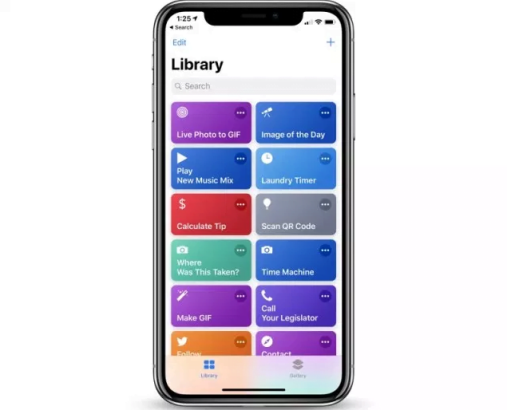
Apple gave users the access to Siri tool through the shortcuts app in iOS 12. After the WWDC control, Apple has rolled out some amazing features for Siri Shortcuts App in Apple’s recent October event!
You can now set alarms, get weather updates, use measurement or convert measurements, operate the police and play media through Home Pod over Airplay!
Want to know more? Here is what the update has for you!
Weather
Well, to keep pace with Google Assistant and Alexa apple incorporated a few exciting features in Siri’s shortcut application, which also includes getting weather updates. You can now get weather updates over voice command asking Siri to let you know about the “Weather Today,” “Weather Tomorrow” or about ten days from now. You can also ask specifically about the level of humidity, chances that it would rain or other factors. It would let you plan your day just on the go!
Also read: Apple’s brand new MacBook Air steals the show
Alarms
The new shortcuts app 2.1 has come up addressing some major loopholes in the app before. Like, you can also “Set Alarms,” “Create Alarms” or “Toggle Alarms” through Siri’s Shortcut apps. The app would integrate with all the third-party applications to keep your routine intact without you doing much!
Use Siri Shortcuts with Home Pod
Before this update rolled out, one was not able to use Siri shortcuts with Home Pod. But for now, the issue has been resolved. It would automatically play back media through Home Pod over Airplay; all you have to do is to operate the shortcut from Home Pod through Siri.
Measurement and Convert Measurement
“Measurement” and “Convert Measurement” allows you to convert between a variety of units. This feature is integrated with the Siri Shortcuts app just to make it more accessible and easy for the Apple users.
Camera
The Siri’s shortcut app has integrated with the Photos app and camera allowing users to get the “Last Import” or start recording a video through “Take Video” action.
Police
Well, here is this most interesting part of the update, a user created shortcut named as “Police.” Police will let you give a voice command to perform a series of actions. You can send a message to your friend, pause the media you’re playing, adjust the brightness and actions such as start recording a voice. The police seem to be taking care of all that!
The best part is that all the apps that can integrate with Siri like Google News, Weather Channel and Trello, can add specific tasks to Siri through “Add to Siri” button which is present on these applications already!
With this version of Shortcuts app, Apple seems to have addressed a lot of major issues. If you haven’t updated to this Version 2.1 of Siri’s shortcut app, then get it from the Apple Store now!
Until next time?

Share Your Thoughts